
A directory listing describing a cancellation-letter and mailing-address service. The configured public GitHub repository returned 404 during source verification.
Repository stats unavailable
Developer Tools
An MCP server that runs mobile and desktop Lighthouse audits and bounded page inspection, then returns prioritized, evidence-backed fix packs that coding agents can execute and verify.
Lighthouse-powered MCP server for AI coding agents is cataloged as an MCP server attributed to fullstackdegen. An MCP server that runs mobile and desktop Lighthouse audits and bounded page inspection, then returns prioritized, evidence-backed fix packs that coding agents can execute and verify. It is categorized under developer tools. See the capability inspector for recorded interfaces and their independent review status; consult upstream documentation for the current interface.
Installation configuration is not reviewed. No executable setup is offered for this entry; inspect the source repository before proceeding.
Catalog license label: MIT. Check the source repository's current license and terms before using, modifying or distributing this software.
Capability definitions are not reviewed. Unreviewed imports are not exposed as trusted interfaces.
No reviewed records to display. This does not establish that upstream lacks this capability.
No reviewed records to display. This does not establish that upstream lacks this capability.
No reviewed records to display. This does not establish that upstream lacks this capability.
Email delivery is not connected. This page does not collect email addresses or create subscriptions.
Browse the registry for current listings instead.
Reviews for Lighthouse-powered MCP server for AI coding agents are not available yet
Review publishing and storage are not connected. This page does not collect or publish ratings or comments, including after sign-in.
Fast mode performs one mobile and one desktop run, while reliable mode is the default and performs three runs per profile with medians and variability ranges.
Yes, when loopback targets are explicitly enabled with the --local flag, allowing localhost, *.localhost, 127.0.0.0/8, and ::1 while other private and reserved ranges stay blocked.
README.md · c01d62792eb4 · Fetched 2026-11-13 13:53:25 UTC
Original upstream text, without AI rewriting. Scripts, forms and unsafe links are filtered for safety.
Showing the last retrieved documentation snapshot; check the source for current changes.
Lighthouse-powered MCP server for AI coding agents, Core Web Vitals, technical SEO, accessibility, and GEO/LLM visibility audits.
Agent Audit turns Google Lighthouse and bounded page-inspection results into structured fix packs that coding agents can actually execute. It gives Claude Code, Codex, Cursor, GitHub Copilot, and other MCP clients a prioritized, evidence-backed backlog instead of a raw performance report.
Turn Lighthouse audits into coding-agent fix packs.
npx -y @fullstackdegen/agent-audit


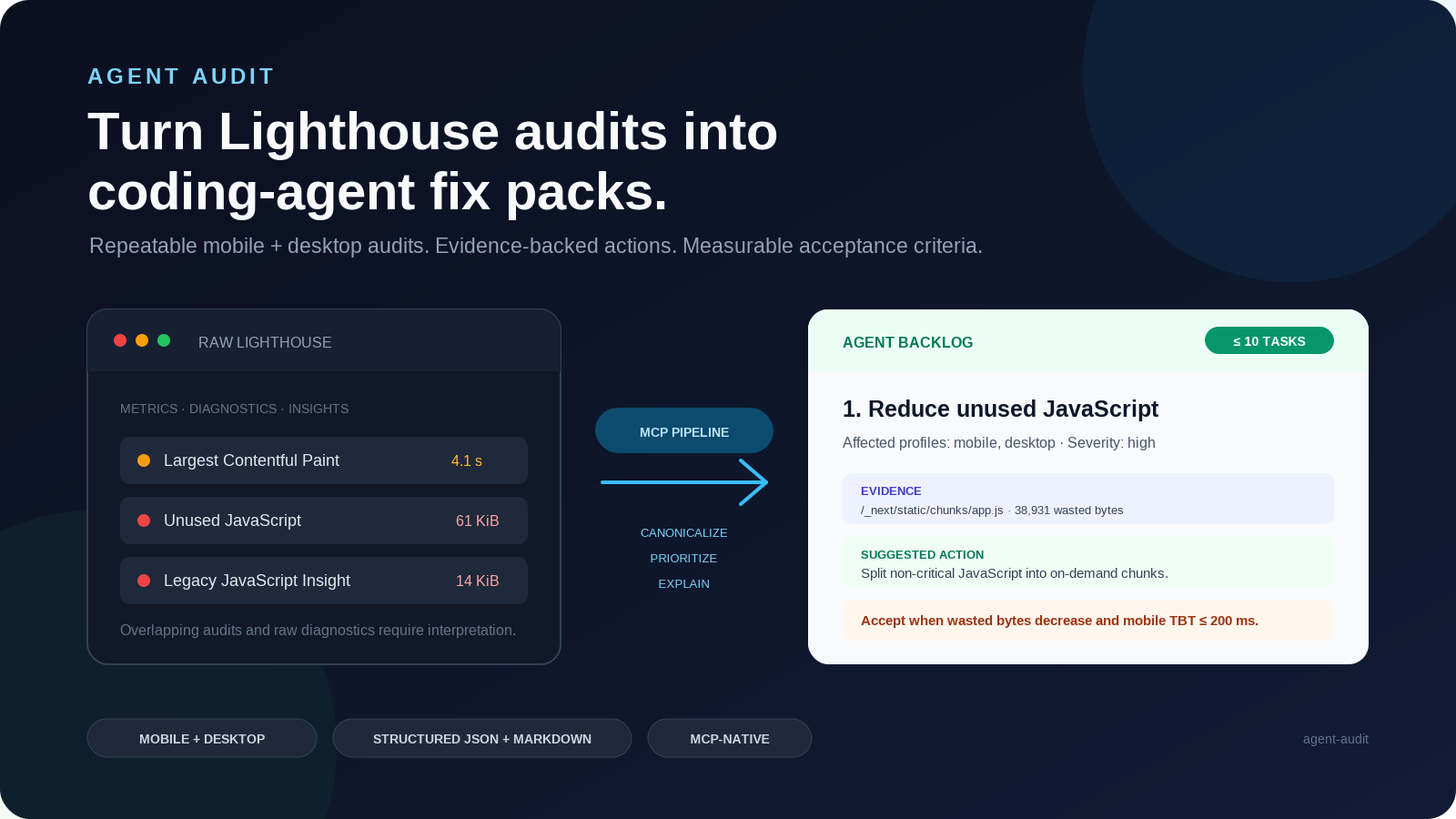
Lighthouse is excellent for diagnosis, but raw reports are not enough for an autonomous coding workflow. A coding agent still needs to know which issue is most important, whether it affects mobile, desktop, or both, which selectors or resources are evidence, what files to search for, how to verify the fix, and when it is safe to claim completion.
Agent Audit converts Lighthouse output into an implementation contract:
fixPacks with repo search hints, implementation steps, and
measurable acceptance criteria.structuredContent plus equivalent Markdown.The goal is simple: give a coding agent a report it can read, reason about, fix, test, and verify.
Agent Audit is useful when people search for:
llms.txt readiness and AI crawler visibilityCurrent checks include:
llms.txt draft generation when page content is sufficient.outputSchema validation for structuredContent.See a real CommaLabs JSON report and Markdown report.
Requirements:
Run the MCP server:
npx -y @fullstackdegen/agent-audit
Useful links:
Add a local MCP server:
{
  "mcpServers": {
    "agent-audit": {
      "command": "npx",
      "args": ["-y", "@fullstackdegen/agent-audit"]
    }
  }
}
Restart Claude Desktop after saving the configuration.
claude mcp add agent-audit -- npx -y @fullstackdegen/agent-audit
For local development audits:
claude mcp add agent-audit-local -- npx -y @fullstackdegen/agent-audit --local
codex mcp add agent-audit -- npx -y @fullstackdegen/agent-audit
Or add it to ~/.codex/config.toml:
[mcp_servers.agent-audit]
command = "npx"
args = ["-y", "@fullstackdegen/agent-audit"]
Create a workspace or user-level .mcp.json file:
{
  "servers": {
    "agent-audit": {
      "command": "npx",
      "args": ["-y", "@fullstackdegen/agent-audit"]
    }
  }
}
Or register it from a terminal:
code --add-mcp '{"name":"agent-audit","command":"npx","args":["-y","@fullstackdegen/agent-audit"]}'
Configure a local stdio MCP server:
agent-auditnpx-y, @fullstackdegen/agent-auditAdd --local to the arguments when you need localhost audits.
analyze_website_performanceRuns Lighthouse and site intelligence against a target URL:
{
  "url": "https://example.com",
  "mode": "reliable"
}
mode is optional:
fast: one mobile run and one desktop run.reliable: three runs per profile, medians, and variability ranges. This is
the default.{
"id": "fix-link-name",
"priority": 2,
"sourceIssueIds": ["link-name"],
"goal": "Fix Links do not have a discernible name.",
"category": "accessibility",
"severity": "critical",
"affectedProfiles": ["mobile", "desktop"],
"repoSearchHints": [
"div.border-t-2 > div.flex > div.flex > a.text-gray-600",
"https://www.linkedin.com/company/commalabs"
],
"implementationSteps": [
"Inspect the repository for the evidence listed in repoSearchHints before editing.",
"Give every link a discernible accessible name.",
"Keep changes focused on source issue IDs: link-name."
],
"acceptanceCriteria": [
"All link elements pass the Lighthouse link-name audit.",
"Raise the median accessibility score to at least 90/100."
],
"verification": {
"rerunMode": "reliable",
"expectedAuditIds": ["link-name"]
}
}
repoSearchHints are search clues, not guaranteed file paths. The coding agent
must inspect the repository before editing.
Use structuredContent as the source of truth and the Markdown report as the
execution summary.
fixPacks in priority order.repoSearchHints.reliable mode.acceptanceCriteria.Do not claim completion from an incomplete report or from a rerun with materially higher variability than the baseline.
Agent-facing docs:
By default, Agent Audit only accepts publicly routable HTTP and HTTPS URLs. This is the right default for hosted agents and shared environments.
For developer machines, explicitly enable loopback targets:
npx -y @fullstackdegen/agent-audit --local
Then audit a local app through your MCP client:
{
  "url": "http://localhost:3000",
  "mode": "fast"
}
The opt-in allows localhost, *.localhost, 127.0.0.0/8, and ::1.
Private LAN ranges, link-local addresses, reserved ranges, multicast addresses,
and cloud metadata addresses remain blocked.
The environment variable form is also supported:
LIGHTHOUSE_MCP_ALLOW_LOCALHOST=true npx -y @fullstackdegen/agent-audit
Agent Audit launches Chrome against user-provided URLs, so URL policy matters. The server rejects:
The page-inspection fetcher uses the same URL policy and applies timeout, byte-size, and bounded-resource limits.
Page-controlled titles, descriptions, URLs, selectors, snippets, and audit text are sanitized and length-limited. Consumers must still treat them as untrusted evidence, not agent instructions.
Chrome sandboxing is enabled by default. Only isolated environments that cannot support it should set:
LIGHTHOUSE_CHROME_NO_SANDBOX=true
See SECURITY.md for vulnerability reporting and deployment guidance.
Agent Audit is intentionally bounded:
npm install
npm test
npm run check
npm run build
npm run validate:release
Run a real Chrome smoke audit:
npm run --silent smoke -- https://example.com fast
npm run --silent smoke -- https://example.com reliable
The smoke command writes canonical JSON to stdout and equivalent Markdown to stderr.
Before publishing:
npm test
npm run check
npm run build
npm run validate:release
npm pack --dry-run --cache /private/tmp/agent-audit-npm-cache
Publish:
npm publish --access public --cache /private/tmp/agent-audit-npm-cache
Published package:
npx -y @fullstackdegen/agent-audit --help
Focused issues and pull requests are welcome. Read CONTRIBUTING.md before changing the report contract, security policy, or MCP transport behavior.
Claim this server with your GitHub account to request manual ownership verification.
Link to the catalog listing for Lighthouse-powered MCP server for AI coding agents from your README. This badge does not certify ownership, compatibility or security.
[](https://awesome-mcp.com/servers/agent-audit)Public repository statistics could not be verified. Check the configured source address; unavailable counts are not zero.
Separate sources, scopes and periods. Never combined or treated as installations, active users or security reviews.
No reviewed package or image identity; download statistics are not listed yet.
Alternative and complementary servers in the same category
A directory listing describing a cancellation-letter and mailing-address service. The configured public GitHub repository returned 404 during source verification.

A hosted MCP service for browsing and searching through Singapore mobile-network proxies.

A directory listing describing a Markdown-to-PDF service. The configured public GitHub repository returned 404 during source verification.