
A directory listing describing a cancellation-letter and mailing-address service. The configured public GitHub repository returned 404 during source verification.
Repository stats unavailable
Developer Tools
An Android virtual display tool with MCP, CLI and HTTP interfaces that let AI agents operate apps in the background while the user keeps using the main screen.
Agent-VScreen is cataloged as an MCP server attributed to kilolonion. An Android virtual display tool with MCP, CLI and HTTP interfaces that let AI agents operate apps in the background while the user keeps using the main screen. It is categorized under developer tools. See the capability inspector for recorded interfaces and their independent review status; consult upstream documentation for the current interface.
Installation configuration is not reviewed. No executable setup is offered for this entry; inspect the source repository before proceeding.
Catalog license label: MIT. Check the source repository's current license and terms before using, modifying or distributing this software.
Capability definitions are not reviewed. Unreviewed imports are not exposed as trusted interfaces.
No reviewed records to display. This does not establish that upstream lacks this capability.
No reviewed records to display. This does not establish that upstream lacks this capability.
No reviewed records to display. This does not establish that upstream lacks this capability.
Email delivery is not connected. This page does not collect email addresses or create subscriptions.
Browse the registry for current listings instead.
Reviews for Agent-VScreen are not available yet
Review publishing and storage are not connected. This page does not collect or publish ratings or comments, including after sign-in.
It is described as an Android virtual display tool that lets AI agents operate apps in the background while the user keeps using the main screen. The source describes MCP, CLI, and HTTP interfaces.
No root is required according to the source. It states that Shizuku is used, and setup guidance says Shizuku must be running.
The source states Android 11+ with Android 14+ recommended, and arm64.
The service listens on 127.0.0.1:18765 by default. The README describes access from another device through built-in Tailscale, the Tailscale app, or SSH port forwarding.
The README provides Operit setup examples, including a ToolPkg integration and a remote MCP connection. It also describes CLI, MCP, and HTTP access for other Android agents, with Tailscale for agents on another device.
The documented MCP configuration uses an Authorization: Bearer <token> header. The app provides the token under Connect an agent, and the README warns that it grants control of the phone and must be kept private.
README.md · 966b472b6fdf · Fetched 2026-11-13 02:31:33 UTC
Original upstream text, without AI rewriting. Scripts, forms and unsafe links are filtered for safety.
Showing the last retrieved documentation snapshot; check the source for current changes.






A background second screen for any phone agent.
中文 · English
Agent-VScreen opens and drives other apps on an invisible virtual display, so your own screen stays yours. All you see is a small floating window showing what the AI is doing, which you can take over or stop at any moment.
Any agent on the phone can use it: agents with a terminal use the vscreen CLI, agents that speak MCP use MCP, and your own code can use plain HTTP.
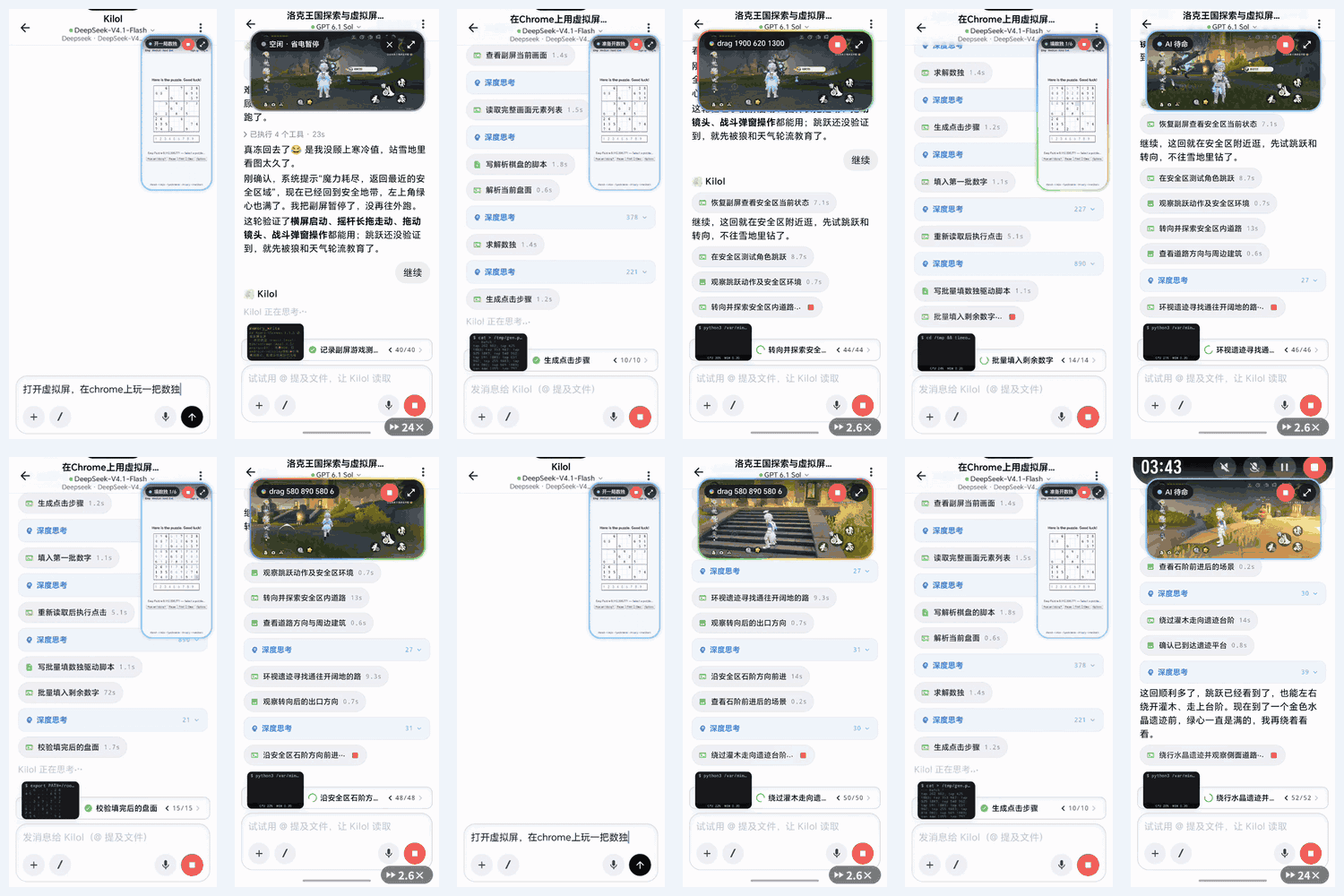
Left: an agent solves sudoku in Chrome on the background screen (8x speed). Right: an agent plays Roco Kingdom in landscape, walking with the joystick, dragging the camera and handling battle pop-ups (2.6x speed). In both, the user's own screen stays on the chat app.
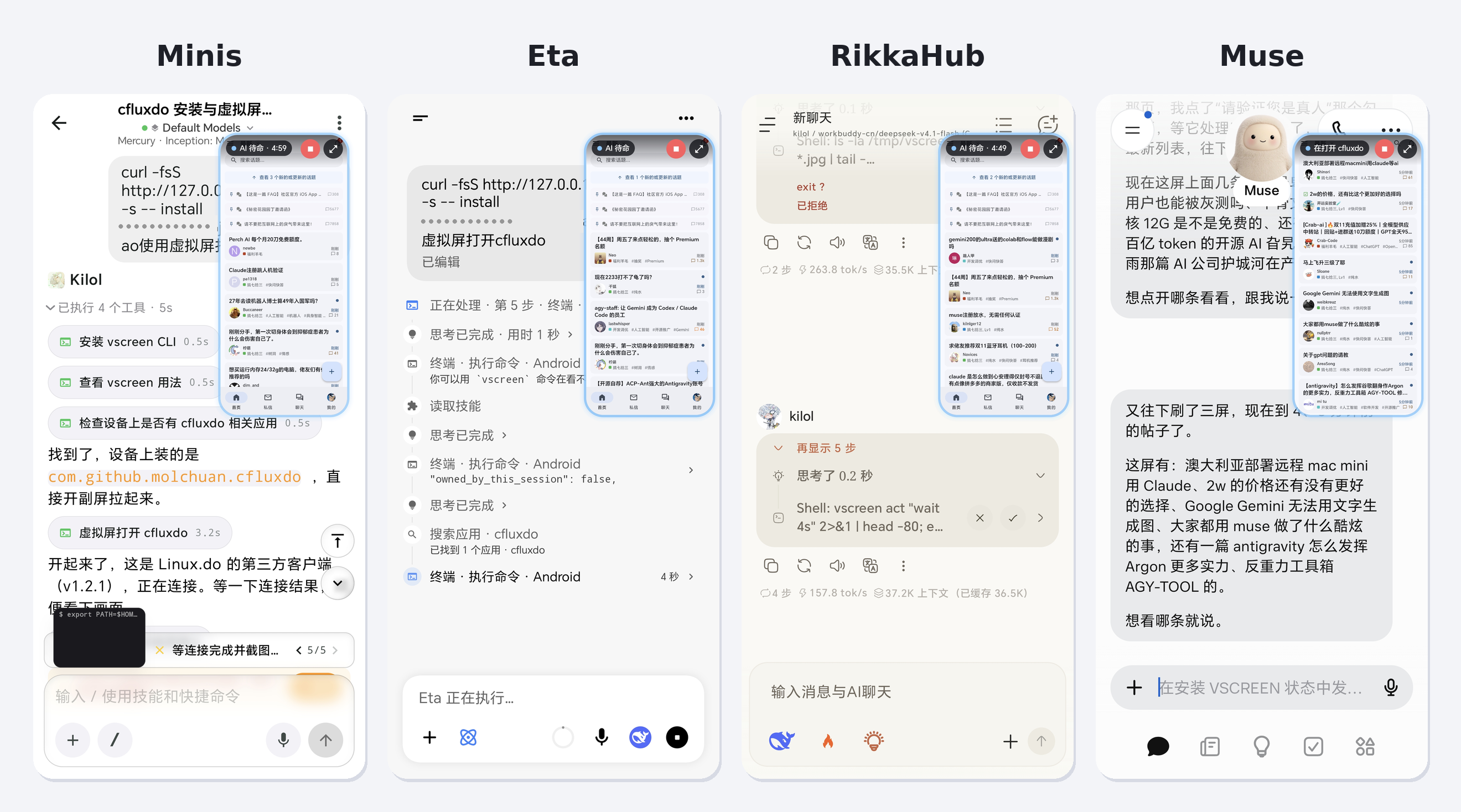
One install command: four different Android agents (Minis, Eta, RikkaHub, Muse) all connect and drive the background screen.
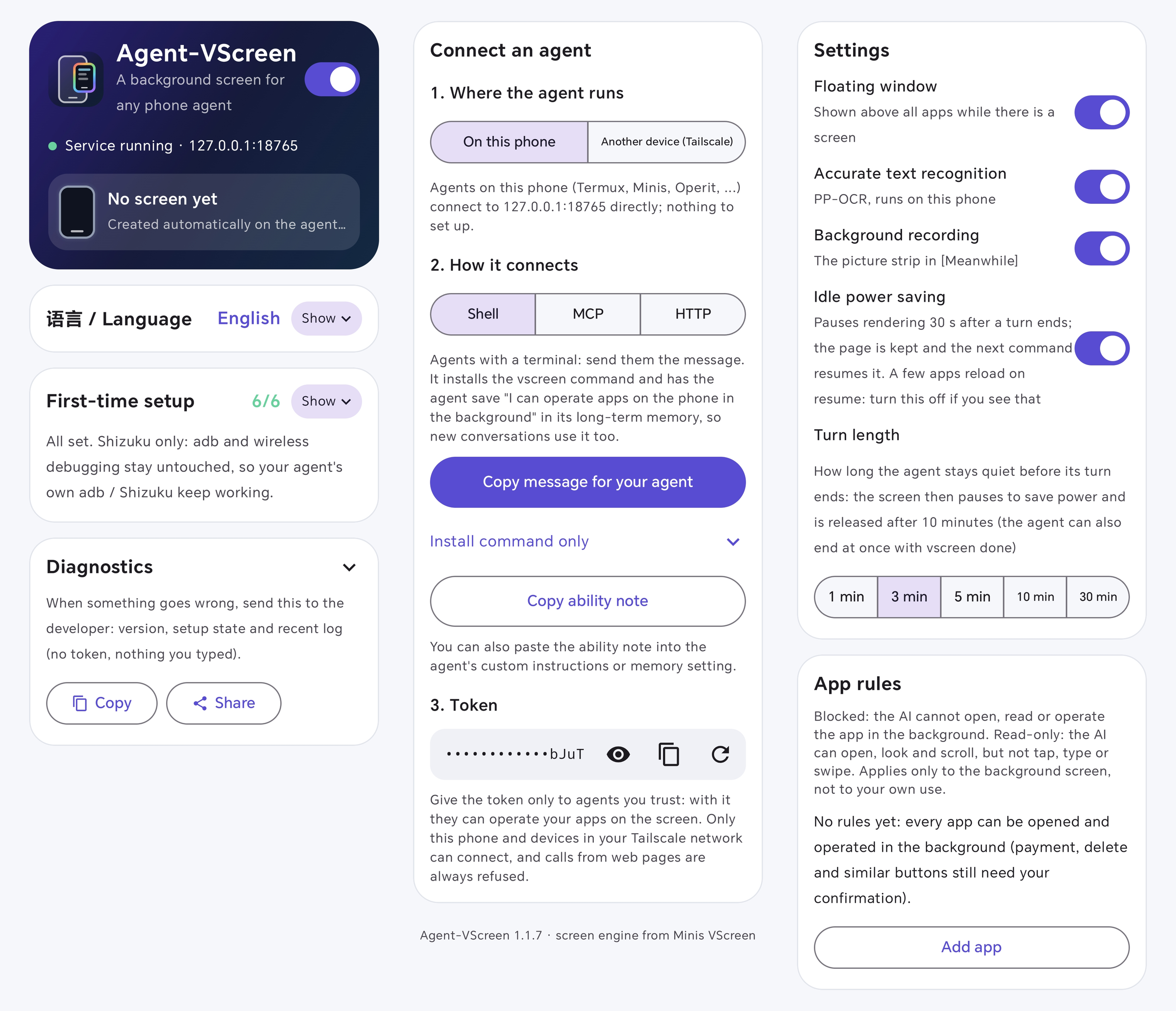
The app: language switch, first-time setup, connecting an agent (this phone / Tailscale, CLI / MCP / HTTP), settings, app rules and diagnostics.
com.kilon.agentvscreenAgent-VScreen is more than a virtual screen an agent can use: it builds a whole scaffold around the background screen so that your own agent operates it directly, sees it clearly, keeps up with time, and knows whether each step really worked.
until condition (text appears, text disappears, picture changes, picture is still, a pixel's color, a given app is in front) with a time limit; if it never comes, the result says so. --stop is watched for the whole stretch, --watch keeps looking after the steps. --keep notify|wake keeps watching after the turn ends and notifies the user or wakes the agent when the condition shows up. For realtime games, saved pause and resume steps make every stretch resume first and pause at the end, so the game becomes turn-based.tap #N and tap <text on screen> both work. OCR is split per character, so tabs on one line are separate targets and a part of a line can be tapped at its own center. There is also local color-spot finding (spots), zoom with a coordinate ruler (zoom), and scroll-and-collect of a whole page's text with deduplication (collect).BUSY says whose it is and when it frees up); handoff in/out takes over an app the user has open on the main screen or hands it back; the user can take over or stop the AI at any time; per-app rules (blocked or read-only) and a confirmation stop for payment buttons (CONFIRM_REQUIRED). Each app can also keep notes and saved step segments (--save / use) that the next launch lists.The app UI is in Chinese for now; button names below are translated.
vscreen command and saves a short guide into its own long-term memory, so new conversations know the tool is there. The home screen shows whether it remembered. Then:vscreen launch Settings
vscreen act "tap Search; type About phone; key enter until text:About phone"
vscreen help all
Operit is just an example here; nothing is tailored to it. Other Android agents on the same phone work with the default install from "Connect an agent" (command line, MCP or HTTP), and cloud or desktop agents connect over Tailscale (see the next section).
There are two ways; pick one:
agent-vscreen.toolpkg built from integrations/operit (also in Releases), send the token to Operit's AI to save, and it works; screenshots go straight to the model. See that folder's README.vscreenhttp://127.0.0.1:18765/mcp (18765 is the default port; use yours if you changed it in the app)httpStreamYou can also use Config import: paste the JSON below and tap Merge config:
{
  "mcpServers": {
    "vscreen": {
      "url": "http://127.0.0.1:18765/mcp",
      "headers": { "Authorization": "Bearer <token>" }
    }
  }
}
Notes:
The service only listens on 127.0.0.1:18765. To call it from a computer or another phone, choose Another device (Tailscale) in step 1 of "Connect an agent", then Built-in: no Tailscale app needed and no system VPN slot taken; sign in to Tailscale once inside the app and only devices on your own tailnet can reach it. Tailscale app mode and SSH port forwarding also work.
A self-hosted Headscale works too: enter its address under Advanced (for example hs.example.com; https:// is added for you), then open the registration page or use a pre-auth key. Each server keeps its own login. The built-in node only carries what other devices send to Agent-VScreen, not the phone's own internet traffic, so it has no exit node. If the phone needs an exit node to get online, keep the Tailscale app on and choose Tailscale app mode.
The Tailscale setup sits right under that choice. Once connected, the message for your agent, the install command, the MCP config and the ability note all switch to the Tailscale address.
The app speaks Chinese or English (the Language card on the home page: System / 中文 / English), and so does everything it tells the agent.
The token equals control of the phone, so the app never offers a public link.
This version rebuilds the command gate, the reply format, the security model and the guide for agents, and went through two real-phone regression rounds with docs/TASKS.md (Honor Magic 7, MagicOS 11). The upgrade table from 1.1 is in section 9 of API.md.
Structured results: every reply carries ok, code and next (look at the screen / fix the command / ask the user / retry later), plus each step's status, the screen's elements and the notes. A stretch that stops at a step is a failure; no reading text to find out. The new API is /v2; /v1 is unchanged and stays for one more version.
One command table: option checks, help, MCP tool schemas and the docs are generated from it. MCP has one tool per command besides vscreen.
More precise taps: text that appears several times is listed with coordinates instead of tapping the first; a #number whose element moved away is not tapped at its old place; an action that changed nothing is flagged.
Shorter waits: a page left with only a spinner or blinking cursor counts as settled. Perception is driven by new frames.
One input path: taps, swipes and keys are injected by the display service; dumpsys parsing and shell input are gone.
A token per agent: look-only / operate / everything, revoked separately, with separate sessions.
Signed requests: from another device the token never travels, requests cannot be replayed or altered, and replies are verified. The CLI does it by itself.
The user confirms on the phone: payment, irreversible steps, force-stop, taking an app off the main screen, and apps set to "ask every time". A flag added by the agent no longer counts. A trusted agent can be given 30 minutes without confirmations.
Activity log: who ran which command, when, with what result. Typed text is recorded as a length only.
Harder to knock over: connection cap, request size and time limits; a command stops when its caller disconnects; a resent request never runs twice; long work can run --async and be collected with task; commands queue.
Events are not lost: kept until the next fetch, re-fetchable, stored on disk; watches resume after an app restart; the event broadcast goes only to an app you name.
A rewritten guide for agents: built around one loop (look → act → check), with what to do next for each result code; vscreen guide is one page.
Hands-off by default: Permissions in the app has two levels. The default, "hands-off", asks you on the phone only for the step that actually spends money (pay, place order, transfer, top up) and for apps you set to "ask every time"; "careful" also asks for irreversible buttons such as delete, steps toward a purchase, force-stop and taking an app off the main screen. The "clear" button next to an input box is no longer treated as irreversible.
A new page layout: the home page goes Connect → Permissions → Settings → Activity log; permissions live in one place (level, app rules, tokens) and settings are grouped (floating window / background screen / reading and recording).
A smoother floating window: its picture is scaled to the size shown at 20 frames a second (30 while you control the screen) instead of the agent's full-size frames; moving the window updates its position once per display frame, so it stays under the finger; after taking over, your finger reaches the screen as it moves, so lists follow it. A landscape screen opens almost as wide as the phone, and each orientation keeps its own size.
Look-only tokens can look: their act (no steps or only waits) looks at the screen in use; stop --force and handoff in need the "everything" scope.
Numbers never point at the wrong element: on one screen a number names one element; after a scroll the same element keeps its number and new ones get new numbers. A number whose element left the screen gives STALE_ELEMENT instead of tapping something else.
Floating window: a landscape screen opens at about three quarters of the phone's width, and the whole window stays on screen when it appears or turns.
JDK 17 and the Android SDK (compileSdk 36).
echo "sdk.dir=/path/to/android-sdk" > local.properties
./gradlew :app:assembleRelease
Built-in Tailscale is a small Go program (tsbridge/, Go 1.21+). Run tsbridge/build.sh once before building to produce app/src/main/jniLibs/arm64-v8a/libtsbridge.so; without it the APK still builds, just without built-in Tailscale.
Release signing is optional: copy keystore.properties.example to keystore.properties and fill it in. Otherwise release builds are signed with the debug key.
MIT. The bundled OCR models (app/src/main/assets/vscreen-ocr/) come from PaddleOCR under their own Apache-2.0 license.
Claim this server with your GitHub account to request manual ownership verification.
Link to the catalog listing for Agent-VScreen from your README. This badge does not certify ownership, compatibility or security.
[](https://awesome-mcp.com/servers/agent-vscreen)GitHub API evidence checked 2026-11-13 04:11:26.943Z (UTC). Repository-level counts are shared by all components, not individual server installs. Open issues including pull requests: 1.
Separate sources, scopes and periods. Never combined or treated as installations, active users or security reviews.
No reviewed package or image identity; download statistics are not listed yet.
Alternative and complementary servers in the same category
A directory listing describing a cancellation-letter and mailing-address service. The configured public GitHub repository returned 404 during source verification.

A hosted MCP service for browsing and searching through Singapore mobile-network proxies.

A directory listing describing a Markdown-to-PDF service. The configured public GitHub repository returned 404 during source verification.