
A directory listing describing a cancellation-letter and mailing-address service. The configured public GitHub repository returned 404 during source verification.
Repository stats unavailable
Developer Tools
A hosted Model Context Protocol server that provides the AccelByte Extend SDK as reference context for AI assistants to answer SDK questions and generate Extend SDK code.
AccelByte Extend SDK MCP Server is cataloged as an MCP server attributed to accelbyte. A hosted Model Context Protocol server that provides the AccelByte Extend SDK as reference context for AI assistants to answer SDK questions and generate Extend SDK code. It is categorized under developer tools. See the capability inspector for recorded interfaces and their independent review status; consult upstream documentation for the current interface.
Installation configuration is not reviewed. No executable setup is offered for this entry; inspect the source repository before proceeding.
Catalog license label: Not specified. Check the source repository's current license and terms before using, modifying or distributing this software.
Capability definitions are not reviewed. Unreviewed imports are not exposed as trusted interfaces.
No reviewed records to display. This does not establish that upstream lacks this capability.
No reviewed records to display. This does not establish that upstream lacks this capability.
No reviewed records to display. This does not establish that upstream lacks this capability.
Email delivery is not connected. This page does not collect email addresses or create subscriptions.
Browse the registry for current listings instead.
Reviews for AccelByte Extend SDK MCP Server are not available yet
Review publishing and storage are not connected. This page does not collect or publish ratings or comments, including after sign-in.
No; AccelByte hosts the server, and users point their AI assistant at the hosted MCP URL for their language. Self-hosting with Docker is also documented as an option.
No sign-in is required; the server only exposes read-only SDK reference data.
The server serves SDK reference for C#, Go, Java, and Python, chosen per connection via the URL path.
README.md · e79317a18d15 · Fetched 2026-11-13 12:46:22 UTC
Original upstream text, without AI rewriting. Scripts, forms and unsafe links are filtered for safety.
Showing the last retrieved documentation snapshot; check the source for current changes.
A Model Context Protocol (MCP) server that gives AI assistants (VS Code Copilot, Cursor, Claude, Gemini, Antigravity) the AccelByte Extend SDK as additional context — so they can answer questions about the SDK and generate correct Extend SDK code.
create-extend-app promptIt serves SDK reference for four languages — C#, Go, Java, and Python. You pick the language per connection through the URL path (see Choose your language).
AccelByte hosts the Extend SDK MCP Server for you — you don't need to install or run anything locally. Just point your AI assistant at the hosted MCP URL for your language. There's no sign-in: the server only exposes read-only SDK reference data. Prefer to run it yourself? See Running Locally & Self-Hosting.
Paste this into your AI coding assistant — it will fetch the install guide, ask you a couple of questions, and configure everything for you:
Install the AGS Extend SDK MCP server for me. Fetch and follow the instructions at
https://raw.githubusercontent.com/AccelByte/ags-extend-sdk-mcp-server/refs/heads/master/INSTALL.md
Works in VS Code Copilot, Cursor, Claude Code, Antigravity, and Gemini CLI.
Claude Desktop users: The simplest path is Settings → Connectors → Add custom connector (Name:
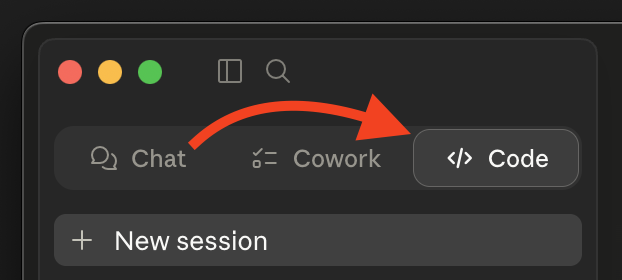
extend-sdk, URL: your MCP URL) — no AI installer needed. See Claude Desktop below.If you want to use the Quick Install prompt above, switch to the Code tab first (Chat and Cowork can't edit your config file).
Prefer to do it yourself? See Manual Install below.
The MCP URL is the hosted server's base URL followed by /extend-mcp/{language}:
https://<mcp-server-host>/extend-mcp/{language}
| Language | URL path |
|---|---|
| C# | /extend-mcp/csharp |
| Go | /extend-mcp/go |
| Java | /extend-mcp/java |
| Python | /extend-mcp/python |
<mcp-server-host> is the host of your organization's deployment — ask your AccelByte administrator if you're not sure./extend-mcp/python → /extend-mcp/go). Requesting an unknown language returns HTTP 400./extend-mcp) with no language serves the server's configured default language.No hosted instance? You can run the server yourself with Docker — see Running Locally & Self-Hosting.
The server uses Streamable HTTP transport. Clients that support HTTP transport connect to the URL directly. Clients that only support stdio transport use mcp-remote as a bridge.
Need
mcp-remote? It runs vianpx, so you need Node.js 18+ withnpxavailable — verify withnpx --version. No global install required.
Substitute your URL from Step 1 wherever you see <URL> below.
.vscode/mcp.json in your workspace (or user settings.json):
{
  "servers": {
    "extend-sdk": {
      "type": "http",
      "url": "<URL>"
    }
  }
}
If your client can't reach an HTTP server, swap to: { "command": "npx", "args": ["-y", "mcp-remote", "<URL>"] }.
See the VS Code MCP documentation.
.cursor/mcp.json in your workspace (or user settings):
{
  "mcpServers": {
    "extend-sdk": {
      "type": "http",
      "url": "<URL>"
    }
  }
}
If your client can't reach an HTTP server, swap to: { "command": "npx", "args": ["-y", "mcp-remote", "<URL>"] }.
See the Cursor MCP documentation.
claude mcp add --transport http extend-sdk <URL>
Fallback (stdio-only environments): claude mcp add extend-sdk -- npx -y mcp-remote <URL>.
See the Claude Code MCP documentation.
mcp_config.json in your project root:
{
  "mcpServers": {
    "extend-sdk": {
      "type": "http",
      "url": "<URL>"
    }
  }
}
If your client can't reach an HTTP server, swap to: { "command": "npx", "args": ["-y", "mcp-remote", "<URL>"] }.
See the Antigravity MCP documentation.
gemini mcp add --transport http extend-sdk <URL>
Fallback (stdio-only environments): gemini mcp add extend-sdk -- npx -y mcp-remote <URL>.
See the Gemini CLI MCP documentation.
Option A — Custom Connector (recommended)
extend-sdk and Remote MCP server URL: your <URL> from Step 1.Don't see "Add custom connector"? Some Team and Enterprise plans disable custom connectors via workspace policy. If the option is missing or greyed out, use Option B.
Option B — mcp-remote config file (fallback)
Edit claude_desktop_config.json:
~/Library/Application Support/Claude/claude_desktop_config.json%APPDATA%\Claude\claude_desktop_config.json{
"mcpServers": {
"extend-sdk": {
"command": "npx",
"args": ["-y", "mcp-remote", "<URL>"]
}
}
}
Restart Claude Desktop after saving.
Once connected, your assistant has access to these tools. In your assistant's chat, try the example prompts below — give permission to run the tools when requested.
search-symbolsSearch Extend SDK symbols by name, tags, or description, with fuzzy matching. Returns a paginated list of summaries.
"Search for symbols related to user" · "Find symbols for inventory"
describe-symbolsGet full details for specific symbols by ID — fields, parameters, imports, example usage, return type, and required permissions.
"Describe the
AdminCreateUser@iamandUser@iamsymbols"
create-extend-appA prompt template that clones an Extend app template repository and opens it (in a Dev Container when available) so you can start from a working sample.
Invoke the
create-extend-appprompt and follow the scenario / template / language completions.
[!TIP] When coding with this MCP server, start from an Extend SDK getting-started sample or an Extend app template instead of a blank project, and add relevant source files as context for better results.
Prefer to run the server locally (stdio) or host the HTTP server yourself? See Running Locally & Self-Hosting for Docker usage, environment variables, HTTP endpoints, smoke tests, developing from source, and releasing the image.
400Check the language in your URL path. It must be one of csharp, go, java, or python (e.g. /extend-mcp/go). An unknown language returns HTTP 400.
Some clients only support stdio transport. Switch that client to the mcp-remote bridge config shown in Step 2. It needs Node.js 18+ with npx available (npx --version).
Confirm the <mcp-server-host> and full URL are correct (ask your AccelByte administrator), and that your network can reach it.
search-symbols and describe-symbolsThis repository is published as-is. For bug reports and questions, please open an issue.
Claim this server with your GitHub account to request manual ownership verification.
Link to the catalog listing for AccelByte Extend SDK MCP Server from your README. This badge does not certify ownership, compatibility or security.
[](https://awesome-mcp.com/servers/ags-extend-sdk-mcp-server)Public repository statistics could not be verified. Check the configured source address; unavailable counts are not zero.
Separate sources, scopes and periods. Never combined or treated as installations, active users or security reviews.
No reviewed package or image identity; download statistics are not listed yet.
Alternative and complementary servers in the same category
A directory listing describing a cancellation-letter and mailing-address service. The configured public GitHub repository returned 404 during source verification.

A hosted MCP service for browsing and searching through Singapore mobile-network proxies.

A directory listing describing a Markdown-to-PDF service. The configured public GitHub repository returned 404 during source verification.