
An AI receptionist platform with an MCP server for accessing business calls, contacts and appointments from AI assistants.
52
Communication
A self-hosted alias mailbox on Cloudflare that creates, disables and sends from unlimited email aliases, and exposes those actions to AI agents through an MCP server.
Self-hosted email alias mailbox with an MCP server is cataloged as an MCP server attributed to charleswei118. A self-hosted alias mailbox on Cloudflare that creates, disables and sends from unlimited email aliases, and exposes those actions to AI agents through an MCP server. It is categorized under communication social. See the capability inspector for recorded interfaces and their independent review status; consult upstream documentation for the current interface.
Installation configuration is not reviewed. No executable setup is offered for this entry; inspect the source repository before proceeding.
Catalog license label: MIT. Check the source repository's current license and terms before using, modifying or distributing this software.
Capability definitions are not reviewed. Unreviewed imports are not exposed as trusted interfaces.
No reviewed records to display. This does not establish that upstream lacks this capability.
No reviewed records to display. This does not establish that upstream lacks this capability.
No reviewed records to display. This does not establish that upstream lacks this capability.
Email delivery is not connected. This page does not collect email addresses or create subscriptions.
Browse the registry for current listings instead.
Reviews for Self-hosted email alias mailbox with an MCP server are not available yet
Review publishing and storage are not connected. This page does not collect or publish ratings or comments, including after sign-in.
Yes. Messages arrive with a private Reply-To, and replies go out from the alias while your real address is scrubbed.
The original message is forwarded as-is, so mail is not lost.
README.md · 65cc6bae451e · Fetched 2026-11-13 14:07:56 UTC
Original upstream text, without AI rewriting. Scripts, forms and unsafe links are filtered for safety.
Showing the last retrieved documentation snapshot; check the source for current changes.
Don't want to hand your real email to every website, and don't want to pay for an alias service? aliasflare is a self-hosted alias mailbox that runs on your own Cloudflare account's free tier.
Unlike SimpleLogin or addy.io, aliases are unlimited, you keep your own domain for free, and nothing lives on someone else's server. A different address for every website, all landing in your real inbox. Turn any of them off in one click when the spam starts. Reply as the alias, so your real address never leaks. Verification codes are pulled into the subject line, tracking pixels are stripped, and AI agents can create aliases and read codes through MCP.
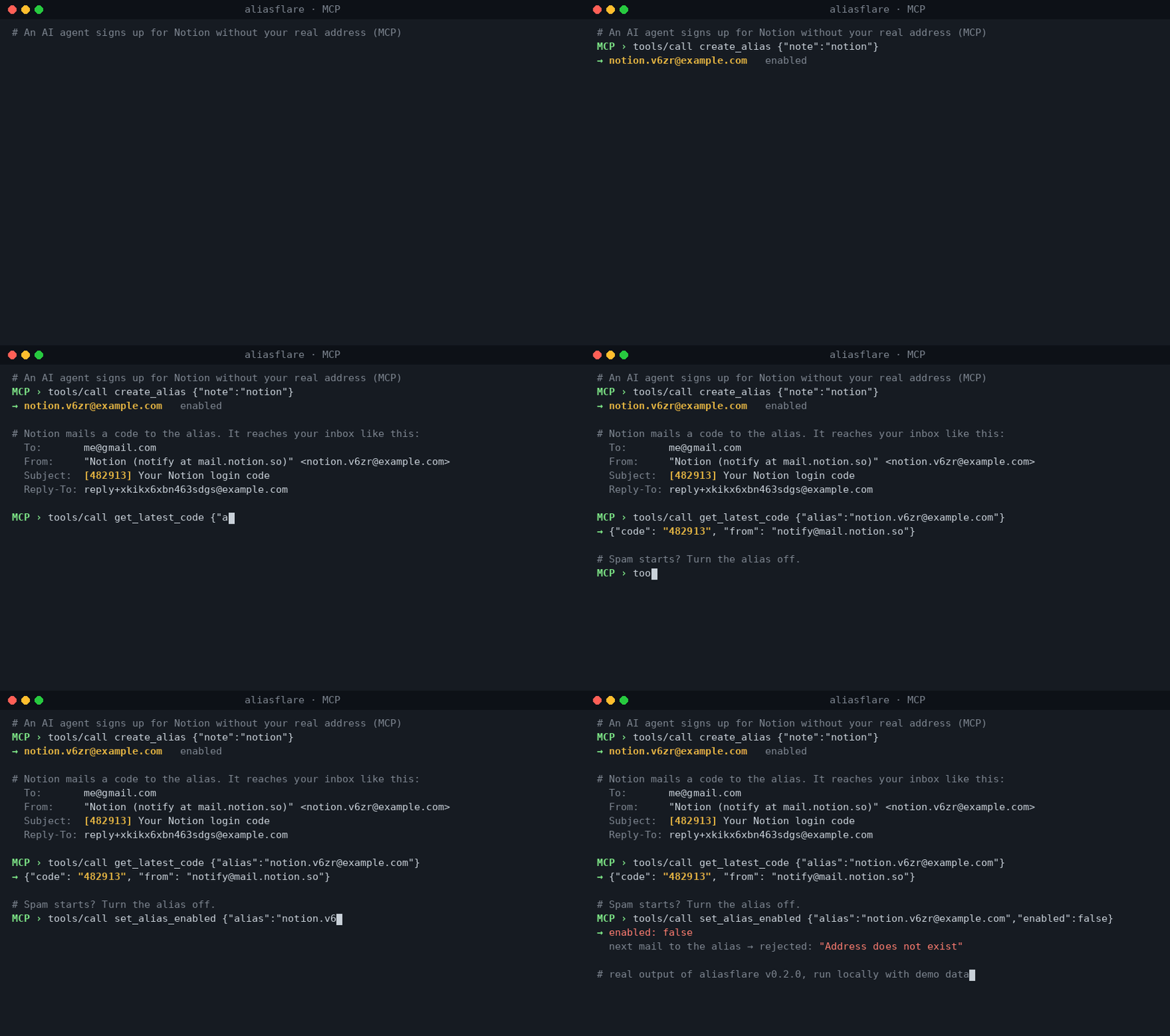
Real output of aliasflare v0.2.0 run locally with demo data (example.com).
| SimpleLogin free | addy.io free | aliasflare | |
|---|---|---|---|
| Aliases | 10 | unlimited on username, 10 shared | unlimited |
| Your own domain | paid | paid | yes |
| Bandwidth | unlimited | 10 MB / month | unlimited inbound |
| Reply from alias | yes | paid | yes (optional: free Resend account, or Workers Paid) |
| Your data | their servers | their servers | your Cloudflare account |
| Cost | $0, then $36/yr | $0, then $12–36/yr | $0 |
anything@yourdomain.com is created on first mail (turn off with AUTO_CREATE=false).From: "Shop (news at shop.com)" <shop.k3f9@yourdomain.com> with a private Reply-To. Hit reply in Gmail and the answer goes out from the alias; your real address is scrubbed from the body too.[482913] Your login code./mcp: create_alias, get_latest_code, list_aliases, set_alias_enabled, recent_messages, send_from_alias. Let your agent sign up for things without your inbox.postal-mime), D1 stores only metadata (no message bodies).You need a domain on Cloudflare.
DOMAIN — e.g. example.com (comma-separate several)DESTINATION — your verified real inboxADMIN_TOKEN — a long random password (openssl rand -hex 24)RESEND_API_KEY — optional, see below; none to skipaliasflare → enable.Open your Worker's URL, log in with ADMIN_TOKEN, and create your first alias.
Receiving and forwarding to your own verified inbox is free on every Cloudflare plan. Sending to other people (replies, new mail) needs one of:
RESEND_API_KEY.BREVO_API_KEY (optional, no need to fill none). Used when RESEND_API_KEY isn't set.
Deliverability depends on your domain's reputation: a brand-new Brevo free account sending from a free subdomain (e.g. *.dpdns.org) may land in Outlook's junk folder or be rejected by Gmail. A domain you own and real, low-volume replies help.RESEND_API_KEY=none.Without either, everything except replying and sending works.
git clone https://github.com/charleswei118/aliasflare && cd aliasflare
npm install
npx wrangler d1 create aliasflare        # wrangler can also create it on first deploy
for s in DOMAIN DESTINATION ADMIN_TOKEN RESEND_API_KEY; do npx wrangler secret put $s; done
npm run deploy                            # applies migrations, then deploys
Then do step 3 above.
Secrets: DOMAIN, DESTINATION, ADMIN_TOKEN, RESEND_API_KEY.
Variables in wrangler.toml:
| Variable | Default | What it does |
|---|---|---|
AUTO_CREATE | true | Create aliases on first incoming mail |
FORWARD_MODE | rewrite | forward = plain forwarding, no sender hiding or replies |
BLOCK_TRACKERS | true | Strip tracking pixels |
CODE_IN_SUBJECT | true | Prefix the subject with a detected code |
BANNER | true | One-line header showing alias and real sender |
{
  "mcpServers": {
    "aliasflare": {
      "url": "https://aliasflare.<you>.workers.dev/mcp",
      "headers": { "Authorization": "Bearer <ADMIN_TOKEN>" }
    }
  }
}
Then: "Sign me up for the Notion newsletter with a new alias and confirm it." The agent calls create_alias(note="notion"), uses the address, then get_latest_code.
If your client only speaks stdio, run the bundled bridge. It answers tools/list locally and forwards tool calls to your own Worker:
{
  "mcpServers": {
    "aliasflare": {
      "command": "npx",
      "args": ["-y", "github:charleswei118/aliasflare"],
      "env": { "ALIASFLARE_URL": "https://aliasflare.<you>.workers.dev", "ALIASFLARE_TOKEN": "<ADMIN_TOKEN>" }
    }
  }
}
A Dockerfile for the same bridge is included.
All endpoints need Authorization: Bearer <ADMIN_TOKEN>.
| Method | Path | Body / query |
|---|---|---|
| GET | /api/config | |
| GET | /api/aliases | ?q= |
| POST | /api/aliases | {note} or {local, domain} or {address} |
| PATCH | /api/aliases/:id | {enabled, note} |
| DELETE | /api/aliases/:id | |
| GET | /api/messages | ?alias_id=&limit= |
| GET | /api/code | ?alias=&since= (minutes) |
| POST | /api/send | {alias, to, subject, text} |
stranger ──▶ shop.k3f9@you.com ──▶ Worker ──▶ you@gmail.com
                                   From: "Shop (news at shop.com)" <shop.k3f9@you.com>
                                   Reply-To: reply+<token>@you.com

you@gmail.com ──▶ reply+<token>@you.com ──▶ Worker ──▶ stranger
                                            From: shop.k3f9@you.com
Only mail from your DESTINATION (and not failing SPF/DMARC) may use a reply+ address.
npm test     # node:test, uses node:sqlite as a D1 stand-in
npm run dev
aliasflare and enabled.DESTINATION must be a verified address under Email Routing → Destination addresses./api/config: outbound should be resend, brevo or cloudflare. A brand-new sending domain has little reputation; use a domain you own and keep volume low.AUTO_CREATE=false and the alias doesn't exist yet./health and /api/config return (never paste your ADMIN_TOKEN).Incoming mail never touches HTTP: Email Routing hands each message straight to the Worker's email() handler. The HTTP side only serves the admin UI, REST API and MCP, so you can lock it down without breaking mail:
workers_dev = false in wrangler.toml and serve the admin side only on a Custom Domain of yours (redeploy after the change). Preview/version URLs are a separate setting.MIT
Looking for an MCP gateway for Chinese public data? See web2mcp.
Claim this server with your GitHub account to request manual ownership verification.
Link to the catalog listing for Self-hosted email alias mailbox with an MCP server from your README. This badge does not certify ownership, compatibility or security.
[](https://awesome-mcp.com/servers/aliasflare)Public repository statistics could not be verified. Check the configured source address; unavailable counts are not zero.
Separate sources, scopes and periods. Never combined or treated as installations, active users or security reviews.
No reviewed package or image identity; download statistics are not listed yet.
Alternative and complementary servers in the same category
An AI receptionist platform with an MCP server for accessing business calls, contacts and appointments from AI assistants.
Pidgeon provides an MCP server and an email inbox API that gives AI agents their own addresses for sending, awaiting, and replying to email.

A Telegram CLI with background sync that can run an optional MCP server for a personal account using MTProto, not the bot API.
