
A directory listing describing a cancellation-letter and mailing-address service. The configured public GitHub repository returned 404 during source verification.
Repository stats unavailable
Developer Tools
An MCP server that lets AI assistants interact with the AlibabaCloud Yunxiao DevOps platform, reading work items, writing code, and submitting merge requests.
AlibabaCloud DevOps MCP Server for the Yunxiao platform is cataloged as an MCP server attributed to aliyun. An MCP server that lets AI assistants interact with the AlibabaCloud Yunxiao DevOps platform, reading work items, writing code, and submitting merge requests. It is categorized under developer tools. See the capability inspector for recorded interfaces and their independent review status; consult upstream documentation for the current interface.
Installation configuration is not reviewed. No executable setup is offered for this entry; inspect the source repository before proceeding.
Catalog license label: Not specified. Check the source repository's current license and terms before using, modifying or distributing this software.
Capability definitions are not reviewed. Unreviewed imports are not exposed as trusted interfaces.
No reviewed records to display. This does not establish that upstream lacks this capability.
No reviewed records to display. This does not establish that upstream lacks this capability.
No reviewed records to display. This does not establish that upstream lacks this capability.
Email delivery is not connected. This page does not collect email addresses or create subscriptions.
Browse the registry for current listings instead.
Reviews for AlibabaCloud DevOps MCP Server for the Yunxiao platform are not available yet
Review publishing and storage are not connected. This page does not collect or publish ratings or comments, including after sign-in.
Yes, it supports Yunxiao central station and Region edition deployment modes.
Yes, toolsets can be specified so only needed tools are enabled; otherwise all tools are enabled by default.
README.md · 526d85c510f3 · Fetched 2026-11-13 09:31:33 UTC
Original upstream text, without AI rewriting. Scripts, forms and unsafe links are filtered for safety.
Showing the last retrieved documentation snapshot; check the source for current changes.
English | 中文
AlibabaCloud Devops MCP Server provides AI assistants with the ability to interact with the Yunxiao platform, enabling them to read work item contents in projects, automatically write code after understanding requirements, and submit code merge requests. Enterprise development teams can use it to assist with code reviews, optimize task management, reduce repetitive operations, and thus focus on more important innovation and product delivery.
alibabacloud-devops-mcp-server provides the following capabilities for AI assistants:
organization-management: Organization management tools (organization list, organization details, department information, organizational roles, member information, etc.)code-management: Code repository management tools (repository management, branch management, merge request management, file tree, etc.)project-management: Project management tools (project management, work item management, work item fields, work item comments, time tracking, etc.)pipeline-management: Pipeline management tools (pipeline list, pipeline configuration, resource management, tag management, deployment management, etc.)application-delivery: Application delivery tools (deployment order management, application management, application tags, variable group management, etc.)packages-management: Artifact repository management tools (artifact repositories, artifact lists, etc.)test-management: Test management tools (test case management, test case directories, test plans, test results, etc.)This tool supports both Yunxiao central station and Region edition deployment modes:
https://openapi-rdc.aliyuncs.com as the API domainhttps://your-org.devops.aliyuncs.comThe tool automatically determines the deployment mode based on the configured API base URL:
openapi-rdc.aliyuncs.com, it operates in central station modeWhen using a Region edition, set the YUNXIAO_API_BASE_URL environment variable:
{
  "mcpServers": {
    "yunxiao": {
      "command": "npx",
      "args": ["-y", "alibabacloud-devops-mcp-server"],
      "env": {
        "YUNXIAO_ACCESS_TOKEN": "<YOUR_TOKEN>",
        "YUNXIAO_API_BASE_URL": "https://your-org.devops.aliyuncs.com"
      }
    }
  }
}
node version >= 18.0.0
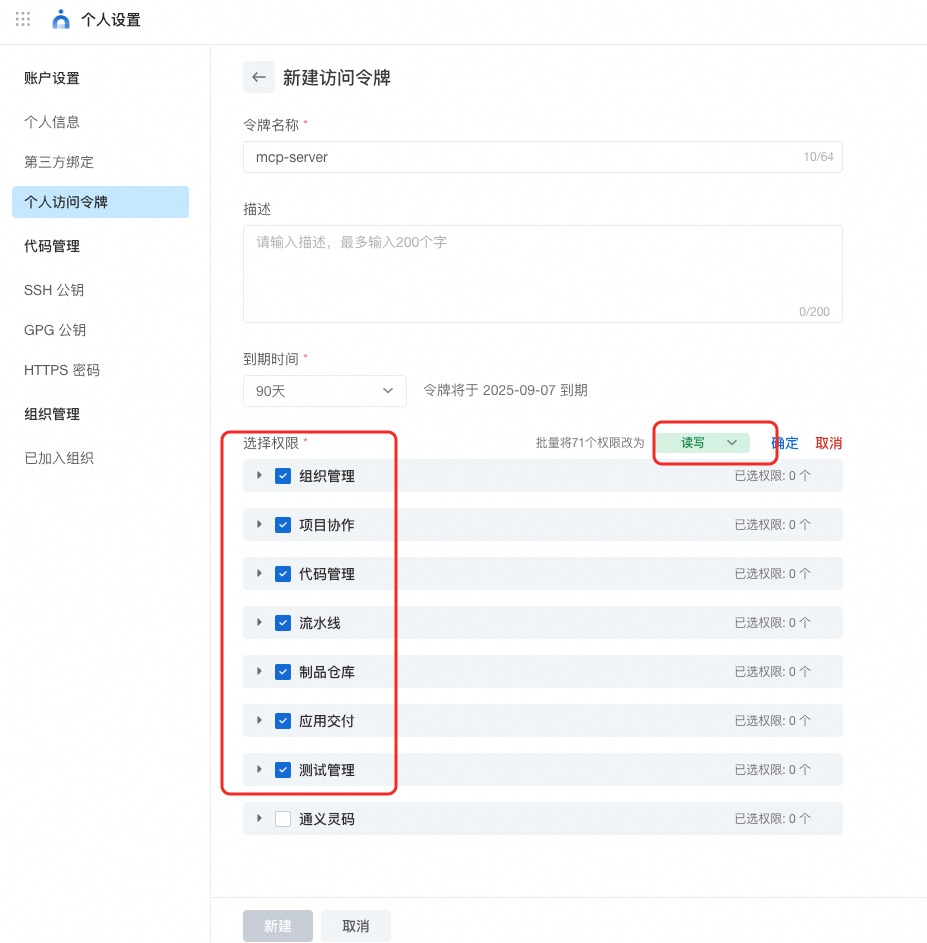
AlibabaCloud Devops Personal Access Token, click here to obtain. Grant read and write permissions to all APIs under organization management, project collaboration, code management, pipeline management, artifact repository management, application delivery and testing management.
Yunxiao provides an officially hosted MCP endpoint — no local install or Docker needed. Just point your client at it and authenticate with your Yunxiao token.
https://openapi-rdc.aliyuncs.com/ai/mcp/ai/mcp, e.g. https://<your-org>.devops.aliyuncs.com/ai/mcp — the same domain you use to access Yunxiao in your region.Authorization: Bearer <YOUR_TOKEN> (or header X-Yunxiao-Token: <YOUR_TOKEN>)Client config — Central (clients with native remote support, e.g. Cursor):
{
  "mcpServers": {
    "yunxiao": {
      "url": "https://openapi-rdc.aliyuncs.com/ai/mcp",
      "headers": { "Authorization": "Bearer <YOUR_TOKEN>" }
    }
  }
}
Client config — Region edition (replace the URL with your own region domain):
{
  "mcpServers": {
    "yunxiao": {
      "url": "https://<your-org>.devops.aliyuncs.com/ai/mcp",
      "headers": { "Authorization": "Bearer <YOUR_TOKEN>" }
    }
  }
}
Tip: cut context usage by requesting only the toolsets you need —
?toolsets=code-management,project-managementor headerX-Devops-Toolsets. See the full guide: docs/hosted-mcp-guide.zh-CN.md.
Stdio mode is the simplest self-hosting way, suitable for most MCP clients (like Cursor, Claude Desktop, iFlow, etc.). No Docker installation required, just run via npx.
Add the following configuration to your MCP client configuration file:
{
  "mcpServers": {
    "yunxiao": {
      "command": "npx",
      "args": [
        "-y",
        "alibabacloud-devops-mcp-server"
      ],
      "env": {
        "YUNXIAO_ACCESS_TOKEN": "<YOUR_TOKEN>"
      }
    }
  }
}
Note:
- Replace
<YOUR_TOKEN>with your Yunxiao access token- The
-yflag automatically confirms installation without manual confirmation- By default the tool calls the Yunxiao Central Station OpenAPI (
https://openapi-rdc.aliyuncs.com); no extra configuration is required- If you are on a Region edition (organization-specific domain), set an additional environment variable
YUNXIAO_API_BASE_URLto your Yunxiao instance URL, e.g.https://your-org.devops.aliyuncs.com. See the Configuring Region Edition section above for details- This method uses stdio mode, communicating with the MCP client via standard input/output
| Mode | CLI Flag | Env Variable | Endpoints |
|---|---|---|---|
| Stdio | (default) | — | stdin/stdout |
| SSE | --sse | MCP_TRANSPORT=sse | /sse + /messages |
| Streamable HTTP | --streamable-http | MCP_TRANSPORT=streamable-http | /mcp |
| Both | --sse --streamable-http | MCP_TRANSPORT=both | /sse + /mcp |
Streamable HTTP is the MCP specification's recommended remote transport. SSE is legacy; use
bothduring migration.
docker pull build-steps-public-registry.cn-beijing.cr.aliyuncs.com/build-steps/alibabacloud-devops-mcp-server:latest
Self-built:
docker build -t alibabacloud/alibabacloud-devops-mcp-server .
Stdio:
docker run -i --rm -e YUNXIAO_ACCESS_TOKEN \
  build-steps-public-registry.cn-beijing.cr.aliyuncs.com/build-steps/alibabacloud-devops-mcp-server:latest
SSE / Streamable HTTP / Both — set MCP_TRANSPORT and expose PORT:
docker run -d --name yunxiao-mcp -p 3000:3000 \
  -e YUNXIAO_ACCESS_TOKEN="your_token" -e PORT=3000 \
  -e MCP_TRANSPORT=streamable-http \   # sse | streamable-http | both
  build-steps-public-registry.cn-beijing.cr.aliyuncs.com/build-steps/alibabacloud-devops-mcp-server:latest
Optional Streamable HTTP env vars:
MCP_STREAMABLE_PATH: MCP endpoint path (default /mcp)MCP_HTTP_HOST: Bind host (default 0.0.0.0)MCP_ALLOWED_HOSTS: Allowed Host header values (comma-separated)Stdio:
{
  "mcpServers": {
    "yunxiao": {
      "command": "docker",
      "args": ["run", "-i", "--rm", "-e", "YUNXIAO_ACCESS_TOKEN", "build-steps-public-registry.cn-beijing.cr.aliyuncs.com/build-steps/alibabacloud-devops-mcp-server:latest"],
      "env": { "YUNXIAO_ACCESS_TOKEN": "<YOUR_TOKEN>" }
    }
  }
}
SSE: http://localhost:3000/sse
Streamable HTTP: http://localhost:3000/mcp
Pass credentials via query parameter or header:
http://localhost:3000/mcp?yunxiao_access_token=YOUR_TOKEN_HERE
Or request header: x-yunxiao-token: YOUR_TOKEN_HERE
Region / instance OpenAPI base:
http://localhost:3000/mcp?yunxiao_access_token=TOKEN&yunxiao_api_base_url=https%3A%2F%2Fyour-org.devops.aliyuncs.com
Or request header: x-yunxiao-api-base-url: https://your-org.devops.aliyuncs.com
cp .env.example .env   # set YUNXIAO_ACCESS_TOKEN
docker compose up -d
Client URL: http://localhost:3000/sse (SSE) or http://localhost:3000/mcp (Streamable HTTP)
The server now supports toolsets, allowing you to enable only the tools you need. This can reduce the number of tools presented to the AI assistant and improve performance.
Available toolsets:
organization-management: Organization management tools (organization list, organization details, department information, organizational roles, member information, etc.)code-management: Code repository management tools (repository management, branch management, merge request management, file tree, etc.)project-management: Project management tools (project management, work item management, work item fields, work item comments, time tracking, etc.)pipeline-management: Pipeline management tools (pipeline list, pipeline configuration, resource management, tag management, deployment management, etc.)packages-management: Artifact repository management tools (artifact repositories, artifact lists, etc.)application-delivery: Application delivery tools (deployment order management, application management, application tags, variable group management, etc.)test-management: Test management tools (test case management, test case directories, test plans, test results, etc.)To use toolsets, you can specify them via command line arguments or environment variables:
npx -y alibabacloud-devops-mcp-server --toolsets=code-management,project-management
DEVOPS_TOOLSETS=code-management,project-management npx -y alibabacloud-devops-mcp-server
If no toolsets are specified, all tools will be enabled by default.
alibabacloud-devops-mcp-server integrates various tools, including:
get_current_organization_Info: Get current user's organization informationget_user_organizations: Get the list of organizations the current user has joinedget_organization_role: Get information about an organization roleget_organization_departments: Get the list of departments in an organizationget_organization_department_info: Get information about a department in an organizationget_organization_department_ancestors: Get the ancestors of a department in an organizationget_organization_members: Get the list of members in an organizationget_organization_member_info: Get information about a member in an organizationget_organization_member_info_by_user_id: Get information about a member in an organization by user IDsearch_organization_members: Search for organization memberslist_organization_roles: List organization rolesget_organization_role: Get information about an organization rolecreate_branch: Create a branchdelete_branch: Delete a branchget_branch: Get branch informationlist_branches: Get branch listcreate_file: Create a filedelete_file: Delete a fileget_file_blobs: Get file contentlist_files: Query file treeupdate_file: Update file contentcreate_change_request: Create a merge requestupdate_change_request: Update a merge request title or descriptioncreate_change_request_comment: Create a comment on a merge requestget_change_request: Query merge requestlist_change_request_patch_sets: Query merge request version listlist_change_request: Query merge request listlist_change_request_comments: Query merge request comment listget_compare: Compare codeget_repository: Get repository detailslist_repositories: Get repository listlist_commits: [Code Management] List commits in a repositoryget_commit: [Code Management] Get commit detailscreate_commit_comment: [Code Management] Create a comment on a commitget_project: Get project detailssearch_projects: Search projectsget_sprint: Get sprint detailslist_sprints: List sprints in a projectcreate_sprint: [Project Management] Create a sprintupdate_sprint: [Project Management] Update a sprintsearch_programs: [Project Management] Search for programslist_program_versions: [Project Management] List program versionslist_versions: [Project Management] List project versionscreate_version: [Project Management] Create a versionupdate_version: [Project Management] Update a versiondelete_version: [Project Management] Delete a versionget_work_item: Get work item detailsupdate_work_item: [Project Management] Update a work itemsearch_workitems: Search work itemsget_work_item_types: get work item typescreate_work_item: create work itemlist_all_work_item_types: List all work item types in an organizationlist_work_item_types: List work item types in a project spaceget_work_item_type: Get details of a specific work item typelist_work_item_relation_work_item_types: List work item types that can be related to a specific work itemlist_workitem_relation_records: List relation records for a work itemcreate_workitem_relation_record: Relate one work item to anotherdelete_workitem_relation_record: Delete a work item relationget_work_item_type_field_config: Get field configuration for a specific work item typeget_work_item_workflow: Get workflow information for a specific work item typelist_work_item_comments: List comments for a specific work itemcreate_work_item_comment: Create a comment for a specific work item; optional formatType: RICHTEXT (default) or MARKDOWNlist_workitem_attachments: List attachments for a specific work itemget_workitem_file: Get file information for a specific work item attachmentcreate_workitem_attachment: Upload a local file as an attachment to a work itemlist_workitem_activities: List activity history for a work item (field changes, status transitions, association changes)list_current_user_effort_records: [Project Management] 获取用户的实际工时明细,结束时间和开始时间的间隔不能大于6个月list_effort_records: [Project Management] 获取实际工时明细create_effort_record: [Project Management] 登记实际工时list_estimated_efforts: [Project Management] 获取预计工时明细create_estimated_effort: [Project Management] 登记预计工时update_effort_record: [Project Management] 更新登记实际工时update_estimated_effort: [Project Management] 更新登记预计工时get_pipeline: Get pipeline detailslist_pipelines: Get pipeline listsmart_list_pipelines: Smart pipeline search with natural language time referencesgenerate_pipeline_yaml: [Pipeline Management] Generate pipeline YAML configurationcreate_pipeline_from_description: Create a pipeline from natural language descriptionupdate_pipeline: [Pipeline Management] Update pipeline YAML contentcreate_pipeline_run: Create a pipeline run instanceget_latest_pipeline_run: Get the latest pipeline run instanceget_pipeline_run: Get pipeline run detailslist_pipeline_runs: Get pipeline run listlist_pipeline_jobs_by_category: Get pipeline execution tasks by categorylist_pipeline_job_historys: Get the execution history of a pipeline taskexecute_pipeline_job_run: Manually run a pipeline taskget_pipeline_job_run_log: Get the execution logs of a pipeline joblist_service_connections: List service connections in organizationcreate_pipeline_from_description: Automatically generates YAML configuration and creates pipelineupdate_pipeline: Update an existing pipeline in Yunxiao by pipelineId. Use this to update pipeline YAML, stages, jobs, etc.create_resource_member: Create a resource memberdelete_resource_member: Delete a resource memberlist_resource_members: Get a list of resource membersupdate_resource_member: Update a resource memberupdate_resource_owner: Transfer resource ownercreate_tag: Create a tagcreate_tag_group: Create a tag grouplist_tag_groups: Get a list of tag groupsdelete_tag_group: Delete a tag groupupdate_tag_group: Update a tag groupget_tag_group: Get a tag groupdelete_tag: Delete a tagupdate_tag: Update a tagstop_vm_deploy_order: Stop VM deploy orderskip_vm_deploy_machine: Skip VM deploy machineretry_vm_deploy_machine: Retry VM deploy machineresume_vm_deploy_order: Resume VM deploy orderget_vm_deploy_order: Get VM deploy order detailsget_vm_deploy_machine_log: Get VM deploy machine logcreate_change_order: [application delivery] 创建部署单list_change_order_versions: [application delivery] 查看部署单版本列表get_change_order: [application delivery] 读取部署单使用的物料和工单状态list_change_order_job_logs: [application delivery] 查询环境部署单日志find_task_operation_log: [application delivery] 查询部署任务执行日志,其中通常包含下游部署引擎的调度细节信息execute_job_action: [application delivery] 操作环境部署单list_change_orders_by_origin: [application delivery] 根据创建来源查询部署单create_appstack_change_request: [application delivery] 创建变更请求get_appstack_change_request_audit_items: [application delivery] 获取变更请求的审批项list_appstack_change_request_executions: [application delivery] 列出变更请求的执行记录list_appstack_change_request_work_items: [application delivery] 列出变更请求的工作项cancel_appstack_change_request: [application delivery] 取消变更请求close_appstack_change_request: [application delivery] 关闭变更请求list_applications: [application delivery] List applications in an organization with paginationget_application: [application delivery] Get application details by namecreate_application: [application delivery] Create a new applicationupdate_application: [application delivery] Update an existing applicationget_latest_orchestration: [application delivery] Get the latest orchestration for an environmentlist_app_orchestration: [application delivery] List application orchestrationscreate_app_orchestration: [application delivery] Create an application orchestrationdelete_app_orchestration: [application delivery] Delete an application orchestrationget_app_orchestration: [application delivery] Get an application orchestrationupdate_app_orchestration: [application delivery] Update an application orchestrationget_env_variable_groups: [application delivery] Get variable groups for an environmentcreate_variable_group: [application delivery] Create a variable groupdelete_variable_group: [application delivery] Delete a variable groupget_variable_group: [application delivery] Get a variable groupupdate_variable_group: [application delivery] Update a variable groupget_app_variable_groups: [application delivery] Get variable groups for an applicationget_app_variable_groups_revision: [application delivery] Get the revision of variable groups for an applicationsearch_app_templates: [application delivery] Search application templatescreate_app_tag: [application delivery] Create an application tagupdate_app_tag: [application delivery] Update an application tagsearch_app_tags: [application delivery] Search application tagsupdate_app_tag_bind: [application delivery] Update application tag bindingscreate_global_var: [application delivery] Create a global variable groupget_global_var: [application delivery] Get a global variable groupupdate_global_var: [application delivery] Update a global variable grouplist_global_vars: [application delivery] List global variable groupsget_machine_deploy_log: [application delivery] Get machine deployment logadd_host_list_to_host_group: [application delivery] Add host list to host groupadd_host_list_to_deploy_group: [application delivery] Add host list to deploy grouplist_app_release_workflows: [application delivery] List all release workflows for an applicationlist_app_release_workflow_briefs: [application delivery] List release workflow briefs for an applicationlist_system_release_workflows: [application delivery] List all system release workflowscreate_system_release_workflow: [application delivery] Create a system release workflowupdate_system_release_stage: [application delivery] Update system release workflow stageexecute_system_release_stage: [application delivery] Execute system release workflow stageget_app_release_workflow_stage: [application delivery] Get release workflow stage detailslist_app_release_stage_briefs: [application delivery] List release stage briefsupdate_app_release_stage: [application delivery] Update application release workflow stagelist_app_release_stage_runs: [application delivery] List release stage execution recordsexecute_app_release_stage: [application delivery] Execute release workflow stage for a change requestcancel_app_release_stage_execution: [application delivery] Cancel release workflow stage executionretry_app_release_stage_pipeline: [application delivery] Retry release workflow stage pipelineskip_app_release_stage_pipeline: [application delivery] Skip release workflow stage pipelinelist_app_release_stage_metadata: [application delivery] List integrated metadata for stage executionget_app_release_stage_pipeline_run: [application delivery] Get release stage pipeline run instancepass_app_release_stage_validate: [application delivery] Pass release workflow stage validationget_app_release_stage_job_log: [application delivery] Get pipeline job execution logrefuse_app_release_stage_validate: [application delivery] Refuse release workflow stage validationlist_package_repositories: Get package repositories details listlist_artifacts: Get artifacts details listget_artifact: Get single artifact detailslist_testcase_directories: [test management] Get test case directory listcreate_testcase_directory: [test management] Create a test case directoryget_testcase_field_config: [test management] Get test case field configurationcreate_testcase: [test management] Create a test casesearch_testcases: [test management] Search test casesget_testcase: [test management] Get test case informationdelete_testcase: [test management] Delete a test caselist_test_plans: [test management] Get test plan listget_test_result_list: [test management] Get test case list in a test planupdate_test_result: [test management] Update test resultIf you have any questions, please join the DingTalk group “云效mcp server&智能化用户沟通2群” (ID: 177120034028).
HTTP requests to a Region OpenAPI forward the ingress-provided X-Real-IP as a
single validated address in X-Forwarded-For and X-Real-IP, including token
checks and attachment uploads. The address is request-scoped, not stored in an
MCP session. Missing or invalid X-Real-IP falls back to the socket peer address;
MCP does not select an address from an incoming X-Forwarded-For chain. Stdio and
central OpenAPI requests do not add these headers.
The hosted deployment relies on ingress to overwrite X-Real-IP with the actual
client address and restrict direct access to MCP. No proxy address list or
Express trust proxy configuration is needed. Self-hosted HTTP deployments using
this feature must enforce the same ingress contract; the header itself does not
authenticate an address. A remote AI provider's egress IP may be the client
observed by ingress, rather than the human user's workstation IP.
Claim this server with your GitHub account to request manual ownership verification.
Link to the catalog listing for AlibabaCloud DevOps MCP Server for the Yunxiao platform from your README. This badge does not certify ownership, compatibility or security.
[](https://awesome-mcp.com/servers/alibabacloud-devops-mcp-server)Public repository statistics could not be verified. Check the configured source address; unavailable counts are not zero.
Separate sources, scopes and periods. Never combined or treated as installations, active users or security reviews.
No reviewed package or image identity; download statistics are not listed yet.
Alternative and complementary servers in the same category
A directory listing describing a cancellation-letter and mailing-address service. The configured public GitHub repository returned 404 during source verification.

A hosted MCP service for browsing and searching through Singapore mobile-network proxies.

A directory listing describing a Markdown-to-PDF service. The configured public GitHub repository returned 404 during source verification.