
A directory listing describing a cancellation-letter and mailing-address service. The configured public GitHub repository returned 404 during source verification.
Repository stats unavailable
Developer Tools
A TypeScript base64 CLI utility that also bundles a Model Context Protocol server exposing encoding, decoding, data URI, job history and cache tools for AI agents and coding workflows.
All Your Base64 (ayb64) is cataloged as an MCP server attributed to skullzarmy. A TypeScript base64 CLI utility that also bundles a Model Context Protocol server exposing encoding, decoding, data URI, job history and cache tools for AI agents and coding workflows. It is categorized under developer tools. See the capability inspector for recorded interfaces and their independent review status; consult upstream documentation for the current interface.
Installation configuration is not reviewed. No executable setup is offered for this entry; inspect the source repository before proceeding.
Catalog license label: MIT. Check the source repository's current license and terms before using, modifying or distributing this software.
Capability definitions are not reviewed. Unreviewed imports are not exposed as trusted interfaces.
No reviewed records to display. This does not establish that upstream lacks this capability.
No reviewed records to display. This does not establish that upstream lacks this capability.
No reviewed records to display. This does not establish that upstream lacks this capability.
Email delivery is not connected. This page does not collect email addresses or create subscriptions.
Browse the registry for current listings instead.
Reviews for All Your Base64 (ayb64) are not available yet
Review publishing and storage are not connected. This page does not collect or publish ratings or comments, including after sign-in.
The MCP server provides encode, decode, recall, jobs, datauri and memory tools for encoding data, decoding base64, recalling prior jobs by ID, listing recent operations, generating web-ready data URIs and managing the job cache.
It runs as a standalone process that communicates over stdio.
Yes, it performs MIME type detection using the file-type and mime-types packages, covering images, documents, archives, media, text and fonts.
README.md · 3282977fff02 · Fetched 2026-11-13 08:17:21 UTC
Original upstream text, without AI rewriting. Scripts, forms and unsafe links are filtered for safety.
Showing the last retrieved documentation snapshot; check the source for current changes.
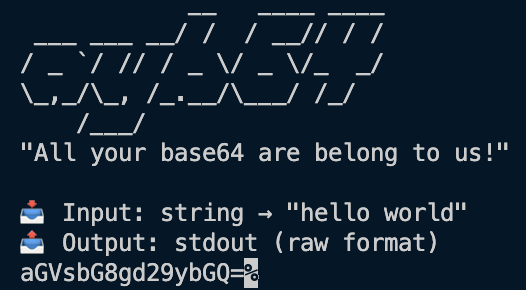
"All your base64 are belong to us!"

A modern, efficient, purpose-built CLI utility to convert any possible input file into a base64 string with comprehensive output options. Built with TypeScript and designed for both performance and developer experience.



🚀 Installation • 🎯 Quick Start • 🤖 MCP Server • 📖 Commands • 🎨 Output Formats • ⚡ Advanced Usage • 🔧 Troubleshooting • 🧪 API Reference
✨ Modern & Fast - Built with TypeScript and optimized for performance
🔍 Smart Detection - Industry-leading MIME type detection via file-type + mime-types
📁 Versatile Input - Files, stdin, strings
🎨 Multiple Outputs - Raw, JSON, JS, TS, CSS, HTML, XML, YAML, Markdown
🔄 Bidirectional - Both encoding and decoding support
🛡️ Robust - Comprehensive error handling and validation
📊 Metadata - File information, hashing, and processing stats
🎯 Data URIs - Generate data URIs with proper MIME types
🌍 Cross-Platform - macOS, Linux, Windows, Docker, Cloud ready
While basic base64 tools simply convert files to strings, ayb64 provides a complete modern solution:
🎨 8 Output Formats - Raw, JSON, JavaScript, TypeScript, CSS, HTML, XML, YAML, Markdown
🤖 AI Integration - Built-in MCP server with memory and job recall for AI workflows
🔍 Smart Detection - Industry-leading MIME type detection (100+ file types)
📋 Rich Metadata - File info, hashing, processing stats, timestamps
🎯 Web-Ready - Generate data URIs for immediate use in web development
⚡ Performance - TypeScript-built with optimized memory usage and benchmarked speed
🔄 Versatile Input - Files, stdin, strings with automatic detection
🛡️ Production Ready - Comprehensive error handling, validation, and testing
📊 Developer Experience - Modern CLI with helpful output and examples
Perfect for developers who need more than just basic file-to-base64 conversion.
npm install -g ayb64
npm install ayb64
npx ayb64 --help
# or use the shorter command
npx ayb64 --help
# Encode a file
ayb64 encode myfile.jpg

# Encode with wrapped output
ayb64 encode myfile.jpg --wrap 76

# Generate data URI
ayb64 encode image.png --data-uri

# Output to file with metadata
ayb64 encode document.pdf -o output.b64 --metadata

# Decode base64 back to file
ayb64 decode SGVsbG8sIFdvcmxkIQ== -o hello.txt

# Pipe from stdin
echo "Hello, World!" | ayb64 encode

# Get file information
ayb64 info myfile.jpg --json
All Your Base64 includes a powerful Model Context Protocol (MCP) server optimized for AI agents and coding tasks. The MCP server provides memory, job recall, checksums for change detection, and specialized tools for AI workflows.
🧠 Smart Memory - LRU cache with job recall by ID
🔍 Change Detection - SHA256 checksums detect file modifications
🤖 AI Optimized - Tools designed for coding and development workflows
📋 Job History - Track and recall previous encoding operations
🔗 Data URIs - Generate web-ready data URIs for images and assets
⚡ Performance - Lightweight, extensible, and robust
encode - Encode files/data with format options and job trackingdecode - Decode base64 with auto-detection and file outputrecall - Retrieve previous jobs by ID with full contextjobs - List recent operations with metadatadatauri - Generate data URIs optimized for web developmentmemory - Manage job cache (stats, clear)# Using the CLI command (recommended)
ayb64 mcp
# Direct binary
ayb64-mcp
# Development mode
npm run mcp
# Or via npx with source
npx tsx src/mcp-server.ts
VS Code/Cursor/Cline (add to mcp.json):
{
  "mcpServers": {
    "ayb64": {
      "command": "ayb64",
      "args": ["mcp"]
    }
  }
}
Claude Desktop:
{
  "mcpServers": {
    "ayb64": {
      "command": "ayb64-mcp"
    }
  }
}
Encode an image for web use:
Tool: encode
Input: {
  "data": "/path/to/logo.png",
  "isFile": true,
  "format": "js",
  "dataUri": true
}
Output: Job ID + JavaScript const with data URI
Recall a previous job:
Tool: recall
Input: {"jobId": "job_1234567890_abc123"}
Output: Full original result with metadata
Generate data URI for CSS:
Tool: datauri
Input: {"input": "/path/to/background.jpg"}
Output: data:image/jpeg;base64,... (ready for CSS)
encode / eConvert input to base64 format.
ayb64 encode [input] [options]
Arguments:
input - Input file path (use - for stdin)Options:
-o, --output <path> - Output file path (default: stdout)-f, --format <format> - Output format: raw, json, js, ts, css, html, xml, yaml, md-w, --wrap <columns> - Wrap base64 output at specified column width-d, --data-uri - Generate data URI with MIME type-m, --metadata - Include file metadata in output--no-mime - Disable MIME type detection--quiet - Suppress non-essential outputdecode / dDecode base64 input back to original format.
ayb64 decode [input] [options]
Arguments:
input - Input file path or base64 string (use - for stdin)Options:
-o, --output <path> - Output file path (default: stdout)-m, --metadata - Show metadata if available--quiet - Suppress non-essential outputinfo / iDisplay file information and metadata without conversion.
ayb64 info <input> [options]
Arguments:
input - Input file pathOptions:
-j, --json - Output as JSONmcpStart the Model Context Protocol server for AI agents.
ayb64 mcp
This command starts the MCP server which provides base64 conversion tools optimized for AI agents and coding workflows. The server includes memory, job recall, checksums, and specialized tools.
No options - The MCP server runs as a standalone process communicating via stdio.
batch / bProcess multiple files in batch (coming soon).
ayb64 batch <pattern> [options]
ayb64 encode file.txt
# SGVsbG8sIFdvcmxkIQ==
ayb64 encode file.txt --format json --metadata
{
  "data": "SGVsbG8sIFdvcmxkIQ==",
  "size": 22,
  "metadata": {
    "filename": "file.txt",
    "mimeType": "text/plain",
    "size": 13,
    "hash": "abc123...",
    "processingTime": 2
  }
}
ayb64 encode file.txt --format js --metadata
const base64Data = 'SGVsbG8sIFdvcmxkIQ==';

const metadata = {
  filename: 'file.txt',
  mimeType: 'text/plain',
  size: 13,
};

module.exports = { base64Data, metadata };
ayb64 encode image.png --data-uri
# data:image/png;base64,iVBORw0KGgoAAAANSUhEUgAA...
ayb64 encode file.txt --format html --metadata
<!DOCTYPE html>
<html lang="en">
  <head>
    <meta charset="UTF-8" />
    <title>Base64 Data</title>
  </head>
  <body>
    <div class="base64-data" data-content="SGVsbG8sIFdvcmxkIQ=="></div>
    <div class="metadata">
      <h3>File Information</h3>
      <p><strong>Filename:</strong> file.txt</p>
      <p><strong>MIME Type:</strong> text/plain</p>
      <p><strong>Size:</strong> 13 bytes</p>
    </div>
  </body>
</html>
ayb64 encode file.txt --format css
.base64-data {
  --base64-content: 'SGVsbG8sIFdvcmxkIQ==';
}

.base64-data::before {
  content: var(--base64-content);
}
Wrap base64 output for better readability:
ayb64 encode file.txt --wrap 64    # 64 characters per line
ayb64 encode file.txt --wrap 76    # RFC 2045 compliant
# Using shell globbing
for file in *.jpg; do
  ayb64 encode "$file" -o "${file}.b64"
done

# Using find
find . -name "*.png" -exec ayb64 encode {} -o {}.b64 \;
# Pipe from curl
curl -s https://example.com/image.jpg | ayb64 encode --data-uri

# Chain operations
ayb64 encode file.txt | ayb64 decode -o restored.txt

# Use with other tools
base64 -d encoded.txt | ayb64 encode --format json
All Your Base64 provides comprehensive error handling with helpful suggestions:
$ ayb64 encode nonexistent.txt
Error: File not found: nonexistent.txt
Suggestions:
  • Check that the file path is correct
  • Ensure the file exists
  Path: nonexistent.txt
Common error types:
--help to see supported formatsWhen using --metadata, you'll get comprehensive file information:
{
  "filename": "example.jpg",
  "mimeType": "image/jpeg",
  "size": 153600,
  "created": "2023-01-01T00:00:00.000Z",
  "modified": "2023-01-02T00:00:00.000Z",
  "hash": "sha256:a1b2c3d4...",
  "processingTime": 15
}
The tool automatically detects file types using the file-type package, supporting:
| File Size | Time | Memory |
|---|---|---|
| 1 KB | 5ms | 0 B |
| 1 MB | 8ms | 92.26 KB |
| 10 MB | 51ms | 170.35 KB |
| 100 MB | 523ms | 257.27 KB |
| 200 MB | 1.0s | 447.2 KB |
Benchmarks run on real hardware: MacBook Pro, 2.4 GHz 8-Core Intel Core i9, 32GB DDR4, macOS 15.6.1
Performance Notes:
Benchmarks run on real hardware using npm run benchmark
AYB64_MAX_MEMORY - Maximum memory usage thresholdAYB64_QUIET - Default quiet mode settingCreate ~/.ayb64rc.json for default settings:
{
  "format": "raw",
  "wrap": 76,
  "metadata": false
}
const { spawn } = require('child_process');

function encodeFile(filePath) {
  return new Promise((resolve, reject) => {
    const child = spawn('ayb64', ['encode', filePath, '--format', 'json']);
    let output = '';

    child.stdout.on('data', (data) => {
      output += data.toString();
    });

    child.on('close', (code) => {
      if (code === 0) {
        resolve(JSON.parse(output));
      } else {
        reject(new Error(`Process exited with code ${code}`));
      }
    });
  });
}
Generate data URIs for CSS:
ayb64 encode logo.png --data-uri > logo-data.css
Create JavaScript modules:
# Use shell globbing until batch command is implemented
for file in assets/*.png; do
  ayb64 encode "$file" --format js -o "${file%.png}.js"
done
# GitHub Actions example
- name: Encode assets
  run: |
    for file in dist/assets/*; do
      ayb64 encode "$file" --format json --metadata > "$file.json"
    done
Q: "Cannot find module 'file-type'"
A: Run npm install to install dependencies.
Q: "Permission denied" errors
A: Check file permissions: chmod +r filename or run with appropriate privileges.
Q: Output is corrupted
A: Ensure proper handling of binary data in your shell/terminal.
Set debug environment variable for verbose output:
DEBUG=ayb64:* ayb64 encode file.txt
We welcome contributions! Please see CONTRIBUTING.md for guidelines.
git clone https://github.com/skullzarmy/all-your-base64.git
cd all-your-base64
npm install
npm run dev
npm test                # Run all tests
npm run test:coverage   # Run with coverage
npm run test:watch      # Watch mode
npm run build           # Build TypeScript
npm run lint            # Lint code
npm run format          # Format code
MIT © Joe Peterson
All Your Base64 leverages the incredible work of the open source community for robust file type detection:
🔍 file-type by Sindre Sorhus - The gold standard for detecting file types via magic numbers. This amazing package supports 100+ file types with blazing-fast detection using binary signatures.
📄 mime-types by jshttp - Comprehensive MIME type database with extension mapping. The backbone of web server MIME handling across the Node.js ecosystem.
These packages provide enterprise-grade file detection that would take years to implement and maintain independently. Standing on the shoulders of giants! 🚀
This project is built with and grateful for these excellent open source packages:
All Your Base64 works seamlessly across platforms:
🍎 macOS - Native support with proper file system handling
🐧 Linux - Full compatibility across distributions
🪟 Windows - PowerShell, Command Prompt, and WSL support
📦 Docker - Container-ready for CI/CD pipelines
☁️ Cloud - AWS Lambda, Google Cloud Functions, Azure Functions
Made with ❤️ and lots of ☕
"In the beginning was the bit, and the bit was with base64, and the bit was base64."
Claim this server with your GitHub account to request manual ownership verification.
Link to the catalog listing for All Your Base64 (ayb64) from your README. This badge does not certify ownership, compatibility or security.
[](https://awesome-mcp.com/servers/all-your-base64)Public repository statistics could not be verified. Check the configured source address; unavailable counts are not zero.
Separate sources, scopes and periods. Never combined or treated as installations, active users or security reviews.
No reviewed package or image identity; download statistics are not listed yet.
Alternative and complementary servers in the same category
A directory listing describing a cancellation-letter and mailing-address service. The configured public GitHub repository returned 404 during source verification.

A hosted MCP service for browsing and searching through Singapore mobile-network proxies.

A directory listing describing a Markdown-to-PDF service. The configured public GitHub repository returned 404 during source verification.