
A directory listing describing a cancellation-letter and mailing-address service. The configured public GitHub repository returned 404 during source verification.
Repository stats unavailable
Developer Tools
Amigent connects a PC or Mac to a real Amiga over the home network, letting an AI agent control the Amiga and letting you use it as a remote desktop.
Amigent is cataloged as an MCP server attributed to akustikrausch. Amigent connects a PC or Mac to a real Amiga over the home network, letting an AI agent control the Amiga and letting you use it as a remote desktop. It is categorized under developer tools. See the capability inspector for recorded interfaces and their independent review status; consult upstream documentation for the current interface.
Installation configuration is not reviewed. No executable setup is offered for this entry; inspect the source repository before proceeding.
Catalog license label: MIT. Check the source repository's current license and terms before using, modifying or distributing this software.
Capability definitions are not reviewed. Unreviewed imports are not exposed as trusted interfaces.
No reviewed records to display. This does not establish that upstream lacks this capability.
No reviewed records to display. This does not establish that upstream lacks this capability.
No reviewed records to display. This does not establish that upstream lacks this capability.
Email delivery is not connected. This page does not collect email addresses or create subscriptions.
Browse the registry for current listings instead.
Reviews for Amigent are not available yet
Review publishing and storage are not connected. This page does not collect or publish ratings or comments, including after sign-in.
Yes, both can be used at the same time; you can watch the agent's clicks and take over at any moment.
An Amiga with AmigaOS 2.04 or newer, any CPU from the 68000 on, a network connection and a TCP/IP stack, plus a PC or Mac with Python 3.10 or newer.
README.md · 61d7c76c7ad5 · Fetched 2026-11-13 14:08:26 UTC
Original upstream text, without AI rewriting. Scripts, forms and unsafe links are filtered for safety.
Showing the last retrieved documentation snapshot; check the source for current changes.
     _____            .__                            __
    /  _  \    _____  |__|   ____    ____    ____  _/  |_
   /  /_\  \  /     \ |  |  / ___\ _/ __ \  /    \ \   __\
  /    |    \|  Y Y  \|  | / /_/  >\  ___/ |   |  \ |  |
  \____|__  /|__|_|  /|__| \___  /  \___  >|___|  / |__|
          \/       \/     /_____/       \/      \/

     complete remote control for a real Amiga, by AI or manually
            tuned for slow Amigas and slow networks

Amigent connects your PC or Mac to your real Amiga over the home network. Then you can:
Both at the same time: you see every click the agent makes and can take over at any moment.
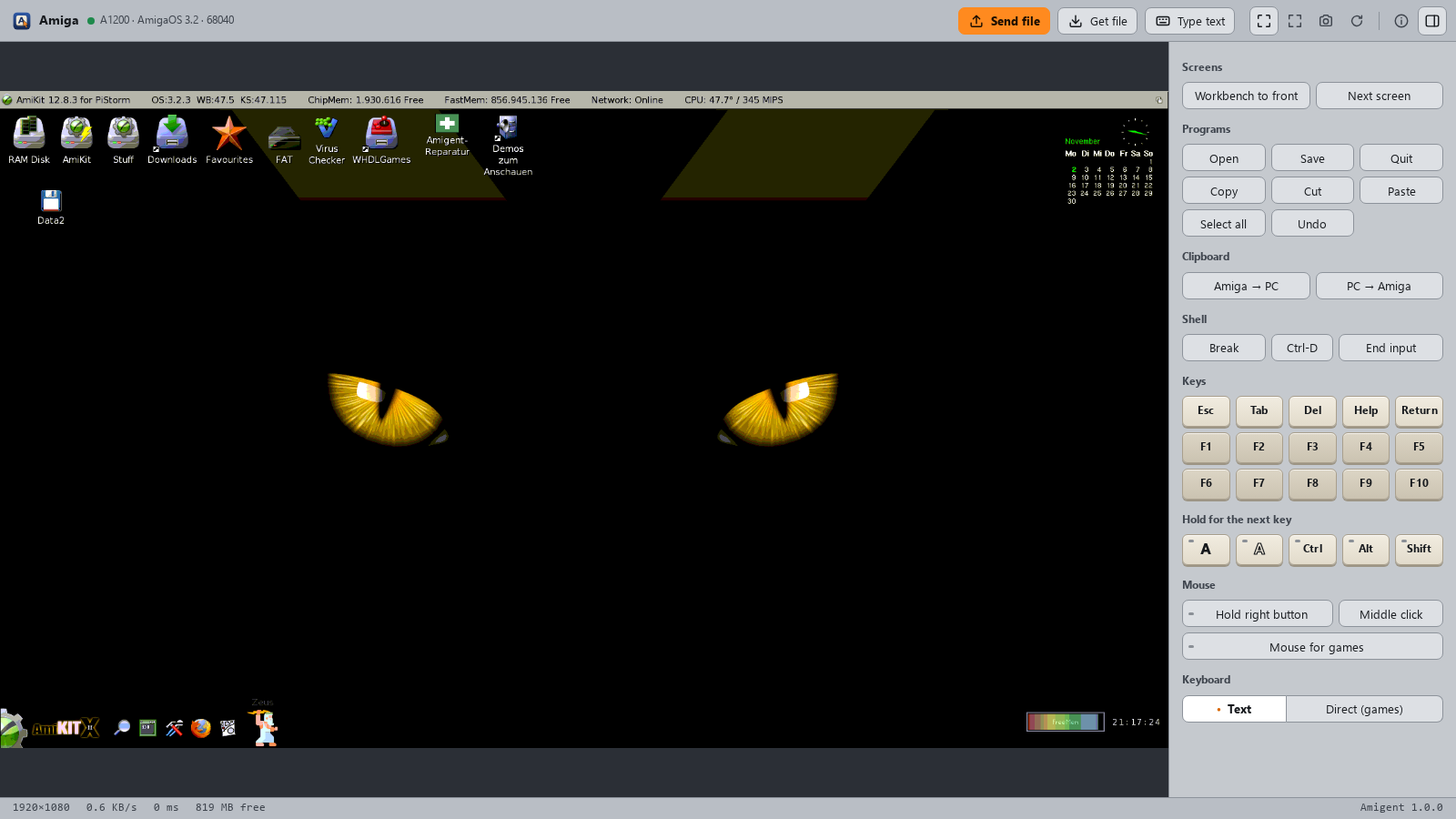
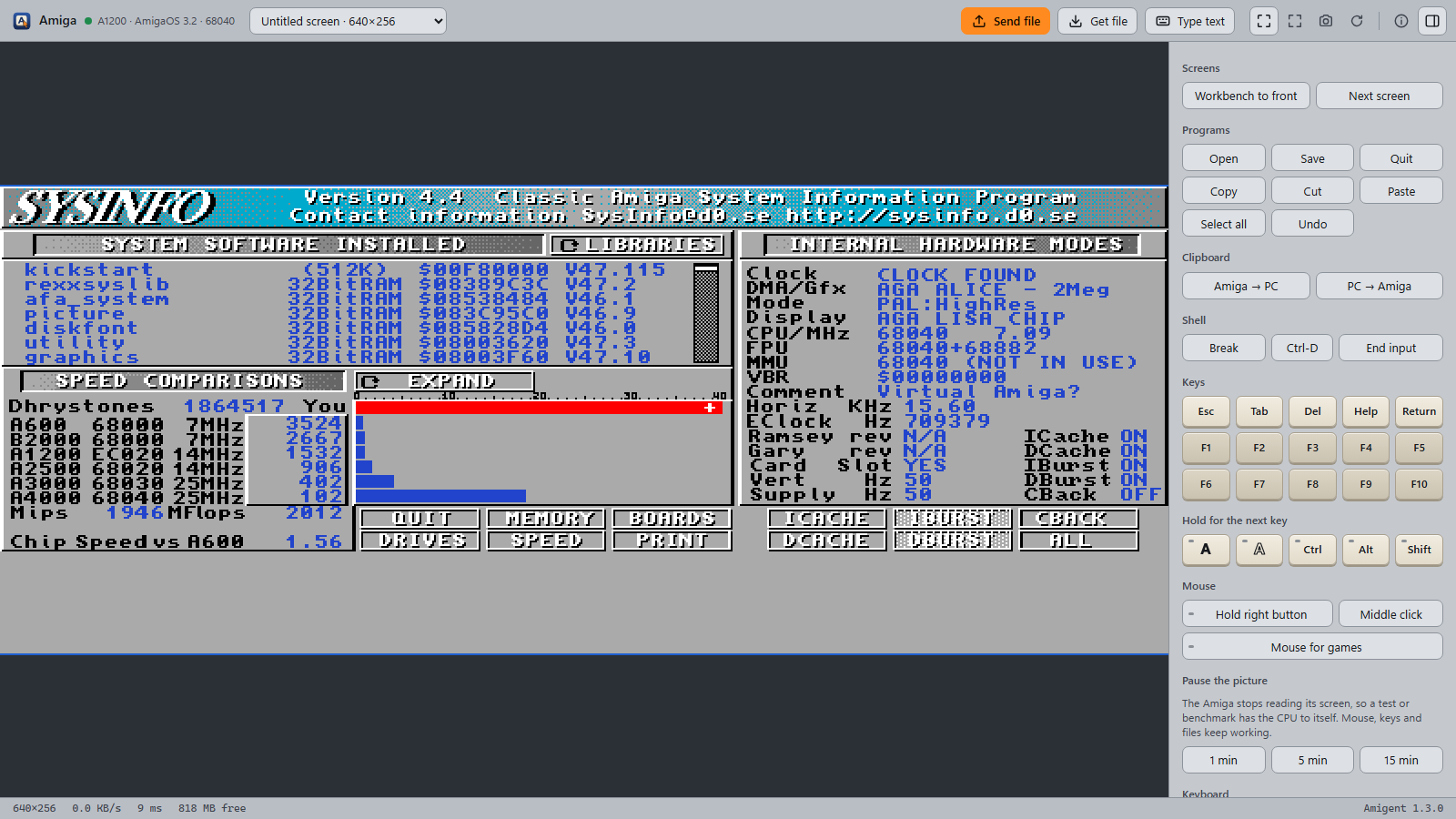
Programs that open their own screen, such as SysInfo on the chipset next to a graphics-card Workbench, show up as they are. The list at the top brings any screen to the front, from the PC.
1. Copy amigentd to the Amiga (amigentd.000 on a
68000), or unpack the archive from the
releases.
2. Start it with amigentd SETUP in a Shell, or double-click its icon.
3. Paste this into your AI agent:
Install Amigent for me: run "pipx install amigent" (if pipx or Python 3.10
or newer is missing, install them first: Windows winget, macOS Homebrew,
Linux the package manager). Then run amigent-setup; it finds my Amiga on
the network by itself. Register the MCP server "amigent" with the command
amigent-server, and run amigent-viewer --install so the remote desktop
shows up as a program. Tell me if you need to be restarted.
The agent sets up the Amiga over the network; from then on amigentd starts with it.
Windows: Amigent appears in the Start menu. For an encrypted connection
openssl is needed, which comes with Git for Windows.
macOS: Amigent appears in ~/Applications. On its first start, allow it
access to the local network, or it cannot reach the Amiga. Cmd is the right
Amiga key.
Linux: there is no program entry; start the remote desktop with
amigent-viewer.
Without an AI agent: see the manual installation.
Amigent has two halves, amigentd on the Amiga and the program on your PC or Mac. Update both; either order works.
Paste this into your AI agent:
Update Amigent for me, both halves: run "pipx upgrade amigent" on this
computer, then "amigent-setup --update" for the amigentd on my Amiga.
Then tell me to restart you, so you get the new tools.
Or in a terminal:
pipx upgrade amigent
amigent-setup --update
Then restart your AI app and the remote desktop, so they run the new version.
Updated the Amiga first, at the Amiga? Unpack the new archive from the
releases or Aminet and
double-click Amigent-Update in its drawer. Then give your agent the same
prompt as above, or run pipx upgrade amigent on the PC and restart the AI app. From 1.3.0 on, the PC notices a newer
amigentd and says so, in the agent's answers and in the remote desktop.
Key, encryption and the start line stay as they are. One side alone keeps working as before; the new features need both.
"Check which programs on the Amiga are outdated."
"Install the game from my Downloads folder and add it to the Games menu."
"Copy the demo to the Amiga and start it."
"Open the remote desktop."
"Install the newest HippoPlayer from Aminet, so I can take it back if it doesn't work."
"Build my program, run it on the Amiga and show me its debug output."
Most of the work in Amigent went into making a slow Amiga on a slow network feel quick, for the AI agent and for you at the mouse:
Measured with a 640×256 Workbench screen:
| Amiga | whole screen | unchanged screen | CPU while watching |
|---|---|---|---|
| 68000, 7 MHz | 0.6–1.0 s | 80–95 ms | under 10 % |
| A1200, 68020 at 14 MHz | 0.1 s | 15 ms | 2–3 % |
On a 1920×1080 graphics-card screen over a plipbox (about 50 KB/s):
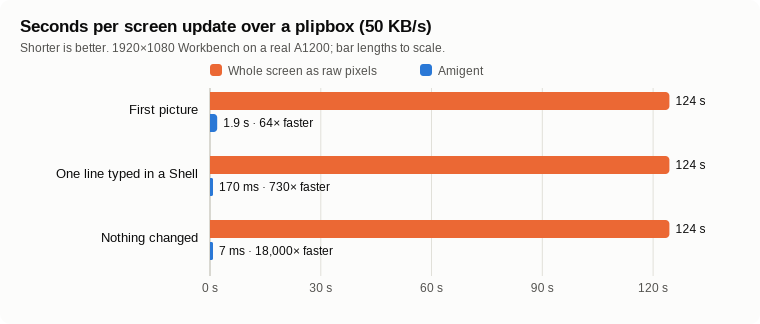
The orange bars are what moving the whole screen as raw 24-bit pixels costs on that wire, every time; the blue ones are Amigent, measured on a real A1200. All numbers, how they were taken and how to repeat them are in docs/PERFORMANCE.md.
amigent-fleet shows them side by side with a preview.amigent-monitor in the Amigent folder opens a
window there that lists, line by line, what the agent is doing.PAUSE by ARexx) gives the Amiga's CPU back to it for a while; mouse,
keys and files keep working.amigent-repair puts back what the update removed.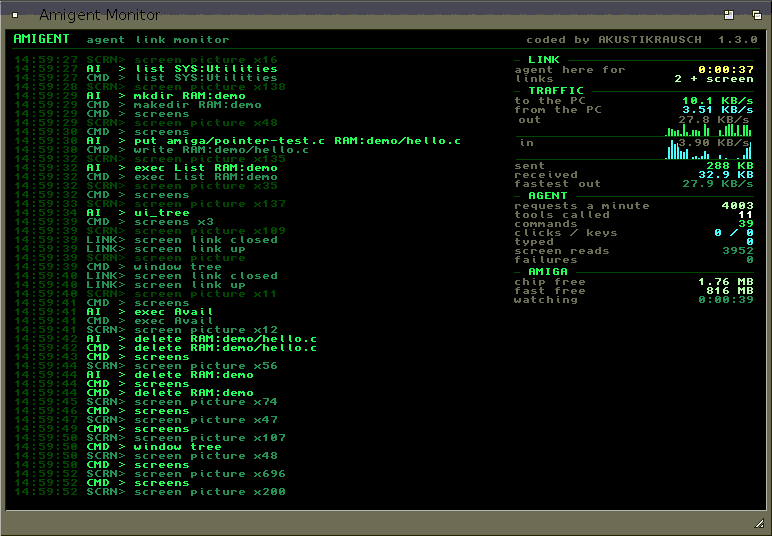
More in the guide and the FAQ.
MIT, see LICENSE. By Andreas Wendorf (Akustikrausch). Changes are in the changelog.
Claim this server with your GitHub account to request manual ownership verification.
Link to the catalog listing for Amigent from your README. This badge does not certify ownership, compatibility or security.
[](https://awesome-mcp.com/servers/amigent)Public repository statistics could not be verified. Check the configured source address; unavailable counts are not zero.
Separate sources, scopes and periods. Never combined or treated as installations, active users or security reviews.
No reviewed package or image identity; download statistics are not listed yet.
Alternative and complementary servers in the same category
A directory listing describing a cancellation-letter and mailing-address service. The configured public GitHub repository returned 404 during source verification.

A hosted MCP service for browsing and searching through Singapore mobile-network proxies.

A directory listing describing a Markdown-to-PDF service. The configured public GitHub repository returned 404 during source verification.