


A directory listing describing a cancellation-letter and mailing-address service. The configured public GitHub repository returned 404 during source verification.
Repository stats unavailable
Developer Tools
A remote MCP service from Aqara Agent that lets MCP-enabled AI applications connect securely to Aqara smart home capabilities.
Aqara MCP Server is cataloged as an MCP server attributed to aqara. A remote MCP service from Aqara Agent that lets MCP-enabled AI applications connect securely to Aqara smart home capabilities. It is categorized under developer tools. See the capability inspector for recorded interfaces and their independent review status; consult upstream documentation for the current interface.
Installation configuration is not reviewed. No executable setup is offered for this entry; inspect the source repository before proceeding.
Catalog license label: MIT License. Check the source repository's current license and terms before using, modifying or distributing this software.
Capability definitions are not reviewed. Unreviewed imports are not exposed as trusted interfaces.
No reviewed records to display. This does not establish that upstream lacks this capability.
No reviewed records to display. This does not establish that upstream lacks this capability.
No reviewed records to display. This does not establish that upstream lacks this capability.
Email delivery is not connected. This page does not collect email addresses or create subscriptions.
Browse the registry for current listings instead.
Reviews for Aqara MCP Server are not available yet
Review publishing and storage are not connected. This page does not collect or publish ratings or comments, including after sign-in.
The application connects over HTTP to Aqara Agent's MCP service with a bearer token generated on the login page; Aqara Agent validates credentials, executes tool calls, and returns results.
They cover homes and spaces, device query and control, scenes, automations, energy consumption, lighting effects, and firmware.
README.md · 1db45d4fcca4 · Fetched 2026-11-13 09:44:13 UTC
Original upstream text, without AI rewriting. Scripts, forms and unsafe links are filtered for safety.
Showing the last retrieved documentation snapshot; check the source for current changes.
Aqara MCP Server is a remote MCP service provided by Aqara Agent. It lets MCP-enabled AI applications securely connect to Aqara smart home capabilities. When you need MCP integration, configure the remote MCP URL provided by Aqara Agent.
[!TIP] Recommended: Official Aqara Agent Skills
If your application supports Agent Skills (such as Codex App, Cursor, or OpenClaw), we recommend using the official Aqara Agent Skills first. You can query and control homes/spaces, devices, scenes, automations, energy consumption, and more in natural language—without configuring an MCP server.
- GitHub: aqara/aqara-agent-skills
- ClawHub: aqara/aqara-agent
The recommended MCP integration today centers on Aqara Agent:
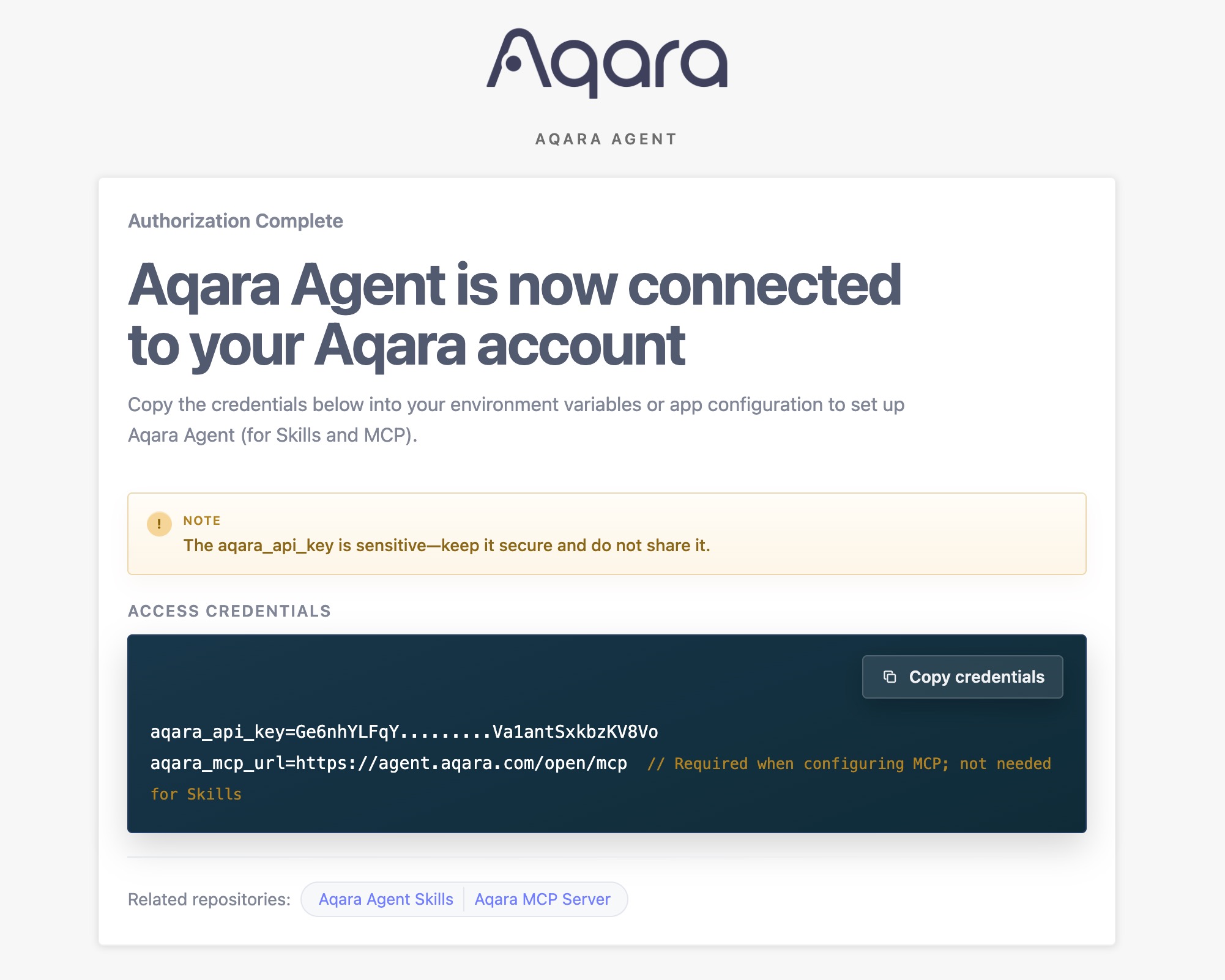
https://agent.aqara.com/open/mcp.aqara_api_key after signing in to Aqara Agent—keep credentials safe when configuring.In remote MCP mode, the application connects over HTTP to Aqara Agent’s MCP service and includes the bearer token generated on the login page. Aqara Agent validates credentials, executes tool calls, and returns results to the application:
graph LR
    A[AI App / MCP host] --> B[Aqara Agent]
    B --> C[Aqara Cloud API]
    C --> D[Aqara Devices / Scenes / Automations]
aqara_api_key and aqara_mcp_url from the login page.Open the login page: https://agent.aqara.com/login
Complete sign-in:
aqara_api_key shown on the page.aqara_mcp_url on the page—typically https://agent.aqara.com/open/mcp.Store credentials securely:
Keep your
aqara_api_keysafe. Do not commit it to a repository, publish it in screenshots, or share it with others.
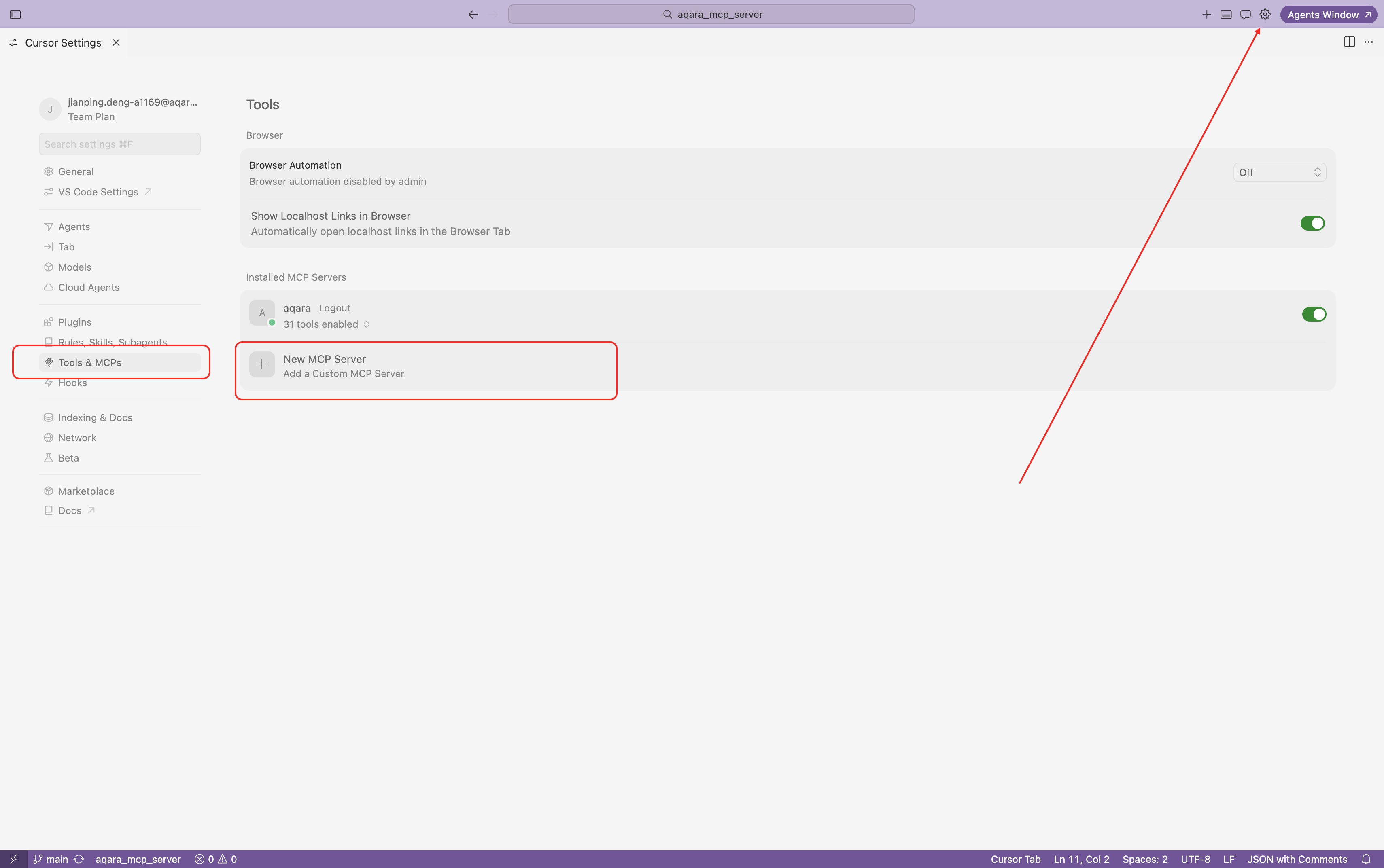
Open Cursor Settings, go to Tools & MCPs, and click New MCP Server.
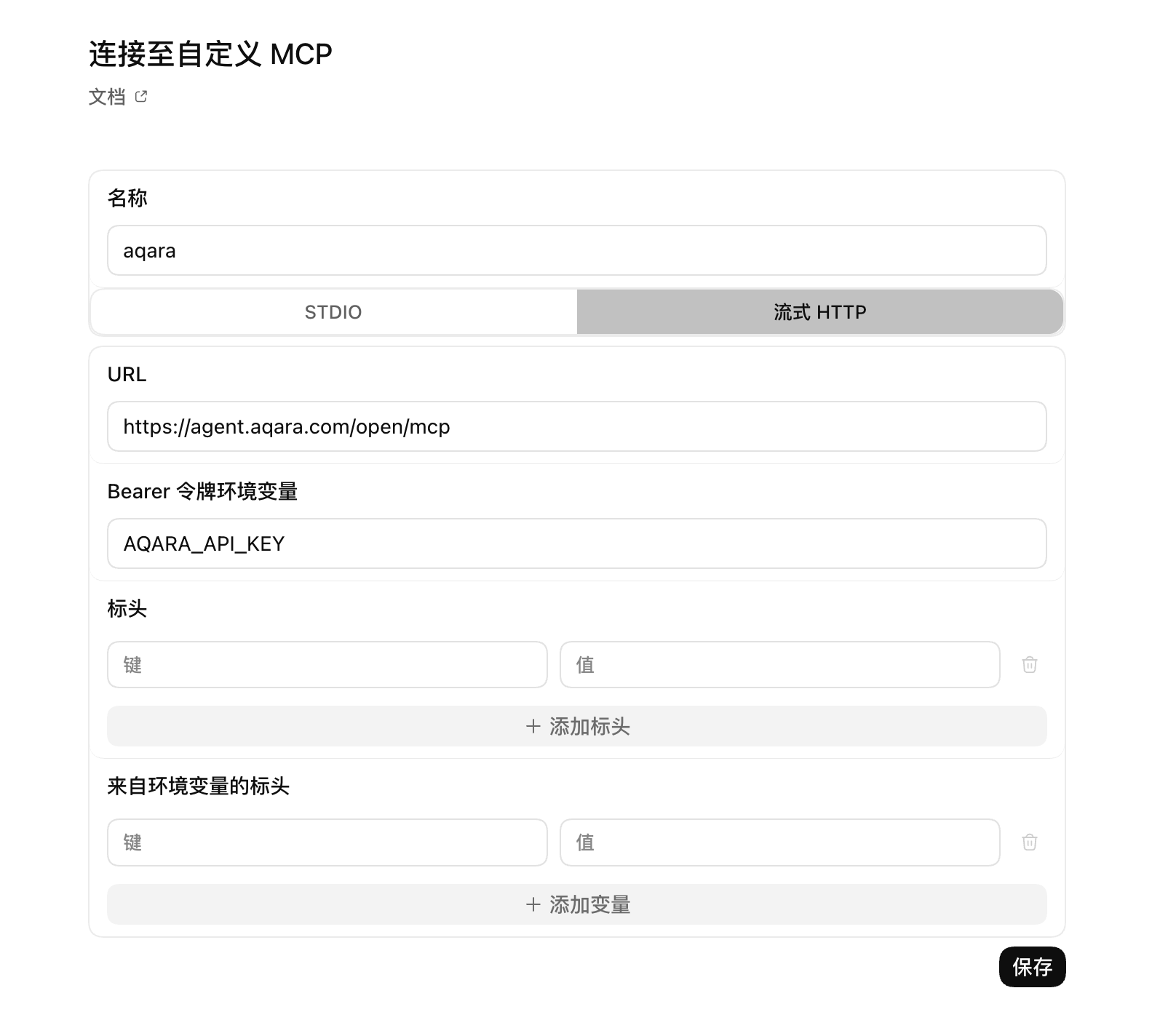
Add the remote MCP configuration. Use the aqara_mcp_url from the login page; if entering manually, use the /open/mcp path.
{
  "mcpServers": {
    "aqara": {
      "type": "http",
      "url": "https://agent.aqara.com/open/mcp",
      "headers": {
        "Authorization": "Bearer <YOUR_AQARA_API_KEY>"
      }
    }
  }
}
Save the configuration and restart Cursor for MCP settings to take effect.
Save the aqara_api_key from the login page as an environment variable. For macOS with zsh, add the following to ~/.zshrc:
export AQARA_API_KEY="<YOUR_AQARA_API_KEY>"
Restart Codex App, then connect to a custom MCP in Settings.
Select Streamable HTTP.
Enter the aqara_mcp_url from the login page, e.g. https://agent.aqara.com/open/mcp.
In Bearer token env var, enter the environment variable name AQARA_API_KEY, not the API key itself. Codex App reads the token from this variable.
After configuration succeeds, you can test with natural-language requests such as:
User: Show all devices in my home
Assistant: Query the device list via MCP

User: Turn on the living room light
Assistant: Run device control via MCP

User: Run the movie night scene
Assistant: Run the scene via MCP
If the app’s MCP panel shows Aqara as connected and Aqara Tools are visible, the configuration is active.
https://agent.aqara.com/open/mcp or the aqara_mcp_url from the login page as the MCP URL—do not use the login page URL as the MCP URL./open/mcp, credentials are not expired, and the app was restarted or MCP reloaded after configuration changes.The Tool list below is based on function definitions registered on the current Aqara Agent service. Applications may display different Tool names in the UI, but parameter semantics and capability scope stay the same.
| Tool Category | Tool | Description |
|---|---|---|
| Home and Positions | all_homes_inquiry, position_base_inquiry | Query home and room/space information |
| Device Query and Control | device_base_inquiry, device_status_inquiry, device_status_control, fuzzy_device_batch_control, device_log_inquiry | Query device basics and real-time status, control devices, and view control logs |
| Scenes | scene_base_inquiry, scene_run, scene_execution_history_inquiry | Query and run scenes, and query scene execution history |
| Automations | automation_base_inquiry, automation_execution_history_inquiry | Query automation rules and execution history |
| Energy Consumption | energy_consumption_inquiry_for_position, energy_consumption_inquiry_for_device | Query electricity usage/cost by room/space or device |
| Lighting Effects | lighting_effect_inquiry, device_lighting_effect_inquiry, lighting_effect_control, lighting_effect_config_params_inquiry | Query and apply lighting effects, and query effect configuration parameters |
| Firmware | device_firmware_inquiry, device_firmware_upgrade | Query and upgrade device firmware |
all_homes_inquiryQuery all homes under the current Aqara account.
Parameters: none
Returns: A list of homes with home name, home ID, and related fields.
position_base_inquiryQuery basic information for all rooms/spaces in the current home.
Parameters: none
Returns: A list of rooms/spaces with position name, position ID, and related fields.
device_base_inquiryQuery device basic information by room/space and device type, without real-time status.
Parameters:
position_ids (Array<String>, optional): List of room/space IDs. When empty, no position filter is applied.device_types (Array<String>, optional): Device types, e.g. Light, Switch, Outlet, AirConditioner, WindowCovering, Camera. When empty, no device type filter is applied.Returns: A list of device basics including device name, device ID, position, and device type.
device_status_inquiryQuery real-time device status such as power, brightness, color temperature, temperature, fan speed, and mode.
Parameters:
device_ids (Array<String>, optional): Device IDs. When provided, query prioritizes device ID.position_ids (Array<String>, optional): Room/space IDs.device_types (Array<String>, optional): Device types.Returns: A list of device states with current readable values.
device_status_controlControl state or attributes of specified devices, such as power, brightness, color temperature, temperature, fan speed, mode, and curtain percentage.
Parameters:
device_ids (Array<String>, required): Target device IDs.attribute (String, required): Attribute to control, e.g. on_off, brightness, color_temperature, temperature, percentage, mode.action (String, required): Control action, e.g. on, off, set, up, down, warmer, cooler, start, stop.value (String, optional): Target value, e.g. 50, max, min, cool, heat, red.Returns: Device control execution result.
fuzzy_device_batch_controlBatch-control devices by room/space and device type—for example, “turn off all lights,” “turn off everything in the living room,” or “set all AC units to 26°.”
Parameters:
position_ids (Array<String>, optional): Room/space IDs. When empty, may mean the entire home.device_types (Array<String>, optional): Device types.attribute (String, required): Attribute to control.action (String, required): Control action.value (String, optional): Target value.Returns: Batch control execution result.
device_log_inquiryQuery device control logs within a time range, including control time, content, and result.
Parameters:
time_range (Array<String>, optional): Time interval, e.g. ["2026-01-01 00:00:00", "2026-01-01 23:59:59"].device_ids (Array<String>, optional): Device IDs. When provided, query prioritizes device ID.position_ids (Array<String>, optional): Room/space IDs.device_types (Array<String>, optional): Device types.Returns: Control log list and the actual queried time range.
scene_base_inquiryQuery scene basic information, filterable by scene ID, position ID, or device ID.
Parameters:
scene_ids (Array<String>, optional): Scene IDs. When provided, query prioritizes scene ID.position_ids (Array<String>, optional): Room/space IDs.device_ids (Array<String>, optional): Device IDs for device-related scenes.Returns: A list of scene basic information.
scene_runRun one or more specified scenes.
Parameters:
scene_ids (Array<String>, required): Scene IDs to run.Returns: Scene execution result.
scene_execution_history_inquiryQuery scene execution history within a time range.
Parameters:
time_range (Array<String>, optional): Time interval.scene_ids (Array<String>, optional): Scene IDs.position_ids (Array<String>, optional): Room/space IDs.device_ids (Array<String>, optional): Device IDs.Returns: Scene execution history and the actual queried time range.
automation_base_inquiryQuery automation rule basics, filterable by automation ID, position ID, or device ID.
Parameters:
automation_ids (Array<String>, optional): Automation IDs. When provided, query prioritizes automation ID.position_ids (Array<String>, optional): Room/space IDs.device_ids (Array<String>, optional): Device IDs for device-related automations.Returns: A list of automation rules.
automation_execution_history_inquiryQuery automation execution history within a time range.
Parameters:
time_range (Array<String>, optional): Time interval.automation_ids (Array<String>, optional): Automation IDs.position_ids (Array<String>, optional): Room/space IDs.device_ids (Array<String>, optional): Device IDs.Returns: Automation execution history and the actual queried time range.
energy_consumption_inquiry_for_positionQuery electricity usage or cost by home/room/space, with aggregated and detailed views.
Parameters:
data_type (String, required): Query type—1 for electricity usage, 2 for electricity cost, 3 for both.time_range (Array<String>, required): Time interval.time_gradient (String, optional): Granularity: 30min, 1hour, 1day, 1week, 1month.data_aggregation_mode (String, optional): total = aggregated summary, detail = detail view.positions (Array<String>, optional): Room/space IDs. When empty, queries all valid rooms.Returns: Electricity usage/cost statistics by room/space.
energy_consumption_inquiry_for_deviceQuery electricity usage or cost by device, filterable by position or device, with aggregated and detailed views.
Parameters:
data_type (String, required): 1 = electricity usage, 2 = electricity cost, 3 = both.time_range (Array<String>, required): Time interval.time_gradient (String, optional): 30min, 1hour, 1day, 1week, 1month.data_aggregation_mode (String, optional): total = aggregated summary, detail = detail view.positions (Array<String>, optional): Room/space IDs.device_ids (Array<String>, optional): Device IDs. When provided, query prioritizes device.Returns: Electricity usage/cost statistics by device.
lighting_effect_inquiryQuery available lighting scenarios/effects in the home.
Parameters: none
Returns: A list of effects with names and applicable scope for control.
device_lighting_effect_inquiryQuery supported lighting effect names per device.
Parameters:
device_ids (Array<String>, required): Device IDs to query for effects.Returns: Device-to-effect name mapping list.
lighting_effect_controlApply the specified lighting effect to target devices or rooms/spaces.
Parameters:
effect_name (String, required): Effect name.device_ids (Array<String>, optional): Target device IDs. When provided, control prioritizes device.position_ids (Array<String>, optional): Room/space IDs.Returns: Lighting effect control execution result.
lighting_effect_config_params_inquiryQuery parameters required to configure lighting effects on light devices.
Parameters:
device_ids (Array<String>, required): Target light device IDs.Returns: Effect configuration parameters, including configurable items, value ranges, and saved user effects.
device_firmware_inquiryBatch-query current firmware version and available upgrade version for devices.
Parameters:
device_ids (Array<String>, optional): Device IDs. When provided, query prioritizes device.position_ids (Array<String>, optional): Room/space IDs.device_types (Array<String>, optional): Device types.Returns: Firmware information including device name, online status, current version, and available version.
device_firmware_upgradeStart firmware upgrades for eligible devices after filtering by device, position, or type.
Parameters:
device_ids (Array<String>, optional): Device IDs. When provided, upgrades those devices first.position_ids (Array<String>, optional): Room/space IDs.device_types (Array<String>, optional): Device types.Returns: Firmware upgrade submission result.
position_ids / positions: Room/space ID lists; when omitted, query or control scope follows each Tool’s description.device_ids: Device ID or device endpoint ID lists, resolved via client-side identification and server mapping.device_types: Device types, e.g. Light, Switch, Outlet, AirConditioner, WindowCovering, Camera, TemperatureSensor.attribute: Control attributes, e.g. on_off, brightness, color_temperature, temperature, wind_speed, mode, percentage, volume, color.action: Control actions, e.g. on, off, set, up, down, warmer, cooler, start, stop, pause, resume.value: Target values, e.g. 50, 100, max, min, red, cool, heat, lighting effect names.time_range: Time interval array, usually ["YYYY-MM-DD HH:MM:SS", "YYYY-MM-DD HH:MM:SS"].data_type: Energy query type—1 = electricity usage, 2 = electricity cost, 3 = both.time_gradient: Energy statistics granularity: 30min, 1hour, 1day, 1week, 1month.data_aggregation_mode: Energy aggregation mode—total = aggregated summary, detail = detail view.This project is licensed under the MIT License. See the LICENSE file for details.
Copyright © 2025 Aqara-Agent. All rights reserved.
Claim this server with your GitHub account to request manual ownership verification.
Link to the catalog listing for Aqara MCP Server from your README. This badge does not certify ownership, compatibility or security.
[](https://awesome-mcp.com/servers/aqara-mcp-server)Public repository statistics could not be verified. Check the configured source address; unavailable counts are not zero.
Separate sources, scopes and periods. Never combined or treated as installations, active users or security reviews.
No reviewed package or image identity; download statistics are not listed yet.
Alternative and complementary servers in the same category
A directory listing describing a cancellation-letter and mailing-address service. The configured public GitHub repository returned 404 during source verification.

A hosted MCP service for browsing and searching through Singapore mobile-network proxies.

A directory listing describing a Markdown-to-PDF service. The configured public GitHub repository returned 404 during source verification.