
A Model Context Protocol (MCP) server for controlling Chrome with debugging capabilities, userscript injection, and extension support.
Repository stats unavailable
Browser & Scraping
An MCP server that lets an existing AI agent click, type and read the screen in real apps without APIs.
Auten MCP server is cataloged as an MCP server attributed to auten-ai. An MCP server that lets an existing AI agent click, type and read the screen in real apps without APIs. It is categorized under browser automation. See the capability inspector for recorded interfaces and their independent review status; consult upstream documentation for the current interface.
Installation configuration is not reviewed. No executable setup is offered for this entry; inspect the source repository before proceeding.
Catalog license label: MIT. Check the source repository's current license and terms before using, modifying or distributing this software.
Capability definitions are not reviewed. Unreviewed imports are not exposed as trusted interfaces.
No reviewed records to display. This does not establish that upstream lacks this capability.
No reviewed records to display. This does not establish that upstream lacks this capability.
No reviewed records to display. This does not establish that upstream lacks this capability.
Email delivery is not connected. This page does not collect email addresses or create subscriptions.
Browse the registry for current listings instead.
Reviews for Auten MCP server are not available yet
Review publishing and storage are not connected. This page does not collect or publish ratings or comments, including after sign-in.
No. Auten does not ship its own model and does not need your AI key; your agent keeps using the plan you already pay for.
Your agent talks to a local runner over MCP using stdio or SSE, with the stdio entry being the auten mcp-bridge command.
Only when your MCP client calls a tool; it does not run anything in the background on its own.
README.md · 8db1cae51f86 · Fetched 2026-11-13 12:23:43 UTC
Original upstream text, without AI rewriting. Scripts, forms and unsafe links are filtered for safety.
Showing the last retrieved documentation snapshot; check the source for current changes.
Computer use for the AI agent you already have.
Claude Code, Codex, Cursor, Gemini CLI or any MCP client can click, type and read the screen
on your Mac, Windows or Linux computer — and your Android phone (beta) — in real apps that have no API.



Website | Setup for every client | Pricing | hello@auten.ai

Illustration: the first run is driven by your AI, the next runs replay from memory.
Auten is the hands, your AI is the brain. A small runner on your computer does the clicking, typing and screen reading. Your agent talks to it over MCP (stdio or SSE). Auten does not ship its own model and never needs your AI key; your agent keeps using the plan you already pay for.
What makes it different from a plain mouse and keyboard bridge:
list_elements then click_at(3)) instead of guessing
coordinates. OCR and real screenshots are there when an app has no accessibility info.fill_login types a stored secret into a field without the
agent ever seeing the value.
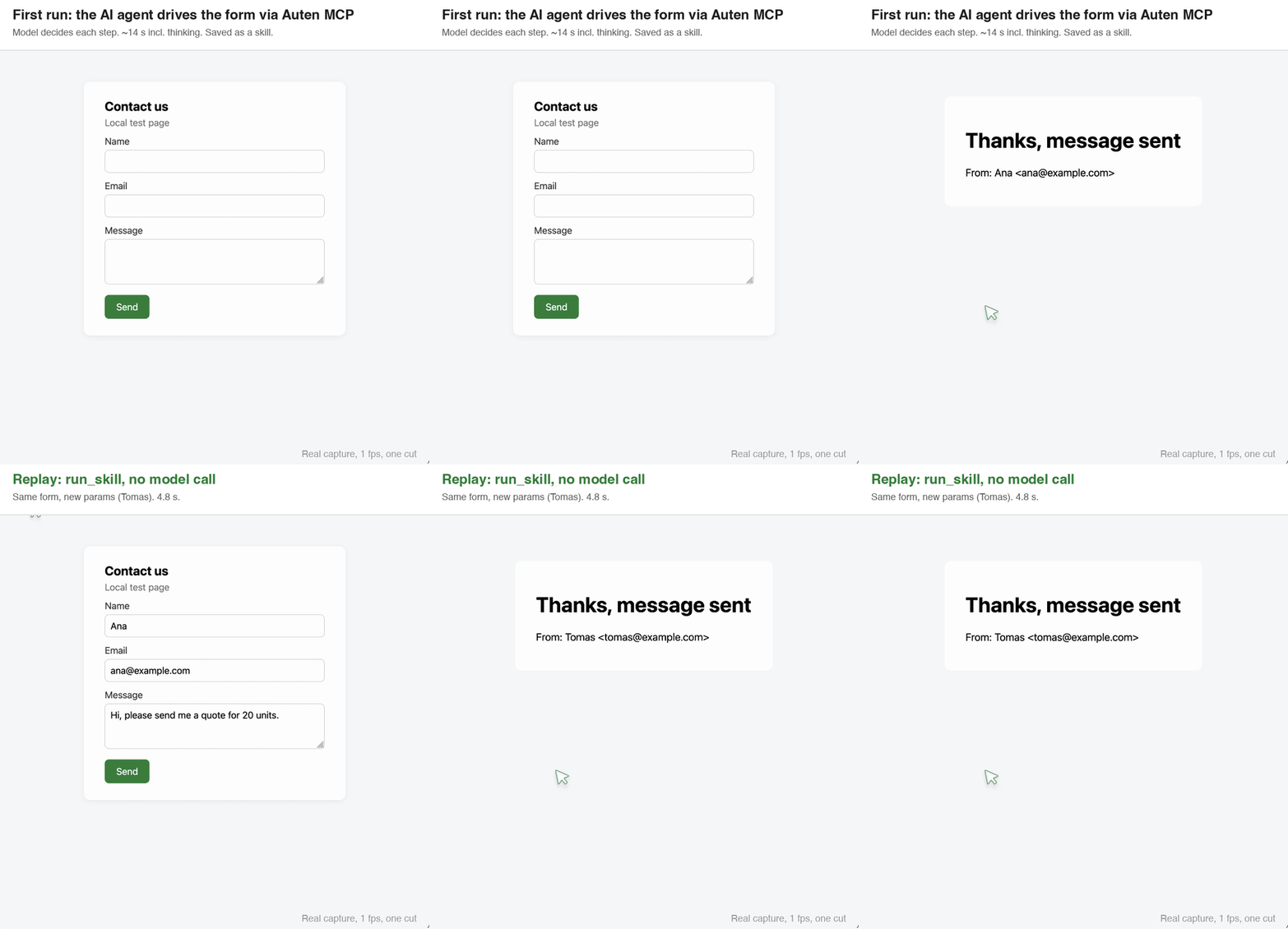
Real capture, not an illustration: first run by the agent (~14 s incl. thinking), then run_skill with new values (4.8 s, no model call). Local test page, 1 fps, one cut between the runs.
Plain requests in the client you already use. The agent decides the steps, Auten does the clicks.
export-report." Next time: "Run export-report." It replays without AI.1. Install the runner (one command; no admin rights on macOS and Windows, on Linux it asks for sudo once to apt-install the accessibility and input tools):
# macOS and Linux
curl -fsSL https://auten.ai/install | bash
# Windows (PowerShell)
irm https://auten.ai/install.ps1 | iex
The first run asks you to connect a free key (30 minutes every month, no card).
2. Add Auten to your agent. For Claude Code, Auten can do it by itself:
auten connect
or add it with the Claude Code CLI and check with /mcp:
claude mcp add -s user auten -- auten mcp-bridge
3. Ask in plain words. For example: "Open Figma, export the Hero frame as PNG to my Desktop" or "Go through the unread invoices in my mail and fill them into the accounting app". More prompts for computer and phone (beta) tasks: examples/prompts.md.
Any client that can start an npm package can use the launcher instead. It starts the installed runner, and if Auten is not installed yet it tells your agent the one-line install command. The "Add to Cursor" and "VS Code" buttons at the top add exactly this entry.
{
  "mcpServers": {
    "auten": { "command": "npx", "args": ["-y", "@autenai/mcp"] }
  }
}
claude mcp add -s user auten -- npx -y @autenai/mcp
On Windows, if the client reports spawn npx ENOENT: npx is npx.cmd there, and some clients start
servers without a shell. Use "command": "cmd", "args": ["/c", "npx", "-y", "@autenai/mcp"]
(Claude Code: claude mcp add -s user auten -- cmd /c npx -y @autenai/mcp), or the direct
auten mcp-bridge entry below.
This repository is also a plugin marketplace. Inside Claude Code:
/plugin marketplace add auten-ai/auten-mcp
/plugin install auten@auten
The plugin adds the same npx launcher entry, nothing else (no hooks or commands). See plugin/README.md.
Every client starts the same stdio command: auten mcp-bridge (or npx -y @autenai/mcp). If your app says it cannot find
auten, use the full path from which auten (usually ~/.local/bin/auten).
codex mcp add auten -- auten mcp-bridge
or in ~/.codex/config.toml:
[mcp_servers.auten]
command = "auten"
args = ["mcp-bridge"]
~/.cursor/mcp.json (or .cursor/mcp.json in a project):
{
  "mcpServers": {
    "auten": { "command": "auten", "args": ["mcp-bridge"] }
  }
}
gemini mcp add --scope user auten auten mcp-bridge
or the same mcpServers entry in ~/.gemini/settings.json.
copilot mcp add auten -- auten mcp-bridge
or in ~/.copilot/mcp-config.json:
{
  "mcpServers": {
    "auten": { "type": "local", "command": "auten", "args": ["mcp-bridge"], "tools": ["*"] }
  }
}
Inside a session, /mcp add opens the same form (type STDIO, command auten mcp-bridge).
Settings, Developer, Edit Config
(~/Library/Application Support/Claude/claude_desktop_config.json on macOS,
%APPDATA%\Claude\claude_desktop_config.json on Windows):
{
  "mcpServers": {
    "auten": { "command": "auten", "args": ["mcp-bridge"] }
  }
}
Restart Claude Desktop.
Run MCP: Open User Configuration and add:
{
  "servers": {
    "auten": { "type": "stdio", "command": "auten", "args": ["mcp-bridge"] }
  }
}
~/.codeium/windsurf/mcp_config.json:
{
  "mcpServers": {
    "auten": { "command": "auten", "args": ["mcp-bridge"] }
  }
}
~/.config/zed/settings.json:
{
  "context_servers": {
    "auten": { "command": "auten", "args": ["mcp-bridge"] }
  }
}
Ask Cline to set Auten up from llms-install.md, or add it yourself in
MCP Servers, Configure (cline_mcp_settings.json):
{
  "mcpServers": {
    "auten": { "command": "auten", "args": ["mcp-bridge"] }
  }
}
For clients that connect over the network, keep the runner online on the computer it should control:
auten --runner-only
Then use your personal MCP URL from your account page. It contains your key, so keep it private.
claude mcp add --transport sse auten <your-url>
No agent? Give the auten CLI your own key (Anthropic, OpenAI, Google, DeepSeek or any
OpenAI-compatible provider) with auten key add, then run auten "open my calendar and tell me what is next".
| Group | Tools |
|---|---|
| See the screen | list_elements, read_text, screenshot, screenshot_labeled, vision, screen_info |
| Act | click_at, click, fill, type, paste_text, press_keys, scroll, drag, move_mouse, act_on_matching, menu_select |
| Apps and windows | open_app, open_url, focus_window, browser_tabs, save_file, upload_file, clipboard_read |
| Secrets | list_logins, fill_login, get_profile |
| Learned skills | list_skills, run_skill, skills, show_skill, start_recording, stop_recording, start_fixing, stop_fixing |
| Coordination | ask_user, focus_app, release, gui_status, wait, opened_items, browser_cleanup |
macOS (Apple Silicon and Intel), Windows 10/11, Linux (X11), plus an Android phone over USB (beta).
Linux: installer stops at the "deps" step? It needs sudo once for the accessibility (AT-SPI) and input tools.
On a fresh or minimal box (empty apt lists, no python3-venv) install them first, then run the installer again:
sudo apt-get update
sudo apt-get install -y python3-venv python3-pyatspi python3-gi xdotool wmctrl scrot xclip libglib2.0-bin tesseract-ocr libsecret-tools
Auten drives a real X11 desktop session, so a headless container without a display won't work. Still stuck? Paste the last lines in Discussions.
| Plan | Runtime | Price |
|---|---|---|
| Free | 30 min every month | €0, no card |
| Starter | 10 h every month | €9/month (early access) |
| Pro | Unlimited | €29/month (early access) |
You bring your own AI, so the price is for Auten only. Details on auten.ai/pricing.
fill_login refuses and types nothing; only you can re-pin it (auten vault unpin <name>).This repository holds the public docs, client configs and the @autenai/mcp npm launcher
(bin/auten-mcp.js), all under the MIT LICENSE. The runner itself is distributed
separately through the installers above, under the Auten terms of service. Questions, bugs and feature requests are
welcome as issues or at hello@auten.ai.
Auten is made by MB Icecode, Lithuania.
Claim this server with your GitHub account to request manual ownership verification.
Link to the catalog listing for Auten MCP server from your README. This badge does not certify ownership, compatibility or security.
[](https://awesome-mcp.com/servers/auten)Public repository statistics could not be verified. Check the configured source address; unavailable counts are not zero.
Separate sources, scopes and periods. Never combined or treated as installations, active users or security reviews.
No reviewed package or image identity; download statistics are not listed yet.
Alternative and complementary servers in the same category
A Model Context Protocol (MCP) server for controlling Chrome with debugging capabilities, userscript injection, and extension support.

An MCP server that lets AI assistants browse websites and extract content using optional CSS selectors.

An MCP server that reads pages, fills forms, takes screenshots, and hands the browser to a person for logins or CAPTCHAs.