

A directory listing describing a cancellation-letter and mailing-address service. The configured public GitHub repository returned 404 during source verification.
Repository stats unavailable
Developer Tools
A service that turns an OpenAPI or Swagger document into an MCP server, generating routes on the fly and proxying requests to a configured upstream endpoint.
Auto MCP is cataloged as an MCP server attributed to brizzai. A service that turns an OpenAPI or Swagger document into an MCP server, generating routes on the fly and proxying requests to a configured upstream endpoint. It is categorized under developer tools. See the capability inspector for recorded interfaces and their independent review status; consult upstream documentation for the current interface.
Installation configuration is not reviewed. No executable setup is offered for this entry; inspect the source repository before proceeding.
Catalog license label: Apache License 2.0. Check the source repository's current license and terms before using, modifying or distributing this software.
Capability definitions are not reviewed. Unreviewed imports are not exposed as trusted interfaces.
No reviewed records to display. This does not establish that upstream lacks this capability.
No reviewed records to display. This does not establish that upstream lacks this capability.
No reviewed records to display. This does not establish that upstream lacks this capability.
Email delivery is not connected. This page does not collect email addresses or create subscriptions.
Browse the registry for current listings instead.
Reviews for Auto MCP are not available yet
Review publishing and storage are not connected. This page does not collect or publish ratings or comments, including after sign-in.
The MCP Config Builder lets users edit endpoint descriptions, filter out unnecessary routes, preview how endpoints appear, and generate an adjustment file applied when running Auto MCP.
Auto MCP supports OAuth 2.1 authentication, including PKCE, dynamic client registration, and multiple providers such as internal, GitHub, and Google.
README.md · 771c154ac18b · Fetched 2026-11-13 09:33:52 UTC
Original upstream text, without AI rewriting. Scripts, forms and unsafe links are filtered for safety.
Showing the last retrieved documentation snapshot; check the source for current changes.




Transform any OpenAPI/Swagger definition into a fully-featured Model Context Protocol (MCP) server – ready to run locally, inside Claude Desktop, or in the cloud.
The service reads a Swagger (OpenAPI v2) or OpenAPI v3 document, generates routes on-the-fly, proxies requests to the upstream endpoint you configure, and exposes them through MCP using either the STDIO or HTTP or SSE transport defined in the MCP specification.
swagger.json and start serving.stdio (default).http - StreamableHttp, newest MCP prototcol.sse – self-hosted long-running event source.AUTO_MCP_).Easily tailor your Swagger/OpenAPI file for optimal MCP integration. The MCP Config Builder lets you:
--adjustment-file) for use with Auto MCP, applying your customizations automatically.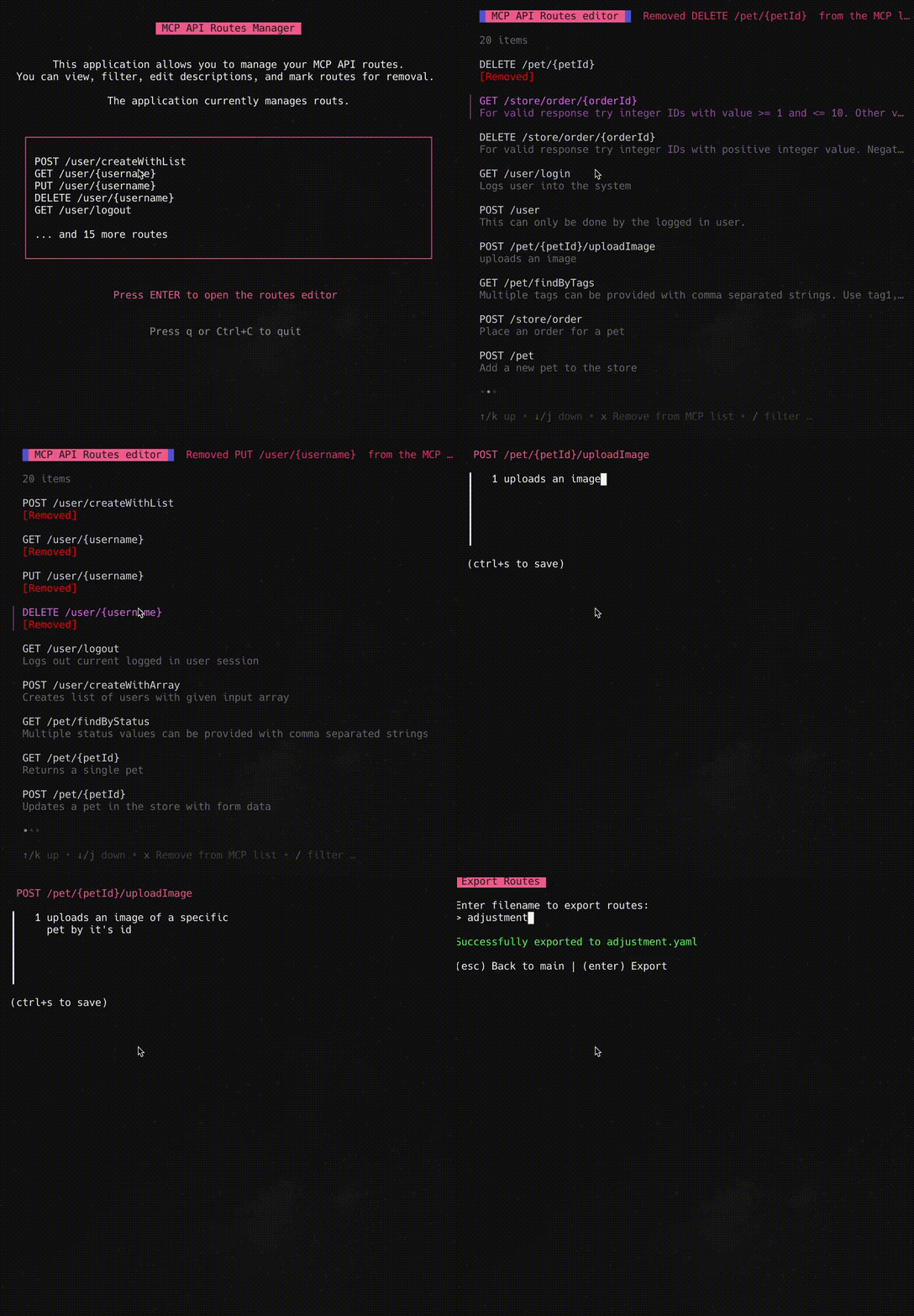
go install ./cmd/mcp-config-builder
mcp-config-builder binary to your $GOPATH/bin (usually ~/go/bin). Make sure this directory is in your PATH.mcp-config-builder --swagger-file=/path/to/swagger.json
auto-mcp --swagger-file=/path/to/swagger.json --adjustment-file=/path/to/adjustments.json
Rapid Prototyping: Wrap any REST API as an MCP server in seconds—ideal for testing ideas or building AI tools fast.
Bridge Legacy Services: Expose legacy or internal systems as MCP endpoints without rewriting them.
Access Any 3rd-Party API from Chat Applications: Turn any third-party API into an MCP tool, making it accessible to AI assistants like Claude.
Minimal Proxy Tools: Use auto-mcp to proxy APIs that already handle validation and logic—no wrappers needed.
Add the following snippet to your Claude Desktop configuration (⟂ Settings → MCP Servers):
{
  "mcpServers": {
    "YourMCP": {
      "command": "docker",
      "args": [
        "run",
        "-i",
        "--rm",
        "-v",
        "/Users/you/path/to/swagger.json:/server/swagger.json",
        "ghcr.io/brizzai/auto-mcp:latest"
        "--swagger-file=/server/swagger.json"
      ]
    }
  },
  "globalShortcut": ""
}
Claude will start the container on-demand and connect over STDIO. Replace the host path to swagger.json and image tag to suit your setup.
--mode – override server.mode (stdio or sse).--swagger-file – path to the OpenAPI document (default: swagger.json).--adjustment-file - mcp-config-builder output filter/change route descriptionsFor detailed configureation guidelines, please see CONFIGURATION.md.
Auto MCP supports OAuth 2.1 authentication, including PKCE, dynamic client registration, and multiple providers (internal, GitHub, Google). This allows you to secure your MCP server with industry-standard authentication flows.
See the OAuth Usage Guide for detailed setup instructions, endpoint descriptions, and testing tips.
Run in local stdio mode:
docker run --rm -i \
  -v $(pwd)/swagger.json:/server/swagger.json \
    ghcr.io/brizzai/auto-mcp:latest \
    --swagger-file=/server/swagger.json \
    --mode=stdio
Run in remote sse/http mode :
docker run \
  -v $(pwd)/swagger.json:/server/swagger.json \
    ghcr.io/brizzai/auto-mcp:latest \
    --swagger-file=/server/swagger.json \
    --mode=http
The bundled docker-compose.yml maps port 8080 and persists logs to ./logs.
You can try out the included Petshop demo using Docker. This demo uses a sample configuration and API specs to show how auto-mcp works.
Steps:
docker run --rm -i \
  -v $(pwd)/examples/petshop/config:/config \
  ghcr.io/brizzai/auto-mcp:latest
examples/petshop/config directory from your local machine into the Docker container at /config./config directory inside the container should contain:
config.yaml: Main configuration file for the demoswagger.json: API specification for the Petshop serviceadjustment.yaml: Optional adjustments or overrides for the APINote: Any files you place in
examples/petshop/configwill overwrite the defaultconfig.yaml,swagger.json, andadjustment.yamlinside the container.
This setup allows you to easily test and modify the Petshop demo configuration.
See [docs/CONFIGURATION.md](docs/ CONFIGURATION.md) for all config options and environment variable overrides.
For detailed contribution guidelines, please see CONTRIBUTING.md.
Distributed under the Apache License 2.0 License. See LICENSE for details.
Claim this server with your GitHub account to request manual ownership verification.
Link to the catalog listing for Auto MCP from your README. This badge does not certify ownership, compatibility or security.
[](https://awesome-mcp.com/servers/auto-mcp-brizzai)Public repository statistics could not be verified. Check the configured source address; unavailable counts are not zero.
Separate sources, scopes and periods. Never combined or treated as installations, active users or security reviews.
No reviewed package or image identity; download statistics are not listed yet.
Alternative and complementary servers in the same category
A directory listing describing a cancellation-letter and mailing-address service. The configured public GitHub repository returned 404 during source verification.

A hosted MCP service for browsing and searching through Singapore mobile-network proxies.

A directory listing describing a Markdown-to-PDF service. The configured public GitHub repository returned 404 during source verification.