AWS FinOps MCP Server


An MCP (Model Context Protocol) server that brings powerful AWS FinOps capabilities directly into your AI assistant. Analyze cloud costs, audit for waste, and get budget insights using natural language, all while keeping your credentials secure on your local machine.
Why Use the AWS FinOps MCP Server?
Managing AWS costs can be complex. Finding answers to questions like "What did we spend on S3 last month?" or "Do we have any unused EC2 instances?" often requires navigating the AWS Console or writing scripts.
This server bridges that gap by connecting the powerful, natural language understanding of an LLM directly to your AWS account's financial data. You can ask complex questions and get immediate, actionable insights without ever leaving your chat interface.
Use Cases:
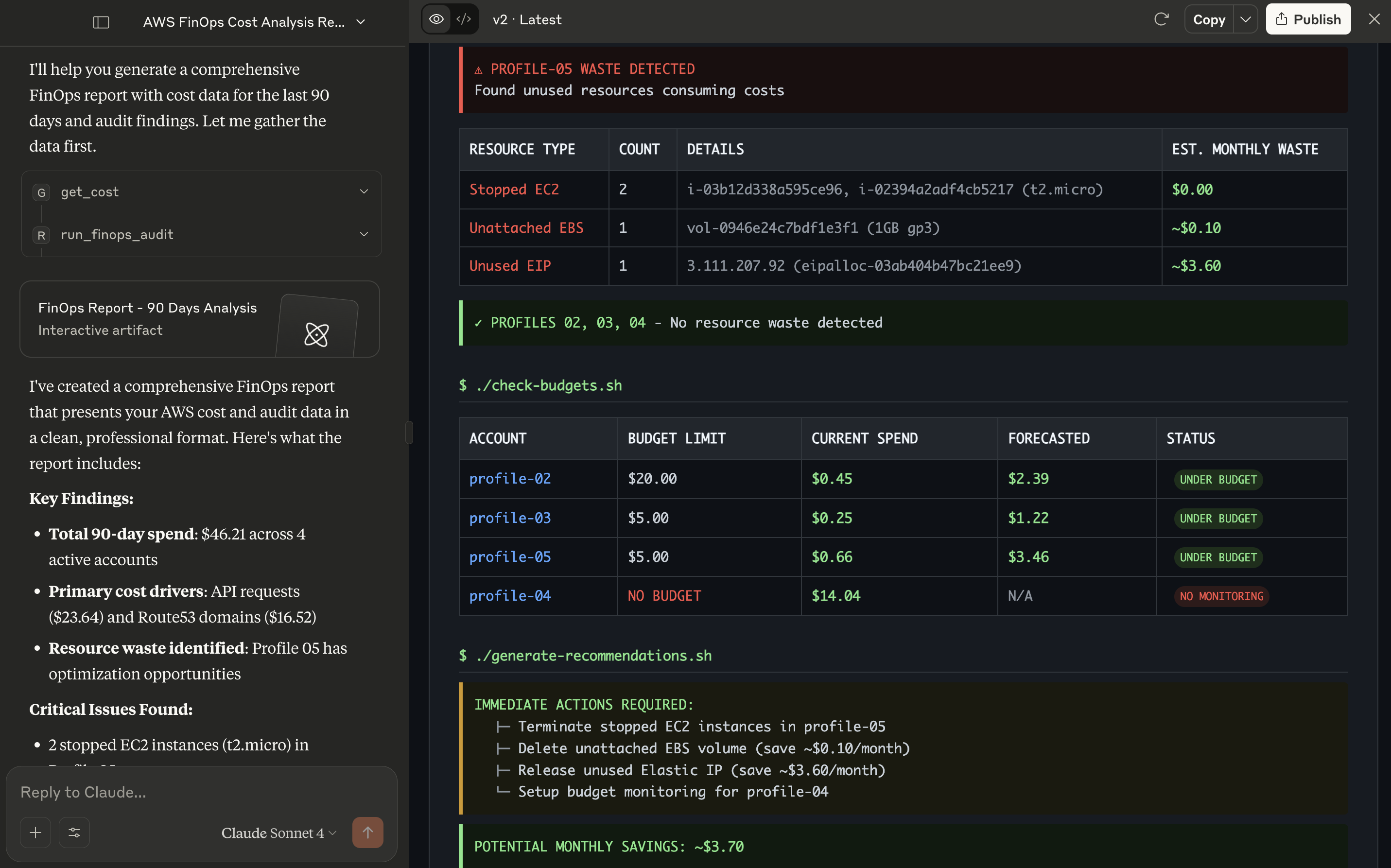
Prompt on Claude Desktop: "Get usage-type based cost for all my AWS CLI profiles for the last 90 days. And get the audit report for all profiles for region ap-south-1. Make a finops report with data in minimalistic way and keep it professional."
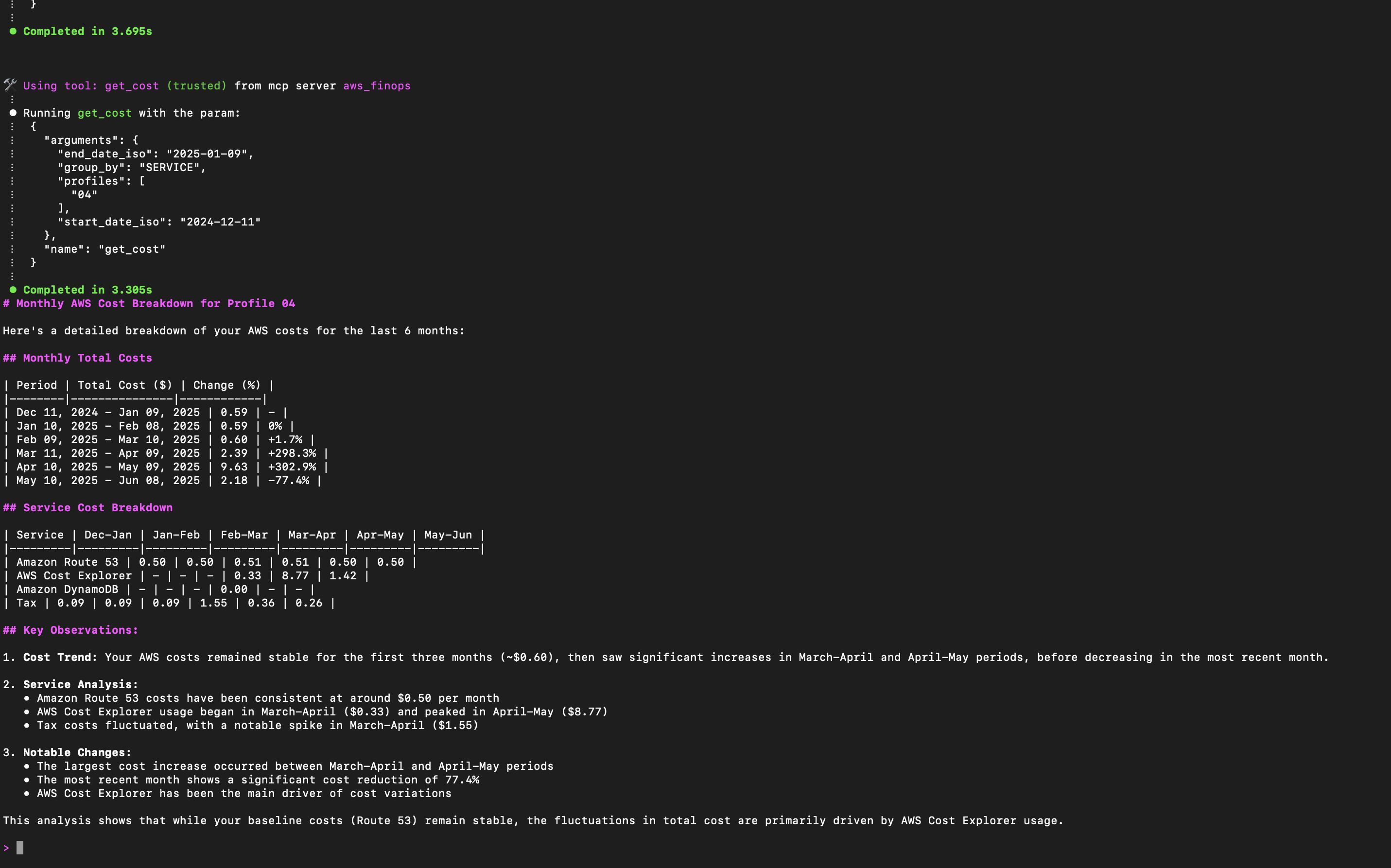
Prompt on Amazon Q CLI: "Could you use aws-finops mcp server and get cost data for each month in the last 6 months for profile 04 and present the data in a tabular format highlighting how the total cost and cost for each service has changed every month?"
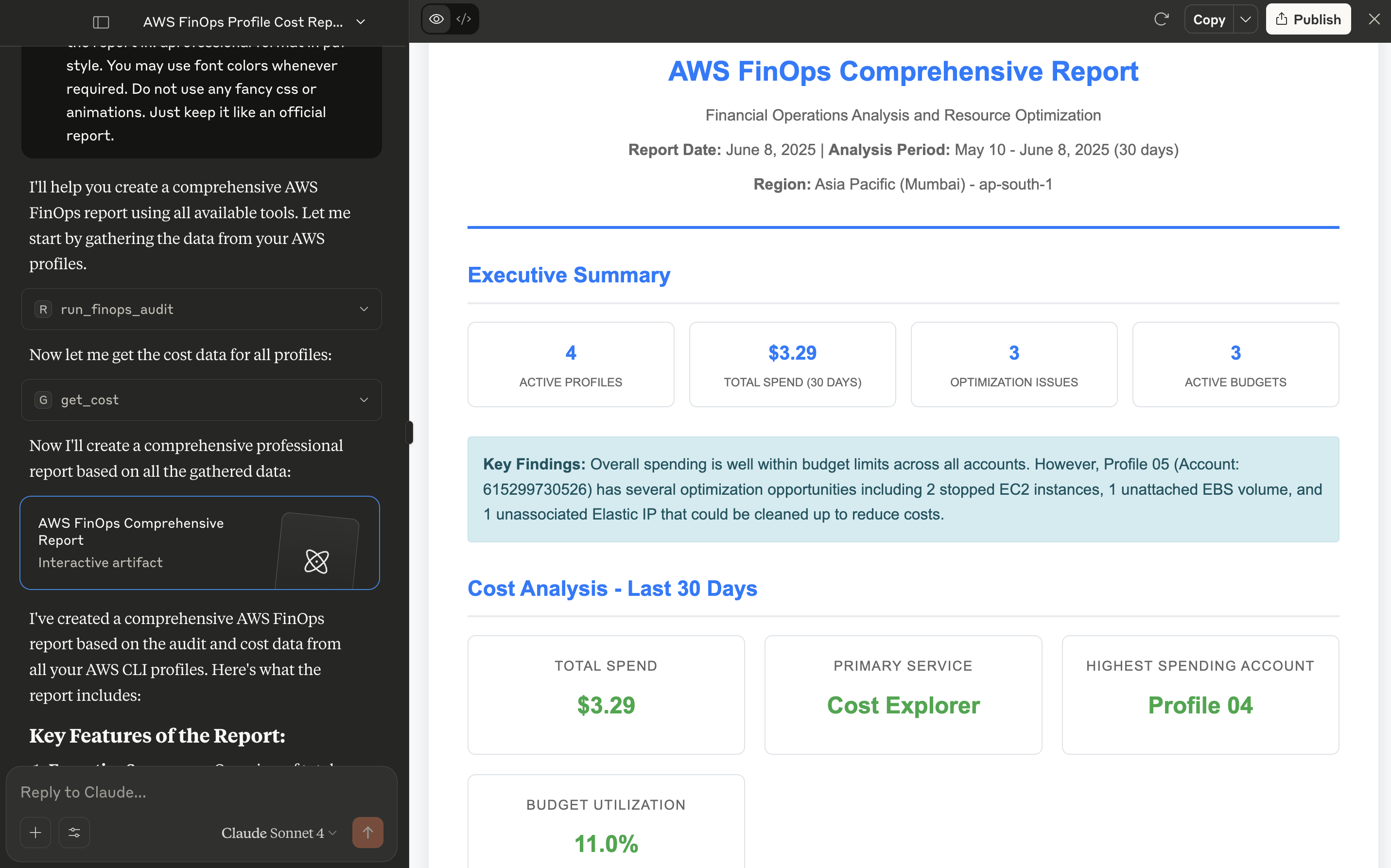
Prompt on Claude Desktop: "Generate a comprehensive finops report for management using all the tools available in the AWS FinOps MCP server. Use all the available CLI profiles and use the region ap-south-1 wherever required."
Other sample reports generated by Claude using AWS FinOps MCP Server
Network Usage & Cost Analysis Report
Comprehensive FinOps Report
Table of Contents
- What is an MCP Server?
- Why Use the AWS FinOps MCP Server?
- Key Features
- Prerequisites
- Installation
- Configuration
- Usage & Example Prompts
- Tool Reference
- Cost Considerations
- Development & Contributing
- License
Key Features
- Detailed Cost Analysis: Query your AWS cost data using tags, time ranges, and service groupings.
- Automated FinOps Audit: Instantly find common sources of cloud waste, such as stopped EC2 instances, unattached EBS volumes, and unassociated Elastic IPs etc.
- Budget Monitoring: Check the status of your AWS Budgets to see if you are on track, over budget, or forecasted to exceed your limits.
- Multi-Profile & Multi-Region: Seamlessly query across any or all of your configured AWS accounts and regions in a single command.
- Secure by Design: Your AWS credentials never leave your machine. The server runs locally and uses your existing AWS CLI configuration to make API calls directly to AWS.
Prerequisites
General Requirements
- Python 3.10+: Ensure you have a compatible Python version installed.
- MCP Client: An application that supports MCP. This guide uses Claude for Desktop as the example.
AWS Requirements & IAM Permissions
- AWS CLI: The AWS CLI must be installed on your machine.
- AWS Account & Profile(s): You need at least one configured AWS profile.
- IAM Permissions: The AWS identity (IAM User or Role) associated with your profile(s) requires specific read-only permissions to function correctly.
Create an IAM policy with the following JSON and attach it to your user or role. These permissions are read-only and grant access only to the necessary services.
{
    "Version": "2012-10-17",
    "Statement": [
        {
            "Sid": "AllowFinOpsMCPServer",
            "Effect": "Allow",
            "Action": [
                "ce:GetCostAndUsage",
                "budgets:ViewBudget",
                "ec2:DescribeInstances",
                "ec2:DescribeVolumes",
                "ec2:DescribeAddresses",
                "sts:GetCallerIdentity"
            ],
            "Resource": "*"
        }
    ]
}
Installation
There are several ways to install the AWS FinOps MCP Server:
Option 1: Using pipx (Recommended)
pipx install aws-finops-mcp-server
If you don't have pipx, install it with:
python -m pip install --user pipx
python -m pipx ensurepath
Option 2: Using uv (Fast Python Package Installer)
uv is a modern Python package installer and resolver that's extremely fast.
# Install uv if you don't have it yet
curl -LsSf https://astral.sh/uv/install.sh | sh

# Create project directory
mkdir aws-finops-mcp-server && cd aws-finops-mcp-server

# Create and activate python virtual environment
uv venv && source .venv/bin/activate

# Install aws-finops-dashboard
uv pip install aws-finops-mcp-server
Option 3: From Source
# Clone the repository
git clone https://github.com/ravikiranvm/aws-finops-mcp-server.git
cd aws-finops-mcp-server

# Create and activate python virtual environment
python -m venv .venv && source .venv/bin/activate

# Install using pip
pip install -e .
Configuration
Step 1: AWS CLI Profile Setup
If you haven't already, configure your AWS profiles. For each profile you want to use, run:
aws configure --profile your-profile-name
The CLI will prompt you for:
AWS Access Key ID: Your credential's access key.AWS Secret Access Key: Your credential's secret key.Default region name: e.g., us-east-1.Default output format: e.g., json.
For your default profile, you can omit the --profile flag.
Step 2: MCP Client Setup (Claude for Desktop)
To use this server with Claude for Desktop, you need to tell the application how to run it.
-
Open your Claude for Desktop configuration file. It's located at:
- macOS / Linux:
~/Library/Application Support/Claude/claude_desktop_config.json
- Windows:
%APPDATA%\Claude\claude_desktop_config.json
-
Add the following entry to the mcpServers object. If the file doesn't exist or is empty, you'll need to create the JSON structure.
{
  "mcpServers": {
    "aws_finops": {
      "command": "aws-finops-mcp-server",
      "args": []
    }
  }
}
-
Save the file and completely restart Claude for Desktop.
After restarting, the server will launch in the background, and its tools will be available to Claude.
⚠️ Note:
After installing this tool (e.g., via pipx install aws-finops-mcp-server), ensure the aws-finops-mcp-server command is available in your system's PATH.
To check where it's installed, run:
which aws-finops-mcp-server
If it returns a path like /Users/yourname/.local/bin/aws-finops-mcp-server, but it's not in your PATH, you have two options:
- Run
pipx ensurepath and restart your terminal, or
- Use the full path in your
mcpServers config:
{
  "mcpServers": {
    "aws_finops": {
      "command": "/full/path/to/aws-finops-mcp-server",
      "args": []
    }
  }
}
Usage & Example Prompts
You can now ask questions about your AWS finances in plain English.
Use Case: Cost & Usage Analysis
Basic Query:
"Show me my AWS costs for the default profile this month."
Time-Range Query:
"get aws cost for my dev profile for the last 14 days"
Filtered & Grouped Query:
"What was the cost for my production profile last month, filtered by the tag CostCenter=Project-Alpha, and grouped by INSTANCE_TYPE?"
Multi-Profile Query:
"Compare the costs for my staging and production profiles over the last 30 days."
Use Case: FinOps Waste & Savings Audit
Simple Audit:
"Run a finops audit on my default profile in us-east-1."
Multi-Region, Multi-Profile Audit:
"Check for unused resources in us-west-2 and eu-west-1 for my prod-us and prod-eu profiles."
Comprehensive Audit for All Profiles:
"Run a FinOps audit for all my configured profiles in us-east-1."
Supported Clients
- Claude Desktop
- Amazon Q CLI
- Any MCP-compatible client supporting tools
View the list of clients that support MCP Servers at https://modelcontextprotocol.io/clients
get_cost
Fetches cost and usage data from AWS Cost Explorer.
run_finops_audit
Runs a financial audit to find unused and potentially costly resources.
Output Format: JSON, CSV, PDF, HTML, Markdown (depending on client capabilities)
Cost Considerations
This tool interacts with the AWS Cost Explorer API. AWS charges for these API calls.
- Cost: Every time you use
get_cost tool, it makes 2 calls to the Cost Explorer API and it costs $0.01.
- The
run_finops_audit tool calls other AWS service APIs (EC2, Budgets) which are generally included in the free tier or have negligible costs at typical usage levels.
Development & Contributing
Contributions are welcome! If you'd like to improve the server or add new features, please follow these steps:
- Fork and Clone: Fork the repository and clone it to your local machine.
- Set Up Environment:
git clone https://github.com/your-username/aws-finops-mcp-server.git
cd aws-finops-mcp-server
python -m venv .venv
source .venv/bin/activate  # On Windows, use `.venv\Scripts\activate`
- Install in Editable Mode:
pip install -e .
- Make Changes: Add your features or bug fixes.
- Submit a Pull Request: Open a PR against the
main branch with a clear description of your changes.
License
This project is licensed under the MIT License. See the LICENSE file for full details.
This is a sister project of https://github.com/ravikiranvm/aws-finops-dashboard
Made with ❤️ by Ravi Kiran


