Serverless MCP Framework


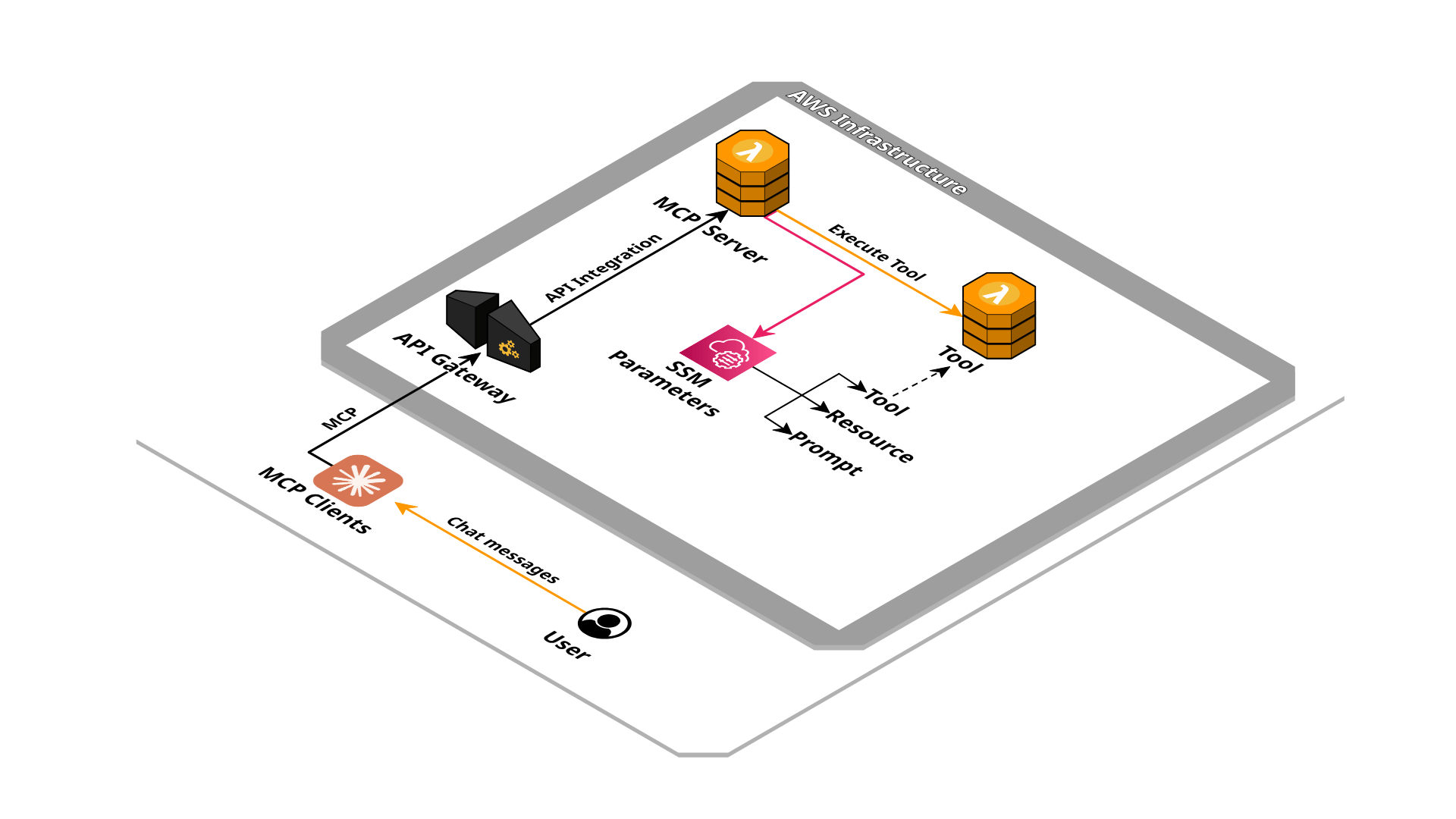
MCP Server implementation with AWS Serverless services.
Created resources
A set of Lambda function connected to EventBridge rules that handle start, stop and task start. Create StepFunction state machine to wait until a specific date and send events.
Installation
Using the SAM CLI:
sam build
sam deploy --guided
Parameters
This application need some parameters when you deploy it:
-
EventBusName: The event bus name to connect the integration to
-
Project: Project identifier
-
Environment: Environment identifier
-
ServerName: The MCP server name
-
ServerVersion: The MCP server version
-
Instructions: The MCP server instructions
-
DomainName: The domain name of the endpoint
-
AcmCertificateArn: The certificate arn for the domain name provided
-
AuthenticationType: Authentication type for the MCP server
-
AuthenticationToken: The authentication token for the MCP server
-
OAuthIssuerUrl: The issuer URL for OAuth authentication
-
OAuthAuthorizationUrl: The authorization URL for OAuth authentication
-
OAuthTokenUrl: The token URL for OAuth authentication
-
OAuthRevocationUrl: The revocation URL for OAuth authentication
-
OAuthRedirectUris: The redirect URIs for OAuth authentication
Outputs
- ServerEndpoint: The MCP server endpoint
Development
Requirements:
Install NPM modules
npm install
Configure the .env file with MCP server specifications:
SERVER_NAME=local
SERVER_VERSION=1.0.0
INSTRUCTIONS=""
Configure the .env file with AWS environment configuration:
AWS_PROFILE=<your AWS profile>
AWS_REGION=<selected AWS region>

SSM_PREFIX=
TOOLS_SSM_PREFIX=
RESOURCES_SSM_PREFIX=
PROMPTS_SSM_PREFIX=
TOOL_LAMBDA_PREFIX=
Run local MCP server
npm run dev
The MCP server is running on http://localhost:3000/mcp.
Run the MCP Inspector
npm run inspector
Configure the inspector with:
- Transport Type:
Streamable HTTP
- URL:
http://localhost:3000/mcp
Connect to the MCP server with "Connect" button.
Claude Desktop
Use mcp-remote to proxy HTTP to STDIO:
{
  "mcpServers": {
    "example": {
      "command": "npx",
      "args": [
        "-y",
        "mcp-remote",
        "https://xxxxxxxxxx.execute-api.eu-west-1.amazonaws.com/dev/mcp",
        "--transport",
        "http-only"
      ]
    }
  }
}
Deploy
Requirements:
Build project
sam build
Deploy the stack
sam deploy --profile <your AWS profile> --guided
Usage
Once the solution is installed, you can extend the MCP server with resources, prompts or tools using SSM parameters and Lambda functions.
The SSM parameters must begin with the prefix /<project name>/<environment name>/, for example /mcp/dev/tools/echo.
As an example of integration you can take inspiration from the template: template.integration.yaml.
Resources
The SSM parameters must begin with prefix /<project name>/<environment name>/resources/, for example /mcp/dev/resources/example.
The content must be in valid JSON format and have the properties:
- name: Resource name
- uri: Resource URI, for example "config://example"
- content: Resource text content
It can be declared in a SAM template as:
ExampleResourceParameter:
  Type: AWS::SSM::Parameter
  Properties:
    Name: !Sub "/${Project}/${Environment}/resources/example"
    Type: String
    Value: |
      {
        "name": "example",
        "uri": "config://example",
        "content": "Just an example resource"
      }
Prompts
The SSM parameters must begin with prefix /<project name>/<environment name>/prompts/, for example /mcp/dev/prompts/echo.
The content must be in valid JSON format and have the properties:
- name: Prompt name
- description: Prompt description
- inputSchema.json: JSON schema
- content: Prompt template content
The content template will be elaborate with ejs with input data interpolation.
It can be declared in a SAM template as:
EchoPromptParameter:
  Type: AWS::SSM::Parameter
  Properties:
    Name: !Sub "/${Project}/${Environment}/prompts/echo"
    Type: String
    Value: |
      {
        "name": "echo",
        "description": "Execute the example tool",
        "inputSchema": {
          "json": {
            "type": "object",
            "properties": {
              "message": {
                "type": "string"
              }
            },
            "required": ["message"]
          }
        },
        "content": "Execute the tool 'echo' with the message '<%= message %>'"
      }
The SSM parameters must begin with prefix /<project name>/<environment name>/tools/, for example /mcp/dev/tools/echo.
The content must be in valid JSON format and have the properties:
- name: Prompt name
- description: Prompt description
- inputSchema.json: JSON schema
The related Lambda function that will be executed must be name as <project name>-<environment name>-tools-<tool name>, for example mcp-dev-tools-echo.
The function input and output must respect the Converse API pattern.
The parameter can be declared in a SAM template as:
EchoToolParameter:
  Type: AWS::SSM::Parameter
  Properties:
    Name: !Sub "/${Project}/${Environment}/tools/echo"
    Type: String
    Value: |
      {
        "name": "echo",
        "description": "Print the message provided in input",
        "inputSchema": {
          "json": {
            "type": "object",
            "properties": {
              "message": {
                "type": "string"
              }
            },
            "required": ["message"]
          }
        }
      }
The Lambda function implementation could be:
exports.handler = async ({ toolUseId, name, input }, context) => {
  return {
    name,
    toolUseId,
    status: 'success',
    content: [{
      text: input.message
    }]
  }
}
declared inline in a SAM template:
EchoToolFunction:
  Type: AWS::Serverless::Function
  Properties:
    FunctionName: !Sub "${Project}-${Environment}-tools-echo"
    Handler: index.handler
    InlineCode: |
      exports.handler = async ({ toolUseId, name, input }, context) => {
        return {
          name,
          toolUseId,
          status: 'success',
          content: [{
            text: input.message
          }]
        }
      }
Credits


