Azure Developer CLI template for deploying a C# MCP server

Azure Developer CLI template for deploying a C# MCP server

azd-mcp-csharp•bypowergentic

A template that builds and deploys a Model Context Protocol server written in C# to Azure Container Apps using SSE transport, complete with Azure infrastructure provisioning.

License: Not specified•Runtime: Awaiting documentation review•Category: cloud devops

WHAT IT DOES

  • •Deploys an MCP server written in C# to Azure Container Apps using SSE transport.
  • •Includes a Dockerfile that builds the C# MCP server app.
  • •Provisions Azure resources including a Container Apps Environment, Container App, Log Analytics, Application Insights, and Container Registry.
  • •Exposes an SSE endpoint that can be opened in a browser to confirm the MCP server is running.

BEST FOR

  • •Developers who want a starting point to customize and build their own C# MCP server for an AI solution.
  • •Teams looking to host an MCP server in Azure using Azure Container Apps and infrastructure provisioning via azd.

ABOUT AZD-MCP-CSHARP

Azure Developer CLI template for deploying a C# MCP server is cataloged as an MCP server attributed to powergentic. A template that builds and deploys a Model Context Protocol server written in C# to Azure Container Apps using SSE transport, complete with Azure infrastructure provisioning. It is categorized under cloud devops. See the capability inspector for recorded interfaces and their independent review status; consult upstream documentation for the current interface.

HOW TO INSTALL

Installation configuration is not reviewed. No executable setup is offered for this entry; inspect the source repository before proceeding.

LICENSE

Catalog license label: Not specified. Check the source repository's current license and terms before using, modifying or distributing this software.

Capability inspector

Capability definitions are not reviewed. Unreviewed imports are not exposed as trusted interfaces.

Tools (0)

No reviewed records to display. This does not establish that upstream lacks this capability.

Resources (0)

No reviewed records to display. This does not establish that upstream lacks this capability.

Prompts (0)

No reviewed records to display. This does not establish that upstream lacks this capability.

NEWSLETTER - COMING LATER

Newsletter subscriptions are not open yet

Email delivery is not connected. This page does not collect email addresses or create subscriptions.

Browse the registry for current listings instead.

Community Reviews

Coming later

Reviews for Azure Developer CLI template for deploying a C# MCP server are not available yet

Review publishing and storage are not connected. This page does not collect or publish ratings or comments, including after sign-in.

FREQUENTLY ASKED QUESTIONS

What Azure resources does the template deploy?

It deploys a Container Apps Environment, a Container App to host the MCP server, Log Analytics and Application Insights for logging, and a Container Registry for the custom Docker container.

What transport does the MCP server use?

The MCP server uses SSE transport and exposes an SSE endpoint.

Upstream README

View this exact version on GitHub

README.md · 917add063e72 · Fetched 2026-11-13 14:02:37 UTC

Original upstream text, without AI rewriting. Scripts, forms and unsafe links are filtered for safety.

Showing the last retrieved documentation snapshot; check the source for current changes.

powergentic/azd-mcp-csharp Awesome Badge

An Azure Developer CLI (azd) template to deploy a Model Context Protocol (MCP) server written in C# to Azure Container Apps using SSE Transport.

Prerequisites

To deploy this template you will need to have the following installed:

Deployment

To use this template, follow these steps using the Azure Developer CLI:

  1. Log in to Azure Developer CLI. This is only required once per-install.

    azd auth login
    
  2. Initialize this template using azd init:

    azd init --template powergentic/azd-mcp-csharp
    
  3. Ensure Docker Engine is running on your machine. This will be needed by azd to build the Docker image for the app prior to deployment to Azure Container Apps.

  4. Use azd up to provision your Azure infrastructure and deploy the web application to Azure.

    azd up
    
  5. Once the template has finished provisioning all resources, and Azure Container Apps has completed deploying the app container (this can take a minute or so after azd up completes to finish), the MCP server will be running.

    Screenshot AZD UP completed successfully

  6. To verify the MCP server is running, navigate your browser to the /sse url for the app within your browser.

    Example URL:

    https://ca-mcp-vnv7lqmg46722.bravebeach-29a82758.eastus2.azurecontainerapps.io/sse
    

    This will open a streaming output within the browser that will look similar to the following:

    Screenshot of /sse endpoint on the MCP server

  7. Congratulations, you now have a simple MCP Server written in C# up and running in Azure! You can now customize this app to build the specific MCP server you need for your AI solution.

Architecture Diagram
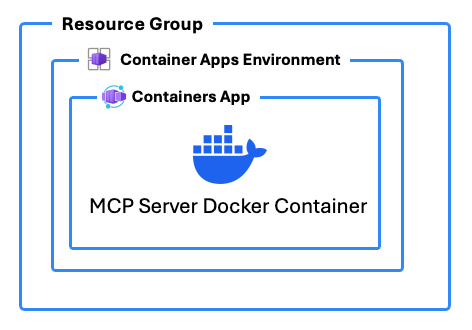
Diagram of Azure Resources provisioned with this template

In addition to deploying Azure Resources to host the MCP server, this template includes a DOCKERFILE that builds the MCP server app with C#.

Azure Resources

These are the Azure resources that are deployed with this template:

  • Container Apps Environment - The environment for hosting the Container App
  • Container App - The hosting for the MCP server app
  • Log Analytics and Application Insights - Logging for the Container Apps Environment
  • Container Registry - Used to deploy the custom Docker container for the app

Author

This azd template was written by Chris Pietschmann, founder of Powergentic.ai, Microsoft MVP, HashiCorp Ambassador, and Microsoft Certified Trainer (MCT).

Install configuration

Are you the maintainer?

Claim this server with your GitHub account to request manual ownership verification.

README Embed Badge
Markdown

Link to the catalog listing for Azure Developer CLI template for deploying a C# MCP server from your README. This badge does not certify ownership, compatibility or security.

[![MCP catalog listing](https://img.shields.io/badge/MCP-awesome--mcp-orange?style=flat-square)](https://awesome-mcp.com/servers/azd-mcp-csharp)

REPOSITORY STATS

GitHub StarsUnavailable
ForksUnavailable

Public repository statistics could not be verified. Check the configured source address; unavailable counts are not zero.

Downloads and pulls

Separate sources, scopes and periods. Never combined or treated as installations, active users or security reviews.

No reviewed package or image identity; download statistics are not listed yet.

Related cloud devops MCP Servers

Alternative and complementary servers in the same category

View all in cloud devops →
Huawei MCP Server
mcp-server-huaweiclouddeveloper•huaweiclouddeveloper

A Model Context Protocol server built on Huawei Cloud services that enables AI assistants to operate Huawei Cloud resources within conversational workflows, supporting ECS, OBS, GaussDB, and other cloud products.

Repository stats unavailable
Cloud & DevOps
Coolify MCP Server
coolify-mcp-server•wrediam

An MCP server that exposes the Coolify v4.3.1 REST API so AI clients can manage applications, databases, services, servers, deployments, and more.

Repository stats unavailable
Cloud & DevOps

A deprecated Model Context Protocol server for interacting with Kong Konnect APIs, enabling AI assistants to query and analyze Kong Gateway configurations, traffic, and analytics.

Repository stats unavailable
Cloud & DevOps