
A directory listing describing a cancellation-letter and mailing-address service. The configured public GitHub repository returned 404 during source verification.
Repository stats unavailable
Developer Tools
A simplified C# Model Context Protocol server built with the ModelContextProtocol package, exposing sport event tools, prompts, resources and resource subscriptions, paired with a demo console application.
Sample C# MCP server for sports event tools, prompts and resources is cataloged as an MCP server attributed to roberteichenseer. A simplified C# Model Context Protocol server built with the ModelContextProtocol package, exposing sport event tools, prompts, resources and resource subscriptions, paired with a demo console application. It is categorized under developer tools. See the capability inspector for recorded interfaces and their independent review status; consult upstream documentation for the current interface.
Installation configuration is not reviewed. No executable setup is offered for this entry; inspect the source repository before proceeding.
Catalog license label: Not specified. Check the source repository's current license and terms before using, modifying or distributing this software.
Capability definitions are not reviewed. Unreviewed imports are not exposed as trusted interfaces.
No reviewed records to display. This does not establish that upstream lacks this capability.
No reviewed records to display. This does not establish that upstream lacks this capability.
No reviewed records to display. This does not establish that upstream lacks this capability.
Email delivery is not connected. This page does not collect email addresses or create subscriptions.
Browse the registry for current listings instead.
Reviews for Sample C# MCP server for sports event tools, prompts and resources are not available yet
Review publishing and storage are not connected. This page does not collect or publish ratings or comments, including after sign-in.
It provides tools, prompts, resources and resource subscription handlers.
The SportApp starts the MCP server via dotnet run using a stdio client transport.
README.md · 67cc9f46ed77 · Fetched 2026-11-13 11:23:01 UTC
Original upstream text, without AI rewriting. Scripts, forms and unsafe links are filtered for safety.
Showing the last retrieved documentation snapshot; check the source for current changes.
MCP is an open protocol that standardizes how applications provide context to LLMs and is often called the "USB-C port for AI Applications". MCP provides a standardized way to connect AI models to different data sources, prompts and tools.
An MCP (Model Context Protocol) server provides Resources, Tools, and Prompts to an application, enabling it to enhance its communication with a Large Language Model (LLM) or Small Language Model (SLM). The application initiates the MCP server—typically within its own security context—and communicates with it via standard I/O (stdio)
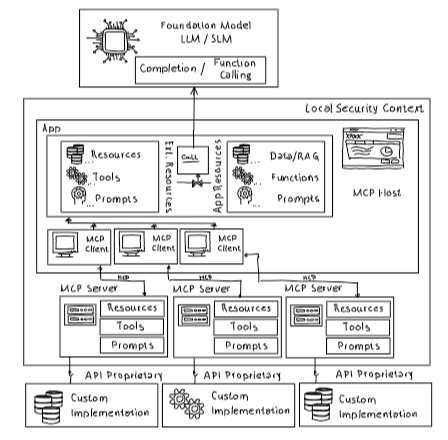
An application is not limited to a single MCP server; it can start and interact with multiple MCP servers simultaneously, each providing distinct Resources, Tools, and Prompts. While there is a one-to-one relationship between each MCP client (initiated by the application) and its corresponding MCP server, the application can manage several such pairs. In the given example, three MCP servers are launched, each contributing their own contextual assets to enhance model interactions.
Tools: Often used to provide functionality to the application (e.g. retrieve private information, perform specific tasks etc.). A list of available MCP server tools can be provided by the app to the LLM/SLM instance (with function calling capabilities) where most SDKs wrap the necessary function or tool calls to the MCP server automatically.
Resources: Data which the app can request from the MCP server to e.g. ground LLM/SLM calls. The app can also subscribe to a MCP resource to get continous updates (if new information is available). The MCP server implements the necessary update logic.
Prompts: The MCP server can provide prompt templates for the app to send to LLMs/SLMs.
The repo contains a simplified c# MCP Server and a c# console application consuming Tools, Resources and and a script to setup an Azure OpenAI instance with a deployed gpt-4 model instance:
| Folder | Appliation |
|---|---|
| ./src/SportApp | A simplified c# console application which uses Tools, Prompts and Resources from SportKnowHow_McpServer |
| ./src/SportKnowHow_McPServer | A simplified c# Mcp Server |
| ./setup/setup.azcli | A powershell Azure CLI script to setup the necessary Azure OpenAI instance with deployed gpt-4 instance |
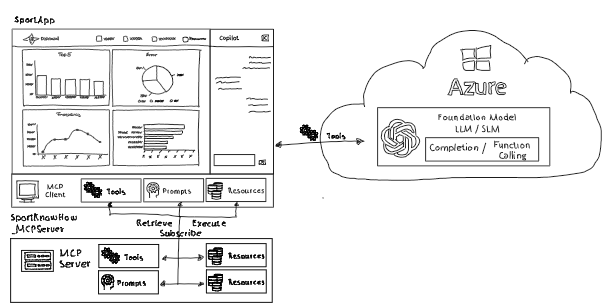
SportApp starts the provided MCP server using dotnet run and stdio
    //MCP Server: start parameter
    string command = "dotnet";
    string[] arguments = new string[] {
        "run",
        "--project",
        "./src/SportKnowHow_MCPServer/SportKnowHow_MCPServer.csproj"};

    //MCP Server: communication protocol
    StdioClientTransportOptions stdioClientTransportOptions = new StdioClientTransportOptions()
    {
        Name = "Sport Know How (MCP Server)",
        Command = command,
        Arguments = arguments,
    };
    StdioClientTransport stdioClientTransport = new StdioClientTransport(stdioClientTransportOptions);

    //Start MCP Server
    await using IMcpClient mcpClient = await McpClientFactory.CreateAsync(stdioClientTransport);
All available tools provided by the MCP server are listed
The tool with id RetrieveWinner with parameter eventName' and eventDate` is executed
    //List available tools
    IList<McpClientTool> mcpClientTools = await mcpClient.ListToolsAsync();

    //Manual tool call
    string toolName = "RetrieveWinner";
    Dictionary<string, object?> callParameter = new Dictionary<string, object?>
    {
        { "eventName", "Super Sports Champtionship" },
        { "eventDate", "2025-01-01"}
    };
    CallToolResponse callToolResponse = await mcpClient.CallToolAsync(toolName, callParameter);
The MCP server tools are provided to a LLM/SLM completion call using Microsoft.Extensions.AI. There's no need to intercept the LLM/SLM function tooling requests as chatClient.RetResponse() takes care of calling the MCP Server tools as requested by the LLM and provides results back to the LLM.
    //Use tools in chat completions
    ...
    string systemMessage = "You help with information around international sport events.";
    string userMessage = "Who won the Super Sports Championship 2025?";
    var chatMessages = new List<ChatMessage>
    {
        new ChatMessage (Microsoft.Extensions.AI.ChatRole.System, systemMessage),
        new ChatMessage (Microsoft.Extensions.AI.ChatRole.User, userMessage)
    };
    ChatResponse chatResponse = await chatClient.GetResponseAsync(
        chatMessages,
        new ChatOptions
        {
            Tools = mcpClientTools.ToArray()
        }
    );
    ...
Within the MCP server defined prompts are listed and a specific prompt (CreateMatchSummaryPrompt) with parameters is requested.
    // List available prompts
    IList<McpClientPrompt> mcpClientPrompts = await mcpClient.ListPromptsAsync();

    // Retrieve specific prompt
    string promptName = "CreateMatchSummaryPrompt";
    Console.WriteLine($"Retrieve prompt: {promptName}");
    Dictionary<string, object?> promptParameter = new Dictionary<string, object?>
    {
        { "eventName", "Munich Flying Dolphins vs. Berlin Bears" },
        { "winner", "Munich Flying Dolphins" },
        { "score", "24:31" },
        { "enthusiasm", "high" }
    };
    GetPromptResult getPromptResult = await mcpClient.GetPromptAsync(promptName, promptParameter);
Within the MCP server defined resources templates and resources are listed and requested.
    //List available resource templates
    string resourceTemplateUri = "";
    IList<McpClientResourceTemplate> mcpClientResourceTemmplates = await mcpClient.ListResourceTemplatesAsync();

    //Retrieve a specific resource template
    resourceTemplateUri = resourceTemplateUri.Replace("{id}", "NurembergFlyingTigers");
    ReadResourceResult readResourceTemplateResult = await mcpClient.ReadResourceAsync(resourceTemplateUri);

    //List available resources
    string resourceUri = "";
    IList<McpClientResource> mcpClientResources = await mcpClient.ListResourcesAsync();

    // Retrieve a specific resource
    ReadResourceResult readResourceResult = await mcpClient.ReadResourceAsync(resourceUri);
A subsription with the MCP server is created. The MCP server can send updates whenever the underlying resource is changed.
    // Subscribe to resources
    mcpClient.RegisterNotificationHandler("notifications/resource/updated", NotificationHandler);
    await mcpClient.SubscribeToResourceAsync("sportIntelligence://team/MunichFlyingDolphins");
//create MCP server
HostApplicationBuilder hostApplicationBuilder = Host.CreateApplicationBuilder(args);
hostApplicationBuilder.Logging.AddConsole(consoleLogOptions =>
{
    consoleLogOptions.LogToStandardErrorThreshold = LogLevel.Trace;
});

hostApplicationBuilder.Services
    .AddMcpServer()
    .WithStdioServerTransport()
    .WithTools<SportEventTools>()
    .WithPrompts<SportEventPrompts>()
    .WithResources<SportEventResources>()
    .WithSubscribeToResourcesHandler(SubscribeToResourcesHandler)
    .WithUnsubscribeFromResourcesHandler(UnsubscribeFromResourcesHandler)
    .WithReadResourceHandler(ReadResourceHandler);

hostApplicationBuilder.Services.AddSingleton(resourceSubscriptions);
hostApplicationBuilder.Services.AddHostedService<SubscriptionMessageSender>();
MCP Server which often exectue in the security context of the calling applications make it easy to provide tools,resources and prompts to calling applications. Just like shown in the sample SportApp application the ModelContextProtocol nuget package simplifies the development of Mcp Server and Mcp Host applicatons.
Claim this server with your GitHub account to request manual ownership verification.
Link to the catalog listing for Sample C# MCP server for sports event tools, prompts and resources from your README. This badge does not certify ownership, compatibility or security.
[](https://awesome-mcp.com/servers/azureai.mcp)Public repository statistics could not be verified. Check the configured source address; unavailable counts are not zero.
Separate sources, scopes and periods. Never combined or treated as installations, active users or security reviews.
No reviewed package or image identity; download statistics are not listed yet.
Alternative and complementary servers in the same category
A directory listing describing a cancellation-letter and mailing-address service. The configured public GitHub repository returned 404 during source verification.

A hosted MCP service for browsing and searching through Singapore mobile-network proxies.

A directory listing describing a Markdown-to-PDF service. The configured public GitHub repository returned 404 during source verification.