

A directory listing describing a cancellation-letter and mailing-address service. The configured public GitHub repository returned 404 during source verification.
Repository stats unavailable
Developer Tools
An MCP server that lets LLM agents start, stop, and monitor long-running command-line processes in the background.
Background Process MCP server is cataloged as an MCP server attributed to waylaidwanderer. An MCP server that lets LLM agents start, stop, and monitor long-running command-line processes in the background. It is categorized under developer tools. See the capability inspector for recorded interfaces and their independent review status; consult upstream documentation for the current interface.
Installation configuration is not reviewed. No executable setup is offered for this entry; inspect the source repository before proceeding.
Catalog license label: Not specified. Check the source repository's current license and terms before using, modifying or distributing this software.
Capability definitions are not reviewed. Unreviewed imports are not exposed as trusted interfaces.
No reviewed records to display. This does not establish that upstream lacks this capability.
No reviewed records to display. This does not establish that upstream lacks this capability.
No reviewed records to display. This does not establish that upstream lacks this capability.
Email delivery is not connected. This page does not collect email addresses or create subscriptions.
Browse the registry for current listings instead.
Reviews for Background Process MCP server are not available yet
Review publishing and storage are not connected. This page does not collect or publish ratings or comments, including after sign-in.
Yes, a Core Service WebSocket server manages process lifecycles and serves as the single source of truth; the MCP client can connect to an existing service or spawn a new one.
Yes, you can run the Core Service and connect the TUI manually outside of an MCP client.
README.md · 21ddb354a001 · Fetched 2026-11-13 08:23:07 UTC
Original upstream text, without AI rewriting. Scripts, forms and unsafe links are filtered for safety.
Showing the last retrieved documentation snapshot; check the source for current changes.
A Model Context Protocol (MCP) server that provides background process management capabilities. This server enables LLMs to start, stop, and monitor long-running command-line processes.
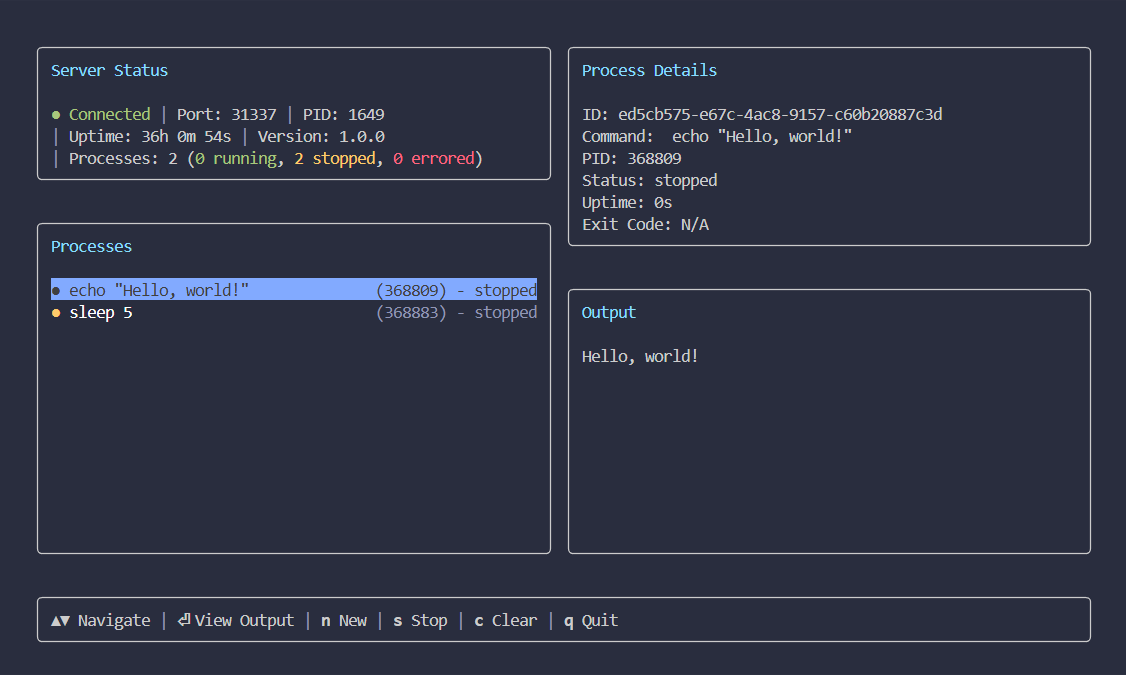
Some AI agents, like Claude Code, can manage background processes natively, but many others can't. This project provides that capability as a standard tool for other agents like Google's Gemini CLI. It works as a separate service, making long-running task management available to a wider range of agents. I also added a TUI because I wanted to be able to monitor the processes myself.
To get started, install the Background Process MCP server in your preferred client.
Standard Config
This configuration works for most MCP clients:
{
  "mcpServers": {
    "backgroundProcess": {
      "command": "npx",
      "args": [
        "@waylaidwanderer/background-process-mcp@latest"
      ]
    }
  }
}
To connect to a standalone server, add the --port argument to the args array (e.g., ...mcp@latest", "--port", "31337"]).
Use the Claude Code CLI to add the Background Process MCP server:
claude mcp add backgroundProcess npx @waylaidwanderer/background-process-mcp@latest
Follow the MCP install guide, use the standard config above.
Create or edit the configuration file ~/.codex/config.toml and add:
[mcp_servers.backgroundProcess]
command = "npx"
args = ["@waylaidwanderer/background-process-mcp@latest"]
For more information, see the Codex MCP documentation.

Go to Cursor Settings -> MCP -> Add new MCP Server. Name it backgroundProcess, use command type with the command npx @waylaidwanderer/background-process-mcp@latest.
Follow the MCP install guide, use the standard config above.

Go to Advanced settings -> Extensions -> Add custom extension. Name it backgroundProcess, use type STDIO, and set the command to npx @waylaidwanderer/background-process-mcp@latest. Click "Add Extension".

Go to Program in the right sidebar -> Install -> Edit mcp.json. Use the standard config above.
Follow the MCP Servers documentation. For example in ~/.config/opencode/opencode.json:
{
  "$schema": "https://opencode.ai/config.json",
  "mcp": {
    "backgroundProcess": {
      "type": "local",
      "command": [
        "npx",
        "@waylaidwanderer/background-process-mcp@latest"
      ],
      "enabled": true
    }
  }
}
Open Qodo Gen chat panel in VSCode or IntelliJ → Connect more tools → + Add new MCP → Paste the standard config above.
Click Save.

Follow the MCP install guide, use the standard config above. You can also install the server using the VS Code CLI:
# For VS Code
code --add-mcp '{"name":"backgroundProcess","command":"npx","args":["@waylaidwanderer/background-process-mcp@latest"]}'
Follow Windsurf MCP documentation. Use the standard config above.
The following tools are exposed by the MCP server.
start_process
command (string): The shell command to execute.stop_process
processId (string): The UUID of the process to stop.clear_process
processId (string): The UUID of the process to clear.get_process_output
head for the first N lines or tail for the last N lines.processId (string): The UUID of the process to get output from.head (number, optional): The number of lines to get from the beginning of the output.tail (number, optional): The number of lines to get from the end of the output.list_processes
get_server_status
The project has three components:
Core Service (src/server.ts): A standalone WebSocket server that uses node-pty to manage child process lifecycles. It is the single source of truth for all process states. It is designed to be standalone so that other clients beyond the official TUI and MCP can be built for it.
MCP Client (src/mcp.ts): Exposes the Core Service functionality as a set of tools for an LLM agent. It can connect to an existing service or spawn a new one.
TUI Client (src/tui.ts): An ink-based terminal UI that connects to the Core Service to display process information and accept user commands.
If you wish to run the server and TUI manually outside of an MCP client, you can use the following commands.
For a shorter command, you can install the package globally:
pnpm add -g @waylaidwanderer/background-process-mcp
This will give you access to the bgpm command.
Start the background service manually:
# With npx
npx @waylaidwanderer/background-process-mcp server

# Or, if installed globally
bgpm server
The server will listen on an available port (defaulting to 31337) and output a JSON handshake with the connection details.
Connect the TUI to a running server via its port:
# With npx
npx @waylaidwanderer/background-process-mcp ui --port <port_number>

# Or, if installed globally
bgpm ui --port <port_number>
Claim this server with your GitHub account to request manual ownership verification.
Link to the catalog listing for Background Process MCP server from your README. This badge does not certify ownership, compatibility or security.
[](https://awesome-mcp.com/servers/background-process-manager)Public repository statistics could not be verified. Check the configured source address; unavailable counts are not zero.
Separate sources, scopes and periods. Never combined or treated as installations, active users or security reviews.
No reviewed package or image identity; download statistics are not listed yet.
Alternative and complementary servers in the same category
A directory listing describing a cancellation-letter and mailing-address service. The configured public GitHub repository returned 404 during source verification.

A hosted MCP service for browsing and searching through Singapore mobile-network proxies.

A directory listing describing a Markdown-to-PDF service. The configured public GitHub repository returned 404 during source verification.