Bio-OS MCP Server

Bio-OS MCP Server

bioos-mcp-server•bygba-bi

An MCP-based tool and prompt server for Bio-OS that provides workflow management and Docker image building capabilities.

License: Not specified•Runtime: Awaiting documentation review•Category: cloud devops

WHAT IT DOES

  • •Manages Bio-OS workflows, including submitting and monitoring workflows and uploading WDL workflows.
  • •Validates WDL scripts and generates WDL input file templates.
  • •Builds Docker images and supports checking build status, monitoring progress, and retrieving build logs.
  • •Offers prompts for WDL development, runtime configuration, input preparation, workflow submission, and Docker builds.

BEST FOR

  • •Developers using CLINE or Claude Desktop to manage Bio-OS bioinformatics workflows.
  • •Teams that need to build and track Docker images for workflow environments.
  • •Users working with WDL workflows who need validation and input template generation.

ABOUT BIOOS-MCP-SERVER

Bio-OS MCP Server is cataloged as an MCP server attributed to gba-bi. An MCP-based tool and prompt server for Bio-OS that provides workflow management and Docker image building capabilities. It is categorized under cloud devops. See the capability inspector for recorded interfaces and their independent review status; consult upstream documentation for the current interface.

HOW TO INSTALL

Installation configuration is not reviewed. No executable setup is offered for this entry; inspect the source repository before proceeding.

LICENSE

Catalog license label: Not specified. Check the source repository's current license and terms before using, modifying or distributing this software.

Capability inspector

Capability definitions are not reviewed. Unreviewed imports are not exposed as trusted interfaces.

Tools (0)

No reviewed records to display. This does not establish that upstream lacks this capability.

Resources (0)

No reviewed records to display. This does not establish that upstream lacks this capability.

Prompts (0)

No reviewed records to display. This does not establish that upstream lacks this capability.

NEWSLETTER - COMING LATER

Newsletter subscriptions are not open yet

Email delivery is not connected. This page does not collect email addresses or create subscriptions.

Browse the registry for current listings instead.

Community Reviews

Coming later

Reviews for Bio-OS MCP Server are not available yet

Review publishing and storage are not connected. This page does not collect or publish ratings or comments, including after sign-in.

FREQUENTLY ASKED QUESTIONS

Does the Bio-OS MCP Server support prompts in Cline?

No. Prompts are not currently supported in the Cline environment; they are only available when using the MCP server directly or through Claude Desktop.

What deployment options are available?

It can be installed standalone on a local machine or used through Code Server in a Miracle Cloud IES instance.

Upstream README

View this exact version on GitHub

README.md · 3e58e06d5668 · Fetched 2026-11-13 10:30:53 UTC

Original upstream text, without AI rewriting. Scripts, forms and unsafe links are filtered for safety.

Showing the last retrieved documentation snapshot; check the source for current changes.

Bio-OS MCP Server

A Model Context Protocol (MCP) based tool and prompt server for Bio-OS that provides workflow management and Docker image building capabilities.

Usage

We recommend using the CLINE extension for VSCode to interact with this MCP tool. There are two deployment options available: standalone installation on your local machine or using Code Server in a Miracle Cloud IES instance. Choose the option that best suits your needs.

Local Installation (Using MCP through local VSCode)

Prerequisites

Bio-OS MCP Server requires the following dependencies:

  1. Install uv (Python package manager):
pip install uv
  1. Install Cromwell (Workflow execution engine):
brew install cromwell

Installation

Clone the Bio-OS MCP Server repository:

git clone https://github.com/GBA-BI/bioos-mcp-server.git

Configuration

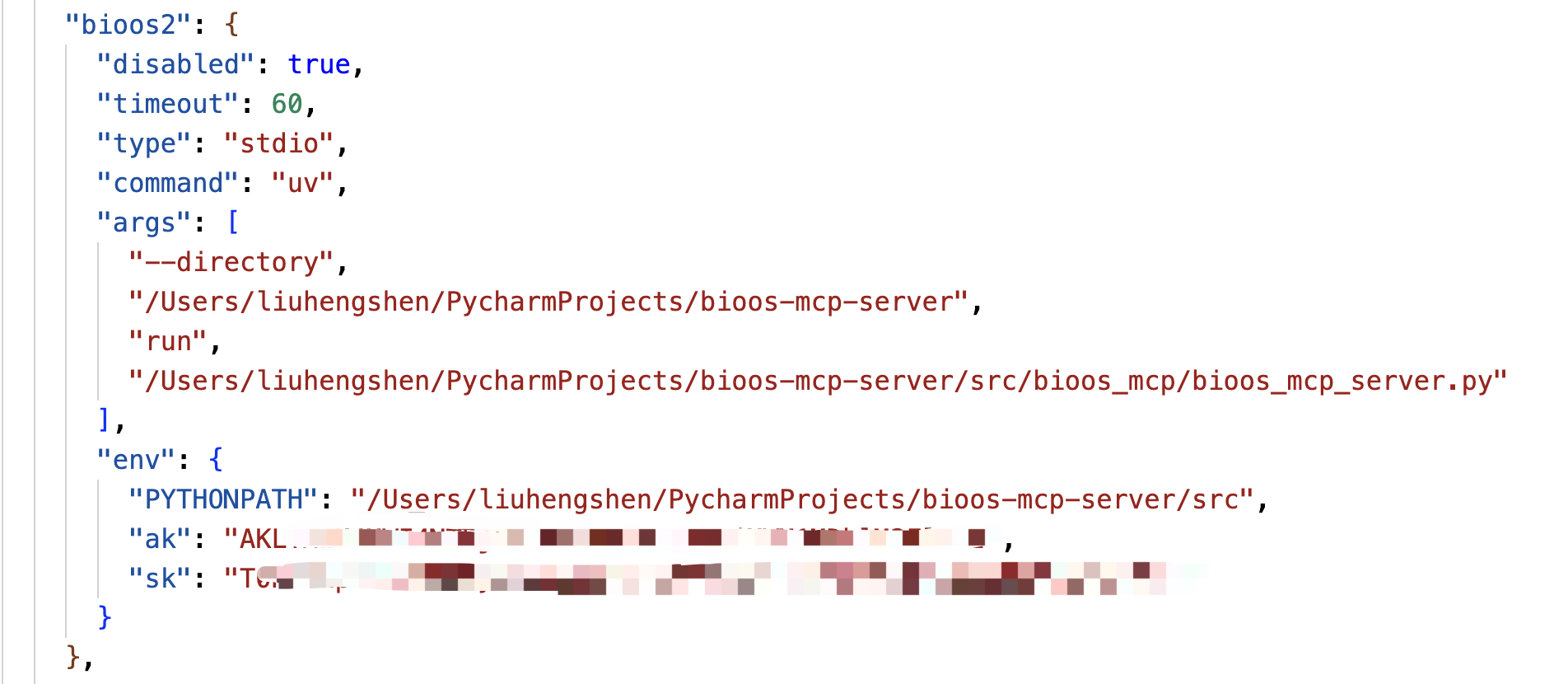
Configure the Bio-OS MCP Server script path in CLINE's MCP settings. Replace the placeholders with absolute paths to your installation:

{
  "mcpServers": {
    "bioos": {
      "command": "path/to/uv",
      "args": [
        "--directory",
        "path/to/bioos-mcp-server",
        "run",
        "path/to/bioos-mcp-server/src/bioos_mcp/bioos_mcp_server.py"
      ],
      "env": {
        "PYTHONPATH": "path/to/bioos-mcp-server/src",
        "MIRACLE_ACCESS_KEY": "xxxxxxxxxxxx",
        "MIRACLE_SECRET_KEY": "xxxxxxxxxxxx"
      }
    }
  }
} 

Follow the configuration process shown below. The Bio-OS MCP Server is ready to use when the status turns green. If the connection is unstable, click "Retry Connection":
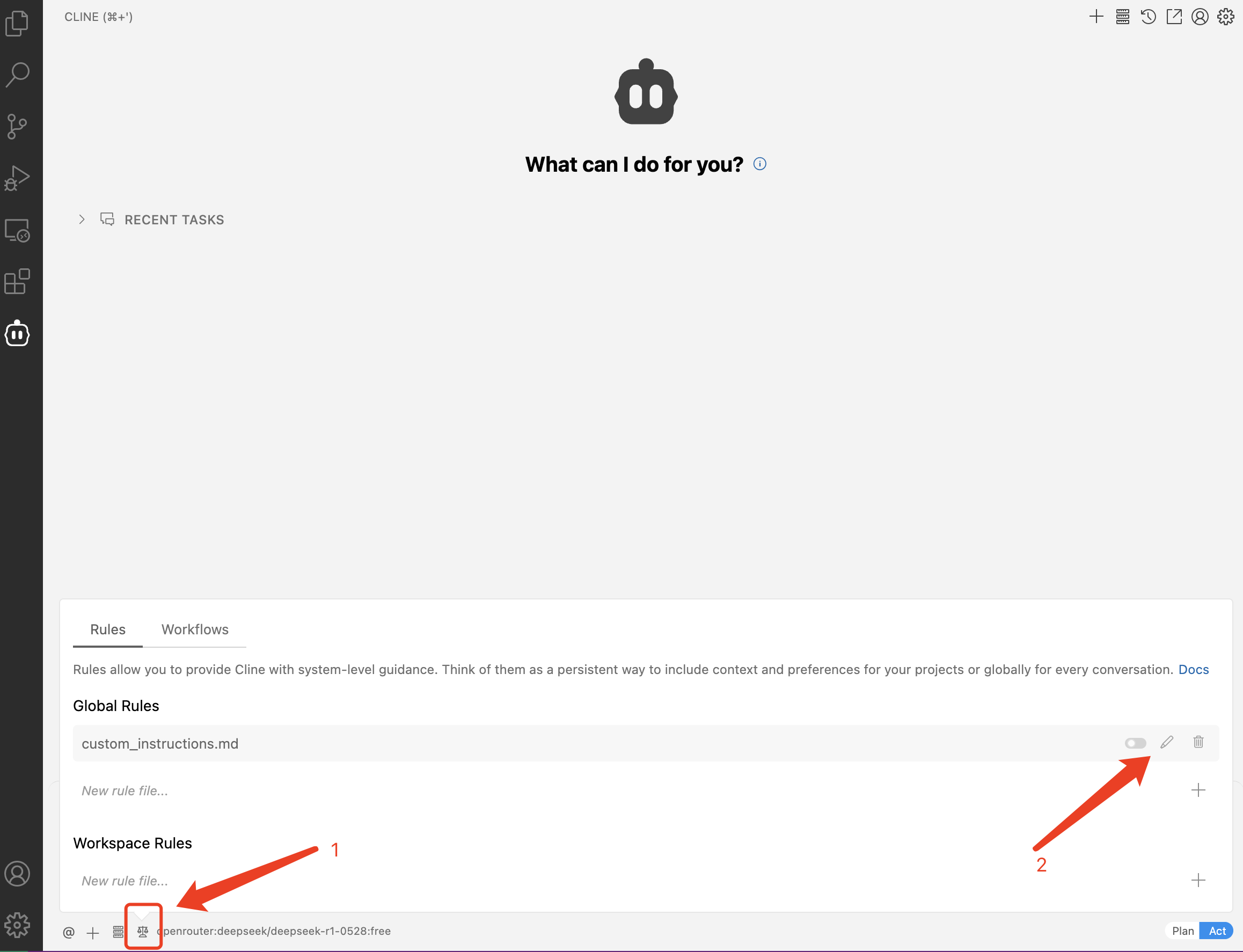
Since CLINE does not yet support MCP Prompts, copy the contents of bioos-mcp-prompt.md into CLINE's Custom Instructions for optimal experience:
After completing the configuration, you can begin using the Bio-OS MCP Server for development.

Cloud Installation (Using MCP through Code Server in Miracle Cloud)

For Miracle Cloud users, we provide a pre-configured Docker image with all Bio-OS MCP Server dependencies. Follow these steps:

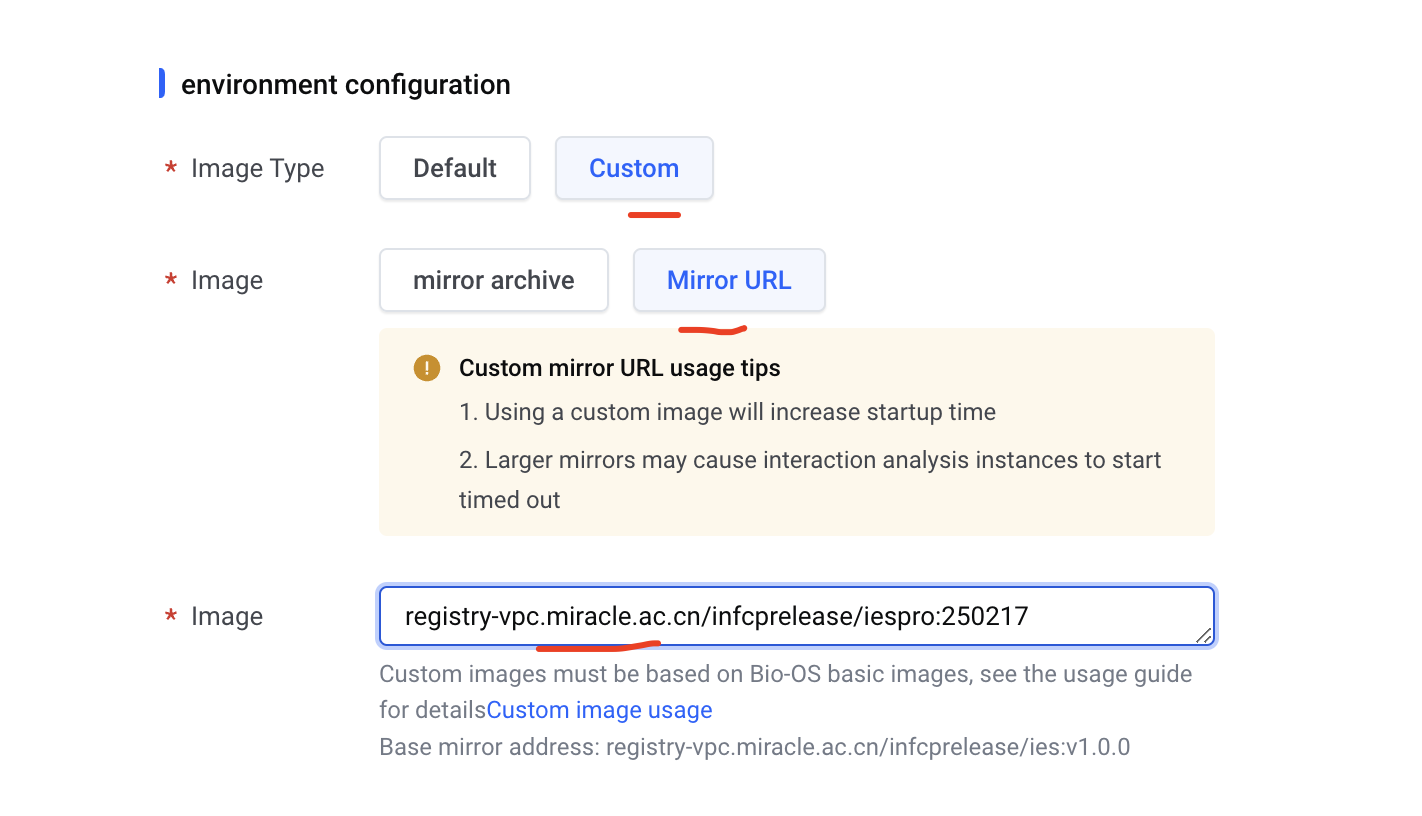
  1. Launch an IES instance using the image: registry-vpc.miracle.ac.cn/infcprelease/iespro:250217
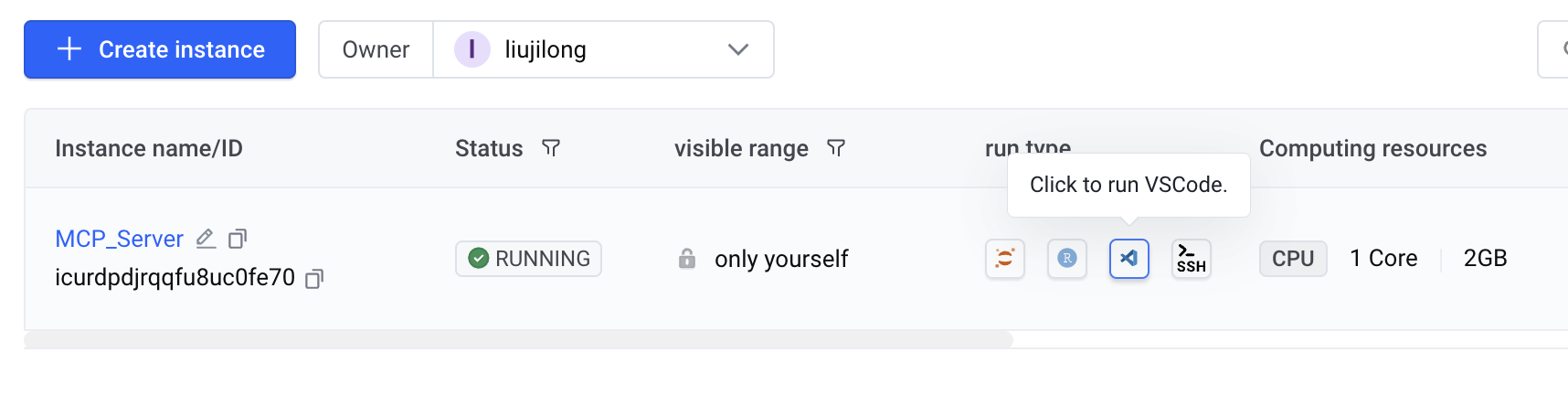
  2. Select "Open with VSCode" to access the development environment:
Configuration in Code Server

  1. Click the CLINE icon in the left sidebar and configure your LLM model credentials:
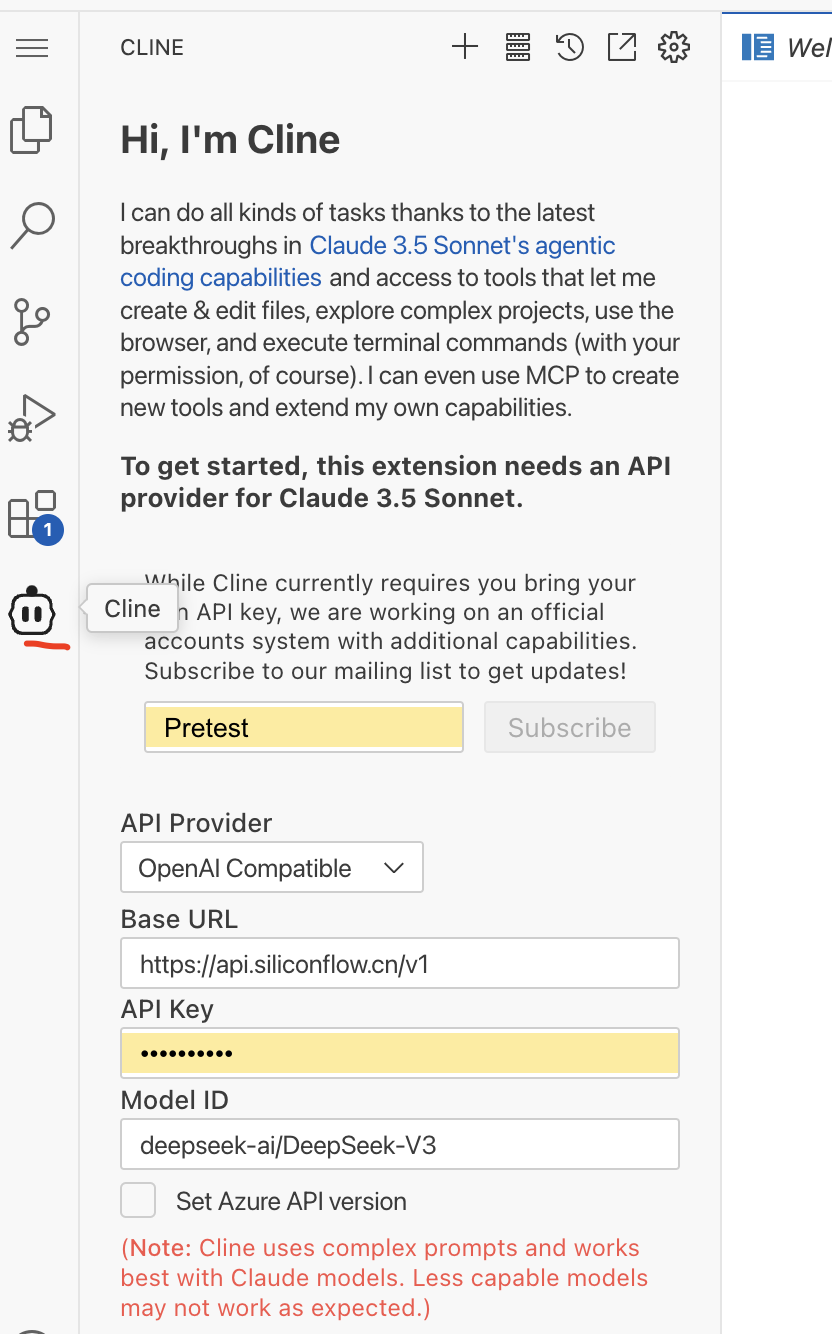
  2. Navigate to CLINE's MCP configuration page and verify that Bio-OS MCP Server is properly connected. Use "Retry Connection" if needed:
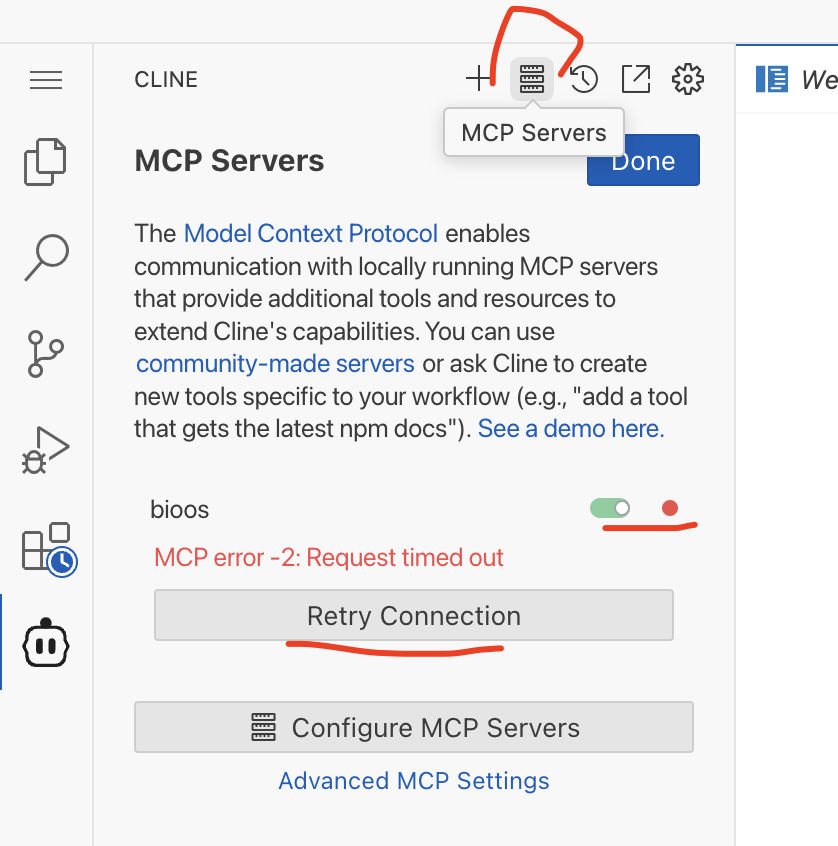
Once configured, you can begin development with Bio-OS MCP Server.

Features

1. Workflow Management

  • Submit and monitor workflows
  • Upload WDL workflows
  • Validate WDL scripts
  • Generate input file templates

2. Docker Image Management

  • Build Docker images
  • Check build status
  • Monitor build progress
  • Retrieve build logs

API Reference

Tools

  1. submit_workflow

    • Function: Submit Bio-OS workflow
    • Parameters:
      • ak: Access Key
      • sk: Secret Key
      • workspace_name: Workspace name
      • workflow_name: Workflow name
      • input_json: Input JSON file path
  2. import_workflow

    • Function: Upload WDL workflow to Bio-OS system
    • Parameters:
      • ak: Access Key
      • sk: Secret Key
      • workspace_name: Workspace name
      • workflow_name: Workflow name
      • workflow_source: WDL file path
      • workflow_desc: Workflow description
  3. validate_wdl

    • Function: Validate WDL workflow script
    • Parameters:
      • wdl_path: WDL file path
  4. generate_inputs

    • Function: Generate WDL input file template
    • Parameters:
      • wdl_path: WDL file path
  5. build_docker_image

    • Function: Build Docker image
    • Parameters:
      • registry: Image registry address
      • namespace_name: Namespace
      • repo_name: Repository name
      • tag: Version tag
      • source_path: Dockerfile or archive path
  6. check_build_status

    • Function: Check Docker image build status
    • Parameters:
      • task_id: Build task ID

Prompts (Not supported in Cline yet)

  1. wdl_development_workflow_prompt

    • Function: Generate complete guidance for WDL workflow development
    • Content:
      • WDL script development steps
      • Task structure guidelines
      • Runtime configuration requirements
      • Docker image preparation guide
  2. wdl_runtime_prompt

    • Function: Generate WDL runtime configuration template
    • Content:
      • Required docker image configuration
      • Memory settings (default: 8 GB)
      • Disk settings (default: 20 GB)
      • CPU settings (default: 4)
  3. workflow_input_prompt

    • Function: Generate workflow input preparation guide
    • Content:
      • Input file preparation steps
      • Parameter validation guidelines
      • File path requirements
  4. workflow_submission_prompt

    • Function: Generate workflow submission template
    • Content:
      • Required credentials (ak/sk)
      • Workspace configuration
      • Input file requirements
  5. docker_build_prompt

    • Function: Generate Docker build process guide
    • Content:
      • Dockerfile generation steps
      • Build configuration requirements
      • Image registry settings
      • Build status monitoring guide

Note: Prompts are currently not supported in Cline environment. These prompts are only available when using the MCP server directly or through Claude Desktop.

✅ Certified by MCPHub

MCPHub Certified
This server is officially certified by MCPHub. Verify certification status on our MCPHub profile page.

Contributing

Issues and Pull Requests are welcome.

License

MIT License

Install configuration

Are you the maintainer?

Claim this server with your GitHub account to request manual ownership verification.

README Embed Badge
Markdown

Link to the catalog listing for Bio-OS MCP Server from your README. This badge does not certify ownership, compatibility or security.

[![MCP catalog listing](https://img.shields.io/badge/MCP-awesome--mcp-orange?style=flat-square)](https://awesome-mcp.com/servers/bioos-mcp-server)

REPOSITORY STATS

GitHub StarsUnavailable
ForksUnavailable

Public repository statistics could not be verified. Check the configured source address; unavailable counts are not zero.

Downloads and pulls

Separate sources, scopes and periods. Never combined or treated as installations, active users or security reviews.

No reviewed package or image identity; download statistics are not listed yet.

Related cloud devops MCP Servers

Alternative and complementary servers in the same category

View all in cloud devops →
Huawei MCP Server
mcp-server-huaweiclouddeveloper•huaweiclouddeveloper

A Model Context Protocol server built on Huawei Cloud services that enables AI assistants to operate Huawei Cloud resources within conversational workflows, supporting ECS, OBS, GaussDB, and other cloud products.

Repository stats unavailable
Cloud & DevOps
Coolify MCP Server
coolify-mcp-server•wrediam

An MCP server that exposes the Coolify v4.3.1 REST API so AI clients can manage applications, databases, services, servers, deployments, and more.

Repository stats unavailable
Cloud & DevOps

A deprecated Model Context Protocol server for interacting with Kong Konnect APIs, enabling AI assistants to query and analyze Kong Gateway configurations, traffic, and analytics.

Repository stats unavailable
Cloud & DevOps