
A Rust CAD application with an MCP server for creating, inspecting and rendering drawings, either headlessly or through a connection to the desktop app.
8K
Media & Design
An MCP server that resolves SVG icons from inline markup, URLs, local files, or Iconify IDs and returns rendered 4x4 PNG comparison grids so vision-capable agents can pick and compare icons.
Rust MCP server for searching, retrieving, and visually comparing SVG icons is cataloged as an MCP server attributed to n0isy. An MCP server that resolves SVG icons from inline markup, URLs, local files, or Iconify IDs and returns rendered 4x4 PNG comparison grids so vision-capable agents can pick and compare icons. It is categorized under media design. See the capability inspector for recorded interfaces and their independent review status; consult upstream documentation for the current interface.
Installation configuration is not reviewed. No executable setup is offered for this entry; inspect the source repository before proceeding.
Catalog license label: Not specified. Check the source repository's current license and terms before using, modifying or distributing this software.
Capability definitions are not reviewed. Unreviewed imports are not exposed as trusted interfaces.
No reviewed records to display. This does not establish that upstream lacks this capability.
No reviewed records to display. This does not establish that upstream lacks this capability.
No reviewed records to display. This does not establish that upstream lacks this capability.
Email delivery is not connected. This page does not collect email addresses or create subscriptions.
Browse the registry for current listings instead.
Reviews for Rust MCP server for searching, retrieving, and visually comparing SVG icons are not available yet
Review publishing and storage are not connected. This page does not collect or publish ratings or comments, including after sign-in.
Grid outputs are 512x512 PNG images with a 4x4 layout of 128x128 cells numbered 0-15 left-to-right, top-to-bottom.
It communicates over stdio using the MCP protocol.
Yes, the server accepts a custom upstream API endpoint via a command-line argument.
README.md · 92d593c327ee · Fetched 2026-11-13 12:13:43 UTC
Original upstream text, without AI rewriting. Scripts, forms and unsafe links are filtered for safety.
Showing the last retrieved documentation snapshot; check the source for current changes.



MCP server that gives AI agents the ability to search, retrieve, compare, and render SVG icons. Built with Rust and the rmcp SDK.
Combines local filesystem access with a remote rendering API to resolve SVGs from any source — inline strings, URLs, local files, or Iconify IDs — and render them onto visual comparison grids.
The key insight: every tool returns images. A vision-capable LLM doesn't just get metadata — it sees the icons. This turns icon selection from guesswork into a visual conversation.
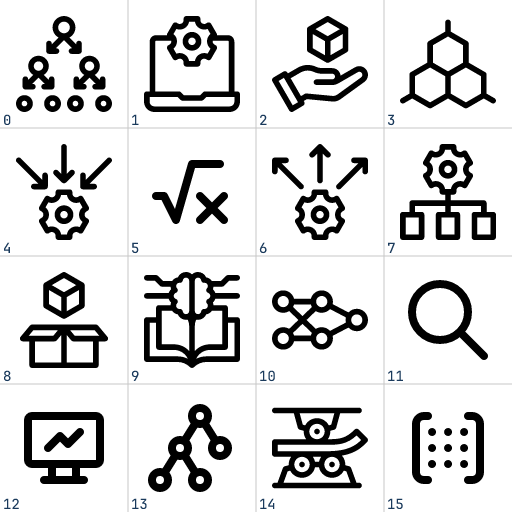
search_icons("machine learning") — 4x4 grid, cells 0–15, returned as PNG
These tools are designed to be composed by AI agents with vision. Below are three proven patterns.
An agent searches for icons and visually picks the best match — no blind URL selection.
                          ┌─────────────────────────────┐
                          │        Agent + Vision        │
                          └──────────────┬──────────────┘
                                         │
                        ┌────────────────┼────────────────┐
                        v                v                v
                  search_icons     search_icons     search_icons
                  "cloud"          "upload"          "storage"
                        │                │                │
                        v                v                v
                  ┌──────────┐    ┌──────────┐    ┌──────────┐
                  │ 4x4 grid │    │ 4x4 grid │    │ 4x4 grid │
                  │  (sees)  │    │  (sees)  │    │  (sees)  │
                  └────┬─────┘    └────┬─────┘    └────┬─────┘
                       │               │               │
                       └───────────────┼───────────────┘
                                       v
                              "cells 3, 7, 12 match
                               the project style"
                                       │
                                       v
                               render_grid [3 winners]
                                       │
                                       v
                              ┌──────────────────┐
                              │  final comparison │
                              │   grid (sees)     │──> pick best
                              └──────────────────┘
The agent runs multiple searches, looks at each grid, picks candidates by cell number, then renders a final side-by-side comparison to make the choice. Works especially well when the agent has context about the project's visual style.
An agent modifies SVG code and uses render_grid as a visual diff to track progress across iterations.
         get_svg "mdi/cloud"
                │
                v
          ┌───────────┐
          │ raw SVG    │
          │ markup     │
          └─────┬─────┘
                │
       ┌────────┴─────────────────────────────────────┐
       │              Edit Loop                        │
       │                                               │
       │   Agent modifies SVG code                     │
       │        │                                      │
       │        v                                      │
       │   render_grid [original, v1, v2, v3]          │
       │        │                                      │
       │        v                                      │
       │   ┌──────────────────────────────┐            │
       │   │ cell 0: original             │            │
       │   │ cell 1: thicker strokes      │            │
       │   │ cell 2: rounded corners      │            │
       │   │ cell 3: filled variant       │            │
       │   └──────────────┬───────────────┘            │
       │                  │                            │
       │        agent sees all versions                │
       │        decides next edit                      │
       │                  │                            │
       │                  └──── loop ──────────────────┘
       │
       v
  save final SVG to disk
Each iteration, the agent passes all versions (original + edits) as inline SVGs to render_grid. It sees them side-by-side in one image and decides whether to keep iterating or stop. The original always stays in cell 0 as a reference.
An agent ensures new icons match the visual style of existing project icons.
  Project icons on disk             Candidate sources
  ─────────────────────             ─────────────────
  /app/icons/nav-home.svg           search_icons "settings"
  /app/icons/nav-search.svg              │
  /app/icons/nav-profile.svg             v
          │                        picks cells 2, 5, 9
          │                              │
          └──────────┬───────────────────┘
                     v
              render_grid [
                /app/icons/nav-home.svg,      ← cell 0: existing
                /app/icons/nav-search.svg,    ← cell 1: existing
                /app/icons/nav-profile.svg,   ← cell 2: existing
                candidate_url_1,              ← cell 3: candidate
                candidate_url_2,              ← cell 4: candidate
                candidate_url_3,              ← cell 5: candidate
                "<svg>...custom edit...</svg>" ← cell 6: agent's edit
              ]
                     │
                     v
              ┌────────────────────────────────┐
              │ grid image:                     │
              │  existing icons  vs  candidates │
              │  (agent sees style match/clash) │
              └────────────────┬───────────────┘
                               │
                      agent judges:
                  "cell 4 matches stroke weight
                   and corner radius of cells 0-2,
                   cell 3 is too thin,
                   cell 5 wrong fill style"
                               │
                               v
                       get_svg cell_4_url
                               │
                               v
                    save to /app/icons/nav-settings.svg
By mixing local file paths and remote sources in a single grid, the agent can visually compare existing project icons against candidates in one shot. The grid becomes a style audit tool.
These patterns compose naturally. A real-world workflow might:
All driven by a single agent with vision, using three tools.
search_iconsSemantic icon search. Returns a 4x4 PNG grid (512x512, cells 0-15) and a mapping of cell numbers to SVG URLs.
| Parameter | Type | Default | Description |
|---|---|---|---|
keyword | string | required | Semantic search query (e.g. "cloud computing", "arrows") |
background | string | "#FFFFFF" | Grid background color, CSS hex |
color | string | null | null | Recolor all icons to this CSS hex color |
get_svgRetrieve raw SVG markup from any source. Returns the complete SVG string for inspection or modification.
| Parameter | Type | Description |
|---|---|---|
source | string | URL, Iconify ID (mdi/cloud), absolute file path, or inline <svg> |
render_gridRender 1-16 SVGs onto a 4x4 comparison grid (512x512, cells 0-15). Useful for comparing icon variants side-by-side or previewing local icons alongside search results.
| Parameter | Type | Default | Description |
|---|---|---|---|
sources | string[] | required | 1-16 SVG sources (URLs, Iconify IDs, file paths, or inline SVGs) |
background | string | "#FFFFFF" | Grid background color, CSS hex |
All tools share a unified resolution pipeline that classifies sources automatically:
| Source type | Example | Resolution |
|---|---|---|
| Inline SVG | <svg xmlns="...">...</svg> | Returned as-is |
| URL | https://mdn.alipayobjects.com/.../original | Resolved via API |
| File path | /home/user/icons/logo.svg | Read from local disk |
| Iconify ID | mdi/cloud, lucide/home | Resolved via API |
File paths are detected by prefix (/, ./, ~/) or .svg extension. Everything else without http:///https:// is treated as an Iconify ID.
All grid outputs are 512x512 PNG images with a 4x4 layout (128x128 cells), numbered 0-15 left-to-right, top-to-bottom:
┌────┬────┬────┬────┐
│  0 │  1 │  2 │  3 │
├────┼────┼────┼────┤
│  4 │  5 │  6 │  7 │
├────┼────┼────┼────┤
│  8 │  9 │ 10 │ 11 │
├────┼────┼────┼────┤
│ 12 │ 13 │ 14 │ 15 │
└────┴────┴────┴────┘
Cell numbers appear at the bottom-left of each cell. Unused cells show the number only.
No build needed. Works on Linux (x64/arm64), macOS (Intel/Apple Silicon), and Windows (x64).
{
  "mcpServers": {
    "icon-visual": {
      "command": "npx",
      "args": ["-y", "@br-ai-n/mcp-icon-visual"]
    }
  }
}
Requires Rust (edition 2024):
cargo build --release --target x86_64-unknown-linux-musl
The release profile produces a fully static binary (musl libc, rustls-tls, LTO, stripped).
# Default upstream API
./mcp-icon-visual

# Custom API endpoint
./mcp-icon-visual --api-base http://localhost:3000
The server communicates over stdio using the MCP protocol.
{
  "mcpServers": {
    "icon-visual": {
      "command": "npx",
      "args": ["-y", "@br-ai-n/mcp-icon-visual"]
    }
  }
}
{
  "mcpServers": {
    "icon-visual": {
      "command": "/path/to/mcp-icon-visual",
      "args": ["--api-base", "http://localhost:3000"]
    }
  }
}
src/
├── main.rs           # Entrypoint, CLI args, stdio transport
├── server.rs         # IconServer + MCP tool routing + response builders
├── api_client.rs     # HTTP client for upstream rendering API
├── resolve.rs        # Source classification and SVG resolution
├── error.rs          # Error types
└── tools/
    ├── mod.rs
    ├── search_icons.rs   # SearchIconsParams
    ├── get_svg.rs        # GetSvgParams
    └── render_grid.rs    # RenderGridParams
# Unit tests (source classification)
cargo test

# Integration tests (requires network access to icons.buan.me)
cargo test -- --ignored
| Crate | Purpose |
|---|---|
rmcp | MCP server SDK (tool routing, stdio transport) |
tokio | Async runtime |
reqwest | HTTP client (rustls-tls, no OpenSSL) |
serde / serde_json | Serialization |
schemars | JSON Schema generation for tool parameters |
clap | CLI argument parsing |
base64 | Base64 encoding |
tracing | Logging |
thiserror | Error derive macros |
MIT License
Copyright (c) 2025
Permission is hereby granted, free of charge, to any person obtaining a copy of this software and associated documentation files (the "Software"), to deal in the Software without restriction, including without limitation the rights to use, copy, modify, merge, publish, distribute, sublicense, and/or sell copies of the Software, and to permit persons to whom the Software is furnished to do so, subject to the following conditions:
The above copyright notice and this permission notice shall be included in all copies or substantial portions of the Software.
THE SOFTWARE IS PROVIDED "AS IS", WITHOUT WARRANTY OF ANY KIND, EXPRESS OR IMPLIED, INCLUDING BUT NOT LIMITED TO THE WARRANTIES OF MERCHANTABILITY, FITNESS FOR A PARTICULAR PURPOSE AND NONINFRINGEMENT. IN NO EVENT SHALL THE AUTHORS OR COPYRIGHT HOLDERS BE LIABLE FOR ANY CLAIM, DAMAGES OR OTHER LIABILITY, WHETHER IN AN ACTION OF CONTRACT, TORT OR OTHERWISE, ARISING FROM, OUT OF OR IN CONNECTION WITH THE SOFTWARE OR THE USE OR OTHER DEALINGS IN THE SOFTWARE.
Claim this server with your GitHub account to request manual ownership verification.
Link to the catalog listing for Rust MCP server for searching, retrieving, and visually comparing SVG icons from your README. This badge does not certify ownership, compatibility or security.
[](https://awesome-mcp.com/servers/brain-mcp-icon-visual)Public repository statistics could not be verified. Check the configured source address; unavailable counts are not zero.
Separate sources, scopes and periods. Never combined or treated as installations, active users or security reviews.
No reviewed package or image identity; download statistics are not listed yet.
Alternative and complementary servers in the same category
A Rust CAD application with an MCP server for creating, inspecting and rendering drawings, either headlessly or through a connection to the desktop app.

Liquid Composer is a browser-based Liquid Glass icon design tool that offers a local MCP server for agent-driven icon workflows.

agent-media makes short drama series and other short vertical videos from Claude, ChatGPT or Codex through one MCP connection, with OAuth sign-in and no API keys.