A Model Context Protocol server built on Huawei Cloud services that enables AI assistants to operate Huawei Cloud resources within conversational workflows, supporting ECS, OBS, GaussDB, and other cloud products.

An MCP server that gives MCP-capable AI assistants controlled access to BT Panel, with high-level daily operations tools and a searchable catalog of the official API operations.
MCP server for safely operating BT Panel (宝塔面板) with readonly and full modes. is cataloged as an MCP server attributed to suxyee. An MCP server that gives MCP-capable AI assistants controlled access to BT Panel, with high-level daily operations tools and a searchable catalog of the official API operations. It is categorized under cloud devops. See the capability inspector for recorded interfaces and their independent review status; consult upstream documentation for the current interface.
Installation configuration is not reviewed. No executable setup is offered for this entry; inspect the source repository before proceeding.
Catalog license label: MIT. Check the source repository's current license and terms before using, modifying or distributing this software.
Capability definitions are not reviewed. Unreviewed imports are not exposed as trusted interfaces.
No reviewed records to display. This does not establish that upstream lacks this capability.
Email delivery is not connected. This page does not collect email addresses or create subscriptions.
Browse the registry for current listings instead.
Reviews for MCP server for safely operating BT Panel (宝塔面板) with readonly and full modes. are not available yet
Review publishing and storage are not connected. This page does not collect or publish ratings or comments, including after sign-in.
Readonly exposes only query and catalog tools, while full enables all management and official API calls.
Full mode can modify sites, configuration, files, databases, certificates, containers and system services, so backups, reading current state first, independent verification and rollback content are recommended for production.
The catalog describes documented operations; actual execution depends on panel version, installed plugins, API whitelist, account permissions and parameter validity.
README.md · 5aef6459ea2d · Fetched 2026-11-13 13:02:33 UTC
Original upstream text, without AI rewriting. Scripts, forms and unsafe links are filtered for safety.
Showing the last retrieved documentation snapshot; check the source for current changes.
让支持 MCP 的 AI 助手安全地操作宝塔面板(BT Panel)。它既提供适合日常运维的高层工具,也内置当前官方 API 文档中的完整操作目录:先检索接口定义,再以受控方式调用。
GitHub | npm | 宝塔官方 API 文档
| 能力域 | 可以做什么 | 可用模式 |
|---|---|---|
| 站点诊断 | 列出站点、读取 Nginx/应用/面板日志、查询网站域名与备份 | readonly / full |
| 服务器观测 | CPU、内存、磁盘、网络、系统负载与面板操作日志 | readonly / full |
| 文件与配置读取 | 读取任意指定文件、查看站点 Nginx 配置、按行数截取大日志 | readonly / full |
| 网站生命周期 | 创建、启停、删除站点,设置备注和到期时间,查询 PHP 版本和目录保护状态 | full |
| 域名与备份 | 绑定/解绑域名,列出、创建和删除网站备份 | full |
| 文件与 Nginx 写入 | 保存网站文件或 Nginx 配置 | full |
| 官方 API 全覆盖 | 查询并调用 369 个内置官方文档操作:系统、网站、数据库、文件、计划任务、FTP、SSL/ACME、SSH 安全、推送、项目部署、Java、Docker、反代等 | 目录 readonly;调用 full |
默认是 readonly,不会暴露写入或管理操作。只有明确设置 BT_MODE=full 才会启用完整管理能力。
内置目录来自宝塔官方 API 文档当前验证基线(面板 v11.7.0,文档提交 1f8efe62fa9757d71a7259b063bd63e3775e2e3c),共 369 个可执行操作。它不是把数百个工具同时塞入客户端,而是提供下面的稳定流程:
search_bt_api -> get_bt_api_operation -> call_bt_api
查找能力 核对参数和路由 在 full 模式执行
| 官方模块 | 代表能力点 |
|---|---|
| 系统管理 | CPU/内存/磁盘/网络、服务启停、面板重启、升级、清理、守护任务 |
| 网站管理 | 站点创建与删除、SSL/HTTPS、重写、运行目录、流量限制、反代、重定向、安全响应头 |
| 数据库 | 数据库和用户、备份、导入状态、慢日志、错误日志、Binlog、MySQL 配置与状态 |
| 文件 | 文件和目录浏览、读写、复制、上传、解压、回收站、文件历史、权限、Webshell 扫描 |
| 计划任务与 FTP | 计划任务增删改查、执行日志、日志切割、自动备份、FTP 用户和权限管理 |
| 证书与安全 | SSL 订单和证书、ACME 申请与续签、DNS API、SSH 安全配置与安全扫描 |
| 项目与容器 | 项目部署、Java/Tomcat/Spring Boot、Docker 容器/镜像/网络/卷/应用商店、反向代理插件 |
| 其他 | 推送、后台任务、Web SSH 终端配置、密码管理、风险扫描 |
目录覆盖的是官方文档中的操作定义。目标面板是否能实际执行,仍取决于面板版本、插件是否安装、API 白名单、账号权限及参数有效性。
| 工具 | 作用 |
|---|---|
list_sites | 列出宝塔已管理的网站,可按名称或域名搜索 |
get_nginx_logs | 读取指定站点的 Nginx 访问/错误日志,支持自动路径探测 |
get_app_logs | 查找和读取 Laravel、ThinkPHP、Java、Node.js 等常见应用日志 |
get_panel_logs | 查询面板操作日志,用于审计与排障 |
get_system_status | 汇总 CPU、内存、磁盘、网络和系统负载 |
read_file | 读取服务器上的指定文件,可限制最后 N 行 |
get_nginx_config | 读取站点的 Nginx 虚拟主机配置 |
list_domains | 查询站点绑定的域名和端口 |
list_backups | 查询站点备份记录 |
search_bt_api | 搜索 369 个官方 API 操作,按模块、操作名或说明筛选 |
get_bt_api_operation | 返回一个官方操作的 HTTP 方法、路径、固定 action、必填参数与说明 |
| 工具 | 作用 | 风险提示 |
|---|---|---|
manage_sites | 创建、启停、删除站点;设置备注、到期时间 | 删除可选地连同目录、数据库、FTP 一起删除 |
manage_domains | 绑定或解绑域名 | 影响站点可访问域名 |
manage_backups | 创建或删除网站备份 | 删除后未必可恢复 |
save_nginx_config | 覆盖站点 Nginx 配置 | 保存后立即影响站点服务 |
save_file | 覆盖服务器上指定文件 | 可能影响应用运行或泄露敏感内容 |
call_bt_api | 执行内置官方目录中的任意操作 | 包含删除、重启、升级、证书、容器和数据库等高风险操作 |
BT_API_KEY、request_time、request_token 与目录规定的 action 不接受 MCP 调用方传入,均由服务端生成或注入。
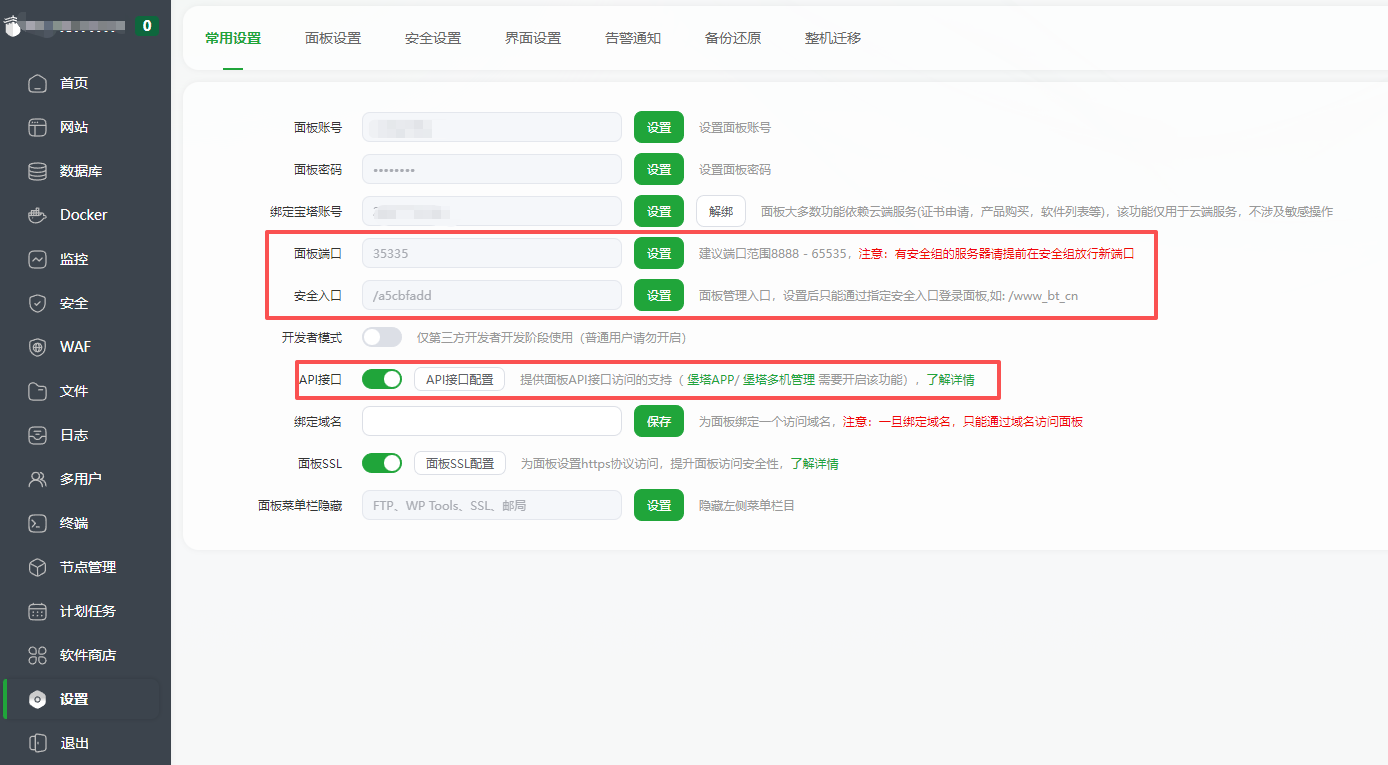
登录宝塔面板,进入「设置」->「常用设置」:

35335。/a5cbfadd。它需要放进 BT_PANEL_URL,但 API 请求会自动从站点根路径发起。推荐通过 npx 运行:
{
"mcpServers": {
"bt-panel": {
"command": "npx",
"args": ["-y", "bt-panel-mcp-server"],
"env": {
"BT_PANEL_URL": "https://服务器IP:面板端口/安全入口",
"BT_API_KEY": "你的API密钥",
"BT_MODE": "readonly"
}
}
}
}
本地源码运行时,把 args 改为本项目 dist/index.js 的绝对路径。配置文件位置因 Cursor、Claude Desktop、Windsurf、Cherry Studio、Cline 等客户端而不同,请使用各客户端的 MCP 设置入口。
重启 MCP 客户端后,先让 AI 执行:
列出宝塔面板的所有网站,并告诉我当前服务器 CPU、内存和磁盘使用情况。
成功后再按需把 BT_MODE 改为 full 并重启客户端。不要在不理解影响范围时直接要求 AI 删除、升级或重启服务。
| 变量 | 必填 | 默认值 | 说明 |
|---|---|---|---|
BT_PANEL_URL | 是 | - | 面板地址,例如 https://192.0.2.10:35335/a5cbfadd;支持端口和安全入口 |
BT_API_KEY | 是 | - | 宝塔 API 接口密钥;只放在 MCP 服务器环境变量中 |
BT_MODE | 否 | readonly | readonly 仅开放查询/目录工具;full 开放所有管理和官方 API 调用 |
BT_ALLOW_INSECURE_TLS | 否 | false | 仅在确认目标可信且无法配置有效证书时设为 true;生产环境应保持 TLS 校验开启 |
安全入口、API 密钥、密码、Token、证书私钥和数据库凭据都不应写入自然语言提示词、URL、浏览器代码或 Git 仓库。
例如让 AI 查找 Docker 容器、数据库或证书操作:
搜索宝塔官方 API 中与 Docker 容器列表有关的操作,列出可用 ID 和必填参数。
也可以直接调用 search_bt_api:
{ "query": "容器列表", "module": "docker", "include_parameters": false }
对要执行的操作先调用 get_bt_api_operation:
{ "operation": "database/GetDatabasesList" }
返回结果会包含请求方法、路径、固定 action、必填参数、类型和官方说明。不要根据猜测拼参数。
确认目的和参数后,在 BT_MODE=full 下调用 call_bt_api:
{
"operation": "database/GetDatabasesList",
"params": {
"p": 1,
"limit": 20,
"sid": 0
}
}
对于带密码、私钥、DNS API Key 或容器配置的操作,params 仍可能包含敏感数据;仅在用户已明确授权向其自己的宝塔面板发送这些值时执行。
1. 列出站点并确认目标名称
2. 读取最近 200 行 Nginx error 日志
3. 读取应用日志,比较同一时间段的异常
4. 查询系统负载、内存、磁盘和网络
5. 只在原因明确后修改配置;修改前先读取原文件并保留回滚内容
可直接对 AI 说:
排查 example.com 最近的 502:先看 Nginx 错误日志、再看应用日志和系统负载;只报告证据,不修改任何配置。
1. 用 manage_sites 创建站点和目录
2. 用 list_domains / manage_domains 核对域名绑定
3. 用 save_file 写入 index.html 或应用配置
4. 用 get_nginx_config 复核虚拟主机配置
5. 在公网或目标网络访问站点,确认 HTTP 状态、证书和内容
1. search_bt_api 找到准确的官方操作
2. get_bt_api_operation 读取参数、前置条件与影响范围
3. full 模式下 call_bt_api 执行
4. 再用对应查询操作验证最终状态、日志或任务结果
涉及删除、覆盖、重启、升级、清理 Binlog、证书替换、容器删除或数据库用户权限变更时,应先说明目标对象、影响范围和回滚方式,再执行。
readonly 不提供写入和官方 API 调用,但 read_file 仍能读取指定文件;不要读取无关的 .env、私钥或凭据文件。full 是权限开关,不是自动授权。执行破坏性操作前应取得针对具体目标的明确许可。call_bt_api 只允许调用内置官方目录中的操作,不接受任意 URL、任意 HTTP 方法或用户自定义 action。BT_ALLOW_INSECURE_TLS=true,此时应确保访问网络可信。提示 Missing required environment variables
检查 MCP 进程环境中是否同时有 BT_PANEL_URL 和 BT_API_KEY,修改后完全重启客户端。
请求超时、403 或 API 白名单错误
确认面板地址/端口正确,MCP 主机 IP 已加入 API 白名单,且防火墙、安全组允许访问面板端口。安全入口需要写入 BT_PANEL_URL。
HTTPS 连接报证书错误
优先为面板配置可信证书。只有在确认内网链路和目标身份可信时才设置 BT_ALLOW_INSECURE_TLS=true。
官方操作执行失败
先用 get_bt_api_operation 重查参数,再确认面板版本、对应插件、账户权限和 API 白名单。文档目录覆盖不保证旧版本面板或未安装插件支持该操作。
full 模式有什么风险
它可以修改站点、配置、文件、数据库、证书、容器和系统服务。对生产环境应保持备份、先读取现状、执行后独立验证,并保留回滚内容。
npm ci
npm run build
node dist/index.js
更新官方目录时,先获取 cnb.cool/btpanel/docs,再运行:
$env:BT_OFFICIAL_DOCS_DIR = 'D:\src\btpanel-docs'
$env:BT_OFFICIAL_DOCS_REVISION = (git -C $env:BT_OFFICIAL_DOCS_DIR rev-parse HEAD)
npm run generate:api-catalog
npm run build
生成后应检查操作数量、抽查 GET/POST 路由和必填参数,再在目标面板或测试面板验证重点插件接口。
@modelcontextprotocol/sdkMIT
Claim this server with your GitHub account to request manual ownership verification.
Link to the catalog listing for MCP server for safely operating BT Panel (宝塔面板) with readonly and full modes. from your README. This badge does not certify ownership, compatibility or security.
[](https://awesome-mcp.com/servers/bt-panel-mcp-server)Public repository statistics could not be verified. Check the configured source address; unavailable counts are not zero.
Separate sources, scopes and periods. Never combined or treated as installations, active users or security reviews.
No reviewed package or image identity; download statistics are not listed yet.
Alternative and complementary servers in the same category

A Model Context Protocol server built on Huawei Cloud services that enables AI assistants to operate Huawei Cloud resources within conversational workflows, supporting ECS, OBS, GaussDB, and other cloud products.

An MCP server that exposes the Coolify v4.3.1 REST API so AI clients can manage applications, databases, services, servers, deployments, and more.

A deprecated Model Context Protocol server for interacting with Kong Konnect APIs, enabling AI assistants to query and analyze Kong Gateway configurations, traffic, and analytics.