
Oleafly is a live collaborative LaTeX, Typst and Markdown editor for research that offers a local MCP server and an oleafly mcp stdio command so outside AI clients can use its project tools.
Repository stats unavailable
Productivity & Ops
Buddy is an Android app that offers its phone tools through a local MCP server to Claude Code, Codex, OpenCode, Antigravity, and Grok sessions.
Buddy Android local MCP server for phone tools is cataloged as an MCP server attributed to ghorbelhamdi. Buddy is an Android app that offers its phone tools through a local MCP server to Claude Code, Codex, OpenCode, Antigravity, and Grok sessions. It is categorized under productivity work. See the capability inspector for recorded interfaces and their independent review status; consult upstream documentation for the current interface.
Installation configuration is not reviewed. No executable setup is offered for this entry; inspect the source repository before proceeding.
Catalog license label: Apache-2.0. Check the source repository's current license and terms before using, modifying or distributing this software.
Capability definitions are not reviewed. Unreviewed imports are not exposed as trusted interfaces.
No reviewed records to display. This does not establish that upstream lacks this capability.
No reviewed records to display. This does not establish that upstream lacks this capability.
No reviewed records to display. This does not establish that upstream lacks this capability.
Email delivery is not connected. This page does not collect email addresses or create subscriptions.
Browse the registry for current listings instead.
Reviews for Buddy Android local MCP server for phone tools are not available yet
Review publishing and storage are not connected. This page does not collect or publish ratings or comments, including after sign-in.
Buddy is free; the agent uses your plan's limits, or nothing at all with OpenCode's free models or Antigravity's free plan.
No; it needs no PC, adb, or root.
No API key is needed; keys for other services can be added and used with Claude Code, Codex, or OpenCode.
README.md · 6b656bf49311 · Fetched 2026-11-13 05:37:32 UTC
Original upstream text, without AI rewriting. Scripts, forms and unsafe links are filtered for safety.
Showing the last retrieved documentation snapshot; check the source for current changes.






A floating chat bubble that lets Claude Code, Codex, OpenCode, Antigravity or Grok use your Android phone.
Type or say what you want, like "reply to Sam that I'm running late" or "add a Switch 2 to my Amazon cart". Buddy reads the screen, taps and types to get it done, and asks you before anything is sent, posted, bought or deleted.
It runs inside the app, on your own plan: Claude Code with your Claude plan, Codex with your ChatGPT plan, Google's Antigravity CLI with your Google account, xAI's Grok Build with your Google or X account, or OpenCode with its free models and no account at all. No PC, no adb, no root, and no API key needed (you can add keys for other services, such as DeepSeek or OpenRouter, and use them with Claude Code, Codex or OpenCode).
Download the APK · Website · Android 11+, 64-bit
https://github.com/user-attachments/assets/d07936fc-4788-4ab5-a105-31b3e9aeba4f
Codex turns on the lights while OpenCode's free model adds a Switch 2 to the Amazon cart (real recordings, waiting sped up)
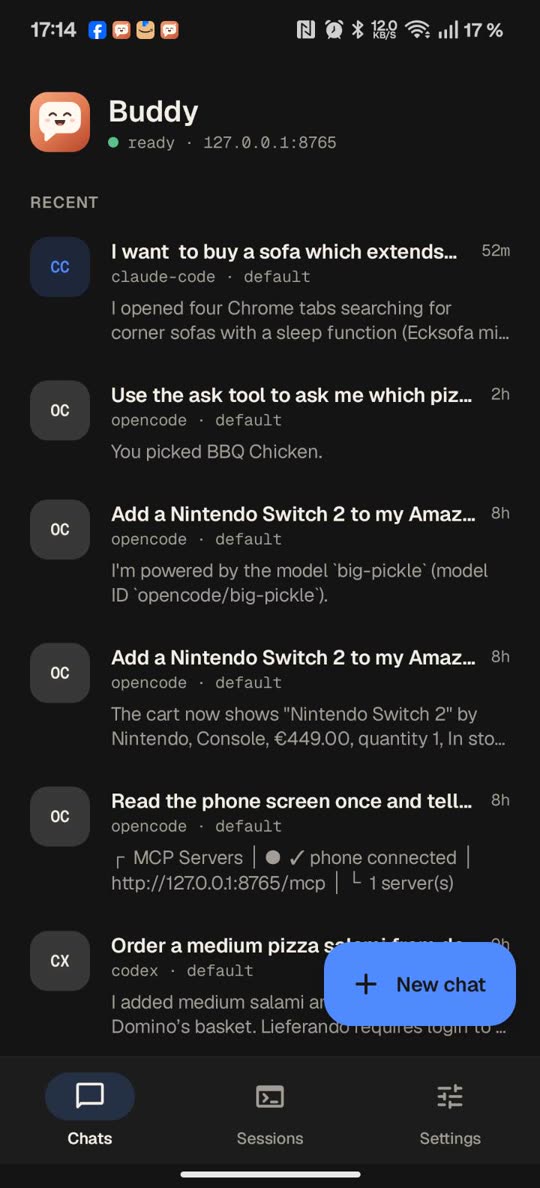 Chats with any agent | 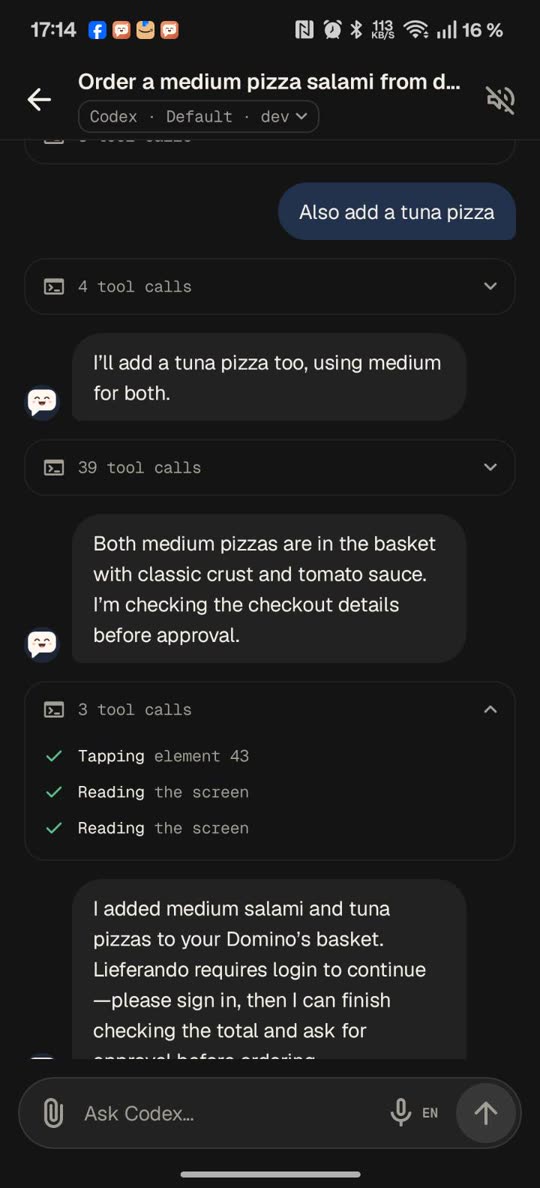 Tool calls fold into one line | 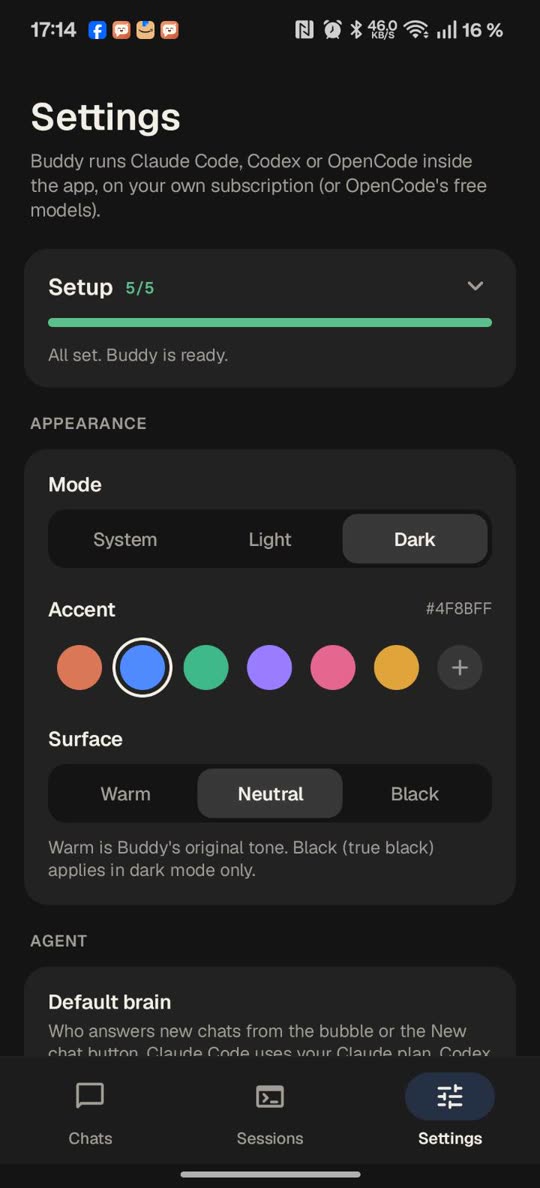 Setup guide and themes |
| Uses your apps | Messages, shopping, smart home, settings: anything on screen. Add instructions while it works. |
| Asks first | Approve, Deny or Change before anything is sent, posted, bought or deleted. |
| Shows you how | "Show me how to turn on dark mode": it points at each step and waits for your tap. |
| Acts on notifications | "When a customer asks on WhatsApp, reply with our opening hours", with your OK, a countdown you can stop, or right away. |
| Voice | Talk to it and have replies read aloud. |
| Background mode | The agent works in your apps on a screen of its own that you don't see, while you keep using your phone. Set up once with the phone's own Wireless debugging, no computer; watch it live in the chat. Optional: let it run adb shell commands on the phone, each one approved by you. |
| Background browser | Web pages in a browser inside Buddy, without taking over your screen, even while the phone is locked. Watch and use it live in the chat; it marks what you need to do (sign in, a captcha) and never types your passwords. |
| Builds apps | Turn on Linux tools in a chat and "make me a calculator app" builds a real APK on the phone; the GitHub version also installs it for you. |
| Phone tools anywhere | The same tools as a local MCP server for your own Claude Code, Codex, OpenCode, Antigravity or Grok sessions, or over stdio with mcp-bridge for clients that start servers as commands. |
Status: 2.3, early. It works well day to day but has rough edges. Tested most on a OnePlus 12 (Android 16). Buddy is an independent project, not made by or affiliated with Anthropic, OpenAI, Google or xAI.
Buddy app / bubble ──► Buddy's Linux (Alpine via proot): claude, codex, opencode, agy or grok
        ▲                                                     │
        └──────────── streamed replies ◄──────────────────────┤
                                                              ▼
Buddy accessibility service ◄──── MCP on 127.0.0.1 (phone tools)
Buddy is a normal Android app with an accessibility service, the kind of permission screen readers use. The agent runs in a small Linux inside the app and uses Buddy's phone tools (read the screen, tap, type, scroll, open apps) over a local MCP server. No adb or Wireless debugging, and it works without Wi-Fi.
You need a 64-bit Android 11+ phone, plus a Claude, ChatGPT or Google account for those agents (Grok: a Google or X account). OpenCode's free models need no account.
Install blocked or "Restricted setting"? See Setup in detail.
Run the model on your own computer and nothing goes to an AI company. Start Ollama, LM Studio or llama.cpp's server on a PC (for Ollama, set OLLAMA_HOST=0.0.0.0 and a context of at least 24k tokens, e.g. OLLAMA_CONTEXT_LENGTH=24576, since the phone tools take about 7k). In Buddy: Settings → API keys → Add API key → Ollama (or LM Studio, llama.cpp), put the PC's address on your Wi-Fi instead of localhost, leave the key empty, and use it in an OpenCode chat. Plain http:// works on your own network and over Tailscale.
What to expect, from tests on an RTX 2060 Super (8 GB): Qwen3 8B and Qwen3 4B handle simple one-step requests, like the battery level or the phone's status. Multi-step tasks on the screen are another matter: in a calculator test the 4B tapped the wrong buttons and then said it had worked. For real tasks, use a bigger model that's good at tool calling. The first answer of a chat takes longest, since the model first reads about 13k tokens of instructions and tool descriptions. A model running on the phone itself works too, but it's slow and makes the phone lag.
Install the new APK over the old one: chats, settings and sign-ins stay (don't uninstall first). You can also ask Buddy to "update yourself", or let Obtainium do it (how).
An accessibility service is powerful, so please read this.
127.0.0.1 with a random per-install token.More in Security in detail. Found a problem? Please open a private security advisory instead of a public issue.
What does it cost? Buddy is free. The agent uses your plan's limits, or nothing at all with OpenCode's free models (no account) or Antigravity's free plan (Google account).
iPhone? No. iOS doesn't let apps operate other apps.
Which phones? 64-bit Android 11 or newer. On some brands, set Buddy's battery use to Unrestricted.
Does it need a computer, adb or root? No.
In the press: ProPakistani, The Neutral, Trendshift (October 2026)
Bug reports, ideas and translation fixes are welcome: see CONTRIBUTING.md. If Buddy is useful to you, a ⭐ helps other people find it.
git clone --recurse-submodules https://github.com/ghorbelhamdi/buddy-android.git
./gradlew assembleRelease     # Android Studio / Gradle
./build.sh                    # on the phone in Termux, no Gradle → build/buddy-release.apk
proot and libandroid-shmem are git submodules in third_party/ (git submodule update --init in an existing clone). build.sh needs pkg install openjdk-17 aapt2 d8 apksigner python clang make and android.jar from platform-36 at ~/android-sdk/android-36/android.jar. It creates a signing key at ~/.buddy-keys/release.jks on first run: back it up, since updates must be signed with the same key. Gradle release signing reads BUDDY_KEYSTORE and BUDDY_KEYSTORE_PASSWORD (optionally BUDDY_KEY_ALIAS, BUDDY_KEY_PASSWORD). The version lives in BuildInfo.java, and the project layout is in CONTRIBUTING.md.
Apache-2.0. Geist fonts: SIL Open Font License. Icons: Material Symbols (Apache-2.0). Bundled proot (GPL-2.0), talloc (LGPL-3.0) and libandroid-shmem (BSD-3-Clause): see third_party for licences and source.
Claim this server with your GitHub account to request manual ownership verification.
Link to the catalog listing for Buddy Android local MCP server for phone tools from your README. This badge does not certify ownership, compatibility or security.
[](https://awesome-mcp.com/servers/buddy-android)GitHub API evidence checked 2026-11-13 07:11:05.332Z (UTC). Repository-level counts are shared by all components, not individual server installs. Open issues including pull requests: 7.
Separate sources, scopes and periods. Never combined or treated as installations, active users or security reviews.
No reviewed package or image identity; download statistics are not listed yet.
Alternative and complementary servers in the same category
Oleafly is a live collaborative LaTeX, Typst and Markdown editor for research that offers a local MCP server and an oleafly mcp stdio command so outside AI clients can use its project tools.

Tuqui is a hosted MCP server that connects Odoo with Claude and ChatGPT so users can ask about sales, stock, customers and overdue invoices in plain language.
An MCP server and skills that help AI assistants set up and troubleshoot a LeadSync account, including connecting Meta lead forms to Google Sheets, CRMs and email and finding out what happened to a lead.
