
A directory listing describing a cancellation-letter and mailing-address service. The configured public GitHub repository returned 404 during source verification.
Repository stats unavailable
Developer Tools
An MCP runtime and integration toolkit that exposes CesiumJS map control commands to MCP hosts such as Claude Desktop, Cursor, and Dify, with a protocol-agnostic bridge shared across browser agents, WebMCP, and function calling.
Cesium MCP runtime and toolkit is cataloged as an MCP server attributed to gaopengbin. An MCP runtime and integration toolkit that exposes CesiumJS map control commands to MCP hosts such as Claude Desktop, Cursor, and Dify, with a protocol-agnostic bridge shared across browser agents, WebMCP, and function calling. It is categorized under developer tools. See the capability inspector for recorded interfaces and their independent review status; consult upstream documentation for the current interface.
Installation configuration is not reviewed. No executable setup is offered for this entry; inspect the source repository before proceeding.
Catalog license label: MIT. Check the source repository's current license and terms before using, modifying or distributing this software.
Capability definitions are not reviewed. Unreviewed imports are not exposed as trusted interfaces.
No reviewed records to display. This does not establish that upstream lacks this capability.
No reviewed records to display. This does not establish that upstream lacks this capability.
No reviewed records to display. This does not establish that upstream lacks this capability.
Email delivery is not connected. This page does not collect email addresses or create subscriptions.
Browse the registry for current listings instead.
Reviews for Cesium MCP runtime and toolkit are not available yet
Review publishing and storage are not connected. This page does not collect or publish ratings or comments, including after sign-in.
It is intended for external MCP hosts such as Claude Desktop, Cursor, and Dify.
Ordinary MCP users need only the Runtime package, which includes the browser Bridge bundle and a built-in Viewer; the separate bridge package is only needed when integrating a custom page.
The version scheme follows the CesiumJS major.minor baseline, currently CesiumJS 1.147, with MCP patch iterations on top.
README.md · 6572b727ff86 · Fetched 2026-11-13 11:26:07 UTC
Original upstream text, without AI rewriting. Scripts, forms and unsafe links are filtered for safety.
Showing the last retrieved documentation snapshot; check the source for current changes.
Usage statistics default to on. Runtime/Dev print a startup notice; browser integrations show a console notice. Set
CESIUM_TELEMETRY_DISABLED=1(Node), orglobalThis.CESIUM_MCP_TELEMETRY_DISABLED=truebefore browser initialization. Fields, destination and opt-out.
[!IMPORTANT]
📣 作者正在求职 · 北京
AI 应用开发 · Agent 应用开发 · AI 产品全栈
我是高鹏彬,有约 6 年软件开发经验。如果你们团队正在招人,欢迎联系,也感谢帮忙内推或转发!
📄 查看简历 PDF · ✉️ 联系我
[!TIP] 📣 Built with Cesium MCP? / 谁在使用 Cesium MCP?
Share your project, screenshots, or feedback—work in progress is welcome! / 欢迎分享项目、截图和使用反馈,开发中的作品也欢迎!
A protocol-agnostic Cesium AI control runtime for MCP, WebMCP, function calling, and browser agents
cesium-mcp-bridge is the protocol-agnostic Cesium command executor. Separate adapters expose it to browser-only agents, WebMCP browser agents, function calling, or MCP — your choice.
Four integration paths: Browser Agent (simplest, zero backend) · WebMCP (page-local browser tools) · function calling (embed in your web app) · MCP runtime (Claude Desktop / Cursor / Dify)
The local Runtime is only required for external MCP hosts. Browser Agent, WebMCP, and function-calling integrations execute the same commands directly in the web application.
Try it now — open the live browser demo, no install, no signup.
Website · 中文 · Getting Started · API Reference






Install the hosted map plugin from this repository's Cesium Map Community source:
codex plugin marketplace add gaopengbin/cesium-mcp --ref main
codex plugin add cesium-map@cesium-community
Restart Codex and ask “Open a map of Manhattan.” Uses native host chat, with no local map server or separate model API key. Requires a compatible MCP Apps host. This is a community beta, separate from the OpenAI public directory.
Installation and compatibility · ZIP download · Product website
Select a scene in the map, click an object and choose Ask in Codex to continue with its map context. The host controls chat placement and map expansion.
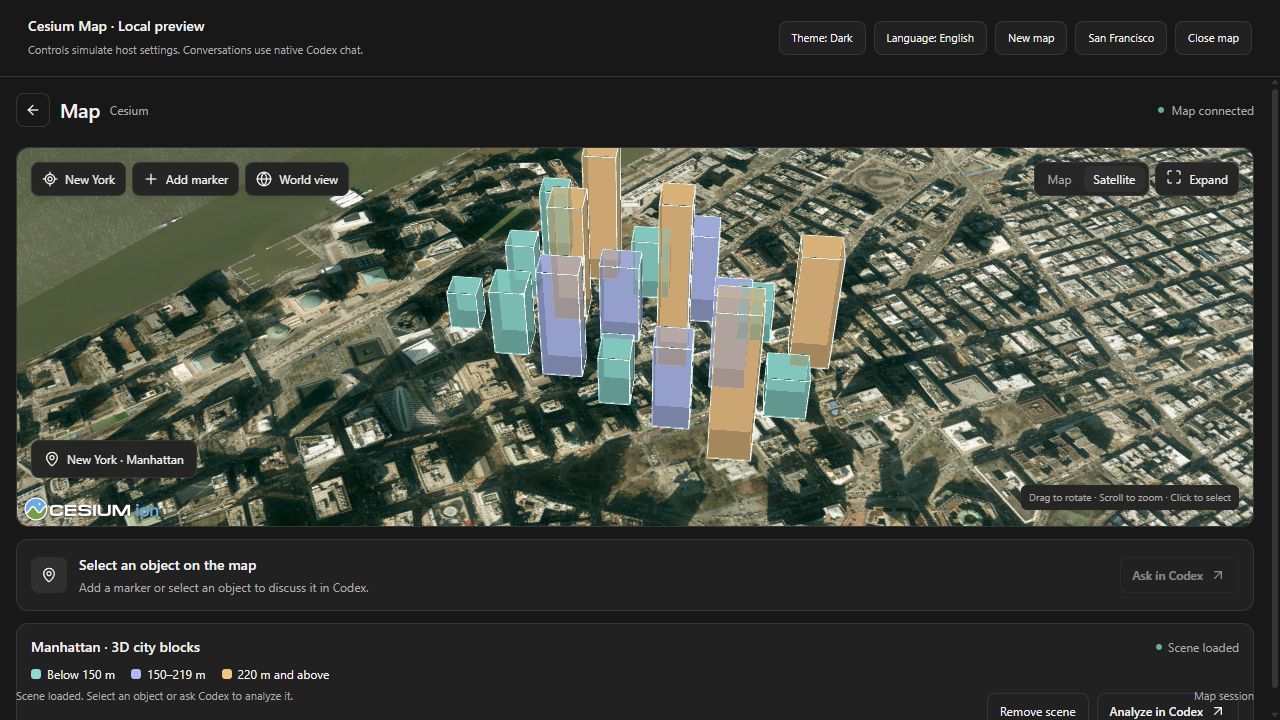
Actual running screenshot: the development preview is connected to the hosted HTTPS MCP service. The native conversation UI is provided by Codex; it is not pictured here.
| San Francisco · City activity | New York · 3D city blocks | Los Angeles · Hotspots |
|---|---|---|
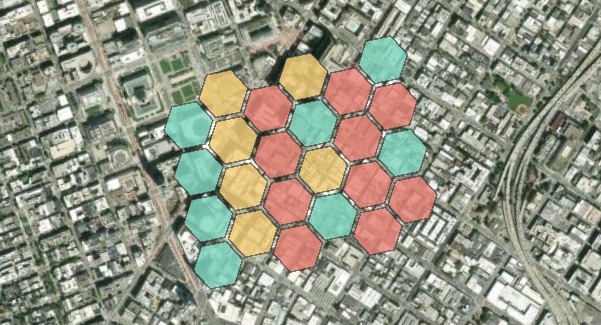 | 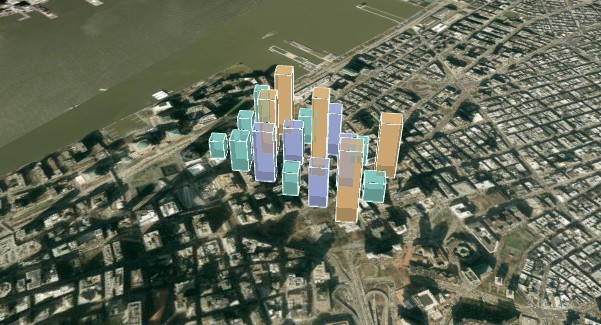 | 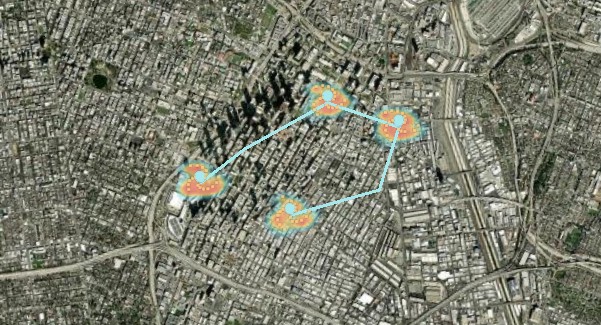 |
| Inspect feature values and change classification colors | Select buildings, edit extrusion heights and read back properties | Combine a heatmap, markers and connecting routes |
These covers come from rendered map scenes. Buildings, activity values and heatmap points are demonstration data, not surveyed heights or official statistics. Basemap imagery: Esri and its imagery contributors.
https://github.com/user-attachments/assets/8a40565a-fcdd-47bf-ae67-bc870611c908
| Module | Role | Status | Links |
|---|---|---|---|
| cesium-mcp-contracts | Transport-neutral names, descriptions, and JSON Schemas for browser tools | New shared layer | source |
| cesium-mcp-bridge | Protocol- and transport-free Cesium command executor (60+ commands) | Mainline, actively iterated |  · source |
| cesium-mcp-webmcp | One-package Viewer integration plus the native document.modelContext adapter | Browser integration | source |
| examples/webmcp-integration | Focused npm + Vite integration without a chat UI or MCP server | Developer example | example |
| examples/browser-agent | Browser-only AI agent with automatic WebMCP exposure | Recommended | example · live demo |
| cesium-mcp-runtime | MCP server (stdio + HTTP) | Stable MCP SDK v2 |  · source |
| cesium-mcp-dev | CesiumJS API knowledge base for coding assistants | Maintained |  · source |
Which one? Personal project or quick try → browser-agent. Let a compatible browser agent discover page-local Cesium tools → WebMCP. Existing web app embedding an AI assistant → bridge + your own function calling. Calling from Claude Desktop / Cursor / Dify → MCP runtime.
flowchart LR
  subgraph clients ["AI Drivers (pick one)"]
    BA["Browser Agent\n(in the same page)"]
    WM["WebMCP Agent\n(browser-provided)"]
    FC["Your web app\nfunction calling"]
    MCP["Claude / Cursor / Dify\nvia MCP runtime"]
  end

  CONTRACTS["cesium-mcp-contracts\ntool definitions"]
  WEBMCP["cesium-mcp-webmcp\nnative adapter"]

  subgraph core ["cesium-mcp-bridge (browser)"]
    B["60+ tools\nprotocol-agnostic dispatcher"]
    C["CesiumJS Viewer"]
  end

  CONTRACTS -.-> BA
  CONTRACTS -.-> WEBMCP
  BA -- "in-page call" --> B
  WM -- "document.modelContext" --> WEBMCP
  WEBMCP --> B
  FC -- "in-page call" --> B
  MCP -- "WebSocket / JSON-RPC" --> B
  B --> C

  style clients fill:#1e293b,stroke:#528bff,color:#e2e8f0
  style core fill:#1e293b,stroke:#12B76A,color:#e2e8f0
The bridge remains the execution core, while contracts and protocol adapters stay separate. Pick whichever driver matches your scenario — they all reach the same Cesium command layer. On WebMCP-capable browsers, cesium-mcp-webmcp can expose 61 browser-safe commands in 12 selectable toolsets through document.modelContext without adding an MCP transport or backend server.
CesiumGS's newer AI work is split between cesiumjs-ai-starter-app, a deployable application template, and cesiumjs-skills, development-time guidance for coding agents. The earlier cesium-ai-integrations repository contains the first-generation experiments and community contributions that helped explore this space.
cesium-mcp is an independent runtime and integration toolkit, not a continuation of the earlier WebSocket-only reference architecture. Its reusable Bridge and shared contracts work unchanged across browser-only function calling, native WebMCP, standard MCP over stdio/HTTP, and embedded desktop shells. A local WebSocket bridge is used only when an external MCP host needs to reach a live browser Viewer; it is not required for the hosted demo or page-local integrations.
The project author was an early contributor to CesiumGS/cesium-ai-integrations, contributing the Imagery server, Terrain server, and unified MCP Gateway. Those experiments informed this project's multi-protocol architecture, while the implementation, release lifecycle, and roadmap remain independent.
Open an interactive Cesium map inside a compatible MCP Apps host with openCesiumMap. The panel uses existing MCP tools, publishes camera/layer/selection context, and can send a selected object to the conversation. OpenAI global/thread entrypoint metadata is included; availability depends on the host.
Try the local preview with npm run app:preview -w packages/cesium-mcp-runtime after npm ci and npm run build, then open http://127.0.0.1:19311/. See the MCP Apps guide for host configuration and verification boundaries.
Open the live demo and ask—the hosted model is ready without a browser API key:
"Fly to the Eiffel Tower and drop a red marker"
Fork the examples/browser-agent folder to deploy your own.
The browser-agent example automatically registers all 61 browser-safe page tools plus 3 page-local resource tools when document.modelContext is available. Its built-in chat uses automatic toolset routing while keeping resource handles available for large GeoJSON/CZML inputs, and still offers explicit core, single-toolset, and all-tools modes:
npm run build -w packages/cesium-mcp-bridge
npm run build -w packages/cesium-mcp-webmcp
npx serve . -l 4173
Open http://localhost:4173/examples/browser-agent/, click Start, then inspect or execute the tools in DevTools → Application → WebMCP. Enable #enable-webmcp-testing and #devtools-webmcp-support in chrome://flags for local testing.
Application developers install the adapter separately. End users only open the integrated website; they do not install npm packages or run an MCP server.
npm install cesium-mcp-webmcp
import { registerCesiumViewerWebMcp } from 'cesium-mcp-webmcp/viewer'

const registration = await registerCesiumViewerWebMcp(viewer, {
  toolsets: 'all',
  excludeTools: ['geocode'], // add your own browser geocoder to expose this tool
})

// Later, if the page is unmounted:
registration.unregister()
See the WebMCP adapter API for custom integrations. For a complete npm + Vite application, start from the WebMCP integration example.
npm install cesium-mcp-bridge
import { CesiumBridge } from 'cesium-mcp-bridge';

const bridge = new CesiumBridge(viewer);
// Then: send the bridge's tool schema to any LLM that supports function/tool calling,
// route the model's tool calls to bridge.execute(name, params).
See examples/browser-agent/index.html for a complete loop with OpenAI-compatible APIs.
Ordinary MCP users need only the Runtime package. It includes the browser Bridge bundle and a built-in Viewer at http://localhost:9100/; install cesium-mcp-bridge separately only when integrating a custom page.
# Stable channel — npm latest, MCP SDK v2
npx -y cesium-mcp-runtime

# HTTP mode
npx -y cesium-mcp-runtime --transport http --port 3000
The stable release serves existing MCP 2025-11-25 clients and the new
2026-07-28 protocol from the same stdio/HTTP entry. It uses the stable
TypeScript SDK v2 and passes the official server-stateless conformance
scenario (28/28).
MCP client config:
{
  "mcpServers": {
    "cesium": {
      "command": "npx",
      "args": ["-y", "cesium-mcp-runtime"]
    }
  }
}
Tools are organized into 12 toolsets. Default mode enables 4 core toolsets (30 tools). Set CESIUM_TOOLSETS=all for everything, or let the AI discover and activate toolsets dynamically at runtime.
Canonical contracts: Tool descriptions default to English; set
CESIUM_LOCALE=zh-CNfor Chinese. Titles, behavior annotations, localized descriptions, defaults, input validation, MCP output schemas, and structured results all come from the shared JSON Schemas incesium-mcp-contracts. Textcontentremains available for older clients.
| Toolset | Tools |
|---|---|
| view (default) | flyTo, setView, getView, zoomToExtent, saveViewpoint, loadViewpoint, listViewpoints, exportScene |
| entity (default) | addMarker, addLabel, addModel, addPolygon, addPolyline, updateEntity, removeEntity, batchAddEntities, queryEntities, getEntityProperties |
| layer (default) | addGeoJsonLayer, addGeoJsonPrimitive, listLayers, removeLayer, clearAll, setLayerVisibility, updateLayerStyle, getLayerSchema, setBasemap |
| interaction (default) | screenshot, highlight, measure |
| camera | lookAtTransform, startOrbit, stopOrbit, setCameraOptions |
| entity-ext | addBillboard, addBox, addCorridor, addCylinder, addEllipse, addRectangle, addWall |
| animation | createAnimation, controlAnimation, removeAnimation, listAnimations, updateAnimationPath, trackEntity, controlClock, setGlobeLighting |
| tiles | load3dTiles, load3dGaussianSplat, loadTerrain, loadImageryService, loadCzml, loadKml, setEdgeDisplayMode |
| trajectory | playTrajectory |
| heatmap | addHeatmap |
| scene | setSceneOptions, setPostProcess, setIonToken (Runtime only) |
| geolocation | geocode |
See examples/minimal/ for a complete working demo.
git clone https://github.com/gaopengbin/cesium-mcp.git
cd cesium-mcp
npm install
npm run build
npm test
npm run test:contracts
npm run test:schema-compat
npm run test:routing
npm run test:model-tools
npm run eval:model-tools
npm run test:e2e:packed
test:contracts is the focused parity gate for MCP Runtime metadata, WebMCP registration, Function Calling definitions, provider Schema portability, and the 60-tool Bridge Executor Registry. Run test:schema-compat directly for actionable OpenAI, Azure, VS Code MCP, and WebMCP Schema diagnostics.
test:routing evaluates bilingual and multi-intent Browser Agent requests across all 12 toolsets, checking required-tool recall and the 20-tool automatic-routing budget.
test:model-tools verifies the provider-neutral multi-turn scoring harness. eval:model-tools performs a no-network routing preflight by default; add an explicit provider and --live to measure real tool choice, argument validity, and required-tool completion. See Model Tool Evaluation.
test:e2e:packed builds npm tarballs, installs them in a clean temporary project, opens the real Cesium Viewer, and verifies a Runtime-WebSocket-Bridge command round trip.
Version format: {CesiumMajor}.{CesiumMinor}.{MCPPatch}
| Segment | Meaning | Example |
|---|---|---|
1.147 | Runtime/Bridge/Dev major.minor follows the verified CesiumJS ~1.147.0 baseline | 1.147.1 targets CesiumJS 1.147 |
.x | MCP patch — independent iterations for new tools, bug fixes, docs | 1.147.1 → 1.147.2 |
Official CesiumJS releases are reviewed before the compatibility baseline is bumped; the project does not automatically claim support for a newer release without Bridge verification.
This project recognizes LINUX DO as a community for open-source exchange, technical discussion, and developer feedback.

Claim this server with your GitHub account to request manual ownership verification.
Link to the catalog listing for Cesium MCP runtime and toolkit from your README. This badge does not certify ownership, compatibility or security.
[](https://awesome-mcp.com/servers/cesium-mcp)Public repository statistics could not be verified. Check the configured source address; unavailable counts are not zero.
Separate sources, scopes and periods. Never combined or treated as installations, active users or security reviews.
No reviewed package or image identity; download statistics are not listed yet.
Alternative and complementary servers in the same category
A directory listing describing a cancellation-letter and mailing-address service. The configured public GitHub repository returned 404 during source verification.

A hosted MCP service for browsing and searching through Singapore mobile-network proxies.

A directory listing describing a Markdown-to-PDF service. The configured public GitHub repository returned 404 during source verification.