An MCP server implementation providing access to college football statistics sourced from the College Football Data API V2 within Claude Desktop.



Overview
This Model Context Protocol (MCP) server enables AI assistants and applications to:
- Query comprehensive college football statistics and data
- Access game results, team records, and player statistics
- Analyze play-by-play data and drive summaries
- View rankings and win probability metrics
- Compare team performances and generate insights
Users can run queries using natural language.
Sample output
Q. What was the largest upset among FCS games during the 2014 season?
A. Let me help find the biggest FCS upset from 2014. I'll look through the games data, focusing on games between FCS teams where there was a significant gap in team strength and an unexpected outcome.
The data suggests there were several notable upsets in FCS during 2014, but one that stands out was Eastern Washington defeating Washington 52-59 on September 6th, 2014. This was particularly significant because:
- Washington was an FBS team from the Pac-12 conference
- The game was played at Washington's home stadium (Husky Stadium)
- Eastern Washington's win probability was only 1.4% according to the post-game stats
- The 59 points Eastern Washington scored was the most ever by an FCS team against a Pac-12 opponent
- Washington had been favored by multiple scores going into the game
Other notable FCS upsets from that season included:
- North Dakota State defeating Iowa State 34-14
- Bethune-Cookman defeating FIU 14-12
- Northern Iowa nearly upsetting Iowa (lost 31-23)
However, Eastern Washington over Washington appears to be the largest upset of the 2014 FCS season when considering:
- The difference in divisions (FCS vs FBS)
- The caliber of the FBS opponent (Power 5 conference)
- The scoring margin and offensive performance by the underdog
- The historical significance as one of the highest-scoring FCS wins over a Power 5 team
- The fact it happened on the road in a hostile environment
Prerequisites
Installation
Installing via Smithery
To install College Football Data Server for Claude Desktop automatically via Smithery:
npx -y @smithery/cli install cfbd --client claude
- Clone this repository:
git clone https://github.com/yourusername/cfbd-mcp-server
cd cfbd-mcp-server
- Create and activate a virtual environment:
uv venv
source .venv/bin/activate  # On Windows: .venv\Scripts\activate
- Install dependencies:
uv pip install -e .
- Create a
.env file in the project root and add your API key:
CFB_API_KEY=your_api_key_here
Manual Installation
- Clone this repository:
git clone https://github.com/yourusername/cfbd-mcp-server
cd cfbd-mcp-server
- Create and activate a virtual environment:
uv venv
source .venv/bin/activate  # On Windows: .venv\Scripts\activate
- Install dependencies:
uv pip install -e .
- Create a
.env file in the project root and add your API key:
CFB_API_KEY=your_api_key_here
Usage
Running the Server
Start the server:
uv run cfbd-mcp-server
Connecting with Claude Desktop
-
Open your Claude Desktop configuration at:
- macOS:
~/Library/Application Support/Claude/claude_desktop_config.json
- Windows:
%APPDATA%\Claude\claude_desktop_config.json
-
Add the server configuration:
{
    "mcpServers": {
        "cfbd-mcp-server": {
            "command": "uv",
            "args": [
                "--directory",
                "/full/path/to/cfbd-mcp-server",
                "run",
                "cfbd-mcp-server"
            ],
            "env": {
                "CFB_API_KEY": "xxx",
                "PATH": "/full/path/to/python"
            }
        }
    }
}
- Close then restart Claude Desktop
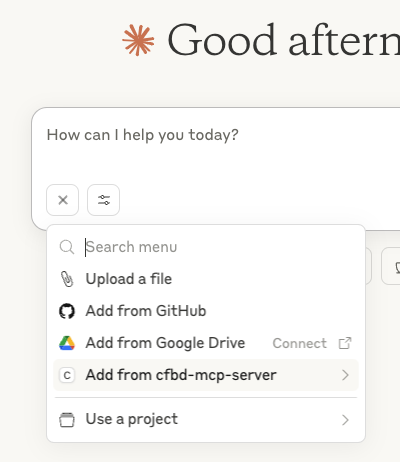
Once you restart you can confirm the installation by clicking on the plus sign in the lower left corner of the text box. If successful you'll see "Add from cfbd-mcp-server" as one of the menu options. Here's an example screenshot.
Updating after install
- Download the updated files
cd cfbd-mcp-server
git pull
- Uninstall the existing package:
uv pip uninstall cfbd-mcp-server
- Delete existing build artifacts and metadata
For Windows:
rmdir /s /q build dist
del /s /q *.egg-info
For macOS:
rm -rf build dist *.egg-info
- Install the revised package and its dependencies
uv pip install -e .
uv sync --dev --all-extras
uv run cfbd-mcp-server
- Close and restart Claude Desktop
Features
Resources
Access schema documentation for all endpoints:
schema://games - Game information and scoresschema://records - Team season recordsschema://games/teams - Detailed team game dataschema://plays - Play-by-play informationschema://drives - Drive summaries and resultsschema://play/stats - Individual play statisticsschema://rankings - Team rankings across pollsschema://metrics/wp/pregame - Pregame win probabilitiesschema://game/box/advanced - Advanced box score statistics
Query endpoints directly:
get-games - Retrieve game dataget-records - Get team recordsget-games-teams - Access team game statisticsget-plays - Query play-by-play dataget-drives - Analyze drive informationget-play-stats - View play statisticsget-rankings - Check team rankingsget-pregame-win-probability - See win probabilitiesget-advanced-box-score - Access detailed game statistics and analytics
Prompts
Pre-built analysis templates:
analyze-game - Get detailed analysis of a specific gameanalyze-team - Comprehensive single team analysisanalyze-trends - Analyze trends over a seasoncompare-teams - Compare performance of two teamsanalyze-rivalry - Analyze historical rivalry matchups
API Limits
The College Football Data API is free to use but has rate limiting:
- Free tier: Limited requests per minute
- CFBD Patreon subscribers get higher rate limits
- Use efficient querying patterns to avoid hitting limits
- Handle rate limit errors gracefully
Development
Project Structure
cfbd-mcp-server/
├── README.md
├── pyproject.toml
└── src/
    └── cfbd_mcp_server/
        ├── .env
        ├── __init__.py
        ├── cfbd_schema.py
        ├── schema_helpers.py
        └── server.py
Setting Up for Development
- Clone the repository
- Install development dependencies:
uv pip install -e ".[dev]"
- Run tests:
pytest
Contributing
- Fork the repository
- Create a feature branch
- Commit your changes
- Push to your fork
- Submit a pull request
Troubleshooting
Common Issues
-
API Key Errors
- Verify your API key is correctly set in both the
.env and claude_desktop_config.json files
- Check the key is valid at collegefootballdata.com
-
Rate Limiting
- Space out requests when possible
- Consider Patreon subscription for higher limits
- Implement caching for frequently accessed data
-
Connection Issues
- Verify internet connectivity
- Check API status at collegefootballdata.com
- Ensure proper error handling in your code
Getting Help
License
This project is licensed under the MIT License - see the LICENSE file for details.
Acknowledgments



