
A directory listing describing a cancellation-letter and mailing-address service. The configured public GitHub repository returned 404 during source verification.
Repository stats unavailable
Developer Tools
A Model Context Protocol server that lets AI coding agents publish HTML content as live, shareable web pages with instant public URLs.
ChatPipe MCP Server is cataloged as an MCP server attributed to darktw. A Model Context Protocol server that lets AI coding agents publish HTML content as live, shareable web pages with instant public URLs. It is categorized under developer tools. See the capability inspector for recorded interfaces and their independent review status; consult upstream documentation for the current interface.
Installation configuration is not reviewed. No executable setup is offered for this entry; inspect the source repository before proceeding.
Catalog license label: MIT. Check the source repository's current license and terms before using, modifying or distributing this software.
Capability definitions are not reviewed. Unreviewed imports are not exposed as trusted interfaces.
No reviewed records to display. This does not establish that upstream lacks this capability.
No reviewed records to display. This does not establish that upstream lacks this capability.
No reviewed records to display. This does not establish that upstream lacks this capability.
Email delivery is not connected. This page does not collect email addresses or create subscriptions.
Browse the registry for current listings instead.
Reviews for ChatPipe MCP Server are not available yet
Review publishing and storage are not connected. This page does not collect or publish ratings or comments, including after sign-in.
Yes, the update_page tool updates the HTML content of an existing page while the URL remains the same.
Yes, pages can be published as public or password-protected, and password-protected pages are encrypted at rest.
README.md · 723cf3243f44 · Fetched 2026-11-13 11:01:16 UTC
Original upstream text, without AI rewriting. Scripts, forms and unsafe links are filtered for safety.
Showing the last retrieved documentation snapshot; check the source for current changes.

Publish live web pages from your AI coding agent — instant shareable URLs from your terminal.

Website · Quick Start · Tools · Pricing
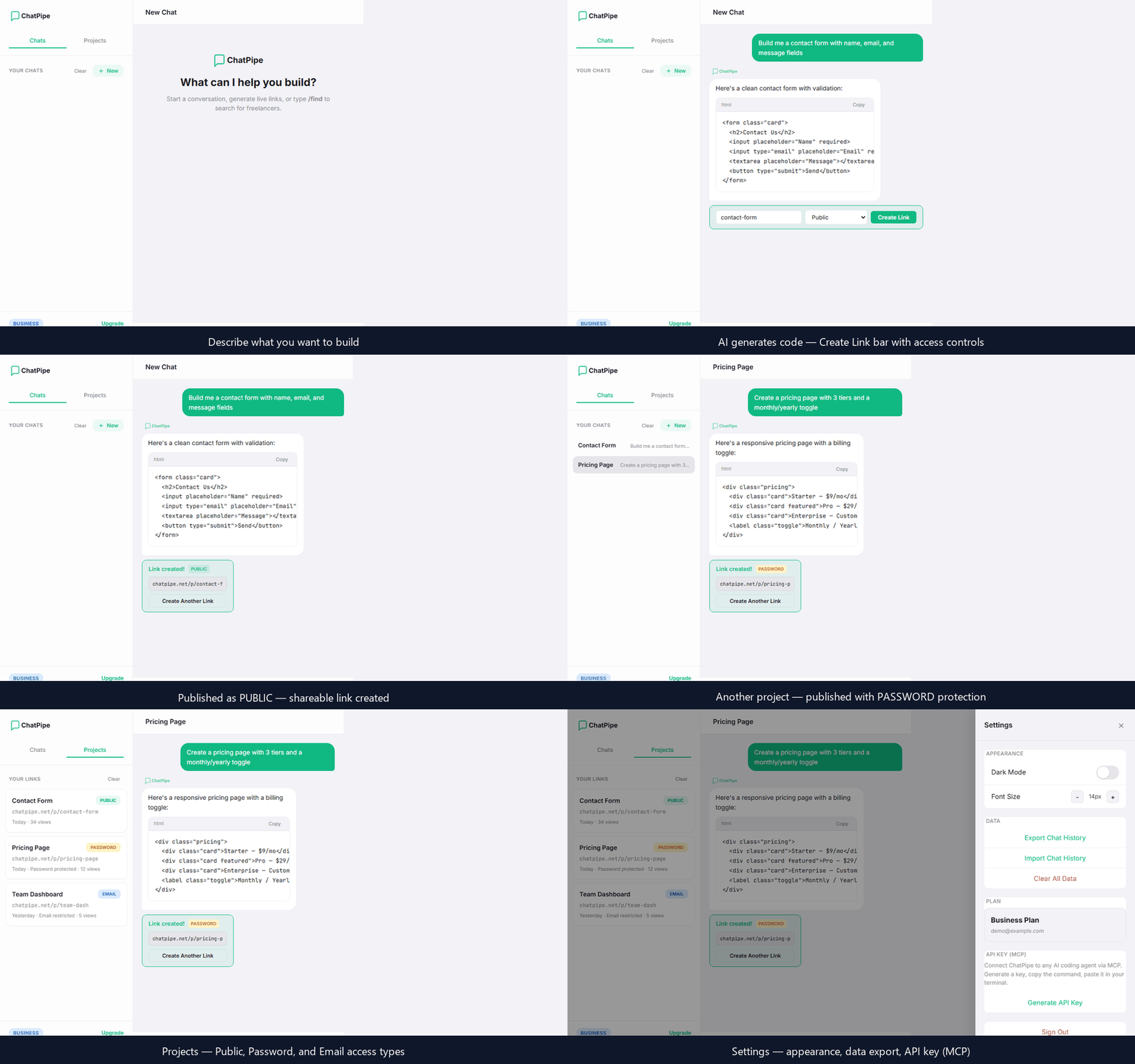
ChatPipe MCP is a Model Context Protocol server that lets AI coding agents publish HTML content as live, shareable web pages. Describe what you need — a dashboard, a landing page, a form — and get a public URL in seconds.
No deployment pipelines. No hosting configuration. No domain setup. Just describe and publish.
Sign up at chatpipe.net, then navigate to Settings → API Key (MCP) → Generate API Key.
Note: Copy the key immediately after generation. It will not be shown again. You can regenerate a new key at any time, which revokes the previous one.
Run this in your terminal — replace YOUR_API_KEY with the key from step 1:
claude mcp add chatpipe --transport url https://api.chatpipe.net/mcp --header "Authorization: Bearer YOUR_API_KEY"
That's it. Restart your AI coding agent and ChatPipe tools are ready.
If you prefer to configure manually, add this to your MCP client config file:
{
  "mcpServers": {
    "chatpipe": {
      "type": "url",
      "url": "https://api.chatpipe.net/mcp",
      "headers": {
        "Authorization": "Bearer YOUR_API_KEY"
      }
    }
  }
}
Replace YOUR_API_KEY with the key generated in step 1.
Try these prompts in your AI coding agent:
"Create a landing page for my project and publish it"
"Build a dashboard showing monthly revenue and publish it as a live page"
"Make a contact form and give me a shareable link"
publish_pagePublish HTML content as a live, shareable page. Returns a public URL.
| Parameter | Type | Required | Description |
|---|---|---|---|
name | string | Yes | Page title (e.g., "Monthly Dashboard") |
slug | string | Yes | URL slug, lowercase with hyphens (e.g., "monthly-dashboard") |
html | string | Yes | Complete HTML content to publish |
access | string | No | "public" (default) or "password" |
password | string | No | Required when access is "password" |
list_projectsList all published pages with their URLs, names, and access levels. Takes no parameters.
update_pageUpdate the HTML content of an existing page. The URL remains the same.
| Parameter | Type | Required | Description |
|---|---|---|---|
slug | string | Yes | Slug of the page to update |
html | string | Yes | New HTML content |
name | string | No | New page title |
delete_pagePermanently remove a published page.
| Parameter | Type | Required | Description |
|---|---|---|---|
slug | string | Yes | Slug of the page to delete |
| Who | What |
|---|---|
| Consultants | Build client dashboards and share a live URL in your next message |
| Developers | Publish project pages, docs, or demos without a deploy pipeline |
| Sales teams | Generate custom proposals as live pages for each prospect |
| Marketers | Spin up landing pages on the fly and test them immediately |
| Freelancers | Share deliverables as live pages instead of static files |
| Free | Pro ($19/mo) | Business ($49/mo) | |
|---|---|---|---|
| Projects | 5 | Unlimited | Unlimited |
| Link expiry | 30 days | Never | Never |
| Password protection | — | Yes | Yes |
| Email-restricted access | — | — | Yes |
| Team seats | — | — | 5 |
Manage your plan at chatpipe.net.
Found a bug or have a feature request? Open an issue.
© 2026 Altazi Labs, Inc. All rights reserved. · contact@altazilabs.com
Claim this server with your GitHub account to request manual ownership verification.
Link to the catalog listing for ChatPipe MCP Server from your README. This badge does not certify ownership, compatibility or security.
[](https://awesome-mcp.com/servers/chatpipe-mcp)Public repository statistics could not be verified. Check the configured source address; unavailable counts are not zero.
Separate sources, scopes and periods. Never combined or treated as installations, active users or security reviews.
No reviewed package or image identity; download statistics are not listed yet.
Alternative and complementary servers in the same category
A directory listing describing a cancellation-letter and mailing-address service. The configured public GitHub repository returned 404 during source verification.

A hosted MCP service for browsing and searching through Singapore mobile-network proxies.

A directory listing describing a Markdown-to-PDF service. The configured public GitHub repository returned 404 during source verification.