
A Rust CAD application with an MCP server for creating, inspecting and rendering drawings, either headlessly or through a connection to the desktop app.
8K
Media & Design
A locally run Go Model Context Protocol server that forwards MCP tool and resource requests to the Clarifai API for image generation, inference, uploads and search.
Unofficial local MCP server bridging MCP clients to the Clarifai API is cataloged as an MCP server attributed to tot-ra. A locally run Go Model Context Protocol server that forwards MCP tool and resource requests to the Clarifai API for image generation, inference, uploads and search. It is categorized under media design. See the capability inspector for recorded interfaces and their independent review status; consult upstream documentation for the current interface.
Installation configuration is not reviewed. No executable setup is offered for this entry; inspect the source repository before proceeding.
Catalog license label: Not specified. Check the source repository's current license and terms before using, modifying or distributing this software.
Capability definitions are not reviewed. Unreviewed imports are not exposed as trusted interfaces.
No reviewed records to display. This does not establish that upstream lacks this capability.
No reviewed records to display. This does not establish that upstream lacks this capability.
No reviewed records to display. This does not establish that upstream lacks this capability.
Email delivery is not connected. This page does not collect email addresses or create subscriptions.
Browse the registry for current listings instead.
Reviews for Unofficial local MCP server bridging MCP clients to the Clarifai API are not available yet
Review publishing and storage are not connected. This page does not collect or publish ratings or comments, including after sign-in.
Authentication relies on a Personal Access Token supplied via the --pat command-line flag, which is added to the metadata of outgoing gRPC requests to the Clarifai API.
Resources are read-only; actions like creating, updating or deleting entities are handled through MCP Tools instead.
README.md · 285a139079a6 · Fetched 2026-11-13 11:20:36 UTC
Original upstream text, without AI rewriting. Scripts, forms and unsafe links are filtered for safety.
Showing the last retrieved documentation snapshot; check the source for current changes.
This hackday project provides a Model Context Protocol (MCP) server that acts as a bridge to the Clarifai API and is meant to run on user's machine (so locally). It allows MCP clients (like IDE extensions) to interact with Clarifai, such as image generation and inference, using standard MCP requests without overloading LLM context with heavy binary results.
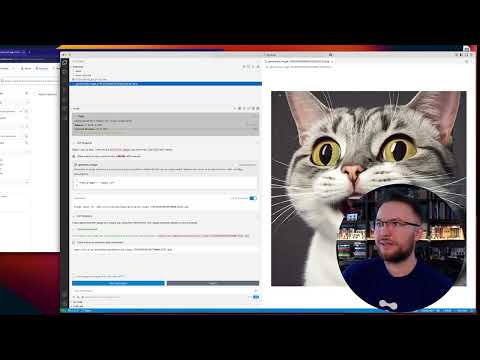
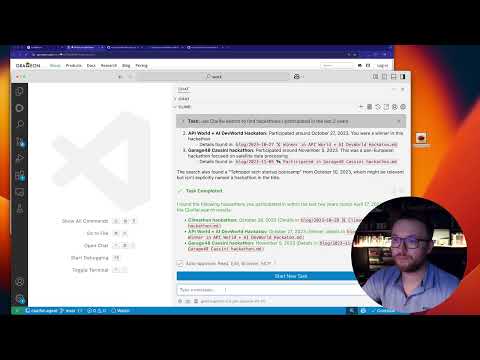
The server is typically run automatically by the MCP client framework (e.g., via settings in VS Code). The configuration usually involves specifying the path to the built binary and any required command-line arguments, such as the Clarifai PAT. You will need Go (version 1.23 or later)
cd ~
git clone git@github.com:tot-ra/clarifai-mcp-server-local.git
cd clarifai-mcp-server-local
go mod tidy
Build the Binary:
Use the go build command, targeting the main package within the cmd/server directory. Specify the output path and target architecture if needed (example for macOS ARM):
# For macOS ARM
make build

# For Linux AMD64
# GOOS=linux GOARCH=amd64 go build -o ./mcp_binary ./...

# For Windows AMD64
# GOOS=windows GOARCH=amd64 go build -o ./mcp_binary.exe ./...
This will create an executable file named mcp_binary (or mcp_binary.exe on Windows) in the project's root directory.
Example MCP settings entry (cline_mcp_settings.json), for example for Cline:
{
  "mcpServers": {
    "clarifai": {
      "command": "~/clarifai-mcp-server-local/mcp_binary",
      "args": [
        "--pat", "YOUR_CLARIFAI_PAT",
        "--output-path", "~/Desktop/",
        "--default-user-id", "your_user_id",
        "--default-app-id", "your_app_id",
      ],
    }
  }
}
Replace YOUR_CLARIFAI_PAT with your Clarifai PAT token.
Unit tests have been added for several packages. To run all tests, bypass the cache, and see verbose output (including individual test names and status):
cd clarifai-mcp-server-local
go test -v -count=1 ./...
The server currently exposes the following MCP capabilities:
upload_file: Uploads a local file to Clarifai as an input.
filepath (required, absolute path to the local file), user_id, app_id (optional).generate_image: Generates an image based on a text prompt using a specified or default Clarifai text-to-image model.
text_prompt (required), model_id, user_id, app_id (optional).--output-path).For example, given a user prompt, AI agent automatically can call image generation and places results on Desktop
Generate 3 cat images with Clarifai



clarifai_image_by_path: Performs inference on a local image file using a specified or default Clarifai model.
filepath (required, path to the local image), model_id, user_id, app_id (optional).Please clarifai images in my_source_folder/images/
clarifai_image_by_url: Performs inference on an image URL using a specified or default Clarifai model.
image_url (required), model_id, user_id, app_id (optional).search_by_text: Searches inputs based on a text query using Clarifai's PostInputSearches.
query (required, text query string), user_id, app_id, page, per_page (optional).search_by_filepath: Searches inputs based on similarity to a local image file using Clarifai's PostInputSearches.
filepath (required, absolute path to the local image file), user_id, app_id, page, per_page (optional).search_by_url: Searches inputs based on similarity to an image URL using Clarifai's PostInputSearches.
image_url (required, URL of the image), user_id, app_id, page, per_page (optional).The server exposes various Clarifai entities as read-only MCP resources, allowing clients to list, search, and read data using standard MCP methods (resources/list, resources/read). Actions like creating, updating, or deleting entities are handled via MCP Tools.
Resource URI Scheme: Resources follow a consistent URI structure:
clarifai://{user_id}/{app_id}/{resource_type}[/{resource_id}][?query_params]
Nested resources like model versions or dataset versions follow patterns like:
clarifai://{user_id}/{app_id}/models/{model_id}/versions[/{version_id}]
clarifai://{user_id}/{app_id}/datasets/{dataset_id}/versions[/{version_id}]
clarifai://{user_id}/{app_id}/inputs/{input_id}/annotations
Supported Resource Templates (resources/templates/list): The server provides templates for discovering available resources:
clarifai://{user_id}/{app_id}/inputsclarifai://{user_id}/{app_id}/inputs?query={search_term}clarifai://{user_id}/{app_id}/inputs/{input_id}clarifai://{user_id}/{app_id}/annotationsclarifai://{user_id}/{app_id}/annotations?query={search_term}clarifai://{user_id}/{app_id}/annotations/{annotation_id}clarifai://{user_id}/{app_id}/inputs/{input_id}/annotationsclarifai://{user_id}/{app_id}/modelsclarifai://{user_id}/{app_id}/models?query={search_term}clarifai://{user_id}/{app_id}/models/{model_id}clarifai://{user_id}/{app_id}/models/{model_id}/versionsclarifai://{user_id}/{app_id}/models/{model_id}/versions/{version_id}clarifai://{user_id}/{app_id}/datasetsclarifai://{user_id}/{app_id}/datasets/{dataset_id}clarifai://{user_id}/{app_id}/datasets/{dataset_id}/versionsListing (resources/list):
clarifai://.../inputs) to list resources of that type. Supports pagination via the cursor parameter (representing the page number).clarifai://.../inputs?query=cats) to search resources.--default-user-id and --default-app-id flags (if set).Reading (resources/read):
clarifai://.../models/{model_id}) to retrieve the full details of the corresponding Clarifai object (Input, Model, Annotation, etc.).text field of the resource content.The server operates by listening for JSON-RPC 2.0 requests on standard input (stdin) and sending responses via standard output (stdout). This allows seamless integration with MCP client frameworks.
Component Structure:
The codebase is organized into several key packages:
graph TD
    subgraph "clarifai-mcp-server-local"
        direction LR
        CmdServer["cmd/server (main)"] --> MCP["mcp (JSON-RPC/stdio)"]
        CmdServer --> Config["config (Flags)"]
        CmdServer --> Tools["tools (Handlers)"]
        CmdServer --> Resources["resources (Handlers)"]

        MCP --> Tools
        MCP --> Resources

        Tools --> ClarifaiClient["clarifai (gRPC Client)"]
        Tools --> Utils["utils (Filesystem)"]
        Tools --> Config

        Resources --> ClarifaiClient
        Resources --> Config

        ClarifaiClient --> Config
    end

    subgraph External
        MCPClient["MCP Client (e.g., IDE)"] -- stdio --> MCP
        ClarifaiClient -- gRPC --> ClarifaiAPI["Clarifai API"]
    end

    style MCPClient fill:#f9f,stroke:#333,stroke-width:2px
    style ClarifaiAPI fill:#ccf,stroke:#333,stroke-width:2px
cmd/server: The main application entry point, responsible for initializing configuration, setting up the MCP server instance, and registering handlers.config: Handles command-line flag parsing and stores configuration values (like PAT, output path).mcp: Manages the core MCP communication loop over stdio, parsing incoming JSON-RPC requests and dispatching them to the appropriate handlers based on the method (tools/call, resources/list, resources/read, etc.).clarifai: Contains the gRPC client logic for interacting with the Clarifai API, including authentication (adding the PAT to requests) and making API calls.tools: Implements the logic for each exposed MCP tool (generate_image, clarifai_image_by_path, clarifai_image_by_url). These handlers use the clarifai client to perform actions.resources: Implements the logic for handling MCP resource requests (resources/list, resources/read). These handlers use the clarifai client to fetch data.utils: Provides utility functions, such as saving generated images to the local filesystem.Request Flow:
The following sequence diagram illustrates the typical flow for handling tool and resource requests:
sequenceDiagram
    participant Client as MCP Client (e.g., IDE)
    participant Server as clarifai-mcp-server (Go)
    participant Clarifai as Clarifai API (gRPC)
    participant Filesystem as Local Filesystem

    Client->>+Server: JSON-RPC Request (stdio)
    Server->>Server: Parse JSON-RPC Request (mcp)

    alt Tool Call (e.g., generate_image, clarifai_image_by_path, clarifai_image_by_url)
        Server->>Server: Route to Tool Handler (tools)
        Server->>Server: Extract tool parameters
        Server->>Server: Create gRPC Request (clarifai)
        Server->>Server: Add PAT to gRPC Context Metadata (clarifai)
        Server->>+Clarifai: Call Clarifai API (gRPC)
        Clarifai-->>-Server: gRPC Response (Data/Error)
        alt generate_image and image is large
            Server->>+Filesystem: Save image to disk (utils, config)
            Filesystem-->>-Server: File path
            Server->>Server: Format JSON-RPC Response (with file path) (mcp)
        else Tool Response (or small image)
            Server->>Server: Format JSON-RPC Response (with data/results) (mcp)
        end
    else Resource Call (e.g., resources/list, resources/read)
        Server->>Server: Route to Resource Handler (resources)
        Server->>Server: Parse URI and parameters
        alt resources/list or search
            Server->>+Clarifai: Call Clarifai List/Search API (gRPC) (clarifai)
            Clarifai-->>-Server: gRPC Response (List of items/Error)
            Server->>Server: Format JSON-RPC Response (List of Resources) (mcp)
        else resources/read
            Server->>+Clarifai: Call Clarifai Get API (gRPC) (clarifai)
            Clarifai-->>-Server: gRPC Response (Item details/Error)
            Server->>Server: Format JSON-RPC Response (Resource Content) (mcp)
        end
    else Other MCP Request (e.g., initialize, tools/list)
        Server->>Server: Handle request internally (mcp)
        Server->>Server: Format JSON-RPC Response (mcp)
    end
    Server-->>-Client: JSON-RPC Response (stdio)
Authentication relies on the Personal Access Token (PAT) provided via the --pat command-line flag, which is included in the metadata of outgoing gRPC requests to the Clarifai API.
Claim this server with your GitHub account to request manual ownership verification.
Link to the catalog listing for Unofficial local MCP server bridging MCP clients to the Clarifai API from your README. This badge does not certify ownership, compatibility or security.
[](https://awesome-mcp.com/servers/clarifai-mcp-server-local)Public repository statistics could not be verified. Check the configured source address; unavailable counts are not zero.
Separate sources, scopes and periods. Never combined or treated as installations, active users or security reviews.
No reviewed package or image identity; download statistics are not listed yet.
Alternative and complementary servers in the same category
A Rust CAD application with an MCP server for creating, inspecting and rendering drawings, either headlessly or through a connection to the desktop app.

Liquid Composer is a browser-based Liquid Glass icon design tool that offers a local MCP server for agent-driven icon workflows.

agent-media makes short drama series and other short vertical videos from Claude, ChatGPT or Codex through one MCP connection, with OAuth sign-in and no API keys.