

A directory listing describing a cancellation-letter and mailing-address service. The configured public GitHub repository returned 404 during source verification.
Repository stats unavailable
Developer Tools
An MCP server that indexes codebases into a vector database and provides semantic code search, so AI coding agents can pull relevant code from large repositories into context.
Claude Context MCP server is cataloged as an MCP server attributed to zilliztech. An MCP server that indexes codebases into a vector database and provides semantic code search, so AI coding agents can pull relevant code from large repositories into context. It is categorized under developer tools. See the capability inspector for recorded interfaces and their independent review status; consult upstream documentation for the current interface.
Installation configuration is not reviewed. No executable setup is offered for this entry; inspect the source repository before proceeding.
Catalog license label: MIT. Check the source repository's current license and terms before using, modifying or distributing this software.
Capability definitions are not reviewed. Unreviewed imports are not exposed as trusted interfaces.
No reviewed records to display. This does not establish that upstream lacks this capability.
No reviewed records to display. This does not establish that upstream lacks this capability.
No reviewed records to display. This does not establish that upstream lacks this capability.
Email delivery is not connected. This page does not collect email addresses or create subscriptions.
Browse the registry for current listings instead.
Reviews for Claude Context MCP server are not available yet
Review publishing and storage are not connected. This page does not collect or publish ratings or comments, including after sign-in.
It stores the codebase in a vector database and pulls only related code into context, which the README says helps keep costs manageable.
Yes, it needs a vector database and integrates with Milvus or Zilliz Cloud.
Yes, file extensions, ignore patterns, and embedding models are configurable, and multiple embedding providers are supported.
README.md · 64a87f9b31b0 · Fetched 2026-11-13 09:28:46 UTC
Original upstream text, without AI rewriting. Scripts, forms and unsafe links are filtered for safety.
Showing the last retrieved documentation snapshot; check the source for current changes.
🆕 Looking for persistent memory for Claude Code? Check out memsearch Claude Code plugin — a markdown-first memory system that gives your AI agent long-term memory across sessions.









Claude Context is an MCP plugin that adds semantic code search to Claude Code and other AI coding agents, giving them deep context from your entire codebase.
🧠 Your Entire Codebase as Context: Claude Context uses semantic search to find all relevant code from millions of lines. No multi-round discovery needed. It brings results straight into the Claude's context.
💰 Cost-Effective for Large Codebases: Instead of loading entire directories into Claude for every request, which can be very expensive, Claude Context efficiently stores your codebase in a vector database and only uses related code in context to keep your costs manageable.
Model Context Protocol (MCP) allows you to integrate Claude Context with your favorite AI coding assistants, e.g. Claude Code.
Claude Context needs a vector database. You can sign up on Zilliz Cloud to get an API key.
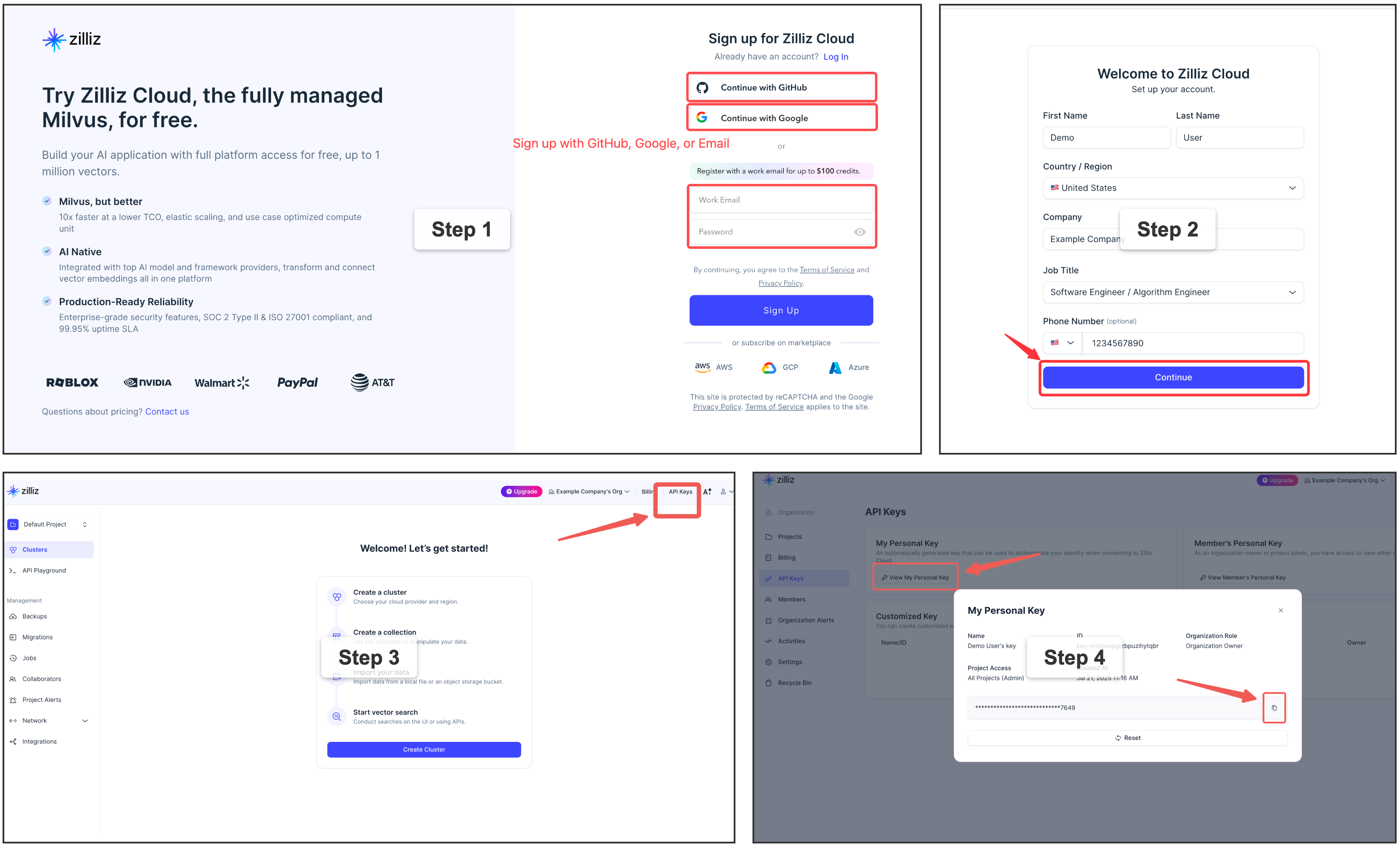
Copy your Personal Key to replace your-zilliz-cloud-api-key in the configuration examples.
You need an OpenAI API key for the embedding model. You can get one by signing up at OpenAI.
Your API key will look like this: it always starts with sk-.
Copy your key and use it in the configuration examples below as your-openai-api-key.
System Requirements:
Use the command line interface to add the Claude Context MCP server:
claude mcp add claude-context \
  -e OPENAI_API_KEY=sk-your-openai-api-key \
  -e MILVUS_ADDRESS=your-zilliz-cloud-public-endpoint \
  -e MILVUS_TOKEN=your-zilliz-cloud-api-key \
  -- npx @zilliz/claude-context-mcp@latest
See the Claude Code MCP documentation for more details about MCP server management.
Codex CLI uses TOML configuration files:
Create or edit the ~/.codex/config.toml file.
Add the following configuration:
# IMPORTANT: the top-level key is `mcp_servers` rather than `mcpServers`.
[mcp_servers.claude-context]
command = "npx"
args = ["@zilliz/claude-context-mcp@latest"]
env = { "OPENAI_API_KEY" = "your-openai-api-key", "MILVUS_TOKEN" = "your-zilliz-cloud-api-key" }
# Optional: override the default 10s startup timeout
startup_timeout_ms = 20000
Gemini CLI requires manual configuration through a JSON file:
~/.gemini/settings.json file.{
"mcpServers": {
"claude-context": {
"command": "npx",
"args": ["@zilliz/claude-context-mcp@latest"],
"env": {
"OPENAI_API_KEY": "your-openai-api-key",
"MILVUS_TOKEN": "your-zilliz-cloud-api-key"
}
}
}
}
Create or edit the ~/.qwen/settings.json file and add the following configuration:
{
  "mcpServers": {
    "claude-context": {
      "command": "npx",
      "args": ["@zilliz/claude-context-mcp@latest"],
      "env": {
        "OPENAI_API_KEY": "your-openai-api-key",
        "MILVUS_ADDRESS": "your-zilliz-cloud-public-endpoint",
        "MILVUS_TOKEN": "your-zilliz-cloud-api-key"
      }
    }
  }
}
Go to: Settings -> Cursor Settings -> MCP -> Add new global MCP server
Pasting the following configuration into your Cursor ~/.cursor/mcp.json file is the recommended approach. You may also install in a specific project by creating .cursor/mcp.json in your project folder. See Cursor MCP docs for more info.
{
  "mcpServers": {
    "claude-context": {
      "command": "npx",
      "args": ["-y", "@zilliz/claude-context-mcp@latest"],
      "env": {
        "OPENAI_API_KEY": "your-openai-api-key",
        "MILVUS_ADDRESS": "your-zilliz-cloud-public-endpoint",
        "MILVUS_TOKEN": "your-zilliz-cloud-api-key"
      }
    }
  }
}
Go to: Settings -> MCP -> Add MCP Server
Add the following configuration to your Void MCP settings:
{
  "mcpServers": {
    "code-context": {
      "command": "npx",
      "args": ["-y", "@zilliz/claude-context-mcp@latest"],
      "env": {
        "OPENAI_API_KEY": "your-openai-api-key",
        "MILVUS_ADDRESS": "your-zilliz-cloud-public-endpoint",
        "MILVUS_TOKEN": "your-zilliz-cloud-api-key"
      }
    }
  }
}
Add to your Claude Desktop configuration:
{
  "mcpServers": {
    "claude-context": {
      "command": "npx",
      "args": ["@zilliz/claude-context-mcp@latest"],
      "env": {
        "OPENAI_API_KEY": "your-openai-api-key",
        "MILVUS_ADDRESS": "your-zilliz-cloud-public-endpoint",
        "MILVUS_TOKEN": "your-zilliz-cloud-api-key"
      }
    }
  }
}
Windsurf supports MCP configuration through a JSON file. Add the following configuration to your Windsurf MCP settings:
{
  "mcpServers": {
    "claude-context": {
      "command": "npx",
      "args": ["-y", "@zilliz/claude-context-mcp@latest"],
      "env": {
        "OPENAI_API_KEY": "your-openai-api-key",
        "MILVUS_ADDRESS": "your-zilliz-cloud-public-endpoint",
        "MILVUS_TOKEN": "your-zilliz-cloud-api-key"
      }
    }
  }
}
The Claude Context MCP server can be used with VS Code through MCP-compatible extensions. Add the following configuration to your VS Code MCP settings:
{
  "mcpServers": {
    "claude-context": {
      "command": "npx",
      "args": ["-y", "@zilliz/claude-context-mcp@latest"],
      "env": {
        "OPENAI_API_KEY": "your-openai-api-key",
        "MILVUS_ADDRESS": "your-zilliz-cloud-public-endpoint",
        "MILVUS_TOKEN": "your-zilliz-cloud-api-key"
      }
    }
  }
}
Cherry Studio allows for visual MCP server configuration through its settings interface. While it doesn't directly support manual JSON configuration, you can add a new server via the GUI:
claude-contextSTDIOnpx["-y", "@zilliz/claude-context-mcp@latest"]OPENAI_API_KEY: your-openai-api-keyMILVUS_ADDRESS: your-zilliz-cloud-public-endpointMILVUS_TOKEN: your-zilliz-cloud-api-keyCline uses a JSON configuration file to manage MCP servers. To integrate the provided MCP server configuration:
Open Cline and click on the MCP Servers icon in the top navigation bar.
Select the Installed tab, then click Advanced MCP Settings.
In the cline_mcp_settings.json file, add the following configuration:
{
  "mcpServers": {
    "claude-context": {
      "command": "npx",
      "args": ["@zilliz/claude-context-mcp@latest"],
      "env": {
        "OPENAI_API_KEY": "your-openai-api-key",
        "MILVUS_ADDRESS": "your-zilliz-cloud-public-endpoint",
        "MILVUS_TOKEN": "your-zilliz-cloud-api-key"
      }
    }
  }
}
To configure Claude Context MCP in Augment Code, you can use either the graphical interface or manual configuration.
Click the hamburger menu.
Select Settings.
Navigate to the Tools section.
Click the + Add MCP button.
Enter the following command:
npx @zilliz/claude-context-mcp@latest
Name the MCP: Claude Context.
Click the Add button.
mcpServers array in the augment.advanced object"augment.advanced": {
"mcpServers": [
{
"name": "claude-context",
"command": "npx",
"args": ["-y", "@zilliz/claude-context-mcp@latest"],
"env": {
"OPENAI_API_KEY": "your-openai-api-key",
"MILVUS_ADDRESS": "your-zilliz-cloud-public-endpoint",
"MILVUS_TOKEN": "your-zilliz-cloud-api-key"
}
}
]
}
Roo Code utilizes a JSON configuration file for MCP servers:
Open Roo Code and navigate to Settings → MCP Servers → Edit Global Config.
In the mcp_settings.json file, add the following configuration:
{
  "mcpServers": {
    "claude-context": {
      "command": "npx",
      "args": ["@zilliz/claude-context-mcp@latest"],
      "env": {
        "OPENAI_API_KEY": "your-openai-api-key",
        "MILVUS_ADDRESS": "your-zilliz-cloud-public-endpoint",
        "MILVUS_TOKEN": "your-zilliz-cloud-api-key"
      }
    }
  }
}
Zencoder offers support for MCP tools and servers in both its JetBrains and VS Code plugin versions.
ToolsAdd Custom MCPClaude Context and server configuration from below, and make sure to hit the Install button{
"command": "npx",
"args": ["@zilliz/claude-context-mcp@latest"],
"env": {
"OPENAI_API_KEY": "your-openai-api-key",
"MILVUS_ADDRESS": "your-zilliz-cloud-public-endpoint",
"MILVUS_TOKEN": "your-zilliz-cloud-api-key"
}
}
Install button.For LangChain/LangGraph integration examples, see this example.
The server uses stdio transport and follows the standard MCP protocol. It can be integrated with any MCP-compatible client by running:
npx @zilliz/claude-context-mcp@latest
Open Claude Code
cd your-project-directory
claude
Index your codebase:
Index this codebase
Check indexing status:
Check the indexing status
Start searching:
Find functions that handle user authentication
🎉 That's it! You now have semantic code search in Claude Code.
For more detailed MCP environment variable configuration, see our Environment Variables Guide.
To configure custom embedding models (e.g., text-embedding-3-large for OpenAI, voyage-code-3 for VoyageAI), see the MCP Configuration Examples for detailed setup instructions for each provider.
For detailed explanation of file inclusion and exclusion rules, and how to customize them, see our File Inclusion & Exclusion Rules.
index_codebaseIndex a codebase directory for hybrid search (BM25 + dense vector).
search_codeSearch the indexed codebase using natural language queries with hybrid search (BM25 + dense vector).
clear_indexClear the search index for a specific codebase.
get_indexing_statusGet the current indexing status of a codebase. Shows progress percentage for actively indexing codebases and completion status for indexed codebases.
Our controlled evaluation demonstrates that Claude Context MCP achieves ~40% token reduction under the condition of equivalent retrieval quality. This translates to significant cost and time savings in production environments. This also means that, under the constraint of limited token context length, using Claude Context yields better retrieval and answer results.
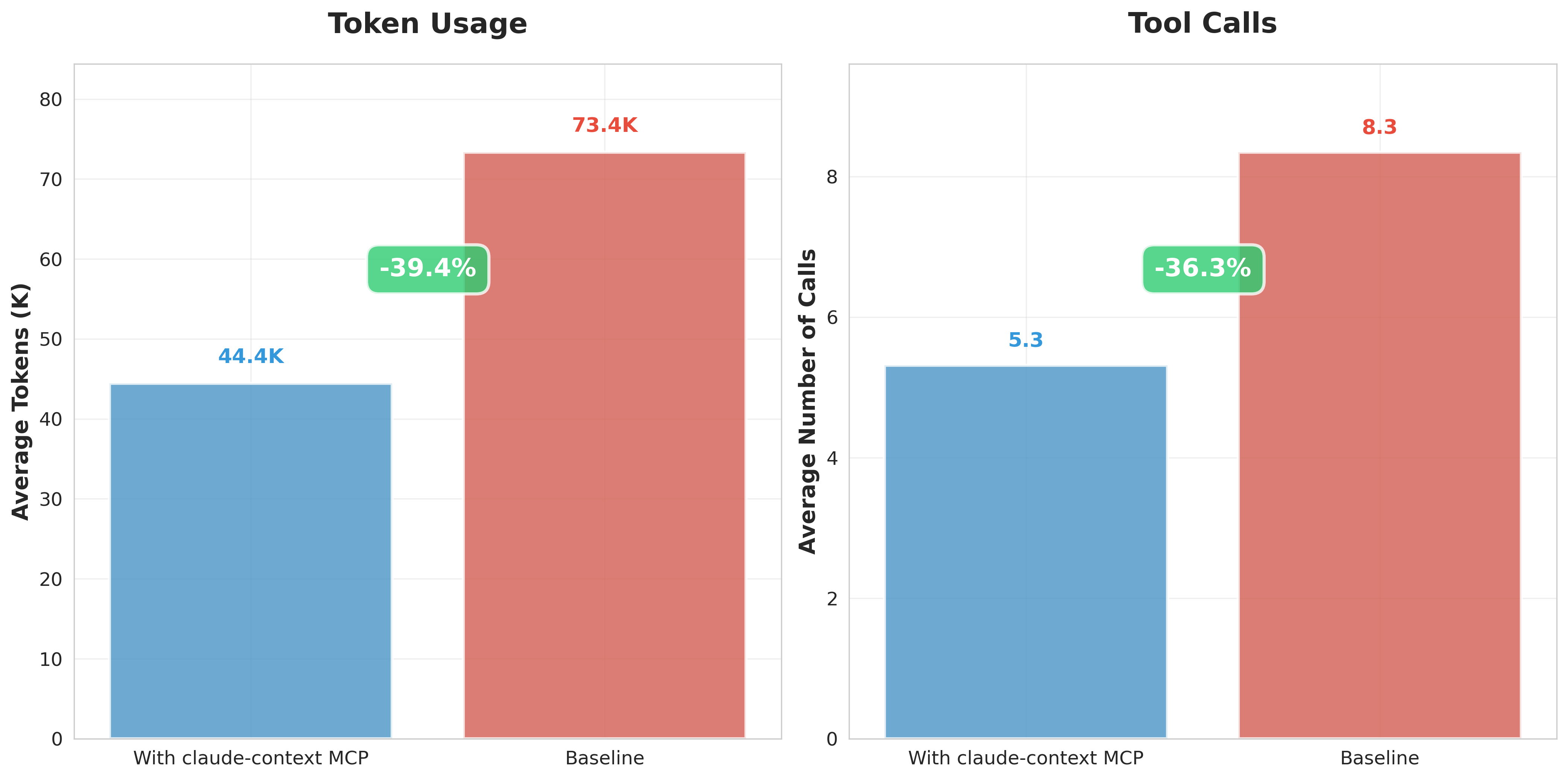
For detailed evaluation methodology and results, see the evaluation directory.
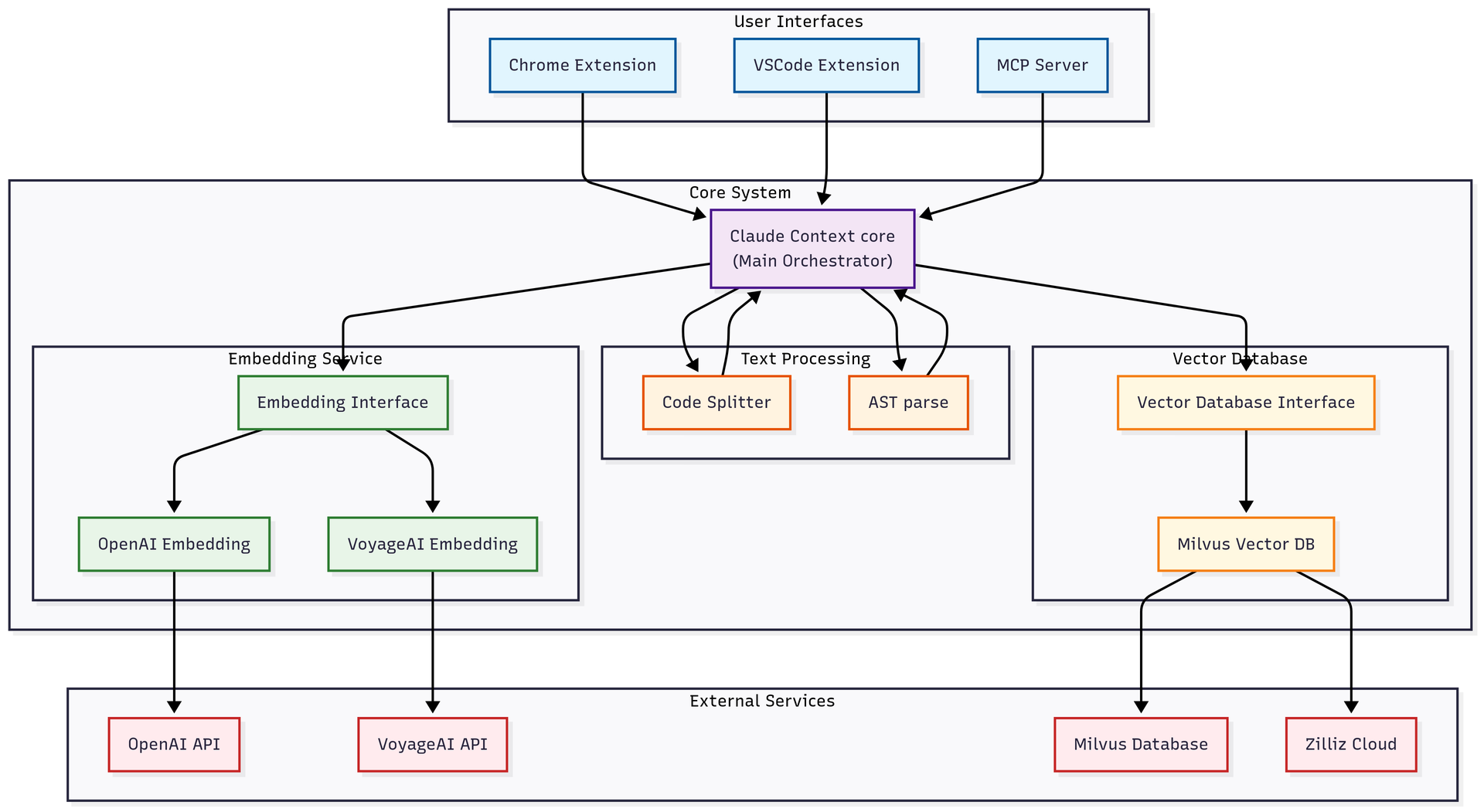
Claude Context is a monorepo containing three main packages:
@zilliz/claude-context-core: Core indexing engine with embedding and vector database integration@zilliz/claude-context-mcp: Model Context Protocol server for AI agent integrationWhile MCP is the recommended way to use Claude Context with AI assistants, you can also use it directly or through the VSCode extension.
The @zilliz/claude-context-core package provides the fundamental functionality for code indexing and semantic search.
import { Context, MilvusVectorDatabase, OpenAIEmbedding } from '@zilliz/claude-context-core';

// Initialize embedding provider
const embedding = new OpenAIEmbedding({
    apiKey: process.env.OPENAI_API_KEY || 'your-openai-api-key',
    model: 'text-embedding-3-small'
});

// Initialize vector database
const vectorDatabase = new MilvusVectorDatabase({
    address: process.env.MILVUS_ADDRESS || 'your-zilliz-cloud-public-endpoint',
    token: process.env.MILVUS_TOKEN || 'your-zilliz-cloud-api-key'
});

// Create context instance
const context = new Context({
    embedding,
    vectorDatabase
});

// Index your codebase with progress tracking
const stats = await context.indexCodebase('./your-project', (progress) => {
    console.log(`${progress.phase} - ${progress.percentage}%`);
});
console.log(`Indexed ${stats.indexedFiles} files, ${stats.totalChunks} chunks`);

// Perform semantic search
const results = await context.semanticSearch('./your-project', 'vector database operations', 5);
results.forEach(result => {
    console.log(`File: ${result.relativePath}:${result.startLine}-${result.endLine}`);
    console.log(`Score: ${(result.score * 100).toFixed(2)}%`);
    console.log(`Content: ${result.content.substring(0, 100)}...`);
});
Integrates Claude Context directly into your IDE. Provides an intuitive interface for semantic code search and navigation.

# Clone repository
git clone https://github.com/zilliztech/claude-context.git
cd claude-context

# Install dependencies
pnpm install

# Build all packages
pnpm build

# Start development mode
pnpm dev
On Windows, ensure you have:
npm install -g pnpm# Windows PowerShell/Command Prompt
git clone https://github.com/zilliztech/claude-context.git
cd claude-context
# Configure git line endings (recommended)
git config core.autocrlf false
# Install dependencies
pnpm install
# Build all packages (uses cross-platform scripts)
pnpm build
# Start development mode
pnpm dev
# Build all packages (cross-platform)
pnpm build

# Build specific package
pnpm build:core
pnpm build:vscode
pnpm build:mcp

# Performance benchmarking
pnpm benchmark
# Development with file watching
cd examples/basic-usage
pnpm dev
Check the /examples directory for complete usage examples:
Common Questions:
❓ For detailed answers and more troubleshooting tips, see our FAQ Guide.
🔧 Encountering issues? Visit our Troubleshooting Guide for step-by-step solutions.
📚 Need more help? Check out our complete documentation for detailed guides and troubleshooting tips.
We welcome contributions! Please see our Contributing Guide for details on how to get started.
Package-specific contributing guides:
This project is licensed under the MIT License - see the LICENSE file for details.
Claim this server with your GitHub account to request manual ownership verification.
Link to the catalog listing for Claude Context MCP server from your README. This badge does not certify ownership, compatibility or security.
[](https://awesome-mcp.com/servers/claude-context)Public repository statistics could not be verified. Check the configured source address; unavailable counts are not zero.
Separate sources, scopes and periods. Never combined or treated as installations, active users or security reviews.
No reviewed package or image identity; download statistics are not listed yet.
Alternative and complementary servers in the same category
A directory listing describing a cancellation-letter and mailing-address service. The configured public GitHub repository returned 404 during source verification.

A hosted MCP service for browsing and searching through Singapore mobile-network proxies.

A directory listing describing a Markdown-to-PDF service. The configured public GitHub repository returned 404 during source verification.