
A Rust CAD application with an MCP server for creating, inspecting and rendering drawings, either headlessly or through a connection to the desktop app.
8K
Media & Design
An MCP server that lets models create, validate and convert CodeVideo lessons and render software educational videos and blog posts from natural language.
CodeVideo MCP server is cataloged as an MCP server attributed to codevideo. An MCP server that lets models create, validate and convert CodeVideo lessons and render software educational videos and blog posts from natural language. It is categorized under media design. See the capability inspector for recorded interfaces and their independent review status; consult upstream documentation for the current interface.
Installation configuration is not reviewed. No executable setup is offered for this entry; inspect the source repository before proceeding.
Catalog license label: Not specified. Check the source repository's current license and terms before using, modifying or distributing this software.
Capability definitions are not reviewed. Unreviewed imports are not exposed as trusted interfaces.
No reviewed records to display. This does not establish that upstream lacks this capability.
No reviewed records to display. This does not establish that upstream lacks this capability.
No reviewed records to display. This does not establish that upstream lacks this capability.
Email delivery is not connected. This page does not collect email addresses or create subscriptions.
Browse the registry for current listings instead.
Reviews for CodeVideo MCP server are not available yet
Review publishing and storage are not connected. This page does not collect or publish ratings or comments, including after sign-in.
Video tools queue a render job and return a jobId immediately; a background worker renders the queue one video at a time and keeps going even if the client is closed. Videos are saved to CODEVIDEO_OUTPUT_DIR or the Desktop.
Data lives under ~/.codevideo/, or the folder CODEVIDEO_HOME points to, including codevideo.db for courses, lessons and the render queue, plus job logs, exports and previews.
Narration can use ElevenLabs via an API key, or self-hosted Kokoro by setting CODEVIDEO_TTS_PROVIDER=kokoro and pointing TTS_SERVICE_URL at a codevideo-tts service.
README.md · b04a3769918c · Fetched 2026-11-13 11:58:12 UTC
Original upstream text, without AI rewriting. Scripts, forms and unsafe links are filtered for safety.
Showing the last retrieved documentation snapshot; check the source for current changes.
The MCP server for CodeVideo.
Create software educational content using natural language.
Creation:
useState hook in React"useState hook in React?"Conversion:
Validation:
node:sqlite, so nothing native is compiled on install.ELEVEN_LABS_API_KEY (and optionally ELEVEN_LABS_VOICE_ID). With CLI 0.0.15 or newer that's all: the clips are embedded in the render job. To serve them from your own S3 bucket instead, add CODEVIDEO_S3_KEY_ID, CODEVIDEO_S3_SECRET, CODEVIDEO_S3_BUCKET and CODEVIDEO_S3_REGION; see Narration. Clips are reused when a line is narrated again, so re-rendering costs nothing.CODEVIDEO_TTS_PROVIDER=kokoro and TTS_SERVICE_URL pointing at a codevideo-tts (Kokoro) service. Clips are embedded in the video job directly.Validate the host first with:
npx @fullstackcraftllc/codevideo-cli doctor
If Chrome is not detected, run npx @fullstackcraftllc/codevideo-cli install-browser. PATH_TO_CODEVIDEO_CLI remains available as an optional override for local CLI builds.
Add the server under mcpServers in your claude_desktop_config.json file, next to any others you have:
{
    "mcpServers": {
        "codevideo-mcp": {
            "command": "npx",
            "args": [
                "-y",
                "@fullstackcraftllc/codevideo-mcp@latest"
            ],
            "env": {
                "CODEVIDEO_TTS_PROVIDER": "kokoro",
                "TTS_SERVICE_URL": "http://localhost:3000"
            }
        }
    }
}
(Or the ElevenLabs variables from Requirements instead of the two Kokoro ones.)
claude mcp add codevideo -e CODEVIDEO_TTS_PROVIDER=kokoro -e TTS_SERVICE_URL=http://localhost:3000 -- npx -y @fullstackcraftllc/codevideo-mcp@latest
Pass the ElevenLabs variables with -e instead of the two Kokoro ones if you use ElevenLabs.
Add the published MCP server to ~/.codex/config.toml:
[mcp_servers.codevideo]
command = "npx"
args = ["-y", "@fullstackcraftllc/codevideo-mcp@latest"]
startup_timeout_sec = 60
env_vars = ["CODEVIDEO_TTS_PROVIDER", "TTS_SERVICE_URL", "ELEVEN_LABS_API_KEY", "ELEVEN_LABS_VOICE_ID", "CODEVIDEO_S3_KEY_ID", "CODEVIDEO_S3_SECRET", "CODEVIDEO_S3_BUCKET", "CODEVIDEO_S3_REGION", "GEMINI_API_KEY"]
Restart Codex or open a new thread after changing MCP configuration.
Be sure to restart Claude after modifying this config!
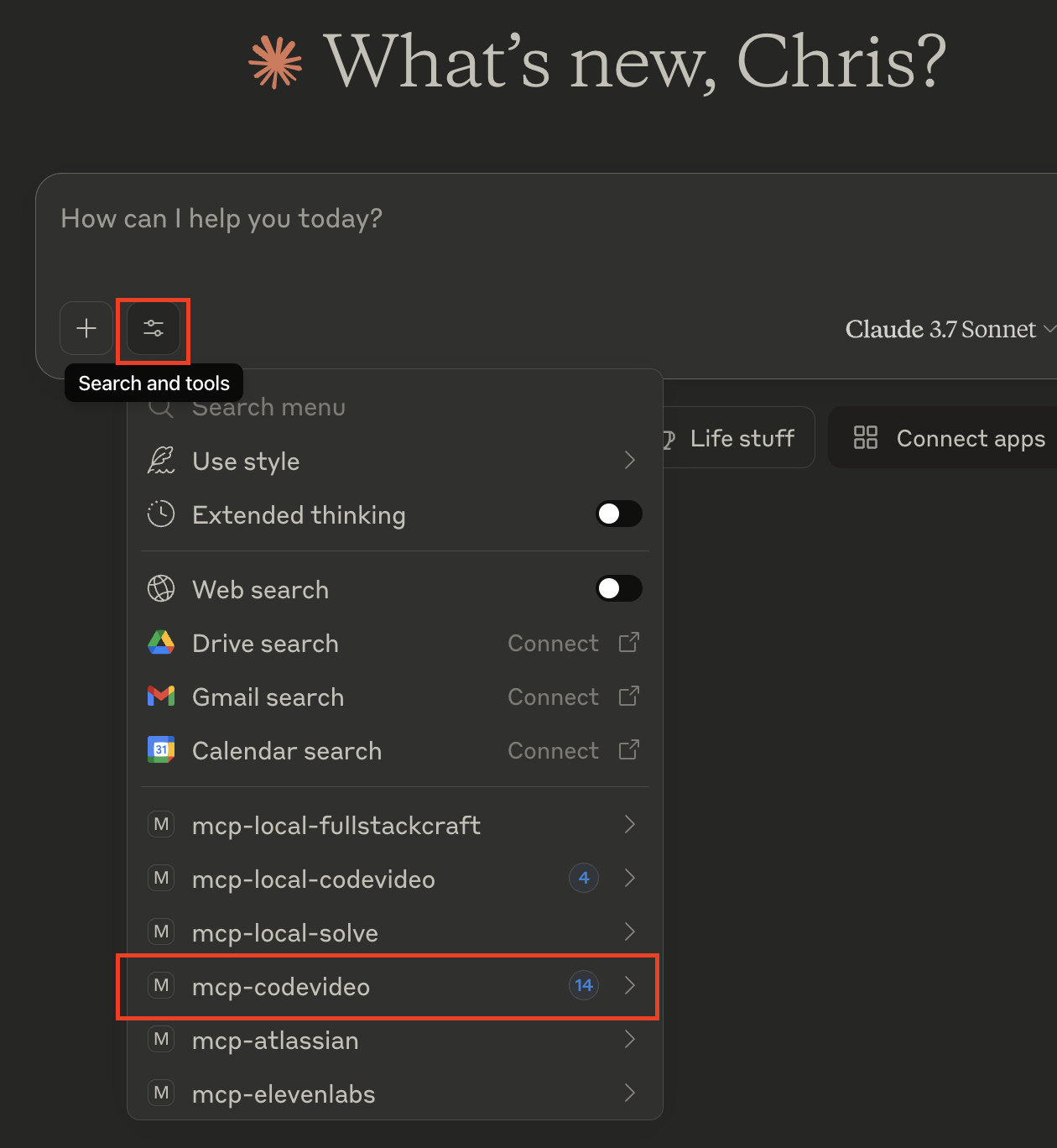
After restarting Claude Desktop, if installation was successful, you should see codevideo-mcp in the list of installed MCPs:
For anything longer than one lesson, start with the codevideo_instructions_to_build_course_from_scratch prompt tool. The course lives in the MCP, keyed by id, so the model writes each lesson's actions once and never carries snapshots or earlier lessons in its context:
codevideo_create_course returns a courseId; codevideo_add_lesson adds lessons, each continuing from the previous one's final state by default.codevideo_set_lesson_actions stores a lesson's actions. To change part of a lesson later, codevideo_edit_lesson_actions applies splice-style edits, and codevideo_get_lesson_actions reads actions back a slice at a time.codevideo_get_lesson_file_tree, codevideo_get_lesson_file and codevideo_compile_lesson read and check the code at the end of a lesson without pulling snapshots.codevideo_validate_course returns done: true once every lesson is valid, continuous, and compiles where it should. Previews and videos refuse to run before that. It also rejects actions that change files with nothing on screen causing them (file-explorer-create-file and similar), because in the video the file would just appear. Lessons make files with the mouse (right-click, New File) or with touch in the terminal. A paste with nothing on the clipboard, or a copy, cut or paste with no file open, is rejected too: nothing would happen on screen.codevideo_generate_course_previews writes an HTML page per lesson to review; codevideo_render_course_videos then renders every lesson.codevideo_get_course_status shows where things stand, with an estimated length per lesson; codevideo_export_course writes the whole course to a JSON file and returns its path.The model learns the actions from codevideo_get_action_names, which lists each one with what it does and what its value takes, straight from codevideo-types.
The older single-slot tools (codevideo_set_current_actions, codevideo_set_current_lesson and the tools that read them) still work for single videos. Every conversation shares their one slot, though, so use the course tools for anything bigger.
Every video tool (codevideo_make_video_from_actions, codevideo_make_video_from_lesson, codevideo_render_lesson_video, codevideo_render_course_videos) queues a render job and returns at once with a jobId. A background worker renders the queue one video at a time, and keeps going if you close Claude or Codex.
codevideo_get_render_job shows a job's status (queued, running, succeeded, failed, cancelled or interrupted), its latest progress line, the saved file, any error, and the end of the CLI's log.codevideo_list_render_jobs lists recent jobs, for one course or all.codevideo_cancel_render_job cancels one job, or everything unfinished in a course, stopping the browser too.All four video tools take the same options:
| Option | Values |
|---|---|
orientation | landscape (default) or portrait (1080×1920) |
theme | dark or light |
isFileExplorerVisible, isTerminalVisible, isEditorTabsVisible, isMinimapVisible, isMouseVisible, withCaptions | true / false; for portrait, usually hide the explorer, tabs, minimap and mouse |
fontSizePx, fileExplorerWidth, terminalHeight, mouseColor, wordWrap, defaultLanguage | IDE layout |
keyboardTypingPauseMs, standardPauseMs, longPauseMs | pacing |
voiceId, ttsProvider | narration voice and provider |
renderMode | realtime (default) or deterministic; renderSeed and renderWorkers (1–32) apply to deterministic renders |
isDiagnosticsVisible | true / false: TypeScript squiggles in the editor from the start; lessons can also turn them on and off with editor-show-diagnostics and editor-hide-diagnostics |
They also take open: whether to open the finished video in your default player. It defaults to on for single videos and off for whole courses.
Videos are saved to CODEVIDEO_OUTPUT_DIR, or your Desktop.
Everything is under ~/.codevideo/, or the folder CODEVIDEO_HOME points to:
codevideo.db: courses, lessons, the legacy single slot, and the render queue.jobs/<jobId>/: each render's project, settings and CLI logs (stdout.log, stderr.log); jobs/worker.log is the worker's own log.exports/: course exports.previews/: lesson previews.Clone this repository:
git clone https://github.com/codevideo/codevideo-mcp.git
Then, install the dependencies and build the project:
cd codevideo-mcp
npm install
npm run build
Run the tests (type-check, unit and integration tests with a fake CLI, and the token-flatness check) with:
npm run type-check
npm test
Then, use the following JSON to run the local version on your Claude Desktop:
    // ... other MCP servers
    "codevideo-mcp": {
        "command": "npx",
        "args": [
            "tsx",
            "/path/to/your/clone/of/codevideo-mcp/src/index.ts"
        ],
        "env": {
            "ELEVEN_LABS_API_KEY": "your-elevenlabs-api-key",
            "ELEVEN_LABS_VOICE_ID": "your-elevenlabs-voice-id"
        }
    }
    // ... other MCP servers
src/rest-server holds an experimental REST and agent server (npm run rest-server). It isn't part of the published package; its dependencies are dev dependencies, and parts of it (the agent loop, the job manager) are still simulated.
react reports "Cannot find module 'react'", so courses that depend on npm packages can't pass codevideo_validate_course.codevideo_compile_lesson freshly replays a lesson from a cloned initial snapshot and checks its saved end-state projects. It reports outcome: passed | failed | blocked | unsupported; legacy status is ok only for passed. Each project reports its root, declared check (syntax, typecheck, build), checked/supporting/unsupported paths, compiler version, structured errors and prerequisite issues. Missing tools/dependencies and nothing-checkable lessons never pass.
Dirty editor buffers and disagreement with a stored final snapshot are reported in lessonIssues; the server does not autosave or silently repair snapshots. Save buffers using actions, then reapply edits and recheck. Replay warnings remain warnings. Course completion requires passed verification for every mustCompile lesson and the final lesson. Intermediate mustCompile:false lessons remain available for deliberate errors or discussion.
TS/JS verification uses real compiler inputs, local project configuration and available dependency declarations. No generated untyped import shims are used. The existing diagnostics field and hover checks remain Monaco-compatible presentation checks and do not establish a project pass. Python guarantees syntax only; Go and C# perform offline builds. Rust is explicitly unsupported. See dynamic AST's README for prerequisites and limitations; native builds are not a security sandbox.
No dependency restoration from the network occurs during verification. CODEVIDEO_HOME optionally sets the MCP state directory (default ~/.codevideo), including for isolated tests.
To test unreleased compiler changes without publishing: build dynamic AST and create a tarball with npm pack --ignore-scripts; install it locally with npm install --no-save --package-lock=false <tarball>, then run the MCP typecheck, tests and build. If the existing local diagnostics changes in codevideo-types are also unreleased, pack that package and set CODEVIDEO_TYPES_TARBALL to its absolute path. Set CODEVIDEO_DYNAMIC_AST_TARBALL to the compiler tarball path when running npm run smoke:packed to exercise the actual packaged compiler through MCP. Neither package version is changed by this workflow. Before shipping, the corresponding compiler release must be published and the MCP dependency/lockfile updated together.
Claim this server with your GitHub account to request manual ownership verification.
Link to the catalog listing for CodeVideo MCP server from your README. This badge does not certify ownership, compatibility or security.
[](https://awesome-mcp.com/servers/codevideo-mcp)Public repository statistics could not be verified. Check the configured source address; unavailable counts are not zero.
Separate sources, scopes and periods. Never combined or treated as installations, active users or security reviews.
No reviewed package or image identity; download statistics are not listed yet.
Alternative and complementary servers in the same category
A Rust CAD application with an MCP server for creating, inspecting and rendering drawings, either headlessly or through a connection to the desktop app.

Liquid Composer is a browser-based Liquid Glass icon design tool that offers a local MCP server for agent-driven icon workflows.

agent-media makes short drama series and other short vertical videos from Claude, ChatGPT or Codex through one MCP connection, with OAuth sign-in and no API keys.