
Store and retrieve entities, relations and observations in a persistent local knowledge graph.
create_entitiescreate_relationsadd_observations+6 more
92K
AI & Multi-Agent
A read-only MCP server that lets assistants query the memories and supporting evidence Coredence has built from your own writing on your machine.
Coredence MCP server is cataloged as an MCP server attributed to coredence. A read-only MCP server that lets assistants query the memories and supporting evidence Coredence has built from your own writing on your machine. It is categorized under ai agents-models. See the capability inspector for recorded interfaces and their independent review status; consult upstream documentation for the current interface.
Installation configuration is not reviewed. No executable setup is offered for this entry; inspect the source repository before proceeding.
Catalog license label: Not specified. Check the source repository's current license and terms before using, modifying or distributing this software.
Capability definitions are not reviewed. Unreviewed imports are not exposed as trusted interfaces.
No reviewed records to display. This does not establish that upstream lacks this capability.
No reviewed records to display. This does not establish that upstream lacks this capability.
No reviewed records to display. This does not establish that upstream lacks this capability.
Email delivery is not connected. This page does not collect email addresses or create subscriptions.
Browse the registry for current listings instead.
Reviews for Coredence MCP server are not available yet
Review publishing and storage are not connected. This page does not collect or publish ratings or comments, including after sign-in.
No. It is read-only, and the connection opens the database read-only so SQLite itself refuses a write.
No. The client starts it and talks to it over a pipe, with no account, key, or listening port.
README.md · ddc27974e584 · Fetched 2026-11-13 11:19:29 UTC
Original upstream text, without AI rewriting. Scripts, forms and unsafe links are filtered for safety.
Showing the last retrieved documentation snapshot; check the source for current changes.
Your mind's digital twin.
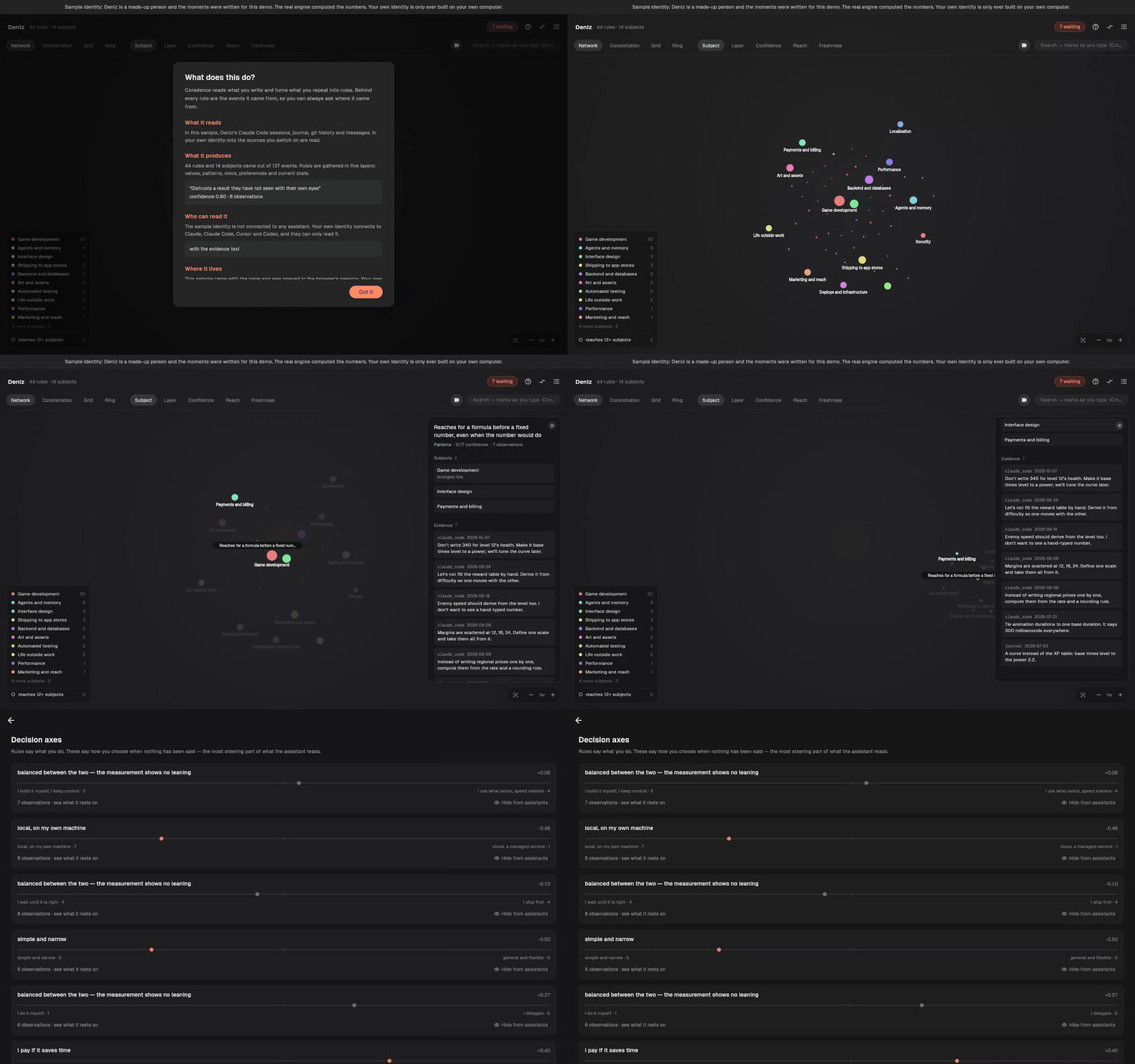
Coredence reads what you have already written, consolidates it into memories about how you actually work, and keeps every one of them tied to the traces it came from. The result lives in a single file on your own machine.
→ coredence.com · Try it in your browser — the real window on a made-up person's mind, nothing to install
Releases, documentation and the issue tracker. Not the source.
The engine that reads your work is not published. The reason, and what you get instead, is written out on coredence.com/license — but the short version is that the claims worth checking are checkable without it, and more conclusively:
lsof -i -a -p $(pgrep -x Coredence)      # prints nothing: the window opens no sockets
sqlite3 ~/.coredence/coredence.db '.tables'  # your whole mind, in a tool we did not write
Source code tells you what should happen. Those tell you what is happening.
One connection exists and it is worth stating plainly: while it is consolidating, the engine calls the model you chose — your Claude Code, your API key, or a server on your own machine. That is the only thing that leaves, it happens only during a cycle, and the last of those three options removes it entirely.
Released. The current version is on the releases page, signed with a Developer ID and notarised by Apple.
Watch this repository (Watch → Custom → Releases) and GitHub will tell you when the next one lands. There is no mailing list, because there is no account and nothing to put you in one.
One download from the releases page or from coredence.com — macOS 14 or later, Apple silicon. The engine ships inside the app — nothing to clone, no Python to install, no command to run.
On first launch it asks two things: where it should think, and what to call you. Reading your work needs a language model and the download does not include one, so you point it at the Claude Code you already have, at an API key of your own, or at any OpenAI-compatible server — including a model running on your own machine.
Windows works too — the engine, the installer and the window all ship. A mind is one file and moves between machines with you.
Already use an MCP client? Coredence is in the official MCP
Registry as
io.github.coredence/coredence. The server is read-only: it answers questions
about a mind the app has already built on your machine.
The mind is more useful inside the tools you already work in than in a window of its own. Coredence ships an MCP server, so an assistant can ask what you think about a subject and what any single memory was drawn from, rather than being handed a file.
It runs on your machine — the client starts it and talks to it over a pipe, so there is no account, no key and nothing listening on a port. It is read-only, and that is mechanical rather than a promise: the connection opens the database read-only, so SQLite itself refuses a write. An assistant can quote your mind and disagree with it, but deciding who you are stays with you.
For Claude Desktop it ships as a desktop extension — coredence-<version>.mcpb
on the releases page, five read-only tools:
| Tool | What it answers |
|---|---|
identity | The whole mind, layer by layer |
rules | Memories of what this person does or values on a given subject |
evidence | The real moments a memory rests on |
axes | How they choose when nothing has been said |
topics | The cortices: the subjects they work on |
The app connects the assistants it finds on your machine during setup. To add
Coredence from an assistant instead, this repository is also a plugin and an
extension. Install the app first, then open it once, so that the coredence
command exists; the plugin only starts it with coredence mcp.
# Claude Code
/plugin install coredence --marketplace coredence/coredence

# Claude Code before 2.1.275: add the marketplace, then install
/plugin marketplace add coredence/coredence
/plugin install coredence@coredence

# Codex
codex plugin marketplace add coredence/coredence

# Gemini CLI
gemini extensions install https://github.com/coredence/coredence
VS Code and GitHub Copilot read the same plugin (plugin.json, mcp.json).
What the plugin runs is the read-only server above and nothing else; it carries
no code of its own.
From a terminal, coredence connect <client> writes the configuration for
you — Claude Code, Cursor, VS Code, Windsurf, JetBrains, Codex and Gemini CLI
are known by name.
Assistants do not always call an MCP server on their own, so the mind can also be handed over directly:
~/.codex/AGENTS.md), Gemini CLI
(~/.gemini/GEMINI.md) and VS Code with Copilot
(~/.copilot/copilot-instructions.md) read one every session. Coredence
writes its own marked section and refreshes it every cycle, leaving the rest
of the file alone. Settings › Assistants, or coredence instructions <name> --on.Both belong here. Nothing is triaged in private, and there is no support address that goes somewhere different from where the work is.
For anything that should not be public, open a private security advisory instead.
Made by Akaya Labs.
Claim this server with your GitHub account to request manual ownership verification.
Link to the catalog listing for Coredence MCP server from your README. This badge does not certify ownership, compatibility or security.
[](https://awesome-mcp.com/servers/coredence)Public repository statistics could not be verified. Check the configured source address; unavailable counts are not zero.
Separate sources, scopes and periods. Never combined or treated as installations, active users or security reviews.
No reviewed package or image identity; download statistics are not listed yet.
Alternative and complementary servers in the same category
Store and retrieve entities, relations and observations in a persistent local knowledge graph.
Organize problem solving into revisable, branching thought steps through an MCP tool.

Query-aware context compression with an MCP plugin for coding agents, plus Python and HTTP interfaces for reducing the context sent to a language model.