
A directory listing describing a cancellation-letter and mailing-address service. The configured public GitHub repository returned 404 during source verification.
Repository stats unavailable
Developer Tools
An MCP server, usable with Claude Desktop, that creates a sample MCP project in a predefined location using Bun.
MCP server for scaffolding Bun-based MCP projects is cataloged as an MCP server attributed to katjes733. An MCP server, usable with Claude Desktop, that creates a sample MCP project in a predefined location using Bun. It is categorized under developer tools. See the capability inspector for recorded interfaces and their independent review status; consult upstream documentation for the current interface.
Installation configuration is not reviewed. No executable setup is offered for this entry; inspect the source repository before proceeding.
Catalog license label: Not specified. Check the source repository's current license and terms before using, modifying or distributing this software.
Capability definitions are not reviewed. Unreviewed imports are not exposed as trusted interfaces.
No reviewed records to display. This does not establish that upstream lacks this capability.
No reviewed records to display. This does not establish that upstream lacks this capability.
No reviewed records to display. This does not establish that upstream lacks this capability.
Email delivery is not connected. This page does not collect email addresses or create subscriptions.
Browse the registry for current listings instead.
Reviews for MCP server for scaffolding Bun-based MCP projects are not available yet
Review publishing and storage are not connected. This page does not collect or publish ratings or comments, including after sign-in.
Yes, the generated sample project includes an example tool to calculate the sum of two numeric values.
README.md · 7ad3b977ce8b · Fetched 2026-11-13 12:01:55 UTC
Original upstream text, without AI rewriting. Scripts, forms and unsafe links are filtered for safety.
Showing the last retrieved documentation snapshot; check the source for current changes.
MCP server providing functionality to set up your own MCP server project using Bun.
This project utilizes Model Context Protocol (MCP) to facilitate a standardized tool (MCP server) to create a sample MCP project in a predefined location.
In this example, we are integrating with Claude Desktop to run the MCP server and at the same time act as MCP client to interact with the MCP server.
The sample project generated follows the same structure as this project with an example tool to calculate the sum of two numeric values.
The choice to use Bun instead of NodeJS was intentional to also showcase that Bun has made significant strides towards becoming a true alternative to NodeJS. It is lightning fast, easy to set up and comes with a lot of functionality out of the box. It also integrates well with existing tool chains, such as ESLint and others.
Clone the repository.
Run:
bun install
Create a .env file in the root based on /env/sample.env. Provide values as necessary and described.
NOTE: This is mostly relevant if you wish to run the server in development mode via bun run start.
(Optional) Run the following to verify integrity of the project:
bun run verify
Run:
bun run build
This will bundle the entry build/main.js, which can then be consumed.
This section is influenced by this general guide with specifics for this use case.
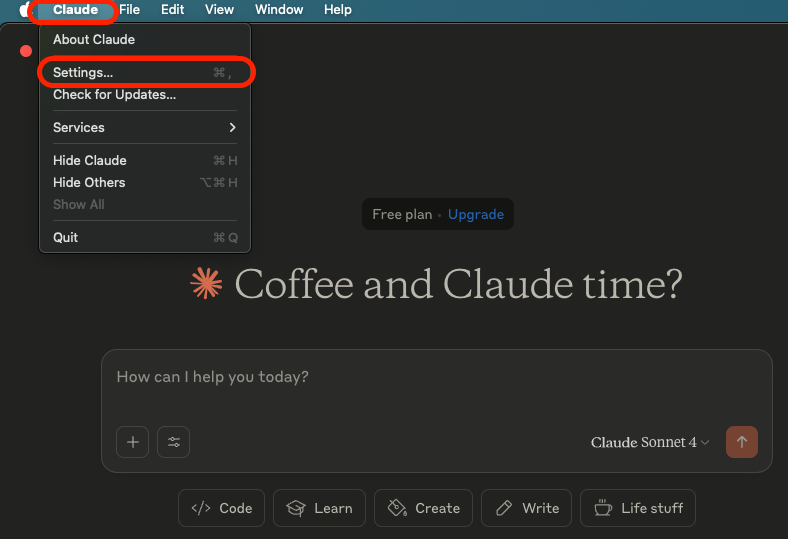
Start Claude Desktop and open Settings
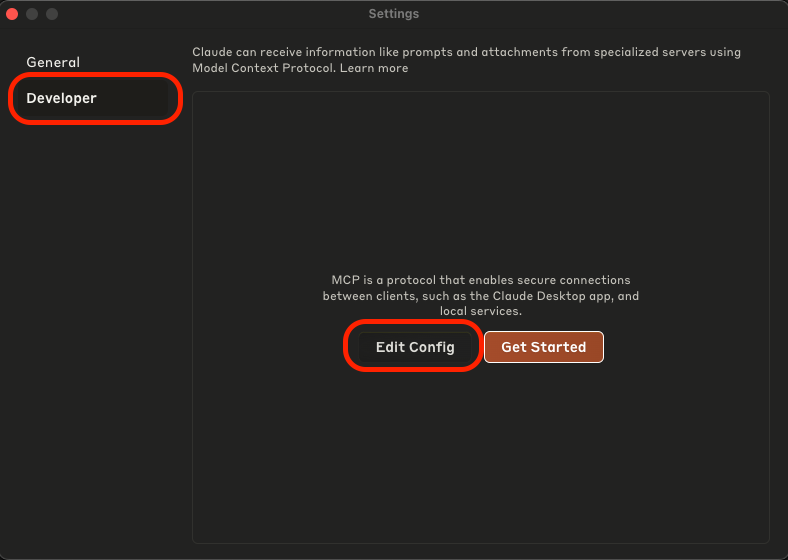
Click on Developer in the left-hand bar of the Settings pane, and then click on Edit Config:
Edit the file claude_desktop_config.json and add the following:
{
  "mcpServers": {
    "create-mcp-app-bun": {
      "command": "bun",
      "args": ["run", "<path_to_project>/build/main.js"]
    }
  }
}
Replace <path_to_project> with the path to your project; e.g.: /Users/username/Documents/projects/create-mcp-server-app-bun
Restart Claude Desktop; this is important as Claude Desktop will otherwise not apply changes to claude_desktop_config.json.
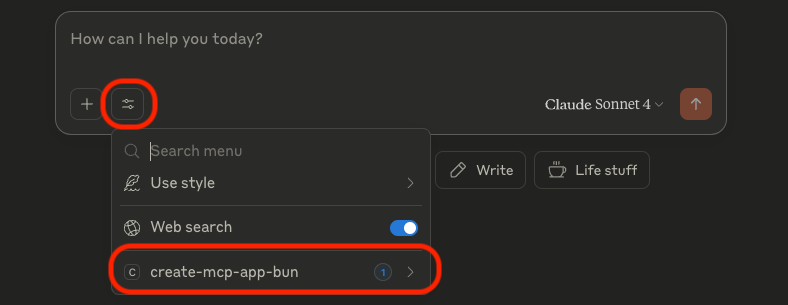
On the main screen, click the Search and Tools button and then on your MCP server name:
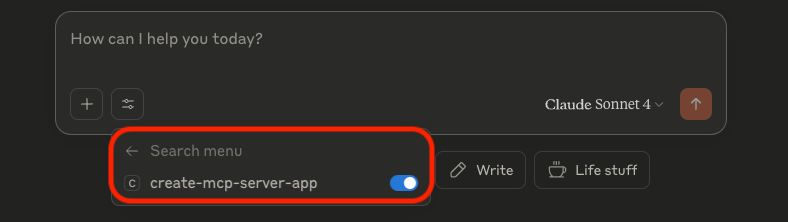
Ensure that it is enabled.
You can start by simply asking Claude to create a new MCP project: create a new mcp project
Claude will in response ask you to specify a name (e.g. my-test-mcp-server), after which it creates the project.
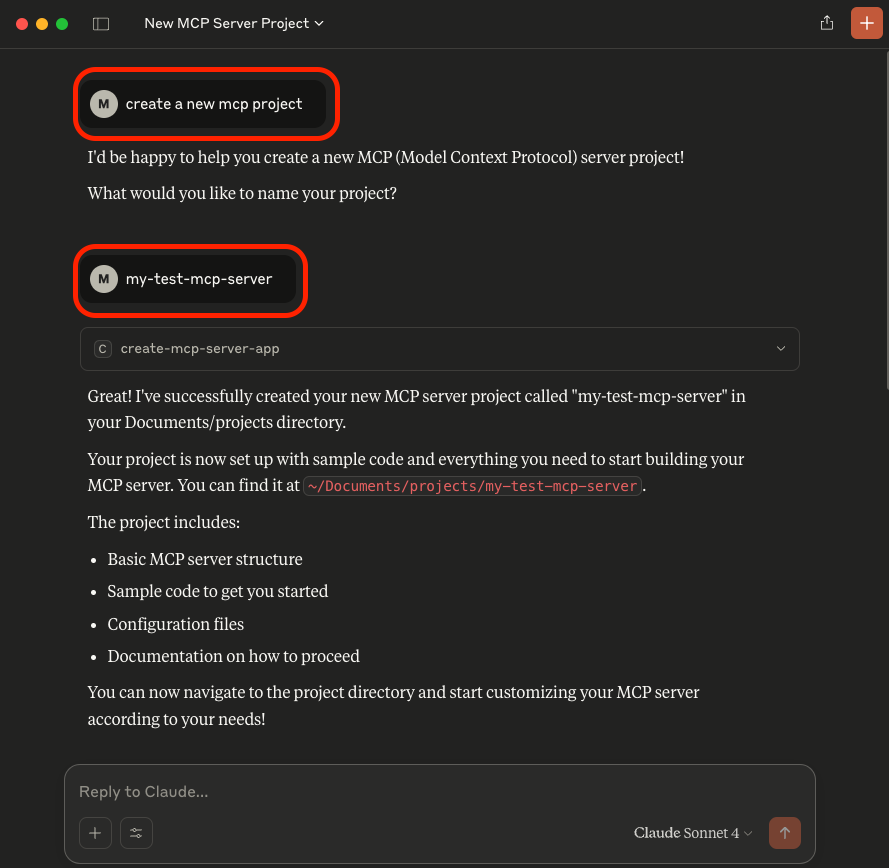
The implementation will also handle situations correctly where the project already exists and prompt the user to specify the follow-up action.
New tools may be added by ensuring each new tool module in ./src/tools extends AbstractTool and implements ITool and provides an explicit constructor (for test coverage):
...
export class NewTool extends AbstractTool implements ITool {
  // Explicit constructor definition to ensure test coverage in Bun tracks constructor.
  constructor(fetch: typeof globalThis.fetch = globalThis.fetch) {
    super(fetch);
  }
...
Additionally, the following methods must be implemented (see their corresponding JSDoc for details.):
getNamegetDescriptiongetInputSchemavalidateWithDefaultsprocessToolWorkflowUse existing tool(s) as guide for the implementation and don't forget to implement a corresponding test.
There is no further configuration required to register any additional tool; they are automatically included upon restart of the MCP server.
It may be useful to analyze test coverage gaps using lcov reports, to gain better visibility into covered lines and functions.
NOTES:
super.import dedent from "dedent";) at the top of a module may cause Bun to not correctly track that line as covered. Simply move it behind other imports, and it will correctly track.Install lcov:
brew install lcov
Install VSCode extension ryanluker.vscode-coverage-gutters (already defined in settings.json).
For most cases, it will suffice to run:
bun run test:coverage
NOTE: If the coverage is less than 100, but no Uncovered Line #s are reported, you may need to investigate further by following the next steps and revisiting the Notes above.
For advanced cases, run:
bun run test:coverage:lcov
It produces the lcov coverage report that is used by VSCode extension ryanluker.vscode-coverage-gutters to visualize covered lines in the editor.
If you prefer to have an HTML report, run in your terminal:
genhtml --function-coverage --branch-coverage --output-directory coverage-report coverage/lcov.info
It produces an HTML coverage report that you can inspect in your preferred browser.
Claim this server with your GitHub account to request manual ownership verification.
Link to the catalog listing for MCP server for scaffolding Bun-based MCP projects from your README. This badge does not certify ownership, compatibility or security.
[](https://awesome-mcp.com/servers/create-mcp-server-app-bun)Public repository statistics could not be verified. Check the configured source address; unavailable counts are not zero.
Separate sources, scopes and periods. Never combined or treated as installations, active users or security reviews.
No reviewed package or image identity; download statistics are not listed yet.
Alternative and complementary servers in the same category
A directory listing describing a cancellation-letter and mailing-address service. The configured public GitHub repository returned 404 during source verification.

A hosted MCP service for browsing and searching through Singapore mobile-network proxies.

A directory listing describing a Markdown-to-PDF service. The configured public GitHub repository returned 404 during source verification.