
This is a Model Context Protocol (MCP) server for interacting with AIStor object stores.
Repository stats unavailable
Databases & Storage
A read-only MCP server bundled with DBConvert Streams that lets AI assistants inspect live schemas, data, streams, files and S3 without pasting DDL into chat.
DBConvert Streams MCP server is cataloged as an MCP server attributed to slotix. A read-only MCP server bundled with DBConvert Streams that lets AI assistants inspect live schemas, data, streams, files and S3 without pasting DDL into chat. It is categorized under databases storage. See the capability inspector for recorded interfaces and their independent review status; consult upstream documentation for the current interface.
Installation configuration is not reviewed. No executable setup is offered for this entry; inspect the source repository before proceeding.
Catalog license label: Not specified. Check the source repository's current license and terms before using, modifying or distributing this software.
Capability definitions are not reviewed. Unreviewed imports are not exposed as trusted interfaces.
No reviewed records to display. This does not establish that upstream lacks this capability.
No reviewed records to display. This does not establish that upstream lacks this capability.
No reviewed records to display. This does not establish that upstream lacks this capability.
Email delivery is not connected. This page does not collect email addresses or create subscriptions.
Browse the registry for current listings instead.
Reviews for DBConvert Streams MCP server are not available yet
Review publishing and storage are not connected. This page does not collect or publish ratings or comments, including after sign-in.
README.md · aea1bf84a82f · Fetched 2026-11-13 12:54:07 UTC
Original upstream text, without AI rewriting. Scripts, forms and unsafe links are filtered for safety.
Showing the last retrieved documentation snapshot; check the source for current changes.
 DBConvert Streams
Database IDE + migration + real-time CDC — in one workflow.
Query data,
move it,
keep it in sync,
and let your AI assistant see it all
without switching between tools.
If this looks useful, consider giving it a ⭐
Most setups look like this:
It works, but it's fragmented.
DBConvert Streams combines these into one workspace.
Think of it as:
DBeaver / DataGrip
but without switching tools every time
Run queries across databases and files:
SELECT *
FROM read_parquet('orders.parquet') o
JOIN postgres.public.customers c
  ON o.customer_id = c.id
LIMIT 10;
Then use the same query as a data source — and stream it anywhere.
All in the same workflow.
Note: This is the public home of DBConvert Streams — example configurations, documentation, issue tracking, and release notes. The product itself is proprietary.
Runs anywhere — your laptop, a VPS, or your own infra. No cloud dependency, no vendor lock-in.
Download for Windows, macOS, or Linux — no account required.
Grab dbconvert-streams-<version>.mcpb from Releases and drop it into Claude → Settings → Extensions. It asks for connection strings and folders, and nothing else has to be installed — no DBConvert Streams, no toolchain, no server to run.
postgres://user:password@host:5432/dbname
mysql://user:password@host:3306/dbname
s3://bucket/folder?region=us-east-1
Several sources go in the one field, separated by spaces — shop=postgres://… orders=mysql://… — and a single question can join across all of them.
Add folders of Parquet, CSV or JSON files with the folder picker. Every source becomes read-only tools in your chat, and one question can span several of them at once.
One file covers Windows and Linux — the bundle carries a binary for each and picks the right one. macOS is planned for a later release.
Not a Claude user? The same server runs as a container, and every MCP client that can launch one can use it:
docker run -i --rm slotix/stream-mcp "shop=postgres://user:password@host:5432/shop"
Cursor and VS Code can set that up in one click — Add to Cursor · Add to VS Code — VS Code asks for the connection string as you install it; in Cursor you replace the sample one. Folders, S3 keys and the rest: standalone server.
The bundled server is proprietary software, distributed under the DBConvert Streams licence. The MIT licence in this repository covers the examples, docs and assets here, not that binary.
Deploy on any machine with Docker — a local server, a VPS (DigitalOcean, Hetzner, AWS EC2, etc.), or your own infrastructure:
curl -fsSL https://dbconvert.nyc3.digitaloceanspaces.com/downloads/streams/latest/docker-install.sh | sh
DBConvert Streams is a database IDE with built-in migration and real-time CDC.
Browse databases, local files, and S3 storage. Edit data directly. Run federated SQL queries that join tables across different database engines — no intermediate exports needed.
In practice, it comes down to this:
Ask about the database work already open in the desktop app: a table, view, file, SQL console, connection, or migration/CDC stream. AI Chat starts with that live workspace context, so it can inspect schemas and data, explain or repair a failed query, and diagnose stream status without asking you to paste DDL into a separate chat.
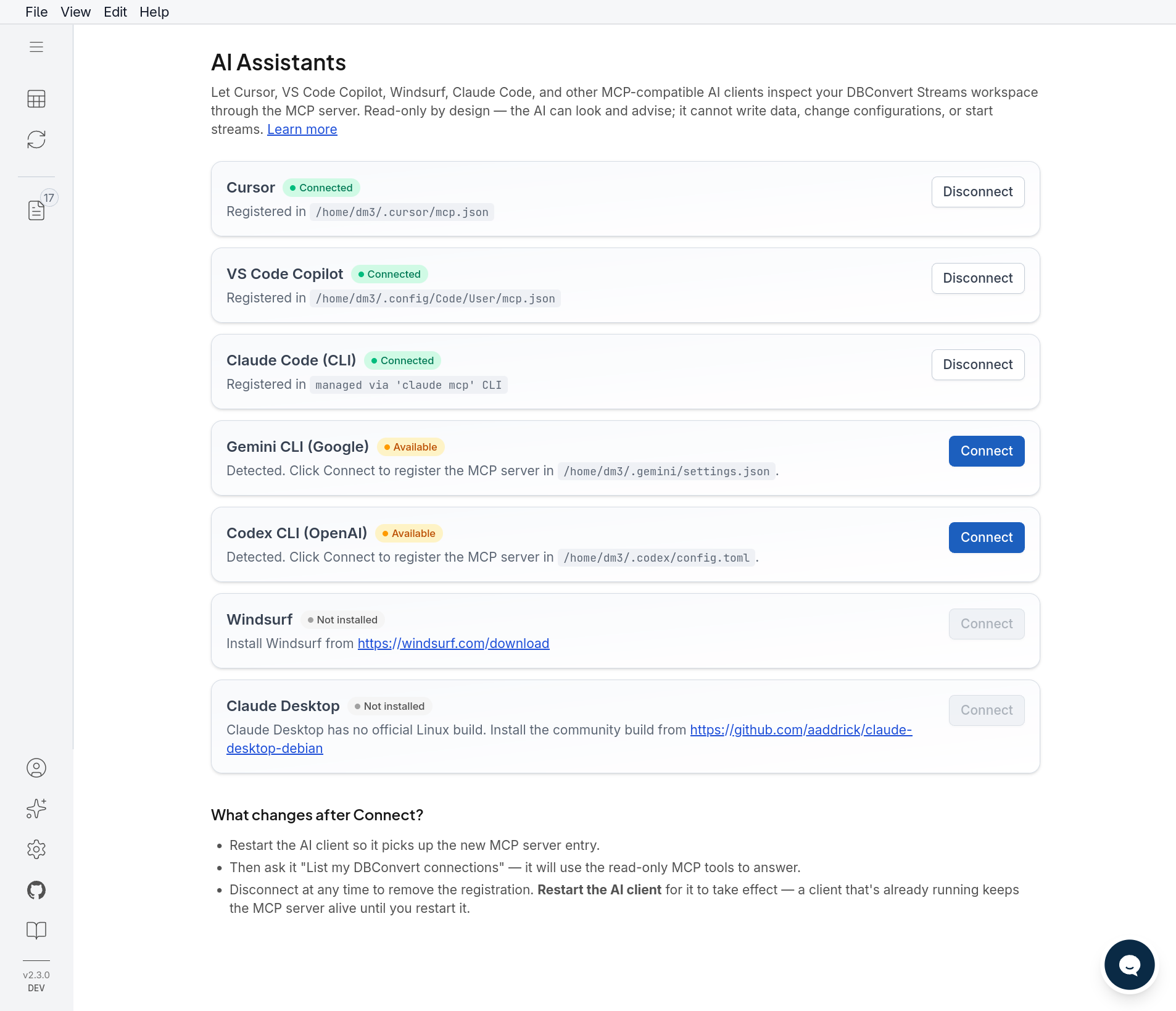
Use your own installed agent CLI — Claude Code, Codex, GitHub Copilot CLI, or OpenCode. AI Chat automatically supplies the relevant scoped subset of DBConvert's read-only tools and shows tool activity while it works; it cannot change connections, configuration, streams, or data.
/mcp over HTTP(S)SELECT passes the server-side filter — the AI can look and advise, never writeDBConvert Streams exposes these 27 read-only MCP tools. The names below match the live MCP server.
dbconvert_list_connections — list workspace connectionsdbconvert_get_connection — inspect one connectiondbconvert_list_databases — list databasesdbconvert_list_schemas — list schemasdbconvert_list_tables — list tablesdbconvert_list_views — list viewsdbconvert_describe_table — inspect table columns and keysdbconvert_preview_table — preview table rowsdbconvert_describe_view — inspect a viewdbconvert_preview_view — preview view rowsdbconvert_run_select — run a SELECT querydbconvert_explain_select — explain a SELECT querydbconvert_compare_schemas — compare schemasdbconvert_compare_data_sample — compare data samplesdbconvert_list_streams — list streamsdbconvert_get_stream — inspect a streamdbconvert_get_stream_status — get stream statusdbconvert_get_stream_stats — get stream throughput and statisticsdbconvert_get_stream_recent_errors — inspect recent stream errorsdbconvert_get_stream_recent_logs — inspect recent stream logsdbconvert_list_files — list workspace filesdbconvert_get_file_schema — inspect a file schemadbconvert_preview_file — preview file rowsdbconvert_list_s3_buckets — list S3 bucketsdbconvert_list_s3_objects — list S3 objectsdbconvert_run_federated_select — run a read-only query across sourcesdbconvert_explain_federated_select — explain a federated SELECT queryOnly read-only operations are exposed: the server-side filter permits
SELECT, so an AI client cannot alter connections, configuration, streams, or
data. For client setup, see the MCP setup guide.
Rapidly move large datasets between databases with automatic schema conversion and validation.
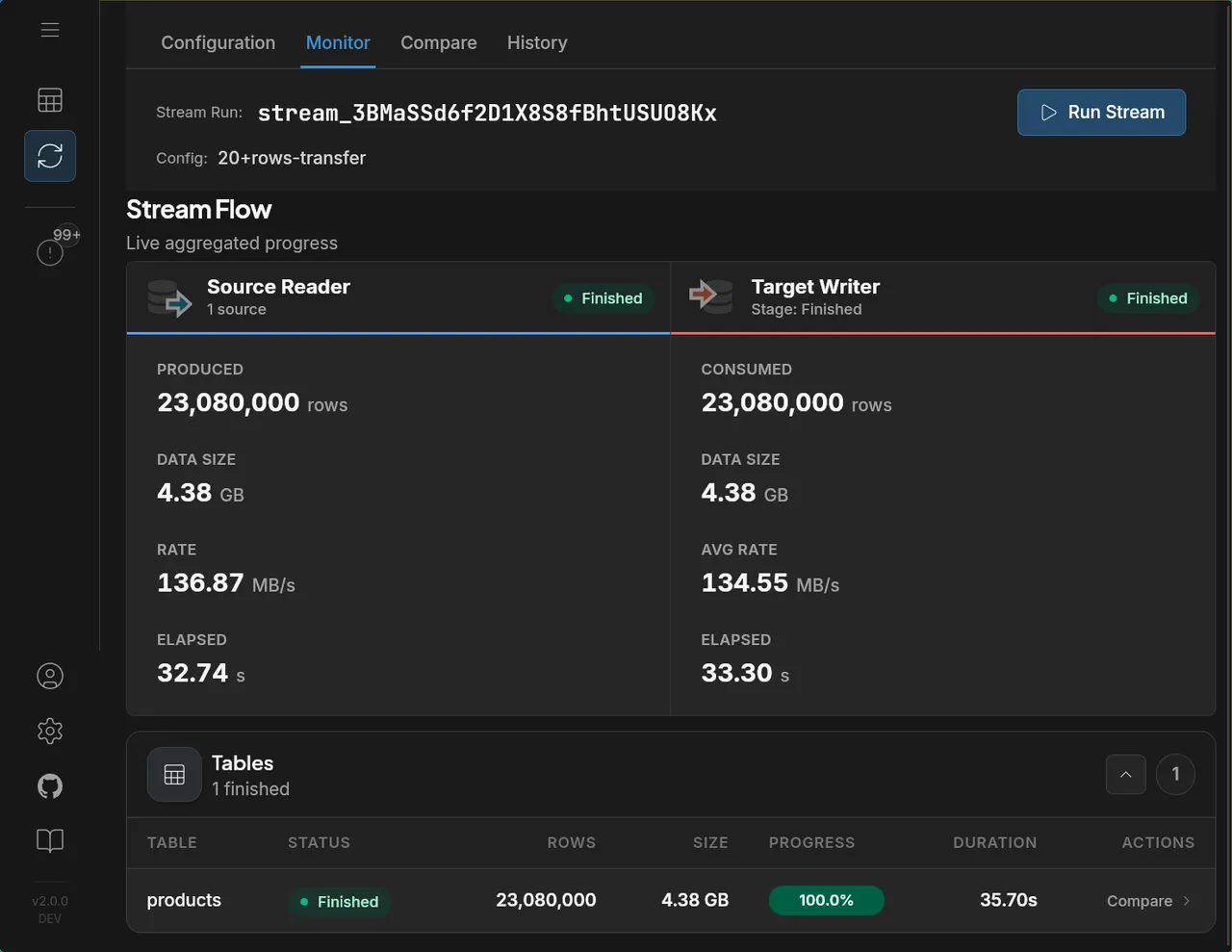
Performance: 23 million rows (4.38 GB) migrated from MySQL to Parquet in 35.7 seconds at 136 MB/s.
Stream INSERT, UPDATE, and DELETE operations from source to target in real-time with minimal latency. Supports CDC to databases, files, and S3 storage.
Browse schemas, view and edit data across multiple database connections with a unified tree navigation:
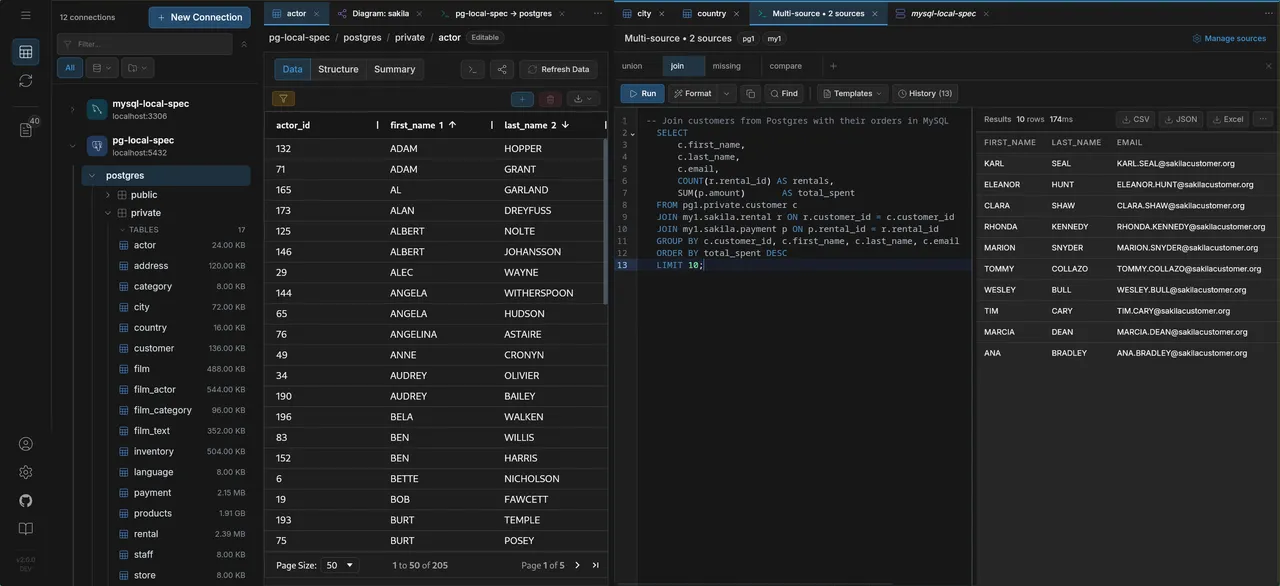
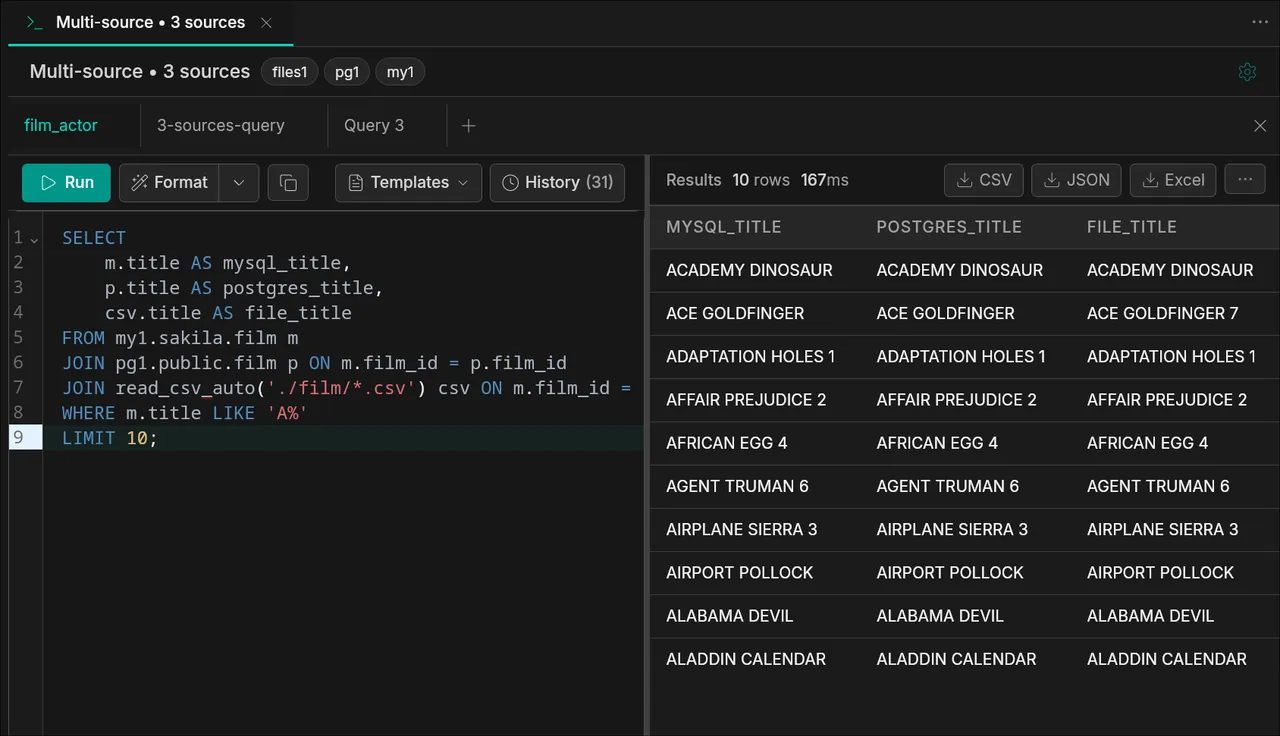
Join tables across MySQL, PostgreSQL, and file sources (CSV, Parquet) in a single query:
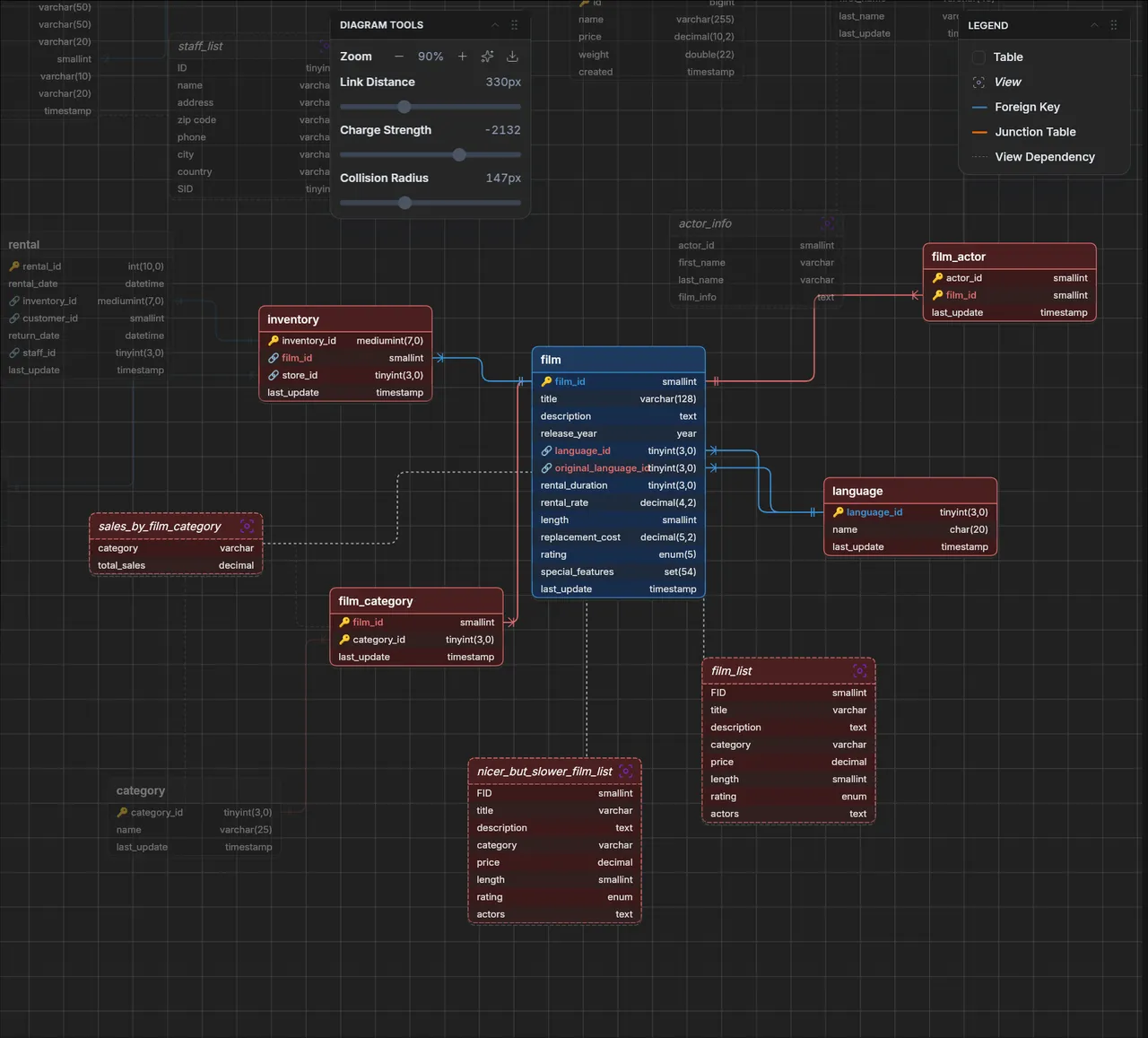
Visualize database relationships with interactive entity-relationship diagrams:
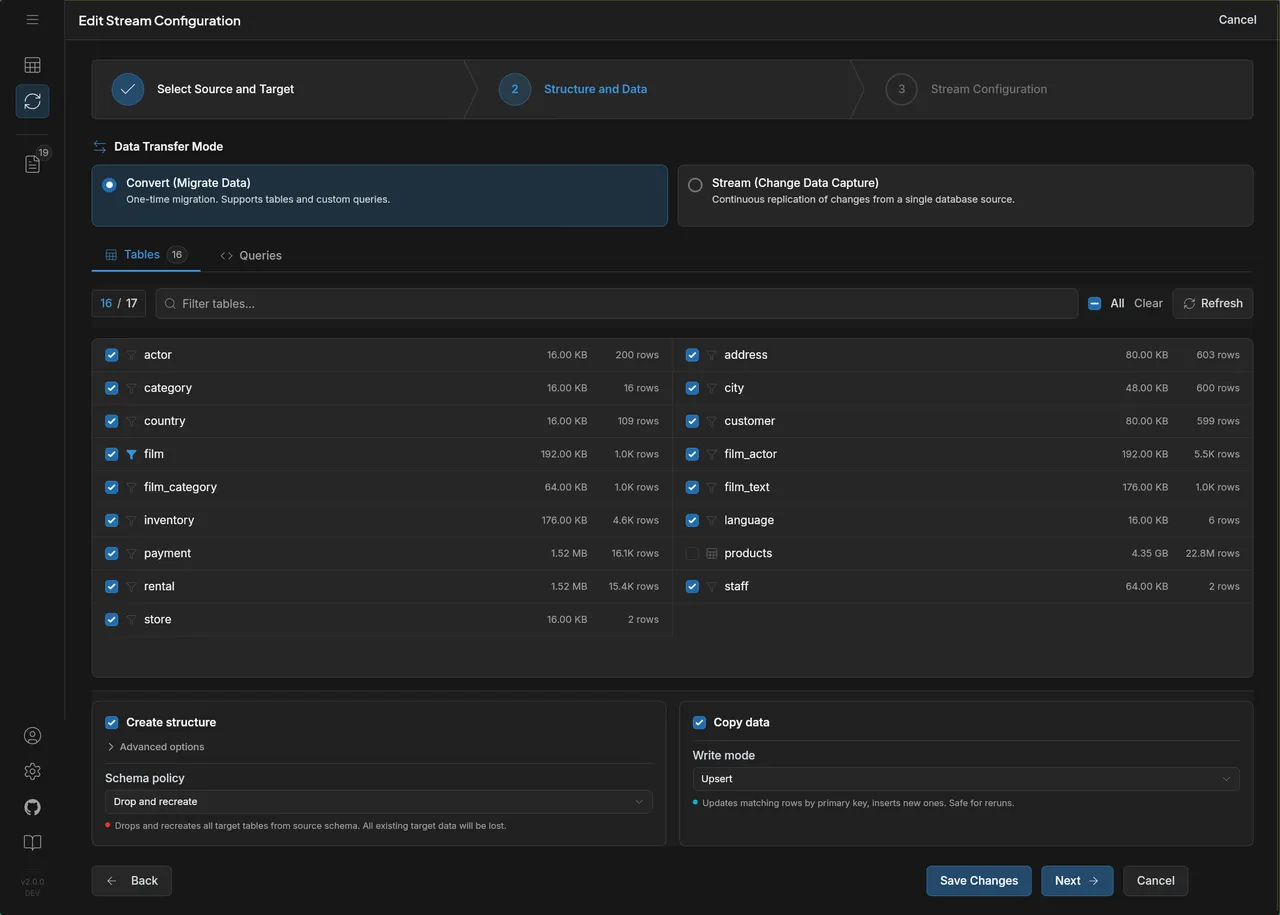
Configure data migration and CDC streams with table selection, custom queries, and transfer settings:
Track data streams with real-time metrics — rows, data size, transfer rates, and per-table progress:
Connect your AI client with one click — it reads the same workspace you see, read-only:
Run it anywhere — no cloud account required, no vendor lock-in.
| Method | Description |
|---|---|
| Desktop | Windows, macOS, Linux — local setup, no account required |
| Self-hosted | Docker / Docker Compose on any machine — local server, VPS, or your own infra |
The Database IDE is free forever. For data migration and CDC streaming, see pricing details.
Most people never touch the API. The UI covers connections, table selection, federated SQL, stream configuration, and monitoring end-to-end. The
curlexamples below are for users who want to script deployments, wire DBConvert Streams into CI/CD, or drive it from another service — not a required workflow.
Connections are managed separately and stream configs reference them by ID. Here are typical workflows via the API.
# Create a MySQL source connection
curl -X POST http://localhost:8020/api/v1/connections \
  -H "Content-Type: application/json" \
  -d '{
    "name": "mysql-source",
    "type": "mysql",
    "host": "localhost",
    "port": 3306,
    "username": "root",
    "password": "password"
  }'

# Create a PostgreSQL target connection
curl -X POST http://localhost:8020/api/v1/connections \
  -H "Content-Type: application/json" \
  -d '{
    "name": "pg-target",
    "type": "postgresql",
    "host": "localhost",
    "port": 5432,
    "username": "postgres",
    "password": "password"
  }'
One-time migration with table selection:
{
  "name": "mysql-to-postgres-migration",
  "mode": "load",
  "source": {
    "connections": [{
      "connectionId": "<mysql-connection-id>",
      "database": "sakila",
      "tables": [
        { "name": "actor" },
        { "name": "film" },
        { "name": "customer" }
      ]
    }]
  },
  "target": {
    "id": "<pg-connection-id>",
    "spec": {
      "db": {
        "database": "target_db",
        "schema": "public",
        "schemaPolicy": "drop_and_recreate"
      }
    }
  }
}
Real-time replication capturing inserts, updates, and deletes:
{
  "name": "mysql-to-postgres-cdc",
  "mode": "cdc",
  "source": {
    "connections": [{
      "connectionId": "<mysql-connection-id>",
      "database": "sakila",
      "tables": [
        { "name": "actor" },
        { "name": "film" }
      ]
    }],
    "options": {
      "operations": ["insert", "update", "delete"]
    }
  },
  "target": {
    "id": "<pg-connection-id>",
    "spec": {
      "db": {
        "database": "target_db",
        "writeMode": "upsert"
      }
    }
  }
}
Export database tables to Parquet files on S3:
{
  "name": "pg-to-s3-parquet",
  "mode": "load",
  "source": {
    "connections": [{
      "connectionId": "<pg-connection-id>",
      "database": "analytics",
      "tables": [
        { "name": "orders" },
        { "name": "customers" }
      ]
    }]
  },
  "target": {
    "id": "<s3-connection-id>",
    "spec": {
      "s3": {
        "fileFormat": "parquet",
        "upload": {
          "bucket": "my-data-lake",
          "prefix": "exports/"
        }
      }
    }
  }
}
Join data from MySQL and PostgreSQL into one target:
{
  "name": "federated-migration",
  "mode": "load",
  "source": {
    "connections": [
      {
        "alias": "my1",
        "connectionId": "<mysql-connection-id>",
        "database": "sakila"
      },
      {
        "alias": "pg1",
        "connectionId": "<pg-connection-id>",
        "database": "dvdrental"
      }
    ]
  },
  "target": {
    "id": "<target-connection-id>",
    "spec": {
      "db": { "database": "warehouse" }
    }
  }
}
curl -X POST http://localhost:8020/api/v1/stream-configs/<config-id>/start
curl http://localhost:8020/api/v1/streams/<stream-id>/stats
See the full API documentation for all endpoints and options. Standalone stream-config files live in
examples/api/, and reproducible benchmarks (including a side-by-side vs Debezium) are inexamples/benchmarks/.
Have questions or feedback? Use Discussions or open an Issue.
Claim this server with your GitHub account to request manual ownership verification.
Link to the catalog listing for DBConvert Streams MCP server from your README. This badge does not certify ownership, compatibility or security.
[](https://awesome-mcp.com/servers/dbconvert-streams-public)Public repository statistics could not be verified. Check the configured source address; unavailable counts are not zero.
Separate sources, scopes and periods. Never combined or treated as installations, active users or security reviews.
No reviewed package or image identity; download statistics are not listed yet.
Alternative and complementary servers in the same category
This is a Model Context Protocol (MCP) server for interacting with AIStor object stores.

A Model Context Protocol server that lets AI assistants run SQL queries against AWS Athena databases and retrieve results.

A Model Context Protocol (MCP) server that exposes access to an InfluxDB v2 instance using the InfluxDB OSS API v2.