


A Rust CAD application with an MCP server for creating, inspecting and rendering drawings, either headlessly or through a connection to the desktop app.
8K
Media & Design
A hosted remote MCP server that generates logos, social posts, app-store screenshots, comic panels, and visual-novel assets from natural-language prompts using a catalog of 119 templates.
DesignForYou hosted design-generation MCP server is cataloged as an MCP server attributed to swapp1990. A hosted remote MCP server that generates logos, social posts, app-store screenshots, comic panels, and visual-novel assets from natural-language prompts using a catalog of 119 templates. It is categorized under media design. See the capability inspector for recorded interfaces and their independent review status; consult upstream documentation for the current interface.
Installation configuration is not reviewed. No executable setup is offered for this entry; inspect the source repository before proceeding.
Catalog license label: MIT. Check the source repository's current license and terms before using, modifying or distributing this software.
Capability definitions are not reviewed. Unreviewed imports are not exposed as trusted interfaces.
No reviewed records to display. This does not establish that upstream lacks this capability.
No reviewed records to display. This does not establish that upstream lacks this capability.
No reviewed records to display. This does not establish that upstream lacks this capability.
Email delivery is not connected. This page does not collect email addresses or create subscriptions.
Browse the registry for current listings instead.
Reviews for DesignForYou hosted design-generation MCP server are not available yet
Review publishing and storage are not connected. This page does not collect or publish ratings or comments, including after sign-in.
Browsing and recommending templates are free, and new users get 50 free credits on sign-up; generation is metered per user against the credit balance.
No. The product is a hosted service, and the repository holds install docs and the MCP server.json rather than a self-host package.
The catalog contains 119 templates, which can be browsed and filtered by category.
README.md · a015e8c9c432 · Fetched 2026-11-13 11:59:52 UTC
Original upstream text, without AI rewriting. Scripts, forms and unsafe links are filtered for safety.
Showing the last retrieved documentation snapshot; check the source for current changes.



Generate logos, social posts, app-store screenshots, comic panels, and visual-novel assets from natural-language prompts — directly inside Claude Code, Grok, Codex, Cursor, OpenCode, ChatGPT, or any MCP client.
DesignForYou is an MCP-native design generator backed by 119 templates. Browse and recommend tools are free; generation is metered per user (50 free credits on sign-up).
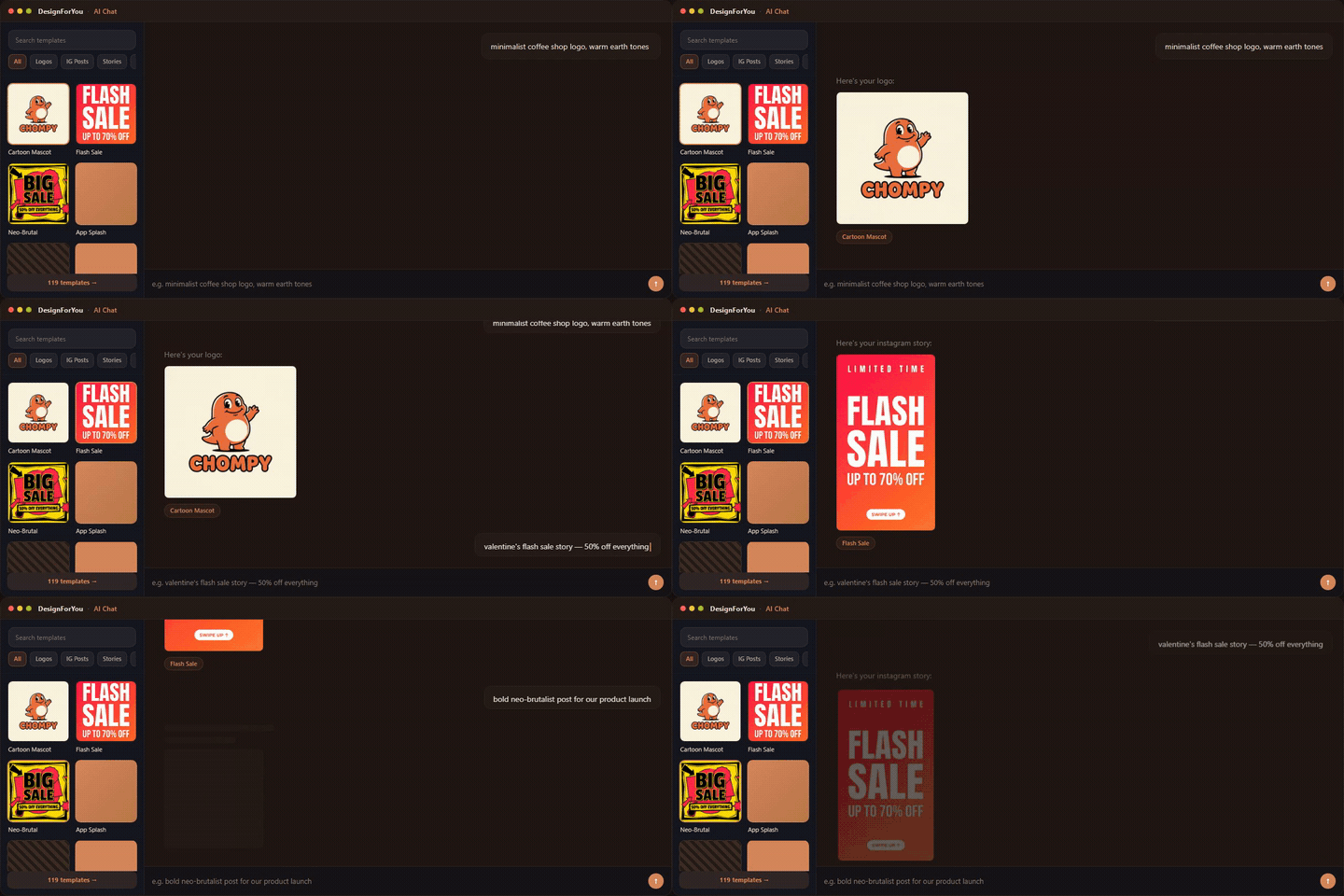
Describe what you want → the agent picks a template and generates a finished design. Logos, Instagram posts, app-store screenshots, and more.
| Website | https://designforyou.swapp1990.org |
| Connect (human) | https://designforyou.swapp1990.org/connect |
| Agent guide (plain text) | https://designforyou.swapp1990.org/.well-known/mcp/connect.md |
| MCP URL | https://designforyou.swapp1990.org/mcp/v2/ (trailing slash required) |
| Privacy | https://designforyou.swapp1990.org/privacy |
| Path | What you do | Who stores secrets |
|---|---|---|
| OAuth (primary) | Complete browser sign-in when the client prompts | The MCP client |
| Long-lived token (fallback) | Sign in on the website → Generate on /connect → DESIGNFORYOU_MCP_TOKEN | You (env / header) |
OAuth is the normal path. PAT minting is only for Codex, headless agents, or when OAuth stays “disabled / not connected.” Full recipes: CONNECT.md or the live well-known guide above.
claude mcp add --transport http designforyou https://designforyou.swapp1990.org/mcp/v2/
claude mcp login designforyou
Approve the browser sign-in when prompted.
grok mcp add --transport http designforyou https://designforyou.swapp1990.org/mcp/v2/
Then /mcps → designforyou → i (authorize) → browser → r.
Add a remote MCP entry for the URL above, then:
opencode mcp auth designforyou
opencode mcp list
DESIGNFORYOU_MCP_TOKENcodex mcp add designforyou --url https://designforyou.swapp1990.org/mcp/v2/ --bearer-token-env-var DESIGNFORYOU_MCP_TOKEN
Or .cursor/mcp.json:
{
  "mcpServers": {
    "designforyou": {
      "url": "https://designforyou.swapp1990.org/mcp/v2/",
      "transport": "http"
    }
  }
}
npx -y designforyou-mcp
Or native HTTP in claude_desktop_config.json with the /mcp/v2/ URL. Complete OAuth when prompted.
The default command above always uses the hosted DesignForYou MCP server. To run the focused local image and reference-animation tools instead, explicitly opt in with an installed, signed-in Grok Build CLI:
$env:DESIGNFORYOU_PROVIDER = "grok-subscription"
npx -y designforyou-mcp
This sidecar invokes grok --single through the CLI's existing signed-in
session; it never accepts or forwards an xAI API key, and it denies all MCP
tools inside the spawned CLI so generation cannot route through a hosted
billing server. Billing note: the Grok Build CLI's native media tools
(image_gen, image_to_video) call the xAI API (api.x.ai) with the
signed-in session token, so each generation meters the account's xAI console
usage — media generation is not covered by the grok.com chat subscription.
The sidecar exposes grok_generate_image and animate_reference_grok_video,
and verifies the requested local output file before returning it. The hosted
tools and their providers remain the default when the variable is unset.
(The grok-subscription opt-in value is kept for compatibility with existing
client configs.)
Register the checked-out sidecar as a local stdio MCP server:
codex mcp add designforyou-grok-local `
  --env DESIGNFORYOU_PROVIDER=grok-subscription `
  -- node D:\MyProjects\Claude\designforyou-mcp\bin.js

codex mcp list
Restart Codex or open a new local thread after adding the server. The thread
can then generate a starting frame with grok_generate_image and pass that
file to animate_reference_grok_video for an acting performance:
{
  "image_path": "D:\\assets\\actor-scene.jpg",
  "prompt": "She notices someone entering, freezes, then forces a nervous smile. Step backward slowly while maintaining eye contact. Use a subtle handheld push-in.",
  "line": "I wasn't expecting you.",
  "duration": 6,
  "aspect_ratio": "16:9",
  "output_path": "D:\\assets\\performance.mp4"
}
The reference may be supplied as image_path, image_url, or
image_data_url. This is a local-development path: the Codex host must be able
to run the installed, signed-in grok executable. Codex cloud threads cannot
use the machine's Grok login or local files. Use only trusted prompts because
the sidecar runs Grok headlessly with automatic tool approval.
For video results, public_url is returned when Grok supplies a usable URL/key
or when optional S3 correlation is configured. The sidecar brackets generation
with S3 listings and accepts only one newly-created object whose key is absent
from the baseline and whose byte size exactly matches the verified local MP4;
it also checks HTTP accessibility. S3 settings can be supplied with
DESIGNFORYOU_GROK_S3_BUCKET, DESIGNFORYOU_GROK_S3_REGION,
DESIGNFORYOU_GROK_S3_ENDPOINT, and DESIGNFORYOU_GROK_S3_KEY_PREFIX, or
discovered from the narrowly-scoped
[tools.zdr_video_output_s3] and its .read_write credentials section in
the local Grok config.
Missing configuration, listing failures, ambiguous matches, and inaccessible
objects leave the verified local success intact and include a diagnostic.
Automatic correlation requires the AWS CLI on PATH and the local Grok S3
configuration. The configured identity also needs s3:ListBucket restricted
to the configured key prefix; upload-only s3:PutObject credentials cannot
perform safe correlation. Credentials are passed only to the AWS child process
and are never printed or packaged. If listing is unavailable, generation still
returns the verified local file with an explicit diagnostic.
| Tool | Cost | What it does |
|---|---|---|
browse_templates | free | Browse the 119-template catalog (filter by category) |
recommend_template | free | Recommend the best templates for a described use case |
get_text_fields | free | List a template's editable text fields |
get_credits | free | Check your credit balance |
generate | paid | Generate a finished design from a template + description |
generate_variations | paid | Generate style variations of a template |
edit_text | paid | Edit text on an existing design |
vn_generate_sprite_sheet | paid | Generate a visual-novel character sprite sheet |
DesignForYou exposes a remote MCP server (Streamable HTTP). On the first paid
tool call (or when you run mcp login / mcp auth), your client discovers the
OAuth flow (RFC 9728 protected-resource metadata → Supabase with Dynamic Client
Registration), opens a browser for sign-in + consent, and stores tokens.
Generation is metered against your credit balance; top up on the website.
This repository is the public home for install docs and the MCP server.json.
The product itself is a hosted service — there is no self-host package.
org.swapp1990.designforyou/designforyouClaim this server with your GitHub account to request manual ownership verification.
Link to the catalog listing for DesignForYou hosted design-generation MCP server from your README. This badge does not certify ownership, compatibility or security.
[](https://awesome-mcp.com/servers/designforyou-mcp)Public repository statistics could not be verified. Check the configured source address; unavailable counts are not zero.
Separate sources, scopes and periods. Never combined or treated as installations, active users or security reviews.
No reviewed package or image identity; download statistics are not listed yet.
Alternative and complementary servers in the same category
A Rust CAD application with an MCP server for creating, inspecting and rendering drawings, either headlessly or through a connection to the desktop app.

Liquid Composer is a browser-based Liquid Glass icon design tool that offers a local MCP server for agent-driven icon workflows.

agent-media makes short drama series and other short vertical videos from Claude, ChatGPT or Codex through one MCP connection, with OAuth sign-in and no API keys.