The dicom-mcp server enables AI assistants to query, read, and move data on DICOM servers (PACS, VNA, etc.).
---------------------------------------------------------------------
🧑⚕️ User: "Any significant findings in John Doe's previous CT report?"
🧠 LLM → ⚙️ Tools:
query_patients → query_studies → query_series → extract_pdf_text_from_dicom
💬 LLM Response: "The report from 2025-03-26 mentions a history of splenomegaly (enlarged spleen)"
🧑⚕️ User: "What's the volume of his spleen at the last scan and the scan today?"
🧠 LLM → ⚙️ Tools:
(query_studies → query_series → move_series → query_series → extract_pdf_text_from_dicom) x2
(The move_series tool sends the latest CT to a DICOM segmentation node, which returns volume PDF report)
💬 LLM Response: "last year 2024-03-26: 412cm³, today 2025-04-10: 350cm³"
---------------------------------------------------------------------
✨ Core Capabilities
dicom-mcp provides tools to:
- 🔍 Query Metadata: Search for patients, studies, series, and instances using various criteria.
- 📄 Read DICOM Reports (PDF): Retrieve DICOM instances containing encapsulated PDFs (e.g., clinical reports) and extract the text content.
- ➡️ Send DICOM Images: Send series or studies to other DICOM destinations, e.g. AI endpoints for image segmentation, classification, etc.
- ⚙️ Utilities: Manage connections and understand query options.
🚀 Quick Start
📥 Installation
Install using uv or pip:
uv tool install dicom-mcp
Or by cloning the repository:
# Clone and set up development environment
git clone https://github.com/ChristianHinge/dicom-mcp
cd dicom mcp

# Create and activate virtual environment
uv venv
source .venv/bin/activate

# Install with test dependencies
uv pip install -e ".[dev]"
⚙️ Configuration
dicom-mcp requires a YAML configuration file (config.yaml or similar) defining DICOM nodes and calling AE titles. Adapt the configuration or keep as is for compatibility with the sample ORTHANC Server.
nodes:
  main:
    host: "localhost"
    port: 4242
    ae_title: "ORTHANC"
    description: "Local Orthanc DICOM server"

current_node: "main"
calling_aet: "MCPSCU"
[!WARNING]
DICOM-MCP is not meant for clinical use, and should not be connected with live hospital databases or databases with patient-sensitive data. Doing so could lead to both loss of patient data, and leakage of patient data onto the internet. DICOM-MCP can be used with locally hosted open-weight LLMs for complete data privacy.
(Optional) Sample ORTHANC server
If you don't have a DICOM server available, you can run a local ORTHANC server using Docker:
Clone the repository and install test dependencies pip install -e ".[dev]
cd tests
docker compose up -d
cd ..
pytest # uploads dummy pdf data to ORTHANC server
UI at http://localhost:8042
🔌 MCP Integration
Add to your client configuration (e.g. claude_desktop_config.json):
{
  "mcpServers": {
    "dicom": {
      "command": "uvx",
      "args": ["dicom-mcp", "/path/to/your_config.yaml"]
    }
  }
}
For development:
{
    "mcpServers": {
        "arxiv-mcp-server": {
            "command": "uv",
            "args": [
                "--directory",
                "path/to/cloned/dicom-mcp",
                "run",
                "dicom-mcp",
                "/path/to/your_config.yaml"
            ]
        }
    }
}
Running over HTTP
By default the server speaks stdio and is launched by the MCP client. To run it as a standalone server instead, use the streamable-HTTP transport:
uv run dicom-mcp /path/to/your_config.yaml --transport http --host 127.0.0.1 --port 8000
Clients then connect to http://127.0.0.1:8000/mcp; Claude Desktop does so through mcp-remote:
{
  "mcpServers": {
    "dicom": {
      "command": "npx",
      "args": ["mcp-remote", "http://127.0.0.1:8000/mcp"]
    }
  }
}
The HTTP transport runs stateless, so the server can be restarted while the client keeps running. --transport sse (the legacy SSE transport) accepts the same --host/--port options.
The HTTP and SSE endpoints have no authentication. Bound to 127.0.0.1 (the default), they reject requests whose Host or Origin header names another site, which keeps web pages in your browser from reaching them through DNS rebinding. Binding to any other address exposes the server to every host that can reach it; keep it behind a firewall or an authenticating reverse proxy.
dicom-mcp provides four categories of tools for interaction with DICOM servers and DICOM data.
query_patients: Search for patients based on criteria like name, ID, or birth date.query_studies: Find studies using patient ID, date, modality, description, accession number, or Study UID.query_series: Locate series within a specific study using modality, series number/description, or Series UID.query_instances: Find individual instances (images/objects) within a series using instance number or SOP Instance UID
extract_pdf_text_from_dicom: Retrieve a specific DICOM instance containing an encapsulated PDF and extract its text content.
move_series: Send a specific DICOM series to another configured DICOM node using C-MOVE.move_study: Send an entire DICOM study to another configured DICOM node using C-MOVE.
⚙️ Utilities
list_dicom_nodes: Show the currently active DICOM node and list all configured nodes.switch_dicom_node: Change the active DICOM node for subsequent operations.verify_connection: Test the DICOM network connection to the currently active node using C-ECHO.get_attribute_presets: List the available levels of detail (minimal, standard, extended) for metadata query results.
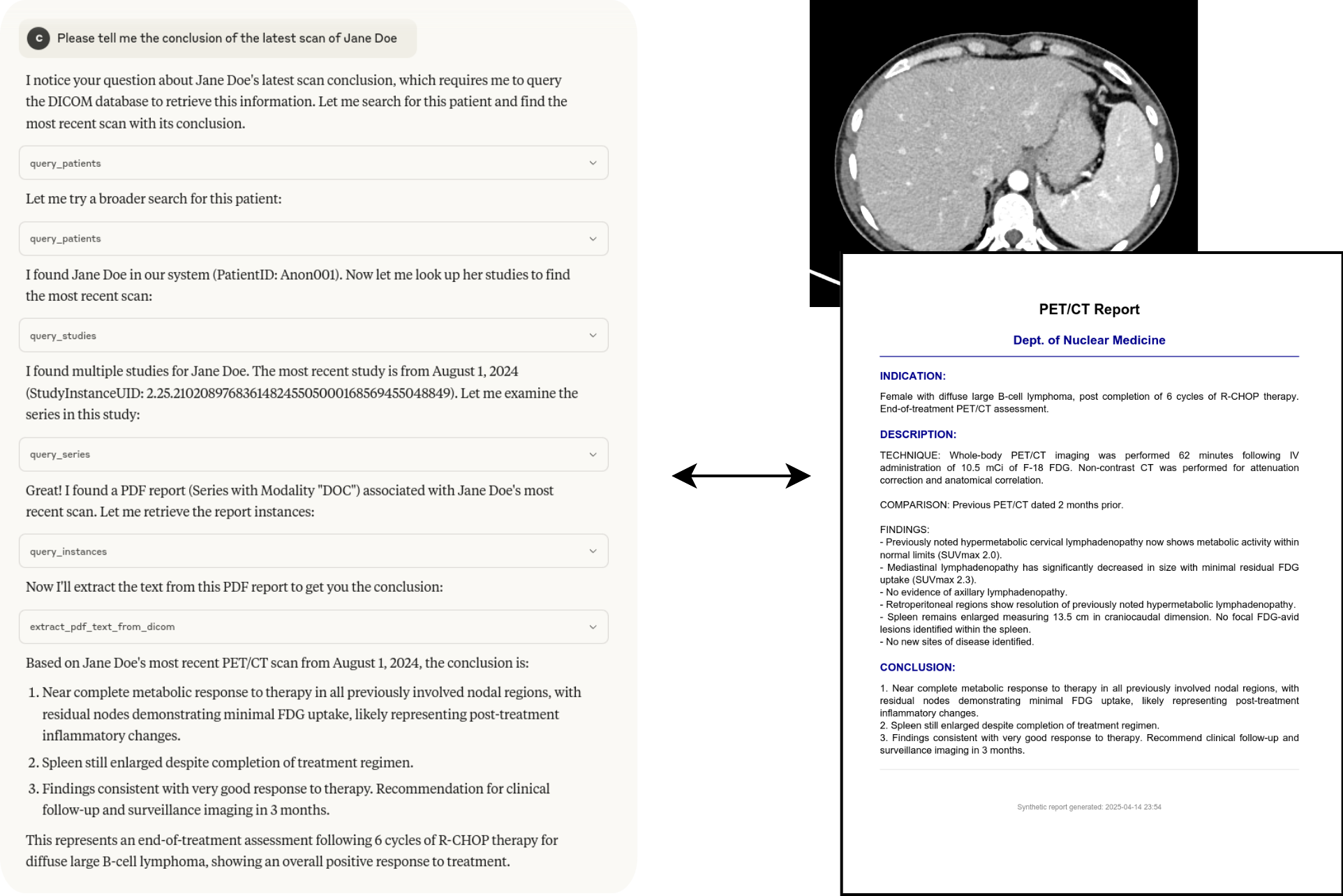
Example interaction
The tools can be chained together to answer complex questions:
📈 Contributing
Running Tests
Tests require a running Orthanc DICOM server. You can use Docker:
# Navigate to the directory containing docker-compose.yml (e.g., tests/)
cd tests
docker-compose up -d
Run tests using pytest:
# From the project root directory
pytest
Stop the Orthanc container:
cd tests
docker-compose down
Debugging
Use the MCP Inspector for debugging the server communication:
npx @modelcontextprotocol/inspector uv run dicom-mcp /path/to/your_config.yaml --transport stdio
🙏 Acknowledgments