
A directory listing describing a cancellation-letter and mailing-address service. The configured public GitHub repository returned 404 during source verification.
Repository stats unavailable
Developer Tools
A Docker CLI plugin providing a gateway that runs MCP servers in isolated containers and exposes them to AI clients through a single unified interface.
Docker MCP Gateway is cataloged as an MCP server attributed to docker. A Docker CLI plugin providing a gateway that runs MCP servers in isolated containers and exposes them to AI clients through a single unified interface. It is categorized under developer tools. See the capability inspector for recorded interfaces and their independent review status; consult upstream documentation for the current interface.
Installation configuration is not reviewed. No executable setup is offered for this entry; inspect the source repository before proceeding.
Catalog license label: MIT License. Check the source repository's current license and terms before using, modifying or distributing this software.
Capability definitions are not reviewed. Unreviewed imports are not exposed as trusted interfaces.
No reviewed records to display. This does not establish that upstream lacks this capability.
No reviewed records to display. This does not establish that upstream lacks this capability.
No reviewed records to display. This does not establish that upstream lacks this capability.
Email delivery is not connected. This page does not collect email addresses or create subscriptions.
Browse the registry for current listings instead.
Reviews for Docker MCP Gateway are not available yet
Review publishing and storage are not connected. This page does not collect or publish ratings or comments, including after sign-in.
Yes, it can service multiple clients when using the sse or streaming transports.
Yes, it includes built-in OAuth flows and secure secrets management via Docker Desktop.
README.md · 7e0f34277c91 · Fetched 2026-11-13 09:42:05 UTC
Original upstream text, without AI rewriting. Scripts, forms and unsafe links are filtered for safety.
Showing the last retrieved documentation snapshot; check the source for current changes.

The MCP Toolkit, in Docker Desktop, allows developers to configure and consume MCP servers from the Docker MCP Catalog.
Underneath, the Toolkit is powered by a docker CLI plugin: docker-mcp. This repository is the code of this CLI plugin. It can work in Docker Desktop or independently.
The main feature of this CLI is the Docker MCP Gateway which allows easy and secure running and deployment of MCP servers. See Features for a list of all the features.
The Model Context Protocol (MCP) is an open protocol that standardizes how AI applications connect to external data sources and tools. It provides a secure, controlled way for language models to access and interact with various services, databases, and APIs.
Developers face criticial barriers when integrating Model Context Protocol (MCP) tools into production workflows:
4.59+ (with MCP Toolkit feature enabled)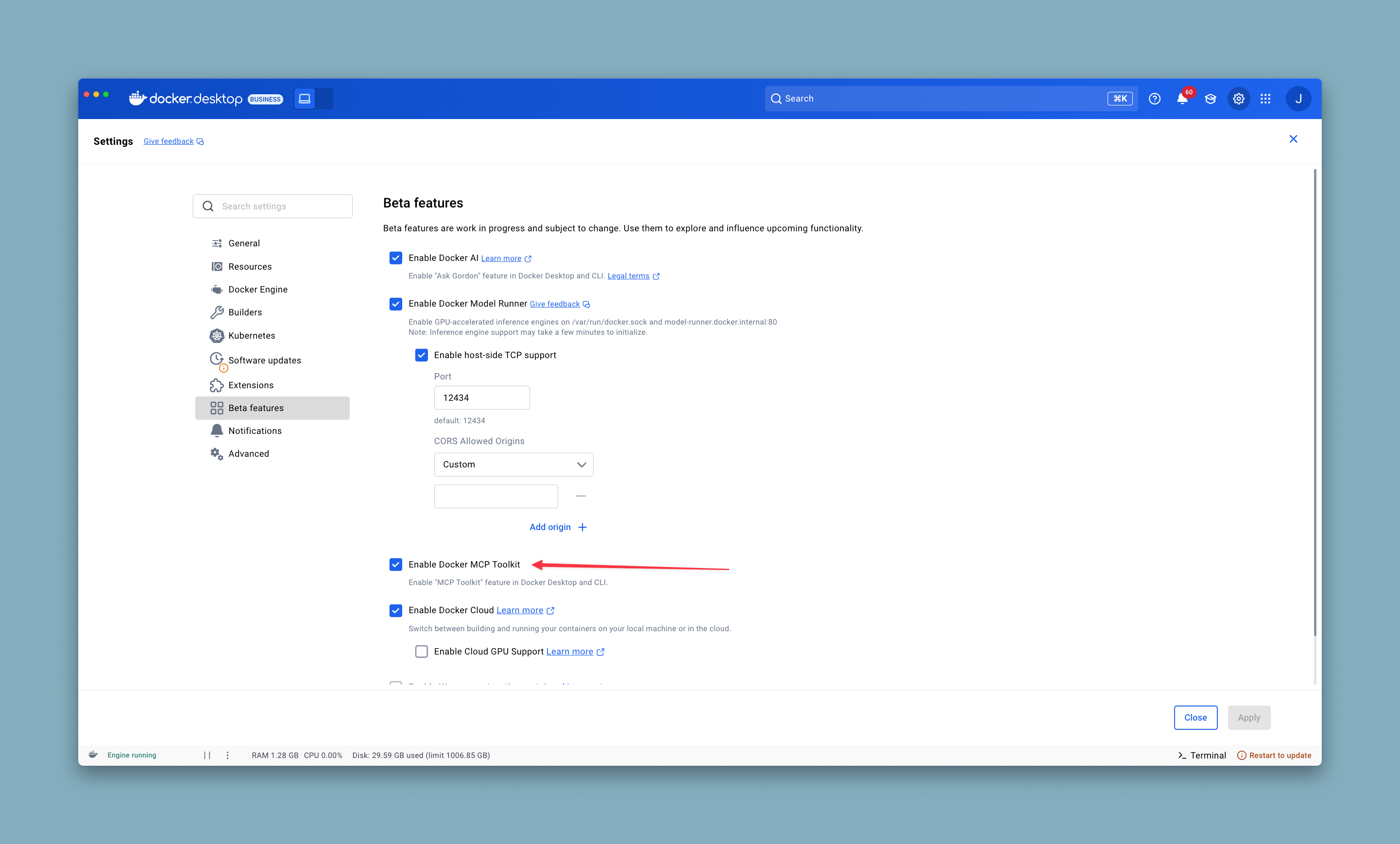
The MCP cli will already be installed on recent versions of Docker Desktop but you can build and install the latest version by following these steps:
# Clone the repository
git clone https://github.com/docker/mcp-gateway.git
cd mcp-gateway
mkdir -p "$HOME/.docker/cli-plugins/"

# Build and install the plugin
make docker-mcp
After installation, the plugin will be available as:
docker mcp --help
[!NOTE] Running without Docker Desktop Feature Flags
If you encounter "Docker Desktop is not running" errors when the Docker daemon is active, you can bypass Desktop feature checks by setting:
export DOCKER_MCP_IN_CONTAINER=1This is useful when running in WSL2, containerized environments, or Docker CE where Desktop backend sockets are unavailable.
[!NOTE] Enabling Profiles outside Docker Desktop
Profiles are enabled automatically in Docker Desktop. If you are using the CLI independently (e.g. Docker CE, WSL2, or a containerized environment), enable the profiles feature first:
docker mcp feature enable profiles
Servers are organized into profiles. A profile groups related MCP servers together and can be connected to clients, exported, and shared via OCI registries.
Servers in a profile can reference multiple sources:
catalog://mcp/docker-mcp-catalog/githubdocker://my-server:latesthttps://registry.modelcontextprotocol.io/v0/servers/<id>file://./server.yaml# Make sure to `docker mcp catalog pull mcp/docker-mcp-catalog` first.
# Create a new profile
docker mcp profile create --name dev-tools \
--server catalog://mcp/docker-mcp-catalog/github
# Create a profile and connect it to a client
docker mcp profile create --name dev-tools \
--server catalog://mcp/docker-mcp-catalog/github \
--connect cursor
# List all profiles
docker mcp profile list
# Show profile details
docker mcp profile show <profile-id>
# Remove a profile
docker mcp profile remove <profile-id>
# Export/import profiles
docker mcp profile export <profile-id> output.yaml
docker mcp profile import input.yaml
# Push/pull profiles to OCI registries
docker mcp profile push <profile-id> <oci-reference>
docker mcp profile pull <oci-reference>
# List servers across all profiles
docker mcp profile server ls

# Filter servers by name or profile
docker mcp profile server ls --filter name=github
docker mcp profile server ls --filter profile=dev-tools

# Add servers to a profile
docker mcp profile server add dev-tools \
  --server catalog://mcp/docker-mcp-catalog/notion

# Remove servers from a profile
docker mcp profile server remove dev-tools github slack
# Set configuration values (<server-name>.<config-key>=<value>)
docker mcp profile config <profile-id> --set github.timeout=30

# Get configuration values (<server-name>.<config-key>)
docker mcp profile config <profile-id> --get github.timeout

# Get all configuration
docker mcp profile config <profile-id> --get-all

# Delete configuration values (<server-name>.<config-key>)
docker mcp profile config <profile-id> --del github.timeout
# Enable specific tools (dot notation: <server>.<tool>)
docker mcp profile tools <profile-id> --enable github.create_issue --enable github.list_repos

# Disable specific tools
docker mcp profile tools <profile-id> --disable github.search_code

# Enable/disable all tools for a server
docker mcp profile tools <profile-id> --enable-all github
docker mcp profile tools <profile-id> --disable-all github
Manage the OCI-based catalogs available to the MCP gateway. The default catalog is the image mcp/docker-mcp-catalog.
# List catalogs
docker mcp catalog ls

# Show a catalog
docker mcp catalog show <oci-reference>

# Create a catalog from server references
docker mcp catalog create myorg/catalog:latest --title "My Catalog" \
  --server catalog://mcp/docker-mcp-catalog/github \
  --server file://./my-server.yaml

# Create a catalog from an existing profile
docker mcp catalog create myorg/catalog:latest --from-profile dev-tools

# Create a catalog from the community registry
docker mcp catalog create myorg/catalog:latest \
  --from-community-registry registry.modelcontextprotocol.io

# Push/pull catalogs to OCI registries
docker mcp catalog push <oci-reference>
docker mcp catalog pull <oci-reference>

# Manage servers within a catalog
docker mcp catalog server ls <oci-reference>
docker mcp catalog server add <oci-reference> --server docker://my-server:latest
docker mcp catalog server remove <oci-reference> github
docker mcp catalog server inspect <oci-reference> <server-name>

# Remove a catalog
docker mcp catalog remove <oci-reference>

# Tag a catalog
docker mcp catalog tag <source>:<tag> <target>:<tag>
More about importing from the OSS MCP Community Registry.
Start up an MCP Gateway. This can be used for one client, or to service multiple clients if using either sse or streaming transports.
# Run the MCP gateway (stdio, using the default profile)
docker mcp gateway run

# Run with a specific profile
docker mcp gateway run --profile dev-tools

# Run the MCP gateway (streaming)
docker mcp gateway run --port 8080 --transport streaming
If no --profile flag is provided, the gateway uses the default profile.
Connect AI clients to the MCP gateway.
# List client configurations
docker mcp client ls

# Connect a client to a profile
docker mcp client connect <client-name> --profile <profile-id>

# Disconnect from a client
docker mcp client disconnect <client-name>
Configure MCP servers that require either secrets or OAuth.
# Manage secrets
docker mcp secret --help

# Handle OAuth flows
docker mcp oauth --help

# export any desktop secrets needed by either server1 or server2
#   (temporary requirement to export secrets for docker cloud runs - this command
#    will no longer be required once Docker Cloud can access secret stores)
docker mcp secret export server1 server2
# Count available tools
docker mcp tools count

# List all available MCP tools
docker mcp tools ls

# List all available MCP tools in JSON format
docker mcp tools ls --format=json

# Inspect a specific tool
docker mcp tools inspect <tool-name>

# Call a tool with arguments
docker mcp tools call <tool-name> [arguments...]

# Enable/disable tools for a server in a profile
docker mcp profile tools <profile-id> --enable <server>.<tool>
docker mcp profile tools <profile-id> --disable <server>.<tool>
Configuration is stored in a local database. Profiles, catalogs, and server configuration are managed through the docker mcp profile and docker mcp catalog commands. Feature flags are stored in ~/.docker/config.json.
The MCP CLI respects the following environment variables for client configuration:
CLAUDE_CONFIG_DIR: Override the default Claude Code configuration directory (~/.claude). When set, Claude Code will use $CLAUDE_CONFIG_DIR/.claude.json instead of ~/.claude.json for its MCP server configuration. This is useful for:
Example usage:
# Set custom Claude Code configuration directory
export CLAUDE_CONFIG_DIR=/path/to/custom/config

# Connect MCP Gateway to Claude Code
docker mcp client connect claude-code --profile dev-tools --global

# Claude Code will now use /path/to/custom/config/.claude.json
The Docker MCP CLI implements a gateway pattern:
AI Client → MCP Gateway → MCP Servers (Docker Containers)
See docs/message-flow.md for detailed message flow diagrams.
The build instructions are available in the contribution guide.
This project is licensed under the MIT License - see the LICENSE file for details.
Claim this server with your GitHub account to request manual ownership verification.
Link to the catalog listing for Docker MCP Gateway from your README. This badge does not certify ownership, compatibility or security.
[](https://awesome-mcp.com/servers/docker-mcp-gateway)Public repository statistics could not be verified. Check the configured source address; unavailable counts are not zero.
Separate sources, scopes and periods. Never combined or treated as installations, active users or security reviews.
No reviewed package or image identity; download statistics are not listed yet.
Alternative and complementary servers in the same category
A directory listing describing a cancellation-letter and mailing-address service. The configured public GitHub repository returned 404 during source verification.

A hosted MCP service for browsing and searching through Singapore mobile-network proxies.

A directory listing describing a Markdown-to-PDF service. The configured public GitHub repository returned 404 during source verification.