Python MCP server for documentation search

Python MCP server for documentation search

document-search-mcp-server•bysawantudayan

An MCP server that searches and extracts documentation from LangChain, LlamaIndex, and OpenAI using the Serper API and BeautifulSoup.

License: Not specified•Runtime: Awaiting documentation review•Category: file systems-docs

WHAT IT DOES

  • •Searches documentation for LangChain, LlamaIndex, and OpenAI via the get_docs tool.
  • •Performs web searches through the Serper API to find relevant documentation.
  • •Fetches documentation pages over HTTP and extracts their readable text with BeautifulSoup.
  • •Includes a dummy_tool to confirm the server is running.

BEST FOR

  • •Developers looking up the latest LangChain documentation through an MCP client.
  • •Querying LlamaIndex or OpenAI documentation from within an interactive MCP session.

ABOUT DOCUMENT-SEARCH-MCP-SERVER

Python MCP server for documentation search is cataloged as an MCP server attributed to sawantudayan. An MCP server that searches and extracts documentation from LangChain, LlamaIndex, and OpenAI using the Serper API and BeautifulSoup. It is categorized under file systems-docs. See the capability inspector for recorded interfaces and their independent review status; consult upstream documentation for the current interface.

HOW TO INSTALL

Installation configuration is not reviewed. No executable setup is offered for this entry; inspect the source repository before proceeding.

LICENSE

Catalog license label: Not specified. Check the source repository's current license and terms before using, modifying or distributing this software.

Capability inspector

Capability definitions are not reviewed. Unreviewed imports are not exposed as trusted interfaces.

Tools (0)

No reviewed records to display. This does not establish that upstream lacks this capability.

Resources (0)

No reviewed records to display. This does not establish that upstream lacks this capability.

Prompts (0)

No reviewed records to display. This does not establish that upstream lacks this capability.

NEWSLETTER - COMING LATER

Newsletter subscriptions are not open yet

Email delivery is not connected. This page does not collect email addresses or create subscriptions.

Browse the registry for current listings instead.

Community Reviews

Coming later

Reviews for Python MCP server for documentation search are not available yet

Review publishing and storage are not connected. This page does not collect or publish ratings or comments, including after sign-in.

FREQUENTLY ASKED QUESTIONS

Which libraries' documentation can the server search?

It supports searching documentation for LangChain, LlamaIndex, and OpenAI.

What external service does the server rely on for searching?

It uses the Serper API for web searches, requiring a Serper API key configured in a .env file.

Upstream README

View this exact version on GitHub

README.md · 25995ba9df1f · Fetched 2026-11-13 12:44:33 UTC

Original upstream text, without AI rewriting. Scripts, forms and unsafe links are filtered for safety.

Showing the last retrieved documentation snapshot; check the source for current changes.

Python MCP Server - Documentation Search
mcp_server.jpg

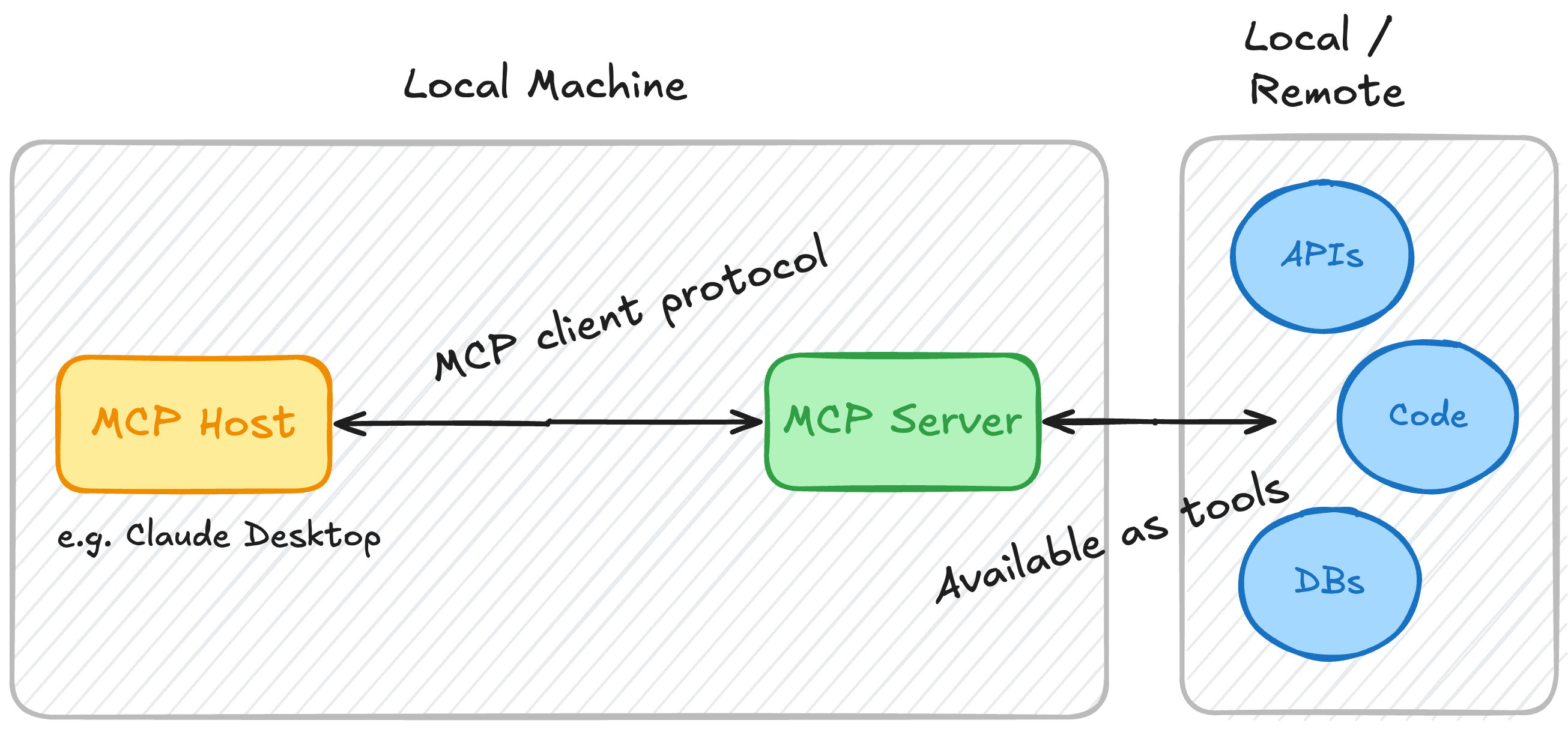
This is a simple MCP (Minimal Command Protocol) server that allows users to search for documentation from popular libraries such as LangChain, LlamaIndex, and OpenAI using the Serper API. The server fetches search results and extracts the relevant documentation from the web using HTTP requests and BeautifulSoup.

Features

  • Supports searching documentation for LangChain, LlamaIndex, and OpenAI.
  • Uses Serper API to perform web searches.
  • Extracts and returns the text from the relevant documentation pages.
  • Can be used interactively through MCP protocol.

Requirements

  • Python 3.12 or higher.
  • Serper API Key for performing web searches.
  • MCP library for the server and tool execution.
  • BeautifulSoup4 and httpx for HTTP requests and HTML parsing.

Installation

Step 1: Install Python Dependencies

To set up the project, clone this repository and install the required dependencies.

git clone <repository-url>
cd <repository-directory>
pip install -r requirements.txt

Or, if you're not using a requirements.txt file:

pip install httpx beautifulsoup4 mcp python-dotenv

Step 2: Set Up Environment Variables

Create a .env file in the root directory of the project with your Serper API Key.

SERPER_API_KEY=your-serper-api-key-here

Make sure the .env file is loaded using the dotenv package.

Step 3: Run the Server

Once the environment is set up, run the server using the following command:

uv run main.py

The server will start and wait for input.

Usage

Once the server is running, you can use it to query the latest documentation for specific libraries. Here’s an example of how to query the tool:

Example Query

Start your server with uv run main.py.

In another terminal or from within an interactive MCP client, invoke the get_docs tool to search for documentation:

 get_docs("Chroma DB", "langchain")

This will search for "Chroma DB" in the LangChain documentation and return the relevant content.

Available Libraries

  • LangChain: Documentation at langchain.com
  • LlamaIndex: Documentation at llamaindex.ai
  • OpenAI: Documentation at platform.openai.com

Code Overview

main.py

  • FastMCP: Initializes the MCP server.
  • Tools: The server has two tools:
  • dummy_tool: A simple tool that confirms the server is up and running.
  • get_docs: Fetches the latest documentation for a given query and library (LangChain, LlamaIndex, OpenAI).
  • search_web(): Handles searching using the Serper API.
  • fetch_url(): Fetches a URL and extracts the text content using BeautifulSoup.

dotenv and logging

  • Loads the Serper API Key from the .env file.
  • Provides debug-level logging for better visibility into server actions and potential issues.`````

Troubleshooting

  • Missing API Key: Make sure the Serper API Key is set correctly in the .env file. You’ll get an error if it's missing.
  • Timeout Issues: If a search or URL fetch times out, try increasing the timeout values or checking the network connectivity.
  • Package Installation Issues: Ensure all dependencies are installed and the correct Python environment is activated.

Contributor

Udayan Sawant

Install configuration

Are you the maintainer?

Claim this server with your GitHub account to request manual ownership verification.

README Embed Badge
Markdown

Link to the catalog listing for Python MCP server for documentation search from your README. This badge does not certify ownership, compatibility or security.

[![MCP catalog listing](https://img.shields.io/badge/MCP-awesome--mcp-orange?style=flat-square)](https://awesome-mcp.com/servers/document-search-mcp-server)

REPOSITORY STATS

GitHub StarsUnavailable
ForksUnavailable

Public repository statistics could not be verified. Check the configured source address; unavailable counts are not zero.

Downloads and pulls

Separate sources, scopes and periods. Never combined or treated as installations, active users or security reviews.

No reviewed package or image identity; download statistics are not listed yet.

Related file systems-docs MCP Servers

Alternative and complementary servers in the same category

View all in file systems-docs →

A Model Context Protocol server for global law with read-only tools to find and read provisions by date, trace the law behind each word, search text and changes, and check cases or briefs against law in force.

Repository stats unavailable
Files & Documentation
LoreKeeper MCP server
lorekeeper-rpg-lorekeeper-com•lore-keeper

Hosted MCP server for tabletop RPG worlds that organizes messy notes and documents into a private store and lets MCP apps search lore, read documents, find characters, and optionally generate character or world pictures.

Repository stats unavailable
Files & Documentation

An MCP server that gives AI assistants scoped file system operations inside a project directory, with read-only reference projects plus git and GitHub tools.

Repository stats unavailable
Files & Documentation