
A directory listing describing a cancellation-letter and mailing-address service. The configured public GitHub repository returned 404 during source verification.
Repository stats unavailable
Developer Tools
An OpenAI-compatible endpoint manager built with Deno and Fresh that also runs built-in MCP servers over SSE and proxies connections to other MCP servers.
Doroseek: AI app with built-in MCP servers and an MCP proxy is cataloged as an MCP server attributed to junjiepro. An OpenAI-compatible endpoint manager built with Deno and Fresh that also runs built-in MCP servers over SSE and proxies connections to other MCP servers. It is categorized under developer tools. See the capability inspector for recorded interfaces and their independent review status; consult upstream documentation for the current interface.
Installation configuration is not reviewed. No executable setup is offered for this entry; inspect the source repository before proceeding.
Catalog license label: Not specified. Check the source repository's current license and terms before using, modifying or distributing this software.
Capability definitions are not reviewed. Unreviewed imports are not exposed as trusted interfaces.
No reviewed records to display. This does not establish that upstream lacks this capability.
No reviewed records to display. This does not establish that upstream lacks this capability.
No reviewed records to display. This does not establish that upstream lacks this capability.
Email delivery is not connected. This page does not collect email addresses or create subscriptions.
Browse the registry for current listings instead.
Reviews for Doroseek: AI app with built-in MCP servers and an MCP proxy are not available yet
Review publishing and storage are not connected. This page does not collect or publish ratings or comments, including after sign-in.
README.md · c6e44183c30f · Fetched 2026-11-13 12:11:21 UTC
Original upstream text, without AI rewriting. Scripts, forms and unsafe links are filtered for safety.
Showing the last retrieved documentation snapshot; check the source for current changes.
DoroseekA simple AI app built with Deno and Fresh.
Doroseek API key with others to access the
endpoints.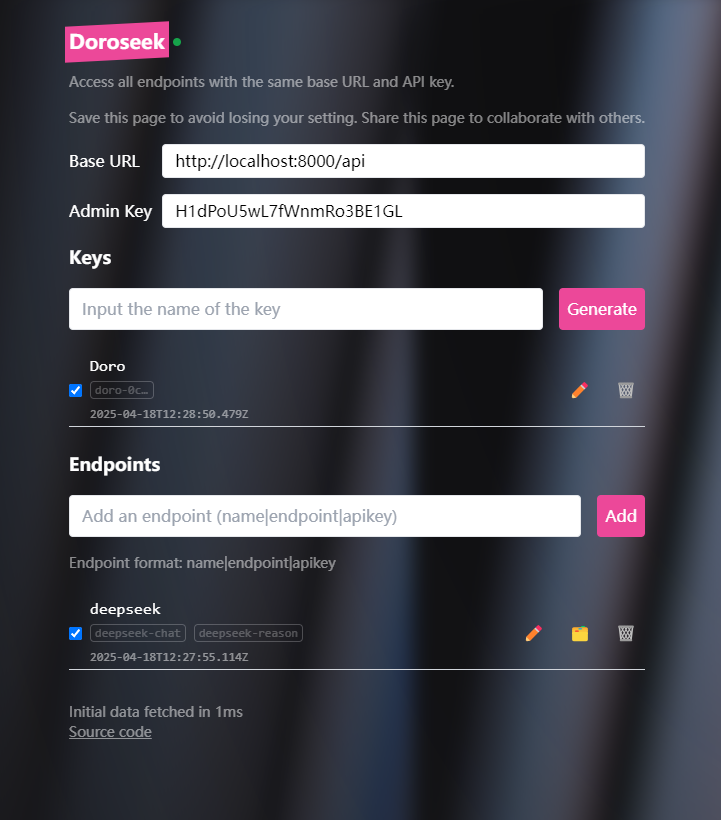
Doroseek API keys/{key}/api/mcp/{server}/sse?apiKey={apiKey}/mcp/proxy/sse?apiKey={apiKey}&transport=stdio&command=&args=&env=/mcp/proxy/sse?apiKey={apiKey}&transport=sse&url=/mcp/proxy/sse?apiKey={apiKey}&transport=stdio&command=npx&args=-y @modelcontextprotocol/server-sequential-thinking&env={}Doroseek now includes several powerful MCP-based services for advanced use cases:
These features leverage WebSockets for real-time communication and Deno KV for persistence where applicable.
Concept:
This feature allows you to expose services running on your private network (e.g., a local development server, a database, or any TCP/HTTP service) to the public internet through a secure tunnel established with your Doroseek instance.
Local Agent:
To use this feature, a local agent (client software) must be run on the machine where the private services are accessible. Doroseek itself can also run in this "Agent Mode". For details on configuring and running Doroseek as a local agent, see the Agent Mode section below. The agent is responsible for connecting to a remote Doroseek instance (acting as a relay), managing the tunnel, and forwarding traffic between the relay and the local services.
Registration Process (Agent to Relay):
Connection: The local agent establishes a WebSocket connection to the Doroseek MCP server:
wss://your-doroseek-instance/mcp/tunnel/register?apiKey=<your_api_key>
An API key is mandatory for registration.
Registration Message: After the WebSocket connection is established, the agent sends a register message. This message details the services it wishes to expose.
Example register message from agent:
{
  "type": "register",
  "data": {
    "services": [
      { "type": "http", "local_port": 3000, "subdomain_or_path": "my-web-app" },
      { "type": "http", "local_port": 8080, "subdomain_or_path": "api-service" }
      // Other types like 'tcp' might be supported by the agent protocol in the future.
    ]
  }
}
Server Response: Upon successful registration, Doroseek responds with a registered message containing the unique tunnelId and the public base URL for accessing the tunneled services.
Example registered message from server:
{
  "type": "registered",
  "data": {
    "tunnelId": "xxxxxxxx-xxxx-xxxx-xxxx-xxxxxxxxxxxx",
    "public_base_url": "https://your-doroseek-instance/t/xxxxxxxx-xxxx-xxxx-xxxx-xxxxxxxxxxxx"
  }
}
Accessing Tunneled Services:
Once the tunnel is established, your local services can be accessed via the public URLs derived from the public_base_url and the subdomain_or_path defined during registration. For example, if your-doroseek-instance is example.com and a service was registered with subdomain_or_path: 'my-web-app', it might be accessible via:
https://example.com/t/<tunnelId>/my-web-app/...
The exact URL structure depends on how the public-facing routing (/t/:tunnelId/...) is configured to map to specific services.
Local Agent Responsibilities (High-Level):
/mcp/tunnel/register.register message with service definitions.httpRequest messages from Doroseek over the WebSocket. Each httpRequest message will contain:
requestId: A unique ID for the request.data: An object with method, path, headers, and body of the incoming public request.httpRequest, the agent makes a corresponding request to its local service (e.g., http://localhost:3000/some/path).httpResponse message back to Doroseek over the WebSocket, including the original requestId and the response details (status, headers, body).Doroseek's public-facing tunnel route).Concept: Enable real-time, bi-directional communication between multiple clients. This can be used as a backend for features like live chat in web applications, collaborative editing, or other multi-user interactive experiences.
Connecting to a Room:
Clients connect to a room using a WebSocket connection. The roomId is specified in the path.
wss://your-doroseek-instance/mcp/room/:roomId?apiKey=<optional_api_key>
apiKey is provided in the query string, it is validated. This allows associating users with an API key owner if needed.Core Functionality:
ServerRoomInfoMessage to the joining user, containing a list of users already in the room.ServerUserJoinedMessage.ServerUserLeftMessage.ClientChatMessage from client:
{
  "type": "chatMessage",
  "payload": {
    "roomId": "your-target-room-id", // Though roomId is in path, can be in payload
    "message": "Hello everyone!"
  }
}
ServerChatMessage: A chat message sent by another user in the room.
{
  "type": "chatMessage",
  "payload": {
    "roomId": "the-room-id",
    "fromUserId": "user-id-of-sender",
    "message": "Hello everyone!",
    "timestamp": "2023-01-01T12:00:00.000Z"
  }
}
ServerUserJoinedMessage: Notifies that a new user has joined.ServerUserLeftMessage: Notifies that a user has left.Conceptual Client-Side Interaction Example (JavaScript):
const roomId = "my-chat-room";
const apiKey = "your-optional-api-key"; // Or leave undefined for anonymous
const socket = new WebSocket(`wss://your-doroseek-instance/mcp/room/${roomId}?apiKey=${apiKey}`);

socket.onopen = () => {
  console.log("Connected to room:", roomId);
  // Send a chat message
  socket.send(JSON.stringify({
    type: "chatMessage",
    payload: { roomId, message: "Hi from client!" }
  }));
};

socket.onmessage = (event) => {
  const serverMessage = JSON.parse(event.data);
  console.log("Received message:", serverMessage);
  if (serverMessage.type === "chatMessage") {
    // Display chat: serverMessage.payload.fromUserId, serverMessage.payload.message
  } else if (serverMessage.type === "userJoined") {
    // Update user list
  } // etc.
};

socket.onclose = () => {
  console.log("Disconnected from room:", roomId);
};

socket.onerror = (error) => {
  console.error("WebSocket error:", error);
};
Concept:
Allows users to upload small files or data snippets (e.g., configuration files, JSON data, small images) to Doroseek and share them via a unique, publicly accessible URL.
Upload Process (MCP WebSocket):
Endpoint: Connect via WebSocket to /mcp/fileshare/upload.
wss://your-doroseek-instance/mcp/fileshare/upload?apiKey=<your_api_key>
A valid API key is required for uploading files.
Message Flow:
ClientInitiateUploadMessage
The client first sends a message to initiate the upload, providing metadata about the file.
{
  "type": "initiateUpload",
  "payload": {
    "filename": "config.json",
    "filetype": "application/json",
    "size": 1024 // Size in bytes
  }
}
ServerUploadReadyMessage
If the server accepts the upload (e.g., size is within limits), it responds with a unique resourceId.
{
  "type": "uploadReady",
  "payload": {
    "resourceId": "xxxxxxxx-xxxx-xxxx-xxxx-xxxxxxxxxxxx"
  }
}
ClientFileDataMessage
The client sends the actual file data, base64 encoded.
{
  "type": "fileData",
  "payload": {
    "resourceId": "xxxxxxxx-xxxx-xxxx-xxxx-xxxxxxxxxxxx",
    "data": "eyJrZXkiOiAidmFsdWUifQ==" // Base64 encoded content of the file
  }
}
ServerUploadCompleteMessage
Upon successfully saving the file data, the server confirms completion and provides the download URL.
{
  "type": "uploadComplete",
  "payload": {
    "resourceId": "xxxxxxxx-xxxx-xxxx-xxxx-xxxxxxxxxxxx",
    "downloadUrl": "https://your-doroseek-instance/shared/xxxxxxxx-xxxx-xxxx-xxxx-xxxxxxxxxxxx"
  }
}
Download Process (HTTP GET):
https://your-doroseek-instance/shared/:resourceId
Limitations:
This section describes running Doroseek in its default Server Mode. For running Doroseek as a local agent for the Tunneling feature, see the Agent Mode section.
copy .env.example to .env
# .env
ADMIN_KEY=the_admin_key_here
MCP_MAX_DURATION=60
By default, the project allows any key to create its corresponding settings, if
you need to restrict access to only a specific key, you need to set the
ADMIN_KEY environment variable.
The MCP SSE connection can keep MCP_MAX_DURATION second.
Set the db if needed
// services/database.ts
export const db = await Deno.openKv("./db");
To run the app in its default server mode, ensure DOROSEEK_AGENT_MODE_ENABLED is not set to "true".
You will need to install Deno. Then run from the root of this repository:
deno task start
Doroseek can also operate in Agent Mode. In this mode, it does not start the Fresh web server. Instead, it acts as a local client agent that connects to a remote Doroseek instance (acting as a relay server) to expose services from your private network to the internet.
This is an alternative running mode to its default server mode. When Agent Mode is enabled and configured correctly, Doroseek will exclusively perform agent duties.
To enable and configure Agent Mode, you need to set the following environment variables:
DOROSEEK_AGENT_MODE_ENABLED:
"true" to enable Agent Mode. If this is not set to "true", Doroseek will attempt to start in Server Mode.DOROSEEK_RELAY_URL:
Doroseek instance (acting as the relay server) to which this agent should connect. This URL should point to the relay's tunnel registration endpoint.wss://your-remote-doroseek.com/mcp/tunnel/registerDOROSEEK_AGENT_API_KEY:
Doroseek relay server. This API key must be recognized and authorized by the relay server.DOROSEEK_AGENT_SERVICES_JSON:
A JSON string defining an array of local services that this agent should expose through the tunnel.
Each service object in the array must have the following fields:
id (string): A unique identifier for the service (chosen by you, e.g., "my-web").name (string): A user-friendly name for the service (e.g., "My Local Web Server").type (string): The type of service. Currently, only "http" is supported by the agent's HTTP handler.local_host (string): The hostname or IP address of the local service (e.g., "localhost", "127.0.0.1").local_port (number): The port number on which the local service is running (e.g., 8080).subdomainOrPath (string): A string that will be used by the relay server to form the public URL for this service. It should not contain / or spaces. It effectively becomes a path segment on the relay's public tunnel URL.
https://<relay-public-domain>/t/<tunnelId>, and you set subdomainOrPath to "myweb", your service will be accessible at https://<relay-public-domain>/t/<tunnelId>/myweb/....Example DOROSEEK_AGENT_SERVICES_JSON value:
[
  {
    "id": "web1",
    "name": "My Local Web Server",
    "type": "http",
    "local_host": "localhost",
    "local_port": 8080,
    "subdomainOrPath": "myweb"
  },
  {
    "id": "api2",
    "name": "Backend API",
    "type": "http",
    "local_host": "127.0.0.1",
    "local_port": 3000,
    "subdomainOrPath": "myapi"
  }
]
To set this as an environment variable, the JSON string typically needs to be compact (no newlines) and properly escaped if set in certain shell environments. For example, in a .env file or shell:
DOROSEEK_AGENT_SERVICES_JSON='[{"id":"web1","name":"My Local Web Server","type":"http","local_host":"localhost","local_port":8080,"subdomainOrPath":"myweb"},{"id":"api2","name":"Backend API","type":"http","local_host":"127.0.0.1","local_port":3000,"subdomainOrPath":"myapi"}]'
DOROSEEK_AGENT_MODE_ENABLED is set to "true".deno task start
Doroseek will start in Agent Mode. You will not see the usual Fresh server startup logs (e.g., "Listening on http://localhost:8000/").[Main] Doroseek starting in Agent Mode.[Agent Config] Agent configuration loaded successfully.[Agent Connector] Initialized with Relay URL: wss://your-remote-doroseek.com/mcp/tunnel/register[Agent Connector] Attempting to connect to ...[Agent Connector] WebSocket connection established.[Agent Connector] Sent registration request: ...[Agent Connector] Successfully registered. Tunnel ID: <your-tunnel-id>, Public URL: <your-public-base-url>[Main] Agent is connected and registered with the relay.[Main] Tunnel ID: <your-tunnel-id>[Main] Public Base URL: <your-public-base-url> - Service 'My Local Web Server' (web1) accessible via: <your-public-base-url>/myweb - Service 'Backend API' (api2) accessible via: <your-public-base-url>/myapiDoroseek instance running in Agent Mode) establishes a WebSocket connection to the DOROSEEK_RELAY_URL, which should be the /mcp/tunnel/register endpoint of a remote Doroseek instance running in Server Mode.DOROSEEK_AGENT_SERVICES_JSON.tunnelId and a public_base_url.httpRequest messages) to the agent over the established WebSocket tunnel.httpRequest messages, makes requests to the configured local services, and sends httpResponse messages back to the relay.ping messages from the relay with pong messages, indicating its status and the health of its primary local service.To monitor the status of an established tunnel and the underlying local service, Doroseek provides a Health Check API endpoint.
Endpoint: GET /tunnel/:tunnelId/status
Description: This endpoint allows you to query the current status of a specific tunnel identified by :tunnelId. It checks both the WebSocket connection from the relay to the local agent and the agent's ability to reach its configured local service(s).
Authentication: This endpoint does not currently require specific API key authentication, but the tunnelId must be valid and known to the system. Access control can be layered on top via standard reverse proxy or gateway mechanisms if needed.
Response Body (HealthStatusReport):
The API returns a JSON object with the following structure:
{
  "tunnelId": "string", // The ID of the tunnel checked
  "tunnelStatus": "connected" | "disconnected" | "unknown",
  "localServiceStatus": "ok" | "error" | "unconfigured" | "timeout" | "unknown" | "agent_unresponsive",
  "checkedByInstanceId": "string", // ID of the relay instance that performed/reported the check
  "timestamp": "string" // ISO 8601 timestamp of when the check was performed
}
tunnelId: The ID of the tunnel that was checked.tunnelStatus:
"connected": The relay server has an active WebSocket connection to the local agent for this tunnel."disconnected": The relay server does not have an active WebSocket connection to the local agent."unknown": The status of the tunnel could not be determined (e.g., tunnel ID not found in the primary database).localServiceStatus:
"ok": The local agent responded to a health check ping and reported its primary configured local service is reachable."error": The local agent responded, but reported an error when trying to check its local service."unconfigured": The local agent responded, but has no local services configured to check, or the service type is not checkable by the agent."timeout": The local agent responded, but its attempt to check the local service timed out."agent_unresponsive": The relay server is connected to the agent, but the agent did not respond to a health check ping within the expected time."unknown": The status of the local service could not be determined (e.g., because tunnelStatus is not "connected").checkedByInstanceId: The unique ID of the relay server instance that performed or last reported the health status. Useful in multi-instance deployments.timestamp: The ISO 8601 timestamp of when the health status was determined.Example Usage: Request:
GET /tunnel/xxxxxxxx-xxxx-xxxx-xxxx-xxxxxxxxxxxx/status
Example Response:
{
  "tunnelId": "xxxxxxxx-xxxx-xxxx-xxxx-xxxxxxxxxxxx",
  "tunnelStatus": "connected",
  "localServiceStatus": "ok",
  "checkedByInstanceId": "yyyyyyy-yyyy-yyyy-yyyy-yyyyyyyyyyyy",
  "timestamp": "2023-10-27T10:30:00.000Z"
}
Another Example (Agent connected, but local service is down):
{
  "tunnelId": "zzzzzzzz-zzzz-zzzz-zzzz-zzzzzzzzzzzz",
  "tunnelStatus": "connected",
  "localServiceStatus": "error",
  "checkedByInstanceId": "wwwwwww-wwww-wwww-wwww-wwwwwwwwwwww",
  "timestamp": "2023-10-27T10:35:00.000Z"
}
Claim this server with your GitHub account to request manual ownership verification.
Link to the catalog listing for Doroseek: AI app with built-in MCP servers and an MCP proxy from your README. This badge does not certify ownership, compatibility or security.
[](https://awesome-mcp.com/servers/doroseek)Public repository statistics could not be verified. Check the configured source address; unavailable counts are not zero.
Separate sources, scopes and periods. Never combined or treated as installations, active users or security reviews.
No reviewed package or image identity; download statistics are not listed yet.
Alternative and complementary servers in the same category
A directory listing describing a cancellation-letter and mailing-address service. The configured public GitHub repository returned 404 during source verification.

A hosted MCP service for browsing and searching through Singapore mobile-network proxies.

A directory listing describing a Markdown-to-PDF service. The configured public GitHub repository returned 404 during source verification.