EasyShell
AI-Native Server Operations Platform
Let AI write your scripts, orchestrate multi-host tasks, and analyze your infrastructure — while you focus on what matters.



Language: English | 简体中文 | 繁體中文 | 한국어 | Русский | 日本語
Why EasyShell?
Traditional server management tools expect you to write every script, SSH into every box, and interpret every output yourself. EasyShell flips that model: AI is the operator, you are the decision-maker.
- Describe what you need in plain language → AI writes production-ready shell scripts with diff review
- Set a goal across multiple hosts → AI plans the execution steps, runs them, and synthesizes the results
- Schedule automated inspections → AI analyzes output and decides whether to alert your team via bot channels
- Connect via Web SSH → Full terminal with file manager, multi-tab, search — no local client needed
Core Features
1. AI Script Assistant
Describe what you want. AI writes the script. Review the diff. One click to apply.
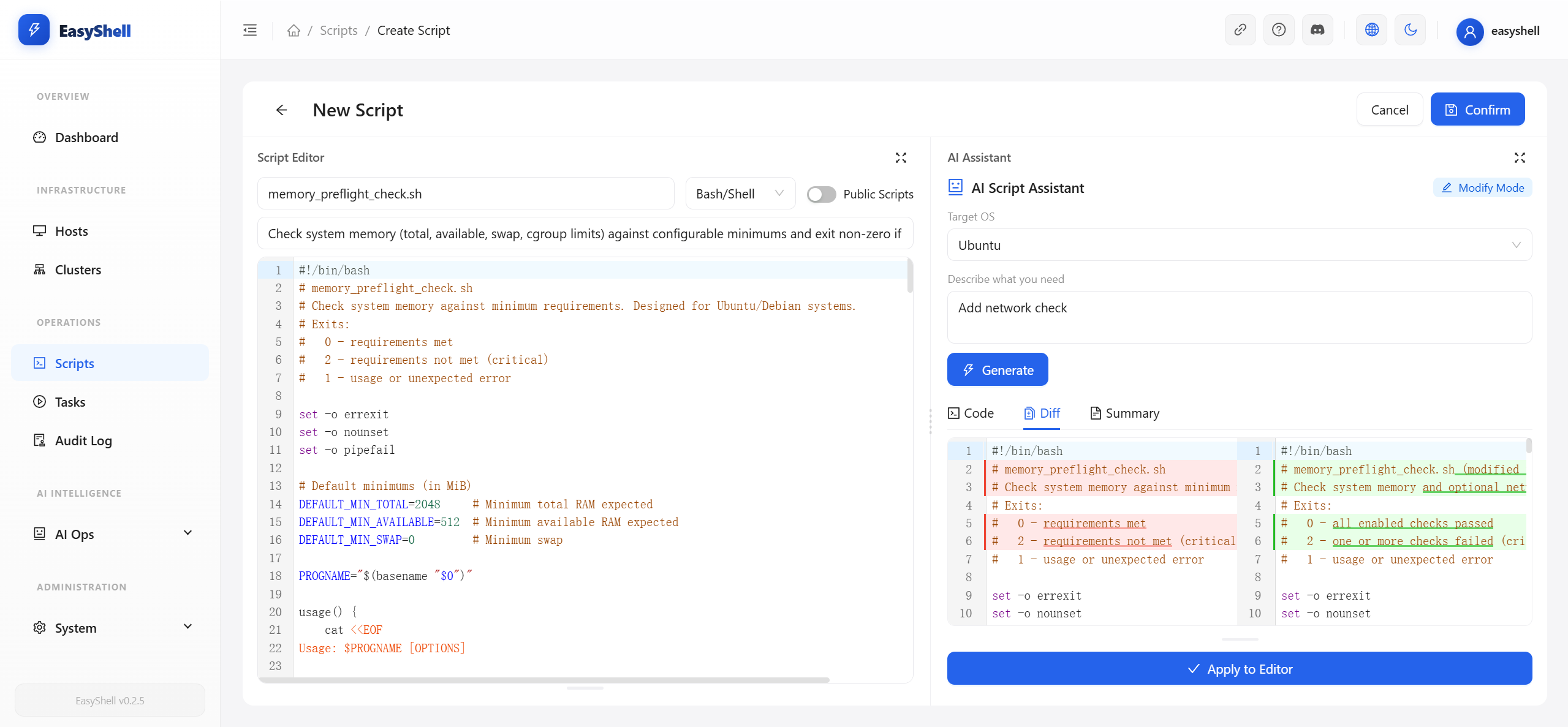
The AI Script Workbench is a split-panel editor where you describe requirements in natural language, and AI generates (or modifies) shell scripts targeting your chosen OS. Real-time streaming shows the script being written. A built-in diff view highlights exactly what changed. A summary tab explains the modifications in your language.
How it works:
- Describe — write your requirements in natural language, choose the target OS
- Generate — AI streams a production-ready script in real time
- Review — built-in diff view highlights every change; summary tab explains modifications
- Apply — one click to save the script to your library or dispatch it immediately
2. AI Task Orchestration
"Check disk and memory on all hosts, flag anything over 80%, and suggest fixes." — Done.
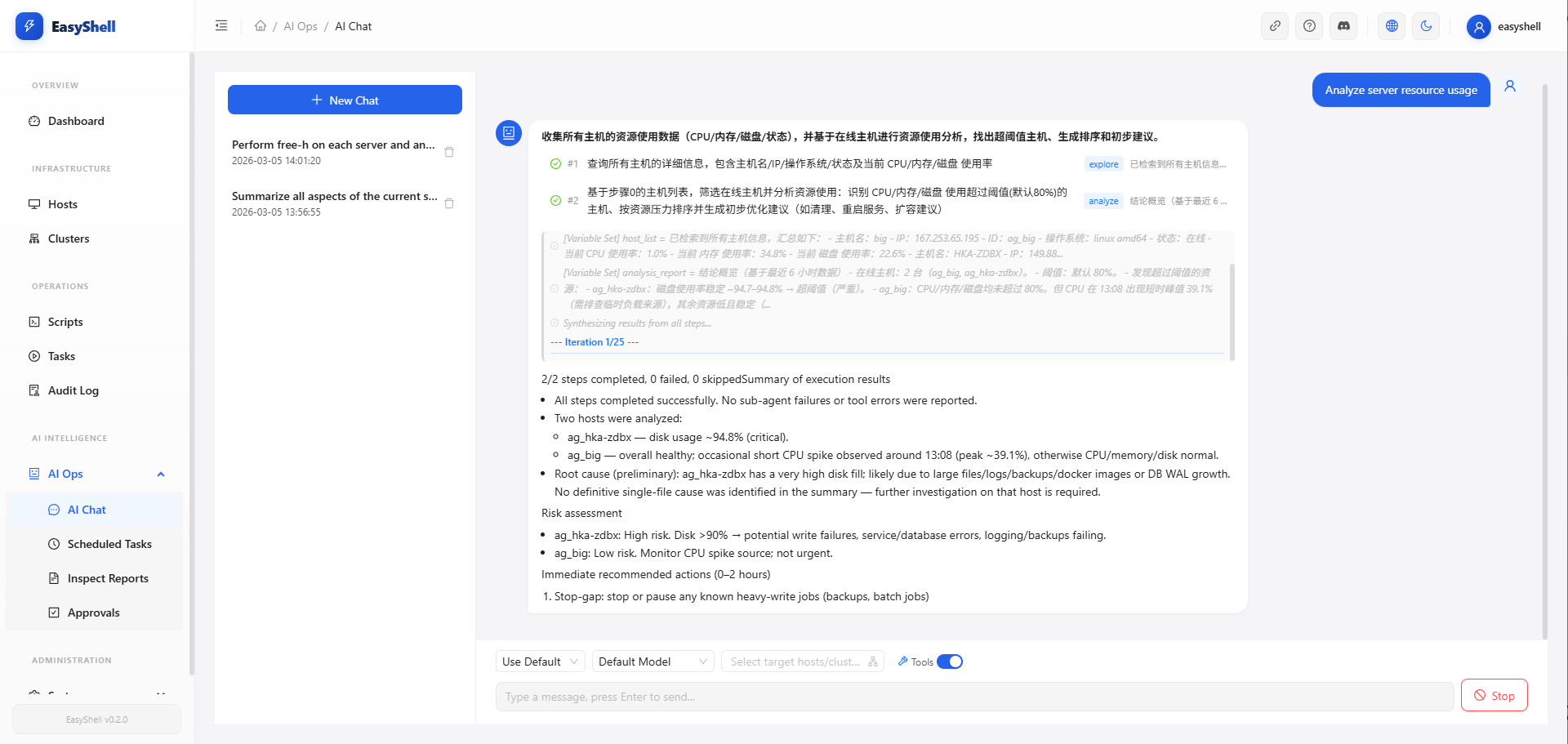
The AI Chat interface lets you issue high-level operational goals. AI decomposes them into a multi-step execution plan (explore → analyze → report), dispatches scripts to target hosts, collects results, and delivers a structured analysis with risk assessment and actionable recommendations — all in a single conversation turn.
How it works:
- Instruct — describe a high-level goal in the AI Chat (e.g. "check disk on all hosts")
- Plan — AI decomposes the goal into a multi-step execution plan (explore → analyze → report)
- Execute — scripts are dispatched to target hosts in parallel; results collected automatically
- Report — AI delivers a structured analysis with risk assessment and actionable recommendations
3. AI Scheduled Inspections
Cron → Script → AI Analysis → Intelligent Alert — AI analyzes output and decides whether to alert your team.
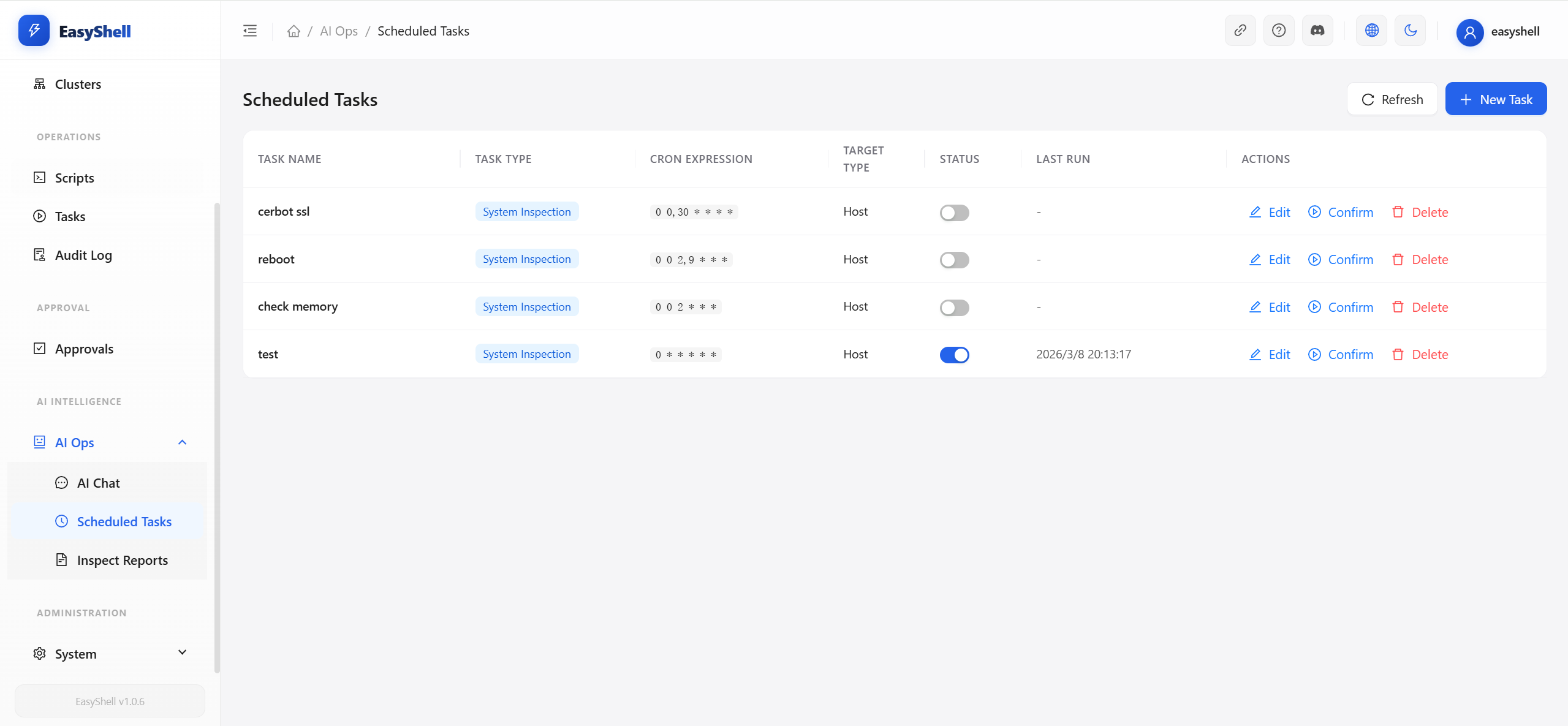
Schedule inspection tasks with cron expressions and select scripts from the built-in script library. EasyShell dispatches them to agents on schedule, collects output (disk, memory, services, logs), sends it to your AI model for intelligent analysis, and lets AI decide whether the results warrant an alert — pushing notifications only when they matter.
How it works:
- Configure — cron expression + script (from library or custom) + AI analysis prompt + notification rules
- Execute — EasyShell dispatches to target agents on schedule
- Analyze — Output sent to AI model (OpenAI / Gemini / GitHub Copilot / Custom) for intelligent analysis
- Notify — AI determines severity and pushes alerts via bot channels when action is needed
Notification modes: Always push, push on failure, push on warning, or AI decides — the AI model evaluates the output and autonomously determines if an alert is necessary.
Supported Bot Channels (Configuration Guide):
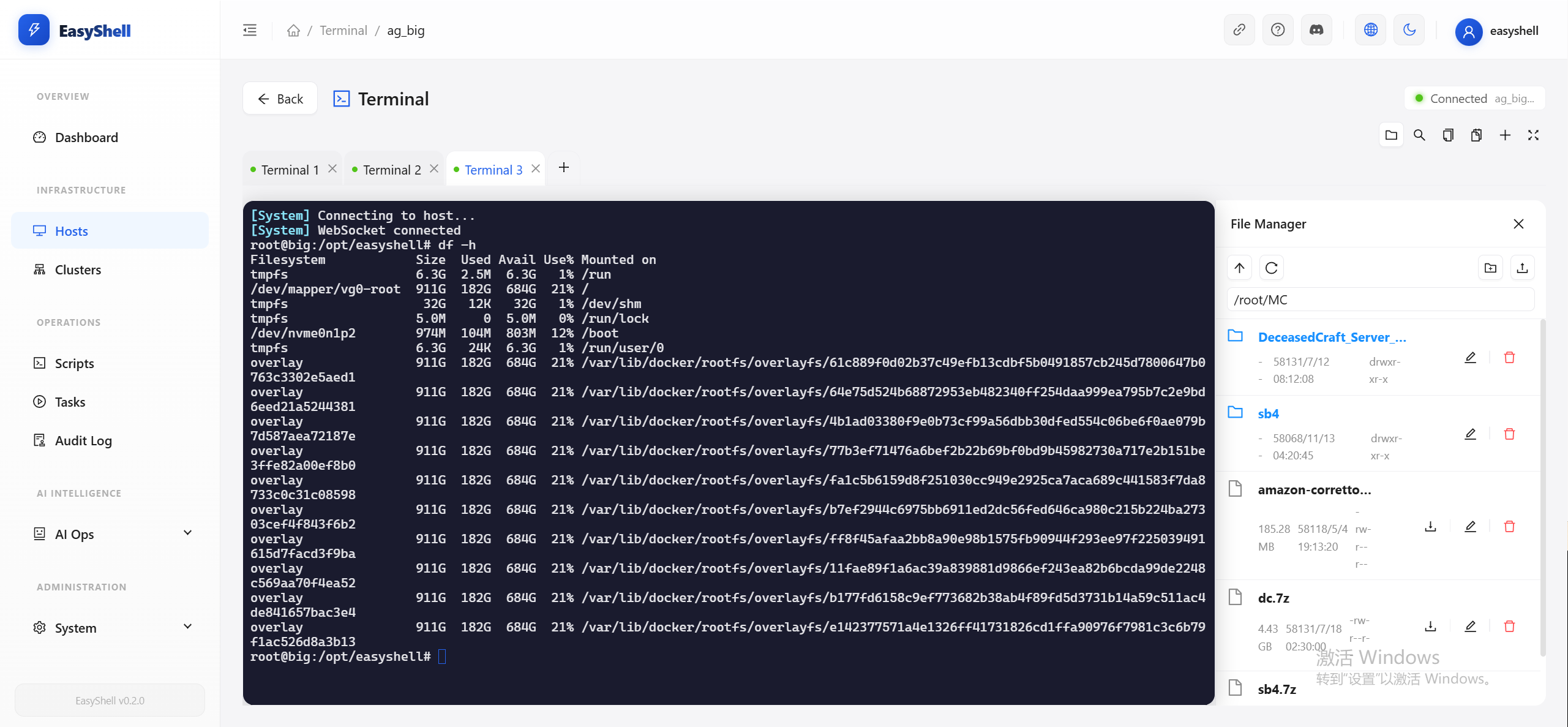
4. Fully Functional Web SSH
Real terminal. Real file manager. No SSH client required.
A production-grade web terminal with multi-tab sessions, integrated file manager (upload, download, create, delete, navigate), full-text search within terminal buffer, and persistent connections via WebSocket. Manage files and run commands side by side.
5. Host Management & Monitoring
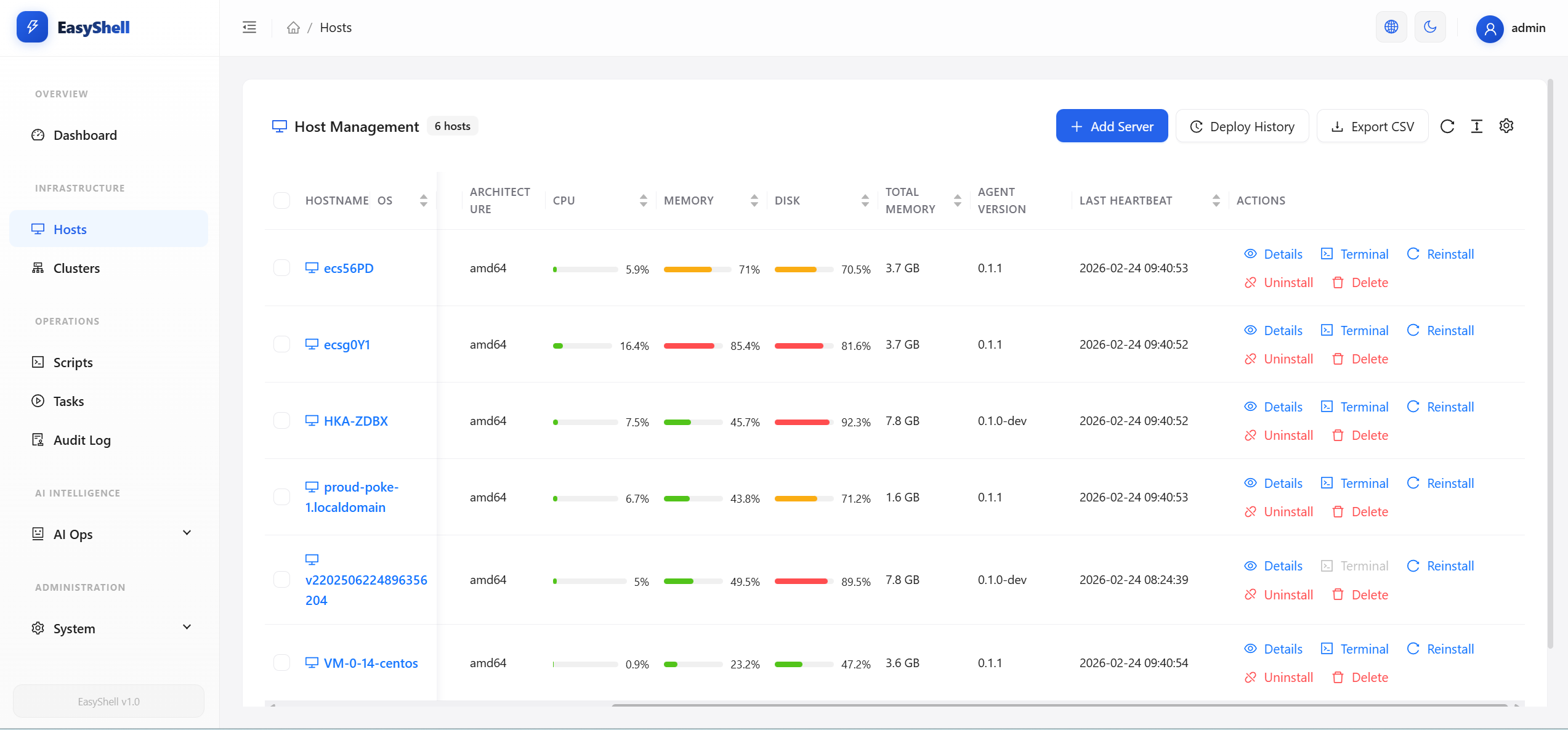
Unified view of all servers with real-time status, batch operations, and agent lifecycle management.
Manage hosts individually or in bulk — add via form or CSV import, organize into clusters, monitor connection status, and deploy/upgrade agents with one click. The unified dashboard shows health metrics at a glance.
6. Real-Time Streaming Logs
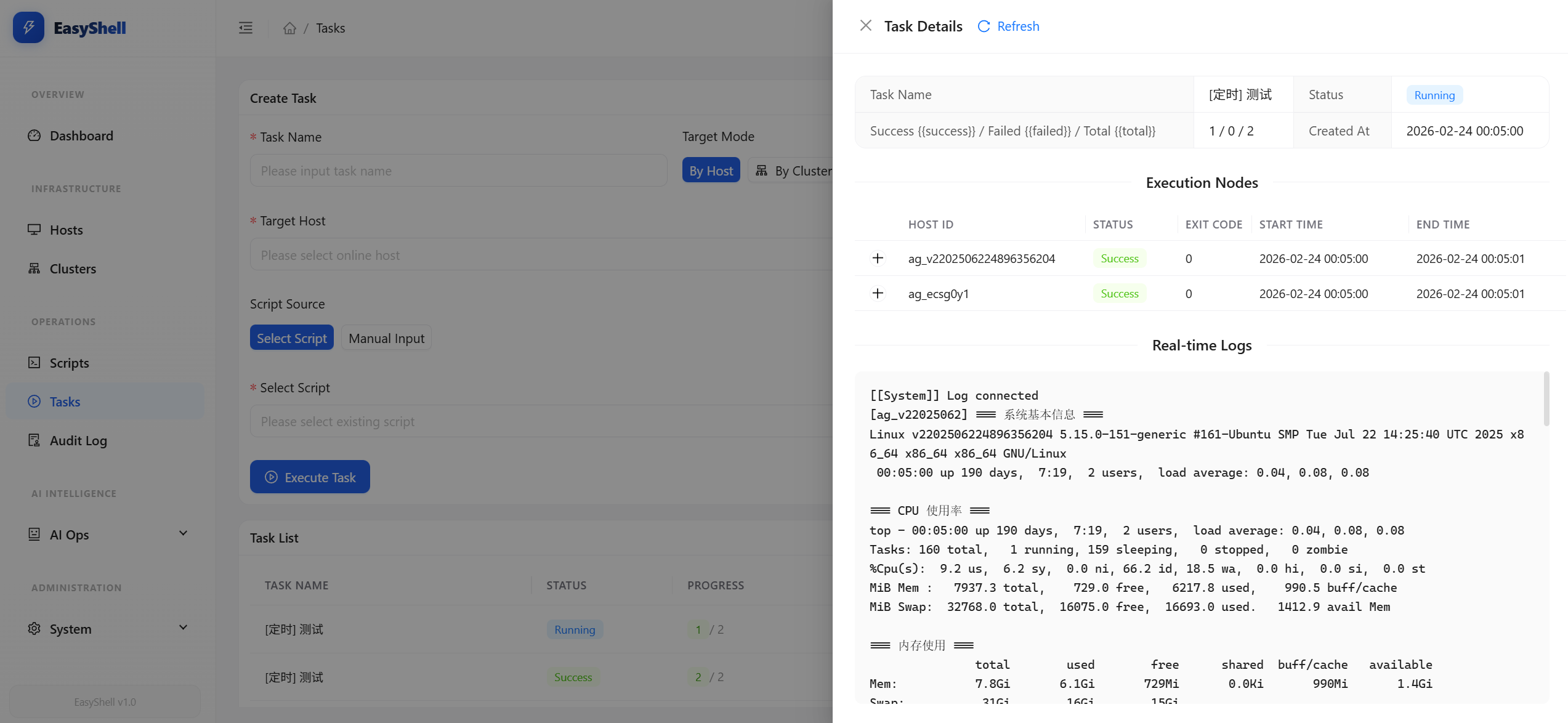
Watch script execution unfold live across all target hosts.
When you dispatch a script, EasyShell streams output from every agent in real time. Color-coded logs, timestamps, and per-host filtering help you spot issues instantly — no more waiting for batch jobs to complete.
7. Security & Risk Controls
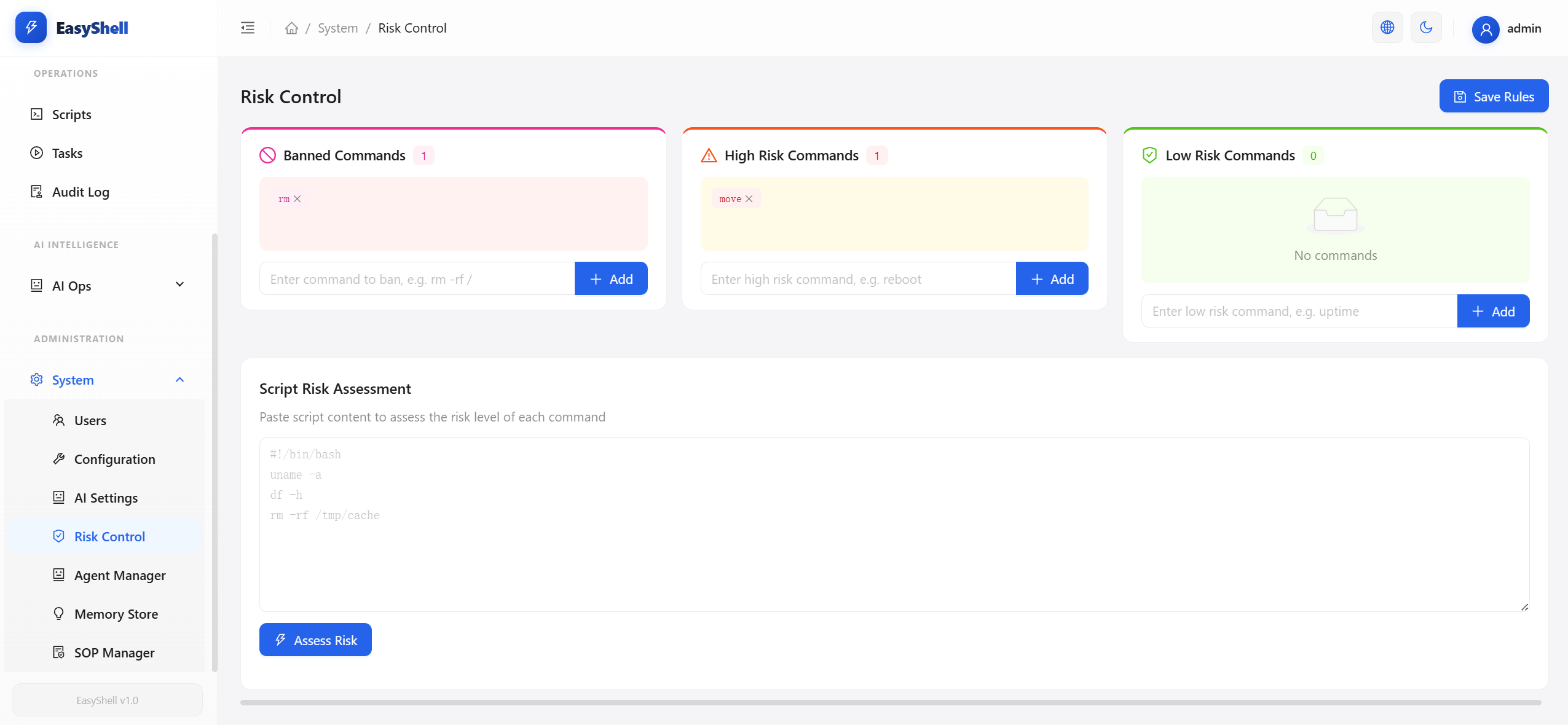
Built-in safeguards: approval workflows, audit trails, and operation restrictions.
Configure which operations require approval before execution. All actions are logged for compliance. Role-based access control limits who can do what, and sensitive commands can be flagged or blocked entirely.
8. MCP Server & AI Skills
Let your AI client run your infrastructure — with the same risk engine, approvals and audit trail as the web console.
EasyShell ships two companion components that put the platform inside your AI assistant:
easyshell-mcp — a Model Context Protocol server that exposes EasyShell hosts, scripts, tasks and inspections as MCP tools, so Claude Desktop, Claude Code, Cursor, Cherry Studio and other MCP clients can drive EasyShell directly.easyshell-skill — a SKILL.md definition that teaches an assistant when and how to use EasyShell (core workflows, full tool catalog, security model), for assistants that support skills.
Published on npm as @easyshell/mcp-server, listed in the MCP Registry and on Smithery. It talks to the EasyShell REST API and needs three variables:
How it works:
- Run —
npx -y @easyshell/mcp-server on Node.js >=18; nothing to build
- Connect — point it at your EasyShell server with the three variables above
- Authenticate — it logs in against the EasyShell API and reuses that session for every tool call
- Operate — your AI client calls EasyShell tools; risk classification, approval workflows and audit logging still apply
stdio (default) — Claude Desktop / Claude Code / Cursor / Cherry Studio
{
  "mcpServers": {
    "easyshell": {
      "command": "npx",
      "args": ["-y", "@easyshell/mcp-server"],
      "env": {
        "EASYSHELL_URL": "http://localhost:18080",
        "EASYSHELL_USER": "easyshell",
        "EASYSHELL_PASS": "easyshell@changeme"
      }
    }
  }
}
Replace the credentials with your own. With zero-configuration Docker deployment the initial admin password is generated randomly and printed once in the server logs (docker logs easyshell-server | grep 'initial admin password').
Prefer not to hand-edit config files? The auto-installer detects OpenCode, Cursor or Claude Desktop and writes the block for you — the generated file is created with 0600 permissions because it holds your password:
MCP_PASSWORD='your-password' npx @easyshell/mcp-server --install
# optional: --url http://your-server:18080 --user easyshell
MCP_PASSWORD is preferred over --pass: values passed on the command line are visible in ps.
HTTP (SSE + Streamable HTTP) — remote or shared deployments
# loopback only, no token required
npx -y @easyshell/mcp-server --port 3000

# reachable from other machines: a bearer token is mandatory
MCP_AUTH_TOKEN='choose-a-strong-token' \
  npx -y @easyshell/mcp-server --port 3000 --host 0.0.0.0 --allow-remote
Clients with HTTP transport point at http://<host>:3000/mcp and send Authorization: Bearer <MCP_AUTH_TOKEN> (exact config keys vary by client):
{
  "mcpServers": {
    "easyshell": {
      "type": "http",
      "url": "http://your-server:3000/mcp",
      "headers": { "Authorization": "Bearer <MCP_AUTH_TOKEN>" }
    }
  }
}
The HTTP transport validates the Host header against DNS-rebinding attacks, restricts CORS to --allowed-origin values, and caps sessions and request size.
Tool surface — 20 tools in 3 tiers
The easyshell-mcp/README.md tool table advertises 19 tools; the source registers 20 — get_cluster_detail is missing from that table. The list above matches easyshell-mcp/src/tools/.
easyshell-skill — teach your assistant the EasyShell workflows
easyshell-skill/SKILL.md is an assistant-agnostic skill definition (name, description, compatibility, tags) that tells an AI assistant when to activate EasyShell and which workflows to follow — execute a script on hosts, AI task orchestration, schedule an inspection, monitor infrastructure — plus the security model it must never bypass.
Install it manually or with the mdskills CLI:
npx mdskills install easyshell
The skill bundles resources/tool-catalog.md (every tool with parameters and examples), resources/deployment-guide.md and resources/troubleshooting.md. It works standalone, but skill + MCP server is the intended combination: the skill decides what to do, the MCP server provides the tools to do it.
Current boundary — read this before you plan a setup
easyshell-mcp is an outbound bridge: it makes EasyShell callable from your AI client. Consuming external MCP servers — Prometheus, Elasticsearch, or your own in-house MCP — inside the EasyShell platform is on the roadmap, not implemented in 1.1.0. There is no built-in MCP client, no external tool registry and no external-tool approval flow yet, and nothing in this section should be read as promising one.
If that is your use case, add it to the discussion in issue #6 ("how do the mcp and skill modules work?"), or open a feature request.
Quick Start
git clone https://github.com/easyshell-ai/easyshell.git
cd easyshell
docker compose up -d
That is the whole setup — no .env, no secret generation, no manual steps. On first
boot a one-shot container creates the database password, JWT secret, encryption key and
agent registration secret, stores them in the easyshell_secrets Docker volume and every
later start reuses them.
scripts/deploy.sh is a convenience wrapper that also waits for the health check and prints
the sign-in details:
./scripts/deploy.sh            # docker compose up -d + wait + show credentials
./scripts/deploy.sh --build    # build the images from this source tree instead of pulling
./scripts/deploy.sh --down     # stop everything (data volumes are kept)
No local build is required for the default path — pre-built images are pulled automatically
from Docker Hub. Use --build to run exactly this
source tree (that is also how you pick up changes that have not been released yet).
Open http://localhost:18880 → log in as easyshell. The initial password is generated
randomly on first start and printed once in the server logs
(docker logs easyshell-server | grep 'initial admin password') — change it right after
signing in. To choose it yourself, set EASYSHELL_ADMIN_PASSWORD in .env.
Agents installed on other machines need a reachable server URL: set PROVISION_SERVER_URL
in .env, or System config → server.external-url in the UI.
Want to use GHCR instead? Set in .env:
EASYSHELL_SERVER_IMAGE=ghcr.io/easyshell-ai/easyshell/easyshell-server:latest
EASYSHELL_WEB_IMAGE=ghcr.io/easyshell-ai/easyshell/easyshell-web:latest
Developer? Build from source:
docker compose -f docker-compose.build.yml up -d
Local web development and dependency checks require Node.js ^20.19.0 || >=22.12.0, matching the Vite 8 toolchain. Dockerfile.web uses the Node 22 image line for web builds.
Full Feature Set
Architecture
┌──────────────┐       HTTP/WS        ┌──────────────────┐
│  EasyShell   │◄─────────────────────►│   EasyShell      │
│    Agent     │  register / heartbeat │     Server       │
│  (Go 1.24)  │  script exec / logs   │ (Spring Boot 3.5)│
└──────────────┘                       └────────┬─────────┘
                                                │
                                       ┌────────┴─────────┐
                                       │   EasyShell Web   │
                                       │ (React + Ant Design)│
                                       └──────────────────┘
Tech Stack
Project Structure
easyshell/
├── easyshell-server/           # Central management server (Java / Spring Boot)
├── easyshell-agent/            # Agent client (Go, single binary)
├── easyshell-web/              # Web frontend (React + Ant Design)
├── easyshell-mcp/              # MCP server — EasyShell as tools for AI clients (npm: @easyshell/mcp-server)
├── easyshell-skill/            # SKILL.md definition for AI assistants
├── docker-compose.yml          # Production deployment (pulls pre-built images)
├── docker-compose.build.yml    # Development (local build from source)
├── Dockerfile.server           # Server + Agent multi-stage build
├── Dockerfile.web              # Web frontend multi-stage build
├── .github/workflows/          # CI/CD: build & publish Docker images
└── .env.example                # Environment configuration template
Documentation
Visit docs.easyshell.ai for:
- Installation & deployment guide
- Getting started walkthrough
- Configuration reference
- Development guide
Join our Discord community for support, discussions, and updates:
https://discord.gg/akQqRgNB6t
License
This project is licensed under the MIT License.


