

A Rust CAD application with an MCP server for creating, inspecting and rendering drawings, either headlessly or through a connection to the desktop app.
8K
Media & Design
An MCP server that lets Claude drive FL Studio's mixer, plugins, piano roll, routing, and project through plain-language requests, with calibrated safety-checked tools.
MCP server for controlling FL Studio via natural language is cataloged as an MCP server attributed to rosasynthesiz. An MCP server that lets Claude drive FL Studio's mixer, plugins, piano roll, routing, and project through plain-language requests, with calibrated safety-checked tools. It is categorized under media design. See the capability inspector for recorded interfaces and their independent review status; consult upstream documentation for the current interface.
Installation configuration is not reviewed. No executable setup is offered for this entry; inspect the source repository before proceeding.
Catalog license label: MIT. Check the source repository's current license and terms before using, modifying or distributing this software.
Capability definitions are not reviewed. Unreviewed imports are not exposed as trusted interfaces.
No reviewed records to display. This does not establish that upstream lacks this capability.
No reviewed records to display. This does not establish that upstream lacks this capability.
No reviewed records to display. This does not establish that upstream lacks this capability.
Email delivery is not connected. This page does not collect email addresses or create subscriptions.
Browse the registry for current listings instead.
Reviews for MCP server for controlling FL Studio via natural language are not available yet
Review publishing and storage are not connected. This page does not collect or publish ratings or comments, including after sign-in.
No. The README states that loading plugins, loading audio files, and rendering audio are UI-only, so the plugin and preset tools suggest rather than load, and export is done manually.
Yes. Project-modifying tools route through a snapshot, write, readback, and rollback safety layer backed by a persisted change log.
Windows 10/11 or macOS, with FL Studio 2025 or newer; Linux is not yet supported.
README.md · 30ad1121fb51 · Fetched 2026-11-13 12:23:32 UTC
Original upstream text, without AI rewriting. Scripts, forms and unsafe links are filtered for safety.
Showing the last retrieved documentation snapshot; check the source for current changes.
Control FL Studio with Claude: AI mixing, composition, and mix diagnosis through natural language.



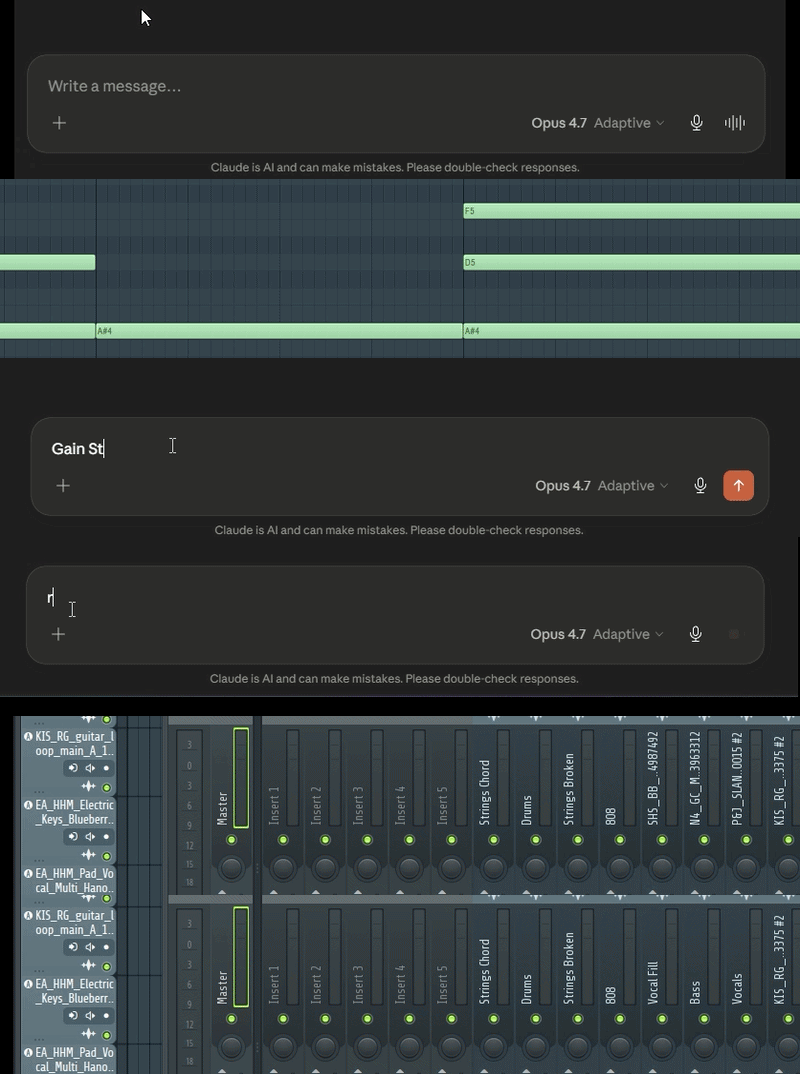
Claude diagnosing and fixing a mix in FL Studio through natural language.
flstudio-mcp is a Model Context Protocol (MCP) server that lets Claude (Claude Code or Claude Desktop) drive FL Studio 2025 directly — the mixer, plugins, piano roll, routing, and project — from plain-language requests. Ask for a mix diagnosis, a vocal chain, a chord progression in a particular scale, or a full arrangement, and Claude carries it out through FL's scripting API and a set of calibrated, safety-checked tools.
It is genre- and producer-agnostic: nothing about it assumes a particular style of music.
For a new FL Studio setup, clone the repository so the controller and installer scripts are available:
git clone https://github.com/rosasynthesiz/flstudio-mcp.git
cd flstudio-mcp
Then run the installer for your OS. It installs the server into its environment, copies the FL controller, and seeds the note bridge:
:: first: in loopMIDI, create two ports named exactly "FLStudioMCP RX" and "FLStudioMCP TX"
scripts\install_windows.bat              :: controller + server (.venv) + note bridge
scripts\start_daemon.bat                 :: start the bridge in its own window, keep it open
./scripts/install_macos.sh         # macOS: controller + server + note bridge
fl-studio-mcp-daemon               # start the bridge, keep it running
Wire the two virtual MIDI ports in FL (loopMIDI on Windows, IAC Driver on
macOS), arm MCP_Apply once in the piano roll, then ask Claude in plain
language:
"Scan my mix and tell me what's wrong." — "Set up a vocal chain from my plugins." — "Export this arrangement to MIDI."
Full setup is below.
For an environment whose FL controller and MIDI bridge are already configured, the server package is also available from PyPI:
python -m pip install fl-studio-mcp
The PyPI package does not replace the controller/port setup above. The current
main branch may contain changes that have not yet been released to PyPI.
verified / attempts and a hint, so a swallowed write is reported instead of echoed back as if it worked.fl_plugin_set_params sets several knobs of one plugin in a single paced burst and one undo step; fl_rollback_last_change puts them all back together.x...x...x...x..., reversible like every other change..mid file..mid or straight into the step sequencer of the channels you choose (one undo step).The server exposes 72 tools across 14 categories, plus 6 live resources (project, mixer, transport, channels, patterns, status) that Claude can read directly.
flstudio-mcp is built as a mixing and production assistant, not only a note sender. It diagnoses and repairs a whole mix, makes decisions from real measured levels rather than guesswork, and is aware of your actual plugin and preset library when it makes suggestions. Every change that touches the project is shown before it is applied, logged, and reversible.
These are properties of FL Studio's scripting API, stated plainly:
verified: false with a hint and the value FL actually holds, instead of echoing the request as if it had landed.Linux is not yet supported — contributions welcome.
Create two virtual MIDI ports, named exactly FLStudioMCP RX and
FLStudioMCP TX. These are the "cables" between the MCP server and FL
Studio: one carries commands into FL (RX), the other carries answers back
(TX). Do this before running the installer, because it checks for them.
Windows (loopMIDI):
loopMIDI Port,
loopMIDI Port 1, …), select them and click − to remove them. The
default names will not be detected.FLStudioMCP RX and click +.FLStudioMCP TX and click + again.macOS:
FLStudioMCP RXFLStudioMCP TXInstall the controller script and server:
Windows:
git clone https://github.com/rosasynthesiz/flstudio-mcp
cd flstudio-mcp
scripts\install_windows.bat
macOS:
git clone https://github.com/rosasynthesiz/flstudio-mcp
cd flstudio-mcp
chmod +x scripts/install_macos.sh
./scripts/install_macos.sh
This copies the controller script, seeds the note-bridge pyscript
(MCP_Apply), installs the server, and checks that your virtual MIDI ports
exist.
On Windows the server is installed into a .venv folder inside the repo,
using Python 3.12/3.11/3.10 when available (the MIDI library has no working
build for newer Pythons on Windows). The installer prints the full paths of
the commands to use in the next steps. It finds your Documents folder even
when it is redirected (OneDrive, non-English names). All FL Studio versions
(2024, 2025, 2026, …) share one user-data folder, so one install covers
them all. It also follows FL's own "User data folder" setting; if it still
can't find the folder, run setx FL_SETTINGS "<folder>\FL Studio\Settings"
once and open a new terminal (the installer and the daemon both use it).
Both installers ask two optional questions (re-run the installer any time to add them):
To answer without the prompts, set FLMCP_EXTRAS first: all, none, or
any of audio accurate chords.
Manual install or picking parts (Windows: .venv\Scripts\pip):
pip install -e ".[audio]"                    # tempo/key + light melody
pip install -e ".[audio,audio-accurate]"     # + CREPE (accurate melody)
pip install -e ".[audio-chords]"             # chords: then also run
pip install --no-deps basic-pitch==0.4.0     #   (skips its TensorFlow requirement)
Configure FL Studio — Options > MIDI Settings:
FLStudioMCP RX as an input, set its controller type to FLStudioMCP, and give it a port number.FLStudioMCP TX in the output list and give it the same port number. Outputs have no Enable button; setting the port is what activates it. Leave Send master sync off.[FLStudioMCP] Ready.Start the bridge daemon (recommended) so the MIDI port is held by a stable process:
scripts\start_daemon.bat                 :: Windows: double-click, keep the window open
fl-studio-mcp-daemon                     # macOS
Register the server with Claude Code or Claude Desktop. On Windows, use
the full ...\.venv\Scripts\fl-studio-mcp.exe path the installer printed
instead of fl-studio-mcp.
Claude Code: just ask Claude, for example:
Add the fl-studio MCP server for all my projects:
<path to fl-studio-mcp>with env FLSTUDIO_MCP_TRANSPORT=tcp
Claude Desktop, add it to the config file:
Windows: %APPDATA%\Claude\claude_desktop_config.json
macOS: ~/Library/Application Support/Claude/claude_desktop_config.json
{
  "mcpServers": {
    "fl-studio": {
      "command": "fl-studio-mcp",
      "env": { "FLSTUDIO_MCP_TRANSPORT": "tcp" }
    }
  }
}
tcp routes through the daemon, which works regardless of how Claude launches the server. Omit the env var to let the server open the MIDI ports directly instead.
Arm the note bridge (per session) — open the piano roll and choose Tools > Scripting > MCP > MCP Apply from its menu once, so note-writing works.
On macOS, the note bridge re-triggers the armed script with Cmd+Opt+Y.
Grant Accessibility permission to the app running the MCP server or daemon,
for example Terminal, iTerm, Claude Desktop, or Cursor:
System Settings > Privacy & Security > Accessibility.
Verify the connection by asking Claude to call fl_ping.
After updating an existing installation, restart the bridge daemon and reconnect your MCP client so both processes load the new source. Dry-run is scoped to one MCP server process and resets on reconnect. See bridge correctness regressions for numeric JSON compatibility, dry-run behavior, and localized parameter names.
| Symptom | Fix |
|---|---|
| Virtual MIDI ports not found / not detected | The two ports must be named exactly FLStudioMCP RX and FLStudioMCP TX. loopMIDI's default loopMIDI Port names won't work. Recreate them in loopMIDI (Windows) or IAC Driver (macOS), make sure loopMIDI is running, then re-run the installer. |
FL Studio Settings\Hardware folder not found | Open FL Studio once so it creates its user-data folder. If you moved that folder (Options > File settings > User data folder), setx FL_SETTINGS "<that folder>\FL Studio\Settings", open a new terminal and re-run. |
fl-studio-mcp-daemon is not recognized | The commands live in the repo's .venv\Scripts\ folder. Run them by full path (the installer prints it). |
| Python crashes on start / MIDI library fails to load (Windows) | Install Python 3.12 from python.org, delete the .venv folder, and re-run the installer. |
No [FLStudioMCP] Ready in FL's Script output | The controller isn't registered: set the FLStudioMCP RX input's Controller type to FLStudioMCP in MIDI Settings, confirm device_FLStudioMCP.py is in Settings\Hardware\FLStudioMCP\, then fully restart FL Studio. |
Claude can't reach FL / fl_ping fails | Make sure the daemon is running (fl-studio-mcp-daemon); check the transport matches (FLSTUDIO_MCP_TRANSPORT=tcp uses the daemon, unset uses direct MIDI); restart Claude Desktop after editing its config, or run /mcp in Claude Code to reconnect. |
fl_ping says the heartbeat is stale (Ready is shown, but FL stops answering) | Usually happens after changing MIDI Settings while the script is running. Open View > Script output, select the FLStudioMCP tab and click Reload script (or restart FL Studio). Also check that the Output port number is on FLStudioMCP TX, not FLStudioMCP RX. |
| Note-writing does nothing | Run MCP_Apply once from the piano roll's scripting menu this session — it arms the note bridge. |
| macOS note-trigger fails | Grant Accessibility permission to the app running the MCP server or daemon, then click the FL Piano roll and try Cmd+Opt+Y. |
| Audio tools error or are unavailable | Re-run the installer and answer Y to "Install audio to MIDI?" (or install the extras manually, see Setup step 2). |
| The installer stops because the MCP server is running | Claude Desktop or Claude Code is running fl-studio-mcp.exe from the .venv, which locks its files. Quit Claude Desktop or Claude Code, then re-run. |
Plain-language prompts:
A thin controller script runs inside FL Studio and returns only cheap, raw data; all judgement — diagnosis, calibration, planning — happens server-side. A standalone daemon owns the MIDI port so the server works regardless of how the MCP client is launched. Note authoring uses a generated pyscript bridge: the daemon re-triggers the armed MCP_Apply script with the platform run-last-script shortcut after a brief window force-focus. Every project-modifying tool routes through a snapshot → write → readback → rollback safety layer backed by a persisted change log.
Design notes and findings are in docs/.
MIT — see LICENSE.
Beta — the public 1.0 release. Windows and macOS are supported; Linux contributions are welcome. Issues and pull requests: github.com/rosasynthesiz/flstudio-mcp.
Claim this server with your GitHub account to request manual ownership verification.
Link to the catalog listing for MCP server for controlling FL Studio via natural language from your README. This badge does not certify ownership, compatibility or security.
[](https://awesome-mcp.com/servers/flstudio-mcp-rosasynthesiz)Public repository statistics could not be verified. Check the configured source address; unavailable counts are not zero.
Separate sources, scopes and periods. Never combined or treated as installations, active users or security reviews.
No reviewed package or image identity; download statistics are not listed yet.
Alternative and complementary servers in the same category
A Rust CAD application with an MCP server for creating, inspecting and rendering drawings, either headlessly or through a connection to the desktop app.

Liquid Composer is a browser-based Liquid Glass icon design tool that offers a local MCP server for agent-driven icon workflows.

agent-media makes short drama series and other short vertical videos from Claude, ChatGPT or Codex through one MCP connection, with OAuth sign-in and no API keys.