
This is a Model Context Protocol (MCP) server for interacting with AIStor object stores.
Repository stats unavailable
Databases & Storage
A gateway that automatically generates secure, LLM-optimized APIs and an MCP server from structured database schemas so AI agents can query databases.
CentralMind Gateway is cataloged as an MCP server attributed to centralmind. A gateway that automatically generates secure, LLM-optimized APIs and an MCP server from structured database schemas so AI agents can query databases. It is categorized under databases storage. See the capability inspector for recorded interfaces and their independent review status; consult upstream documentation for the current interface.
Installation configuration is not reviewed. No executable setup is offered for this entry; inspect the source repository before proceeding.
Catalog license label: Not specified. Check the source repository's current license and terms before using, modifying or distributing this software.
Capability definitions are not reviewed. Unreviewed imports are not exposed as trusted interfaces.
No reviewed records to display. This does not establish that upstream lacks this capability.
No reviewed records to display. This does not establish that upstream lacks this capability.
No reviewed records to display. This does not establish that upstream lacks this capability.
Email delivery is not connected. This page does not collect email addresses or create subscriptions.
Browse the registry for current listings instead.
Reviews for CentralMind Gateway are not available yet
Review publishing and storage are not connected. This page does not collect or publish ratings or comments, including after sign-in.
Gateway supports OpenAI and compatible providers, Anthropic, Amazon Bedrock, Google Vertex AI, and Google Gemini.
Yes, it implements a regex plugin or a Microsoft Presidio plugin to redact PII and sensitive data.
README.md · 82eaeff6f614 · Fetched 2026-11-13 09:37:52 UTC
Original upstream text, without AI rewriting. Scripts, forms and unsafe links are filtered for safety.
Showing the last retrieved documentation snapshot; check the source for current changes.




🚀 Interactive Demo avialable here: https://centralmind.ai
Simple way to expose your database to AI-Agent via MCP or OpenAPI 3.1 protocols.
docker run --platform linux/amd64 -p 9090:9090 \
  ghcr.io/centralmind/gateway:v0.2.18 start \
  --connection-string "postgres://db-user:db-password@db-host/db-name?sslmode=require"
This will run for you an API:
INFO Gateway server started successfully!
INFO MCP SSE server for AI agents is running at: http://localhost:9090/sse
INFO REST API with Swagger UI is available at: http://localhost:9090/
Which you can use inside your AI Agent:
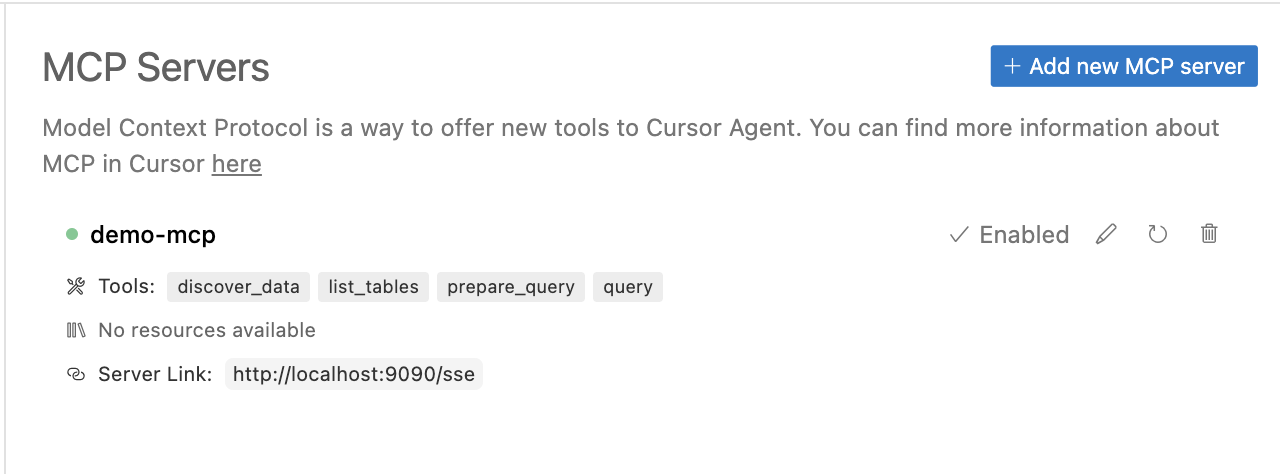
Gateway will generate AI optimized API.
AI agents and LLM-powered applications need fast, secure access to data. We're building an API layer that automatically generates secure, LLM-optimized APIs for your structured data.
It can be useful during development, when an LLM needs to create, adjust, or query data from your database. In analytical scenarios, it enables you to chat with your database or data warehouse. Enrich your AI agents with data from your database using remote function/tool calling.
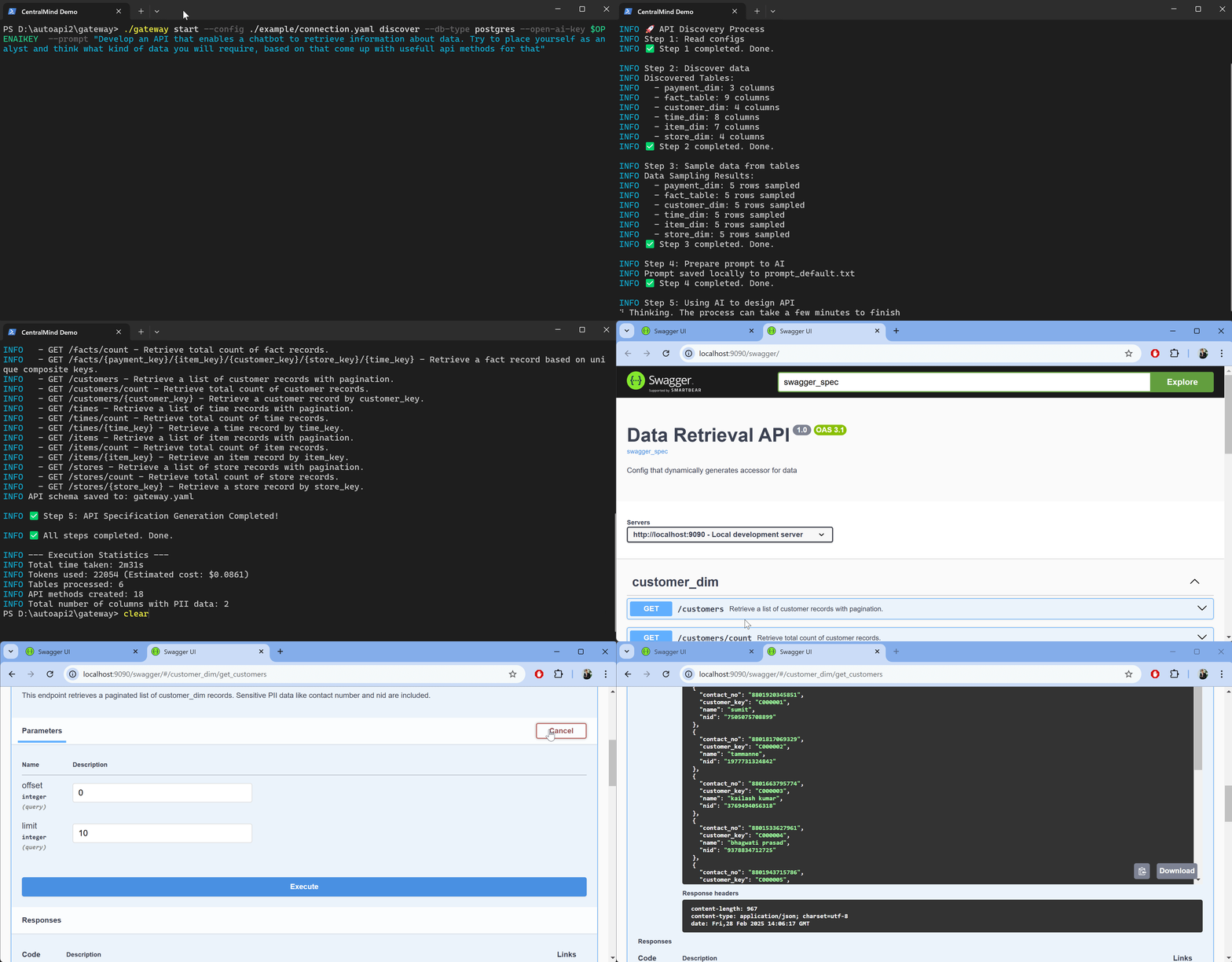
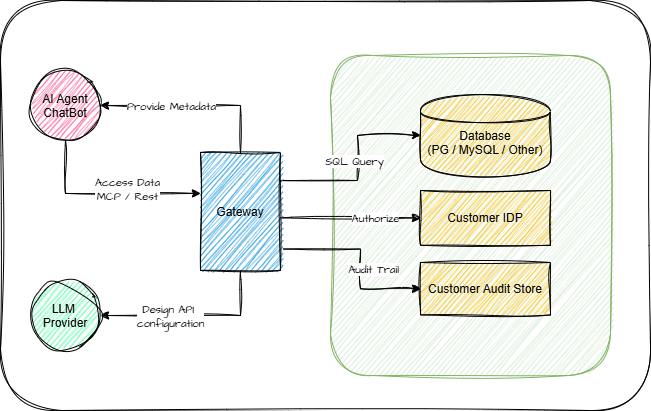
Gateway connects to your structured databases like PostgreSQL and automatically analyzes the schema and data samples to generate an optimized API structure based on your prompt. LLM is used only on discovery stage to produce API configuration. The tool uses AI Providers to generate the API configuration while ensuring security through PII detection.
Gateway supports multiple deployment options from standalone binary, docker or Kubernetes. Check our launching guide for detailed instructions. The system uses YAML configuration and plugins for easy customization.
Access your data through REST APIs or Model Context Protocol (MCP) with built-in security features. Gateway seamlessly integrates with AI models and applications like LangChain, OpenAI and Claude Desktop using function calling or Cursor through MCP. You can also setup telemetry to local or remote destination in otel format.
# Clone the repository
git clone https://github.com/centralmind/gateway.git

# Navigate to project directory
cd gateway

# Install dependencies
go mod download

# Build the project
go build .
Gateway uses LLM models to generate your API configuration. Follow these steps:
Choose one of our supported AI providers:
Google Gemini provides a generous free tier. You can obtain an API key by visiting Google AI Studio:
Once logged in, you can create an API key in the API section of AI Studio. The free tier includes a generous monthly token allocation, making it accessible for development and testing purposes.
Configure AI provider authorization. For Google Gemini, set an API key.
export GEMINI_API_KEY='yourkey'
./gateway discover \
  --ai-provider gemini \
  --connection-string "postgresql://neondb_owner:MY_PASSWORD@MY_HOST.neon.tech/neondb?sslmode=require" \
  --prompt "Generate for me awesome readonly API"
INFO 🚀 API Discovery Process
INFO Step 1: Read configs
INFO ✅ Step 1 completed. Done.

INFO Step 2: Discover data
INFO Discovered Tables:
INFO   - payment_dim: 3 columns, 39 rows
INFO   - fact_table: 9 columns, 1000000 rows
INFO ✅ Step 2 completed. Done.

# Additional steps and output...

INFO ✅ All steps completed. Done.

INFO --- Execution Statistics ---
INFO Total time taken: 1m10s
INFO Tokens used: 16543 (Estimated cost: $0.0616)
INFO Tables processed: 6
INFO API methods created: 18
INFO Total number of columns with PII data: 2
gateway.yaml:api:
name: Awesome Readonly API
description: ''
version: '1.0'
database:
type: postgres
connection: YOUR_CONNECTION_INFO
tables:
- name: payment_dim
columns: # Table columns
endpoints:
- http_method: GET
http_path: /some_path
mcp_method: some_method
summary: Some readable summary
description: 'Some description'
query: SQL Query with params
params: # Query parameters
./gateway start --config gateway.yaml
docker compose -f ./example/simple/docker-compose.yml up
Gateway implements the MCP protocol for seamless integration with Claude and other tools. For detailed setup instructions, see our Claude integration guide.
To add MCP Tool to Claude Desktop just adjust Claude's config :
{
  "mcpServers": {
    "gateway": {
      "command": "PATH_TO_GATEWAY_BINARY",
      "args": ["start", "--config", "PATH_TO_GATEWAY_YAML_CONFIG", "mcp-stdio"]
    }
  }
}
It is always subject to change, and the roadmap will highly depend on user feedback. At this moment, we are planning the following features:
Claim this server with your GitHub account to request manual ownership verification.
Link to the catalog listing for CentralMind Gateway from your README. This badge does not certify ownership, compatibility or security.
[](https://awesome-mcp.com/servers/gateway)Public repository statistics could not be verified. Check the configured source address; unavailable counts are not zero.
Separate sources, scopes and periods. Never combined or treated as installations, active users or security reviews.
No reviewed package or image identity; download statistics are not listed yet.
Alternative and complementary servers in the same category
This is a Model Context Protocol (MCP) server for interacting with AIStor object stores.

A Model Context Protocol server that lets AI assistants run SQL queries against AWS Athena databases and retrieve results.

A Model Context Protocol (MCP) server that exposes access to an InfluxDB v2 instance using the InfluxDB OSS API v2.