

Store and retrieve entities, relations and observations in a persistent local knowledge graph.
create_entitiescreate_relationsadd_observations+6 more
92K
AI & Multi-Agent
An MCP server that exposes up to 36 tools for reaching Gemini, Jules, media generation and Google AI web apps from MCP clients.
gemini-pro-mcp is cataloged as an MCP server attributed to muzaqil555. An MCP server that exposes up to 36 tools for reaching Gemini, Jules, media generation and Google AI web apps from MCP clients. It is categorized under ai agents-models. See the capability inspector for recorded interfaces and their independent review status; consult upstream documentation for the current interface.
Installation configuration is not reviewed. No executable setup is offered for this entry; inspect the source repository before proceeding.
Catalog license label: MIT. Check the source repository's current license and terms before using, modifying or distributing this software.
Capability definitions are not reviewed. Unreviewed imports are not exposed as trusted interfaces.
No reviewed records to display. This does not establish that upstream lacks this capability.
No reviewed records to display. This does not establish that upstream lacks this capability.
No reviewed records to display. This does not establish that upstream lacks this capability.
Email delivery is not connected. This page does not collect email addresses or create subscriptions.
Browse the registry for current listings instead.
Reviews for gemini-pro-mcp are not available yet
Review publishing and storage are not connected. This page does not collect or publish ratings or comments, including after sign-in.
No; the gemini_ask, gemini_research and gemini_code tools run on the AI Pro plan's limits through the Antigravity CLI rather than a pay-per-token API key.
Requests run in plan mode with the sandbox on so Gemini can read and search but cannot change files or run commands.
By default the server asks for confirmation before every paid call; auto-approval can be enabled by setting GEMINI_PRO_AUTO_APPROVE=1.
README.md · e779a4d71195 · Fetched 2026-11-13 14:10:21 UTC
Original upstream text, without AI rewriting. Scripts, forms and unsafe links are filtered for safety.
Showing the last retrieved documentation snapshot; check the source for current changes.
English · Türkçe · Русский · Azərbaycanca
Your Google AI Pro subscription, inside Claude, Codex and the Gemini CLI. Gemini 4 Argon, Deep Research, Flow videos, Gemini Notebooks, Jules and the rest of the plan you already pay for, as up to 36 MCP tools. One command sets it up.






36 tools · no API bill for Gemini · one command for Claude Code, Codex, Antigravity and Gemini CLI
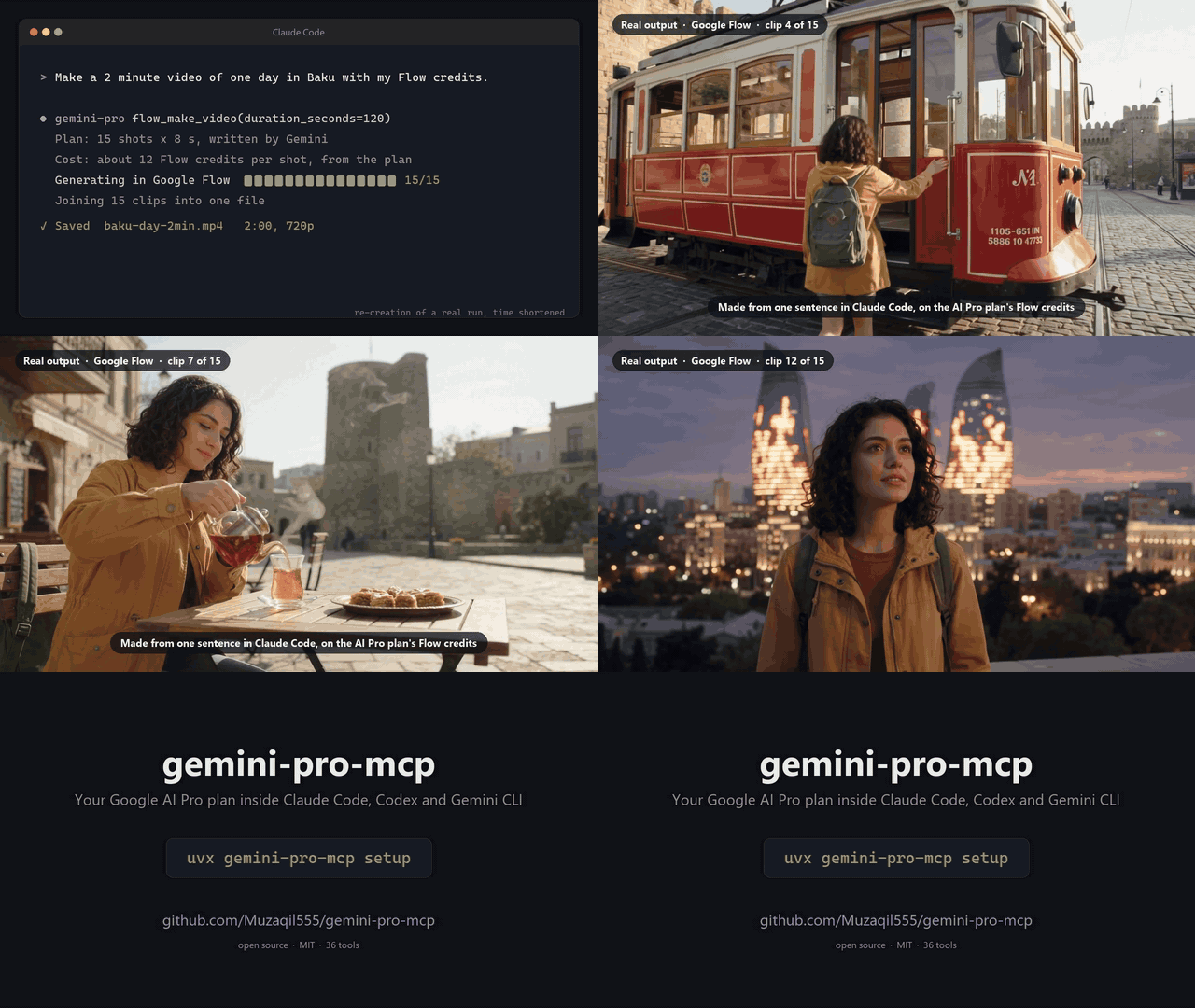
uvx gemini-pro-mcp setup
If it saves you an API bill or a tab switch, a ⭐ helps other AI Pro users find it.
gemini_ask, gemini_research and gemini_code run on your AI Pro plan's limits through the Antigravity CLI, not on a pay-per-token API key.google_pro_benefits lists each benefit and the tool that reaches it.setup adds the server to every client it finds. doctor checks what works and tells you how to fix what does not.gemini_code. Paid calls ask you first. The browser tools are off until you turn them on, and the server never sees or types your Google password.Ask your agent things like:
"Get a second opinion from Gemini on
src/auth.py." "Research what changed in Flutter 3.47, with sources." "Make a 2 minute video of a fox's journey through a snowy forest with my Flow credits." "Put these three PDFs in a Gemini Notebook and make an Audio Overview." "Turn this logo sketch (./sketch.png) into a clean flat icon, 2K."

Most Gemini MCP servers give your agent one thing: a chat with Gemini, or the Gemini API's media models. This one covers the whole AI Pro plan.
| gemini-pro-mcp | gemini-mcp-tool | RLabs gemini-mcp | GuDaStudio geminimcp | |
|---|---|---|---|---|
| Gemini on your AI Pro plan, no API key | ✅ Antigravity CLI | ✅ Antigravity CLI (experimental) | ❌ API key | Gemini CLI1 |
| Ask Gemini, review local files | ✅ | ✅ | ✅ | ✅ |
| Deep Research | ✅ | — | ✅ (API) | — |
| Images and video | ✅ (API, and Flow on the plan) | — | ✅ (API) | — |
| Google Flow: any-length videos, every Flow tool | ✅ | — | — | — |
| Gemini Notebooks (Audio Overviews, quizzes...) | ✅ | — | — | — |
| Jules coding agent | ✅ | — | — | — |
| One-command setup for Claude Code, Codex, Antigravity and Gemini CLI | ✅ setup + doctor | Claude Code and Desktop | Claude Code | Claude Code |
Based on each project's README in November 2026. Corrections are welcome in an issue.
One MCP server, five ways into Google's AI:
| Group | Tools | Runs on | Cost |
|---|---|---|---|
| Gemini (subscription) | gemini_ask, gemini_research, gemini_code, gemini_agents, gemini_models | Antigravity CLI signed in with your Google AI Pro/Ultra account | Free: uses your plan's limits |
| Jules | jules_start, jules_status, jules_approve_plan, jules_message, jules_sources, jules_sessions | Official Jules API (JULES_API_KEY) | Your plan's Jules limits |
| Media (Gemini API) | video_generate, video_edit, video_check, image_generate, video_stitch | Official Gemini API: Omni Flash video, Nano Banana images | Paid per use (AI Pro's monthly Cloud credit can cover it) |
| Google AI web apps (experimental) | gemini_app, gemini_app_result, google_ai_mode, notebook_*, google_page, google_act, google_pro_benefits | Your own signed-in Chrome: Gemini app, Notebooks, AI Mode, AI Studio, Colab, Flow Music, Docs | Your plan's limits |
| Flow (experimental) | flow_make_video, flow_job, flow_generate, flow_approve, flow_reject, flow_collect, flow_status, flow_tools, flow_open_tool: every Flow feature and tool | Your own signed-in Chrome at flow.google.com | Your plan's monthly Flow credits (e.g. 12 credits for an 8 s video) |
agy once and sign in with your Google AI Pro/Ultra account.uvx gemini-pro-mcp setup
setup finds Claude Code, Codex, the Antigravity CLI and the Gemini CLI on your computer, adds the server to each one, and then checks what works: the Antigravity sign-in, your API keys, Chrome and the Flow profile. Each item it reports as missing comes with the fix. Restart the clients afterwards.
--browser also enables the Flow, Gemini app, AI Mode and Notebook tools. Run gemini-pro-mcp flow-login once afterwards and sign in to Google in the window that opens.--auto-approve pre-approves spending, so paid tools run without asking first.--client codex (repeatable) sets up only the clients you name. --dry-run shows the changes without making them.Edited config files are backed up next to themselves (config.toml.bak, settings.json.bak). To check things again later, without changing anything:
uvx gemini-pro-mcp doctor --flow
To add the server by hand instead, use the client's own command:
Claude Code
claude mcp add gemini-pro --scope user -- uvx gemini-pro-mcp
Codex
codex mcp add gemini-pro -- uvx gemini-pro-mcp
Or in ~/.codex/config.toml. Raise the tool timeout: Flow and Deep Research calls take minutes, longer than Codex's default.
[mcp_servers.gemini-pro]
command = "uvx"
args = ["gemini-pro-mcp"]
startup_timeout_sec = 60
tool_timeout_sec = 900
Antigravity CLI and Gemini CLI
agy mcp add gemini-pro -- uvx gemini-pro-mcp
gemini mcp add gemini-pro uvx gemini-pro-mcp
Settings go in as environment variables, e.g. agy mcp add --env GEMINI_PRO_ENABLE_BROWSER=1 gemini-pro -- ..., or in the .env file below.
As a Gemini CLI extension or a Claude Code plugin. Both only add the server; run uvx gemini-pro-mcp doctor afterwards to see what works.
gemini extensions install https://github.com/Muzaqil555/gemini-pro-mcp
In Claude Code:
/plugin install gemini-pro --marketplace Muzaqil555/gemini-pro-mcp
Claude Desktop, Cursor, Windsurf and other clients. Add this to the client's MCP config:
{
  "mcpServers": {
    "gemini-pro": {
      "command": "uvx",
      "args": ["gemini-pro-mcp"]
    }
  }
}
Put it in ~/.config/gemini-pro-mcp/.env so it stays out of client configs:
GEMINI_API_KEY=your-key
Or pass it as an env entry in the client config. Restart the client afterwards.
| Tool | What it does |
|---|---|
gemini_ask | Ask Gemini anything. Pass paths to let it read local files or folders, and conversation_id to continue a chat. |
gemini_research | Live web research with Google Search. The answer ends with source URLs. |
gemini_models | Lists the models your account can use, for example Gemini 4 Argon and Gemini 3.8 Flash. |
Every request runs agy --print in plan mode with the sandbox on, so Gemini can read and search but cannot change your files or run commands.
| Tool | What it does |
|---|---|
video_generate | Text to video with native audio. Optional first frame, last frame and up to 3 reference images. 16:9 or 9:16, 360p to 4K. |
video_edit | Edit a previous result (previous_id) or a local clip of 10 s or less, or extend it, up to 40 s in total. |
video_check | Fetches a video that was still rendering. Free. |
image_generate | Create or edit images with Nano Banana 2.1, Nano Banana 2 Lite or Nano Banana Pro, at 1K, 2K or 4K. |
video_stitch | Joins clips into one MP4, locally and for free (bundled ffmpeg, flow extra). |
Files are saved to ~/gemini-pro-output (change it with GEMINI_PRO_OUTPUT_DIR).
Video uses Gemini Omni Flash. Google shut down the Veo 3.1 preview models on 2026-10-22 and recommends Omni Flash instead.
Prices are taken from Google's pricing page as of October 2026. Check it for current numbers.
| What | Price | Free tier |
|---|---|---|
Gemini tools (gemini_*) | Included in Google AI Pro/Ultra (plan limits apply) | n/a |
| Video, Omni Flash 720p | about $0.10 per second (8 s ≈ $0.80) | none |
| Image, Nano Banana 2.1 | $0.034 (1K) / $0.05 (2K) / $0.11 (4K) | none |
| Image, Nano Banana Pro | $0.13 (1K/2K) / $0.24 (4K) | none |
Does Google AI Pro pay for the API? Not directly. Google says plan benefits apply in the AI Studio web UI, and API-key usage is billed separately. AI Pro does include a monthly Google Cloud credit through the Google Developer Program, which can be spent on the Gemini API once billing is enabled. Google's blog gives the amount as $10/month.
By default the server tells the model to confirm with you before every paid call. If you would rather not be asked, set GEMINI_PRO_AUTO_APPROVE=1: the model then just does it and reports the cost afterwards.
| Variable | Default | Meaning |
|---|---|---|
GEMINI_API_KEY | (none) | Gemini API key for the media tools |
JULES_API_KEY | (none) | Jules API key from jules.google.com/settings, for the jules_* tools |
GEMINI_PRO_OUTPUT_DIR | ~/gemini-pro-output | Where videos and images are saved |
AGY_PATH | agy on PATH | Path to the Antigravity CLI |
GEMINI_PRO_AGY_MODEL | agy's default | Default model for gemini_* tools |
GEMINI_PRO_AGY_TIMEOUT | 600 | Seconds per Antigravity request |
GEMINI_PRO_ENABLE_BROWSER | off | 1 registers the browser tools (Flow, Gemini app, AI Mode, Google AI sites) |
GEMINI_PRO_FLOW_PROJECT | open or most recent project | Flow project id to work in |
GEMINI_PRO_AUTO_APPROVE | off | 1 = spending is pre-approved: no confirmation questions, Flow requests are approved automatically |
GEMINI_PRO_ENV_FILE | ~/.config/gemini-pro-mcp/.env | Optional file with any of the above |
google_pro_benefits lists every benefit of the plan and the tool that reaches it. Here is the short version:
| Benefit | How this server reaches it |
|---|---|
| Gemini app: 4 Argon, 3.1 Pro, thinking levels, files | gemini_app |
| Deep Research | gemini_app(tool="deep_research"), then gemini_app_result |
| Images (Nano Banana), Veo videos, music, Canvas, Guided learning in Gemini | gemini_app(tool=...) |
| Gemini Notebook (former NotebookLM): sources, Audio/Video Overviews, slides, quizzes... | notebook_list, notebook_create, notebook_add_sources, notebook_ask, notebook_studio |
| AI Mode in Google Search | google_ai_mode |
| Google Flow: video, images, every Flow tool | flow_* tools |
| Antigravity: Gemini 4 Argon on your quota | gemini_ask, gemini_research, gemini_code (edits a folder), gemini_agents |
| Jules coding agent (GitHub, PRs) | jules_start, jules_status, jules_approve_plan, jules_message, jules_sources, jules_sessions (official API, JULES_API_KEY) |
| AI Studio, Colab, Flow Music, Gemini in Docs | google_page / google_act |
| $10/month Cloud credit (Developer Program) | video_generate, image_generate (Gemini API) |
| 5 TB storage, Gmail, Calendar | Google's official MCP connectors |
| Mobile-only or US-only features (Photos AI, Auto browse, TV Create Hub, Earth...) | Listed by google_pro_benefits as out of reach |
| Buying AI credits | Never automated |
google_page and google_act work like a person in your browser. They read a page as numbered elements, then click, type, upload files, choose options and download results, so a new feature in any of these apps is usable on day one. They only operate the Google AI sites listed in google_web.py. Sign-in, payment and account pages are off limits.
Google Flow has no public API. The Flow tools drive the website in a dedicated Chrome profile that you sign in to yourself:
uvx --from "gemini-pro-mcp[flow]" gemini-pro-mcp flow-login
Then set GEMINI_PRO_ENABLE_BROWSER=1 (the older GEMINI_PRO_ENABLE_FLOW=1 still works). This enables every browser-based tool: Flow, the Gemini app, AI Mode and the other Google AI sites, all in that one signed-in profile.
| Tool | What it does | Credits |
|---|---|---|
flow_make_video | Any length (e.g. duration_seconds=120). Gemini splits the idea into 4–8 s shots with matching descriptions, Flow generates each one, and the clips are joined into one MP4. Runs in the background. | ~12 per 8 s |
flow_job | Progress of flow_make_video: clips done, credits used, final file | none |
flow_generate | Sends your request to Flow's agent and returns its answer, including the cost question ("…1 video generation, costing 12 credits?") | none |
flow_approve | Answers that question with Approve, waits for the result and saves it (720p MP4 / original image) | spends credits |
flow_reject | Declines the pending request | none |
flow_collect | Downloads the newest items of the project | none |
flow_status | Checks the sign-in and shows the credits left | none |
flow_tools | Lists every Flow tool: Google's (Image Editor, Mockup, Shot Explorer, Mask Magic, Video Resizer, Transition Machine, Type Overlays, Shader Effects, Poster Designer…), the community's and your own | none |
flow_open_tool | Opens a tool by name and shows its interface (a Google or community tool becomes your own "Remix of …" copy, as in Flow) | none |
google_page / google_act | Read any Flow page or tool as numbered elements, then click, type, upload files, pick options or export, like a person. This reaches whatever has no dedicated tool: Characters, Scenes, Library, upscaling, each tool's controls | depends on the button |
Every Flow feature is reachable. Flow's agent (flow_generate) handles anything you can ask in words, and google_page + google_act operate anything with buttons. For example, "put my last clip through Video Resizer at 9:16" opens the tool, imports the clip, exports a 9:16 copy and downloads it. That flow was tested end to end.
By default spending is a separate call: flow_generate stops at Flow's own permission question, and the model has to ask you before it calls flow_approve. With GEMINI_PRO_AUTO_APPROVE=1 the tools approve it themselves. Either way, keep Flow's "Confirm before generating: Always" setting on (the default), because the tools rely on that question.
Tested on 2026-10-21 with Omni 1.1 Flash: an 8 s, 1280×720, 24 fps video for 12 credits, end to end.
Read this first. Automating Flow's website may conflict with Google's terms of service, and it breaks whenever Google changes the page. This project never types or stores your credentials and uses no stealth tricks. If Google shows a CAPTCHA, you solve it. Use at your own risk.
Claude ── MCP (stdio) ──> gemini-pro-mcp ──┬── agy --print (plan + sandbox) ──> Gemini on your AI Pro plan
                                           ├── google-genai Interactions API ──> Omni Flash / Nano Banana
                                           └── Playwright over CDP ──> your Chrome ──> flow.google.com
flow_make_video)uvx gemini-pro-mcp)docs/demo.svg, built by docs/make_demo.py from real output)docs/demo.gif, clips from a real flow_make_video run)Ideas and pull requests are welcome. See CONTRIBUTING.md.
~/.config/gemini-pro-mcp/.env and are sent only to the Google API they belong to.The full statement is in the privacy policy.
This is an independent open-source project. It is not affiliated with, endorsed by or sponsored by Google or Anthropic. Gemini, Google AI Pro, Flow and Antigravity are trademarks of Google LLC.
Google retired the Gemini CLI for Google AI Pro and Ultra users on 2026-06-18 in favor of the Antigravity CLI. API-key and enterprise users can still use it. ↩
Claim this server with your GitHub account to request manual ownership verification.
Link to the catalog listing for gemini-pro-mcp from your README. This badge does not certify ownership, compatibility or security.
[](https://awesome-mcp.com/servers/gemini-pro-mcp)Public repository statistics could not be verified. Check the configured source address; unavailable counts are not zero.
Separate sources, scopes and periods. Never combined or treated as installations, active users or security reviews.
No reviewed package or image identity; download statistics are not listed yet.
Alternative and complementary servers in the same category
Store and retrieve entities, relations and observations in a persistent local knowledge graph.
Organize problem solving into revisable, branching thought steps through an MCP tool.

Query-aware context compression with an MCP plugin for coding agents, plus Python and HTTP interfaces for reducing the context sent to a language model.