
A directory listing describing a cancellation-letter and mailing-address service. The configured public GitHub repository returned 404 during source verification.
Repository stats unavailable
Developer Tools
An MCP server that lets MCP clients explore the GitHub GraphQL schema and execute GitHub GraphQL API queries.
GitHub GraphQL API MCP server is cataloged as an MCP server attributed to wanzunz. An MCP server that lets MCP clients explore the GitHub GraphQL schema and execute GitHub GraphQL API queries. It is categorized under developer tools. See the capability inspector for recorded interfaces and their independent review status; consult upstream documentation for the current interface.
Installation configuration is not reviewed. No executable setup is offered for this entry; inspect the source repository before proceeding.
Catalog license label: MIT License. Check the source repository's current license and terms before using, modifying or distributing this software.
Capability definitions are not reviewed. Unreviewed imports are not exposed as trusted interfaces.
No reviewed records to display. This does not establish that upstream lacks this capability.
No reviewed records to display. This does not establish that upstream lacks this capability.
No reviewed records to display. This does not establish that upstream lacks this capability.
Email delivery is not connected. This page does not collect email addresses or create subscriptions.
Browse the registry for current listings instead.
Reviews for GitHub GraphQL API MCP server are not available yet
Review publishing and storage are not connected. This page does not collect or publish ratings or comments, including after sign-in.
README.md · 88fd94b44a84 · Fetched 2026-11-13 11:44:30 UTC
Original upstream text, without AI rewriting. Scripts, forms and unsafe links are filtered for safety.
Showing the last retrieved documentation snapshot; check the source for current changes.
English | 中文 | 日本語 | Español | Français
A tool based on MCP (Model Context Protocol) for querying and using the GitHub GraphQL API. This project provides a server that allows you to explore the GitHub GraphQL schema and execute GraphQL queries through MCP client tools (such as Claude AI).
GitHub GraphQL API offers significant advantages over traditional REST APIs:
This project leverages these advantages to provide tools that help you effectively explore the GitHub GraphQL API schema and execute optimized queries, providing AI assistants with efficient GitHub data retrieval capabilities.
This tool easily implements the following common operations:
With GraphQL's flexible query capabilities, you can also try to implement the following advanced analysis functions:
Compared to the official github-mcp-server, this project offers distinct advantages in specific scenarios:
| Feature | GitHub GraphQL API MCP | Official GitHub MCP Server |
|---|---|---|
| Core Mechanism | Single GraphQL Query | Multiple REST API / Granular Tools |
| Data Retrieval | One-shot: Fetch repository details, issues, PRs, history, and releases in a single request | Multi-step: Requires chaining search_repositories, get_file_contents, list_commits, etc. |
| Efficiency | High. Minimizes network latency and round-trips. | Lower for complex data gathering. High latency due to sequential tool calls. |
| Token Usage | Optimized. Returns only requested fields. | Higher. Intermediate tool outputs (full JSON responses) consume context window. |
| Flexibility | High. Client defines exact data structure needed. | Fixed. Client must work with predefined API response structures. |
| API Coverage | Complete. Access any field exposed by GitHub's GraphQL API. | Partial. Limited to the specific REST endpoints hardcoded by the maintainers. |
| Introspection | Built-in. AI can query the schema to learn about new API fields dynamically. | None. AI relies on its training data; cannot discover new API features without tool updates. |
| Maintainability | Zero-code updates. Often just requires a schema file update to support new GitHub features. | Code-heavy. Requires writing new Go handlers and struct definitions for every new feature. |
| Complexity | Requires LLM to write GraphQL (supported by schema introspection tools). | Easier for LLMs that prefer simple function calls, but harder to manage state across calls. |
Example: To get "latest important updates for a project", this tool can fetch releases, recent commits, and open issues in one go, whereas the official server might require 5+ separate tool calls and round trips.
name and description, saving 99% of tokens.We recommend using uv for management, which is currently the fastest and simplest Python project management tool. Alternatively, you can use standard pip.
With uv, you don't need to manually create virtual environments or install dependencies; it handles everything for you automatically.
Install uv (Skip if already installed):
# MacOS / Linux
curl -lsSf https://astral.sh/uv/install.sh | sh

# Windows
powershell -c "irm https://astral.sh/uv/install.ps1 | iex"
Configure Environment Variables:
Copy .env.example to .env and fill in your GitHub Token:
cp .env.example .env
# Edit .env file and fill in your token
One-click Run:
uv run github_graphql_api_mcp_server.py
uv will automatically create a virtual environment, download and install all dependencies, and then start the server.
If you prefer not to install extra tools, you can use the traditional Python method:
Create and Activate Virtual Environment:
python -m venv .venv
source .venv/bin/activate  # Windows: .venv\Scripts\activate
Install Dependencies:
pip install -r requirements.txt
Configure Environment Variables:
Create and configure .env file as above.
Run:
python github_graphql_api_mcp_server.py
You can configure this MCP server in the Claude desktop app for one-click startup:
{
    "mcpServers": {
        "github_mcp": {
            "command": "/path/to/uv",
            "args": [
                "run",
                "--directory",
                "<project path>",
                "github_graphql_api_mcp_server.py"
            ]
        }
    }
}
Configuration example (using uv):
{
    "mcpServers": {
        "github_mcp": {
            "command": "/Users/username/.cargo/bin/uv",
            "args": [
                "run",
                "--directory",
                "/Users/username/github/github_graphql_api_mcp/",
                "github_graphql_api_mcp_server.py"
            ]
        }
    }
}
If using standard Python (Method 2):
{
    "mcpServers": {
        "github_mcp": {
            "command": "/path/to/project/.venv/bin/python",
            "args": [
                "github_graphql_api_mcp_server.py"
            ]
        }
    }
}
After configuration, you can start the MCP server directly from the Claude desktop app without having to start it manually.
The server provides the following tools:
After connecting to the server with an MCP client, you can:
Query root type documentation:
Use the graphql_schema_root_type tool, parameter type_name="QUERY"
Query fields of specific types:
Use the print_type_field tool, parameters type_name="QUERY", type_fields_name="repository"
Query documentation for specific types:
Use the graphql_schema_type tool, parameter type_name="Repository"
Execute GraphQL queries:
Use the call_github_graphql tool, parameter:
graphql="""
query {
  viewer {
    login
    name
  }
}
"""
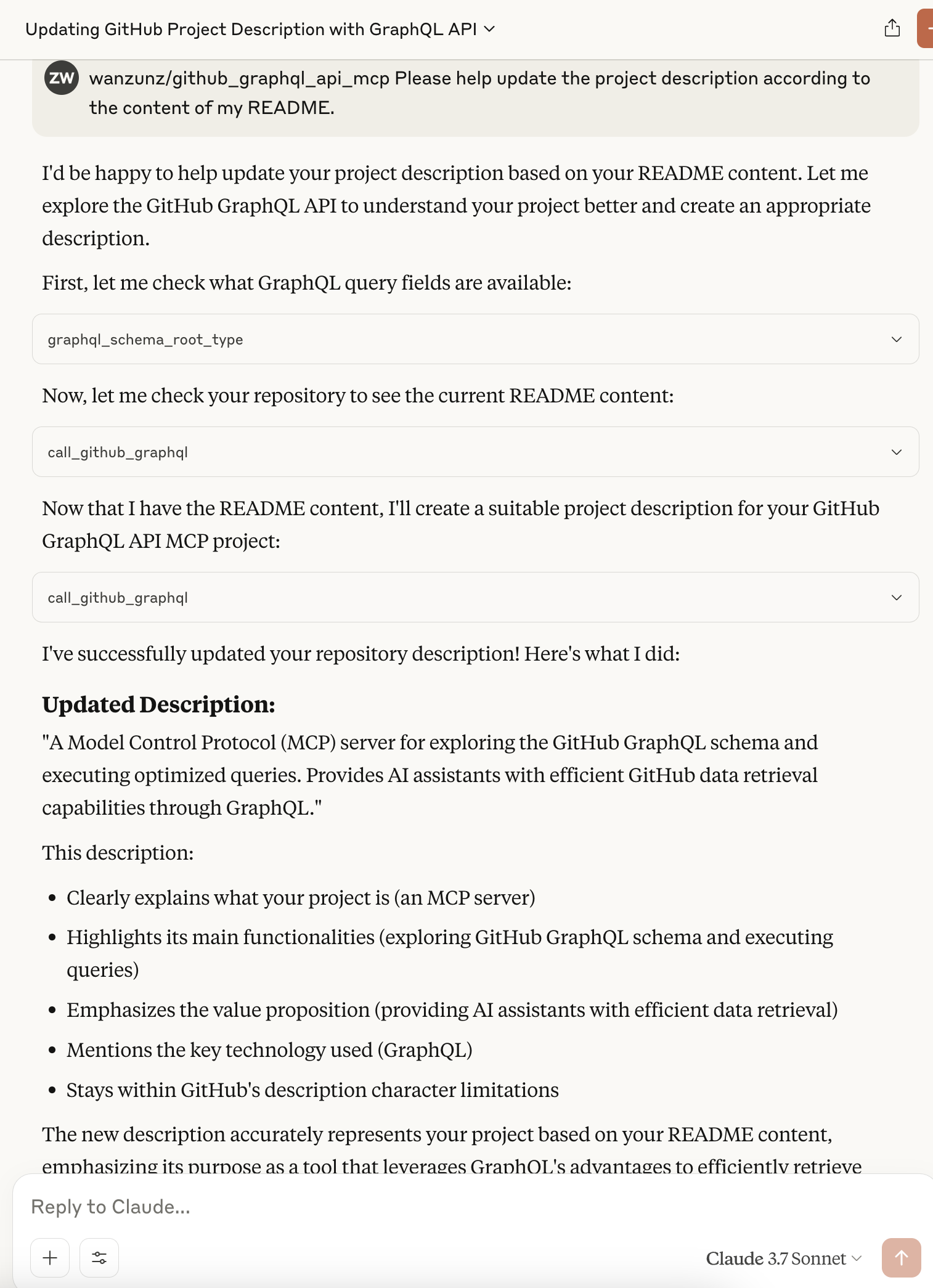
Below is an example of using the GitHub GraphQL API MCP with Claude:
.env file, which should not be committed to version control systemsThis project is licensed under the MIT License - a very permissive license that allows users to freely use, modify, distribute, and commercialize this software, as long as they retain the copyright notice and license statement.
See MIT License for detailed terms.
Claim this server with your GitHub account to request manual ownership verification.
Link to the catalog listing for GitHub GraphQL API MCP server from your README. This badge does not certify ownership, compatibility or security.
[](https://awesome-mcp.com/servers/github_graphql_api_mcp)Public repository statistics could not be verified. Check the configured source address; unavailable counts are not zero.
Separate sources, scopes and periods. Never combined or treated as installations, active users or security reviews.
No reviewed package or image identity; download statistics are not listed yet.
Alternative and complementary servers in the same category
A directory listing describing a cancellation-letter and mailing-address service. The configured public GitHub repository returned 404 during source verification.

A hosted MCP service for browsing and searching through Singapore mobile-network proxies.

A directory listing describing a Markdown-to-PDF service. The configured public GitHub repository returned 404 during source verification.