



Google Trends MCP server

Google Trends MCP server

google-trends-mcp•byeason-gao3

An MCP server that gives AI assistants structured Google Trends data through keyword comparison and batch research tools, with a REST API and hosted SaaS deployment.

License: MIT•Runtime: Awaiting documentation review•Category: search web

WHAT IT DOES

  • •Provides four MCP tools: compare_keywords, research_keywords, research_keywords_async and get_research_task.
  • •Compares up to 5 keywords' Google Trends time-series popularity.
  • •Researches up to 50 keywords in batches of 5, normalizing across batches with an anchor keyword.
  • •Supports a REST API with compare, research and demo-trends endpoints plus an OpenAPI schema.

BEST FOR

  • •Marketing or SEO keyword trend comparison inside MCP-capable AI clients such as Claude Desktop and Cursor.
  • •Batch directional research across large keyword sets, with anchor-based cross-batch normalization.
  • •Teams needing a hosted multi-user deployment with Google OAuth login and per-user API keys.

ABOUT GOOGLE-TRENDS-MCP

Google Trends MCP server is cataloged as an MCP server attributed to eason-gao3. An MCP server that gives AI assistants structured Google Trends data through keyword comparison and batch research tools, with a REST API and hosted SaaS deployment. It is categorized under search web. See the capability inspector for recorded interfaces and their independent review status; consult upstream documentation for the current interface.

HOW TO INSTALL

Installation configuration is not reviewed. No executable setup is offered for this entry; inspect the source repository before proceeding.

LICENSE

Catalog license label: MIT. Check the source repository's current license and terms before using, modifying or distributing this software.

Capability inspector

Capability definitions are not reviewed. Unreviewed imports are not exposed as trusted interfaces.

Tools (0)

No reviewed records to display. This does not establish that upstream lacks this capability.

Resources (0)

No reviewed records to display. This does not establish that upstream lacks this capability.

Prompts (0)

No reviewed records to display. This does not establish that upstream lacks this capability.

NEWSLETTER - COMING LATER

Newsletter subscriptions are not open yet

Email delivery is not connected. This page does not collect email addresses or create subscriptions.

Browse the registry for current listings instead.

Community Reviews

Coming later

Reviews for Google Trends MCP server are not available yet

Review publishing and storage are not connected. This page does not collect or publish ratings or comments, including after sign-in.

FREQUENTLY ASKED QUESTIONS

How does research_keywords keep results comparable across batches?

Each batch includes the anchor keyword, and batches are scaled against the first batch's anchor average; results are estimated comparable values suited to directional comparison, not raw search volume.

What is the difference between compare_keywords and research_keywords results?

compare_keywords returns original within-batch Google Trends heat for precise comparison, while research_keywords returns cross-batch normalized estimates for directional research.

How does the server handle Google Trends rate limits?

It includes 1-3 second random request delays and backoff retries, and can switch between pytrends and trendspy providers.

Upstream README

View this exact version on GitHub

README.md · c173efbb941c · Fetched 2026-11-13 14:06:47 UTC

Original upstream text, without AI rewriting. Scripts, forms and unsafe links are filtered for safety.

Showing the last retrieved documentation snapshot; check the source for current changes.

Google Trends MCP

Live Demo Python FastMCP Docker License

让 AI 助手获得结构化 Google Trends 数据能力 — 支持单次 50 关键词批量调研、跨批次归一化、生产级 SaaS 部署。一次 Google 登录,Claude / ChatGPT / Cursor / Perplexity 等 7 大主流客户端即插即用。

🌐 Live Demo:https://easontrendmcp.dpdns.org/ | 📖 接入文档:https://easontrendmcp.dpdns.org/docs | 🔌 OpenAPI:https://easontrendmcp.dpdns.org/openapi.json
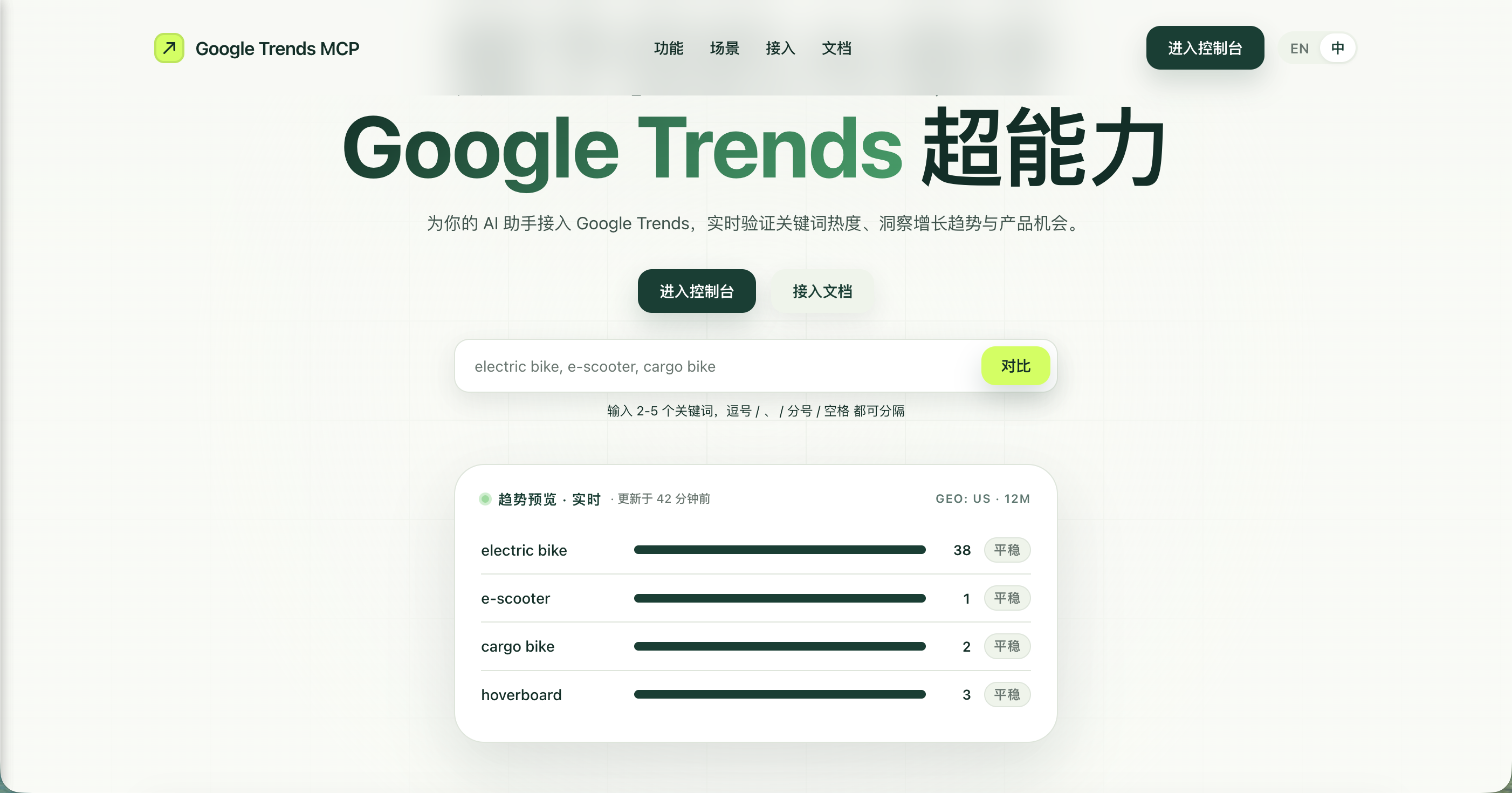
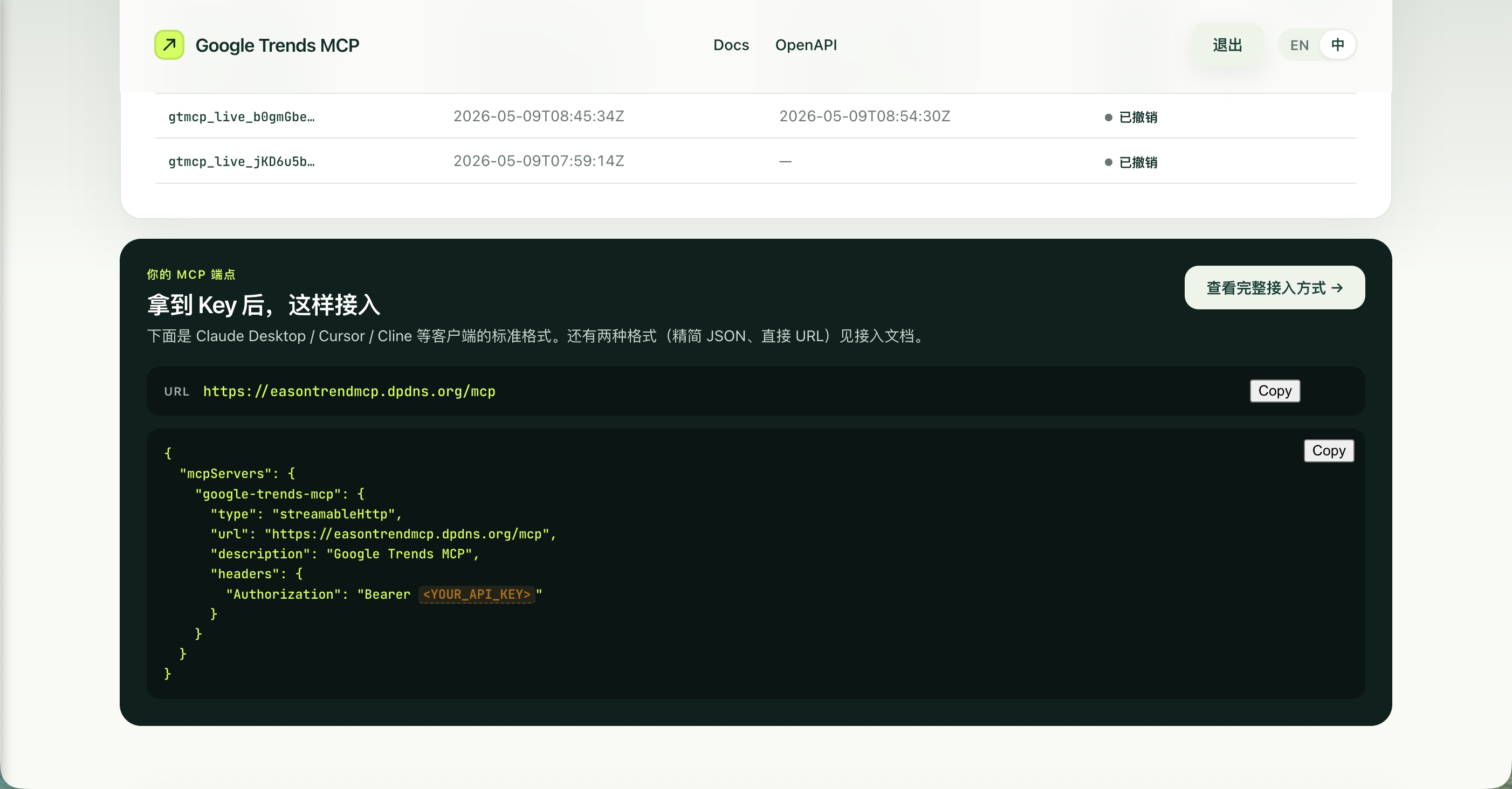
Google Trends MCP — Hero

Dashboard Docs


✨ Highlights

  • 🧩 MCP 原生:基于 FastMCP,4 个工具开箱即用(compare_keywords / research_keywords / research_keywords_async / get_research_task)
  • 📊 跨批次归一化:单次最多 50 关键词,自动以 anchor 关键词拉通批次间可比性
  • ⚡ 多端接入:MCP 协议、REST API、GPT Actions 三套接入方式,覆盖 7 大 AI 客户端
  • 🎨 生产级前端:双语(中/英)SaaS 落地页 + 控制台 + 文档站,Apple 风格设计系统
  • 🐳 一键部署:Docker Compose + Caddy 自动 HTTPS,Google OAuth 用户系统 + 每用户 API Key 管理

项目结构

google-trends-mcp/
├── server.py                 # 主程序入口(3049 行),包含所有后端逻辑
├── requirements.txt          # Python 依赖列表
├── .env.example              # 环境变量模板(Docker 部署用)
├── AGENTS.md                 # AI Agent 工程契约
├── Dockerfile                # Docker 镜像构建文件
├── Caddyfile                 # Caddy 反向代理配置
├── docker-compose.yml        # Docker Compose 部署配置
├── README.md                 # 本文档
│
├── templates/                # 前端模板文件(独立于 server.py)
│   ├── base.html             # HTML 页面骨架
│   ├── styles.css            # 完整设计系统 CSS(~1721 行)
│   └── scripts.js            # 前端交互 JavaScript(~245 行)
│
├── data/                     # 运行时数据(SQLite 数据库)
│   └── google-trends-mcp.sqlite3
│
└── design-system/            # 设计系统参考文件(非运行时依赖)
    └── Google Trends MCP Design System (Remix) (Remix)/
        ├── colors_and_type.css        # 设计令牌
        ├── standalone/                # 可交互预览页面(marketing / dashboard / docs)
        └── ui_kits/                   # JSX 原型组件
            ├── _shared/               # Nav、Footer、Lang 共享组件
            ├── marketing/             # 营销落地页组件
            ├── dashboard/             # 控制台组件
            └── docs/                  # 文档页组件

功能概述

MCP 工具

工具名称说明关键词上限
compare_keywords少量关键词精确对比5 个
research_keywords多关键词批量调研(同步)50 个
research_keywords_async多关键词批量调研(异步)50 个
get_research_task查询异步任务状态/结果—

REST API

端点方法说明
/api/comparePOST关键词对比
/api/researchPOST关键词调研
/api/demo-trendsGET公开 demo 数据预览
/openapi.jsonGETOpenAPI Schema(供 GPT Actions)

Web 页面

路径说明
/双语(中/英)SaaS 营销落地页,含实时趋势预览、Features 代码块、3 种接入配置卡片
/loginGoogle OAuth 登录页
/dashboardAPI Key 管理控制台(创建/复制/吊销),含 MCP 端点快速接入卡片
/docs接入文档(5 节侧边栏布局:快速开始 / 认证 / 接入 / 工具参考 / 错误码)

安装步骤

环境要求

  • Python 3.11+
  • macOS / Linux

安装依赖

cd google-trends-mcp

# 创建虚拟环境
python3 -m venv .venv

# 激活虚拟环境
source .venv/bin/activate

# 安装依赖
pip install -r requirements.txt

运行方式

1. 本地 MCP stdio 模式(默认)

供 Claude Desktop / OpenCode 等本地 MCP 客户端使用:

.venv/bin/python server.py

注意:stdio 模式下 stdout 用于 MCP JSON-RPC 协议通信,禁止使用 print(),日志仅输出到 stderr。

2. 本地 Web 服务模式

启动 Web 服务和 REST API,可在浏览器中访问前端页面:

APP_SECRET_KEY=your-secret .venv/bin/python server.py --transport streamable-http --host 127.0.0.1 --port 8000

然后访问 http://127.0.0.1:8000 查看前端。

本地 Web 模式下 OAuth 不可用,可使用 /auth/dev-login 开发登录(无需 Google 账号)。

3. 自检模式(smoke-test)

快速验证工具是否正常工作:

# 对比模式
.venv/bin/python server.py \
  --smoke-test \
  --keywords "ChatGPT,DeepSeek" \
  --timeframe "today 12-m" \
  --geo "US"

# 批量调研模式
.venv/bin/python server.py \
  --smoke-test \
  --research \
  --keywords "ChatGPT,Claude,Gemini,DeepSeek,Perplexity,Kimi,Grok" \
  --timeframe "today 12-m" \
  --geo "US" \
  --anchor-keyword "ChatGPT"

4. Docker 公网部署

适用于多人使用的公网 SaaS 部署:

# 准备环境变量
cp .env.example .env
# 编辑 .env 填入 Google OAuth 凭证和域名

# 启动服务
docker compose up -d --build

Docker 部署包含:

  • Python 应用:监听 Docker 内部 8000 端口
  • Caddy:HTTPS 反向代理 + 自动证书管理
  • Google OAuth:用户登录认证
  • API Key 管理:每用户最多 3 个 Key,明文仅展示一次
  • 限流控制:每用户 compare 每分钟 10 次,research 每小时 5 次

MCP 工具详解

compare_keywords — 关键词对比

对比最多 5 个关键词的 Google Trends 时间序列热度。

输入参数:

参数类型默认值说明
keywordslist[str]必填关键词列表,最多 5 个
timeframestr"today 5-y"时间范围
geostr""国家/地区代码(如 CN、US)
drop_partialbooltrue是否过滤 isPartial 行

返回字段: rows、table_markdown、summary、meta

research_keywords — 批量调研

调研最多 50 个关键词,自动分批(每批 5 个),使用 anchor 关键词进行跨批次归一化。

输入参数:

参数类型默认值说明
keywordslist[str]必填关键词列表,最多 50 个
timeframestr"today 5-y"时间范围
geostr""国家/地区代码
anchor_keywordstr | None第一个关键词跨批次归一化锚点
drop_partialbooltrue是否过滤 isPartial 行
cache_ttl_secondsint900缓存有效期(秒)

返回字段:

  • keyword_metrics:每个关键词的指标(均值、最新值、峰值、斜率)及归一化值
  • rankings:按 by_normalized_mean、by_normalized_latest、by_slope、by_peak 排序
  • batches:每批次摘要(关键词、归一化系数、缓存状态)
  • table_markdown:指标表格
  • summary:中文调研总结
  • meta:参数回显、缓存状态、耗时、归一化声明、警告

跨批次归一化说明

Google Trends 单次请求最多对比 5 个关键词,返回的 0-100 是批内相对热度,不同批次之间不能直接比较。

research_keywords 使用 anchor 关键词 解决跨批次可比性问题:

  • 每批请求都带上 anchor 关键词
  • 以第一批 anchor 的平均热度为基准,对其他批次缩放
  • 归一化结果是估算可比值,适合方向性比较,不代表原始搜索量

如果 anchor 关键词在某些批次热度极低(均值 < 2.0),会在 meta.warnings 中提示可信度偏低。

客户端接入方式

支持 7 种主流 MCP 客户端,全部使用相同的远程端点:

客户端接入方式备注
Claude DesktopStandard(claude_desktop_config.json)需 Pro/Team
CursorStandard(.cursor/mcp.json)需 HTTPS
VS Code CopilotCompact(Command Palette → MCP: Add Server)v1.102+ GA
Cherry StudioStandard(Settings → MCP Servers)无需本地 uv/bun
WindsurfStandard(Plugins → Manage → View Raw Config)保存后刷新
Gemini CLICompact(gemini mcp add 或 settings.json)SDK 2026.3 起
Perplexity(Mac)Standard(Settings → Connectors)macOS Pro only

Standard 配置(Claude Desktop / Cursor 等)

{
  "mcpServers": {
    "google-trends": {
      "url": "https://easontrendmcp.dpdns.org/mcp",
      "headers": {
        "Authorization": "Bearer gtmcp_live_your-api-key"
      }
    }
  }
}

Compact 配置(VS Code Copilot / Gemini CLI 等)

https://easontrendmcp.dpdns.org/mcp?key=gtmcp_live_your-api-key

本地 stdio 模式(Claude Desktop / OpenCode)

{
  "mcpServers": {
    "google-trends": {
      "command": "/path/to/.venv/bin/python",
      "args": ["/path/to/google-trends-mcp/server.py"]
    }
  }
}

ChatGPT GPT Actions 接入

ChatGPT MCP Connector 需要 OAuth 2.0,本服务暂不支持。建议使用 GPT Builder → Actions 方式:

  1. 在 GPT Builder → Configure → Actions → Import from URL 填入:
    https://easontrendmcp.dpdns.org/openapi.json
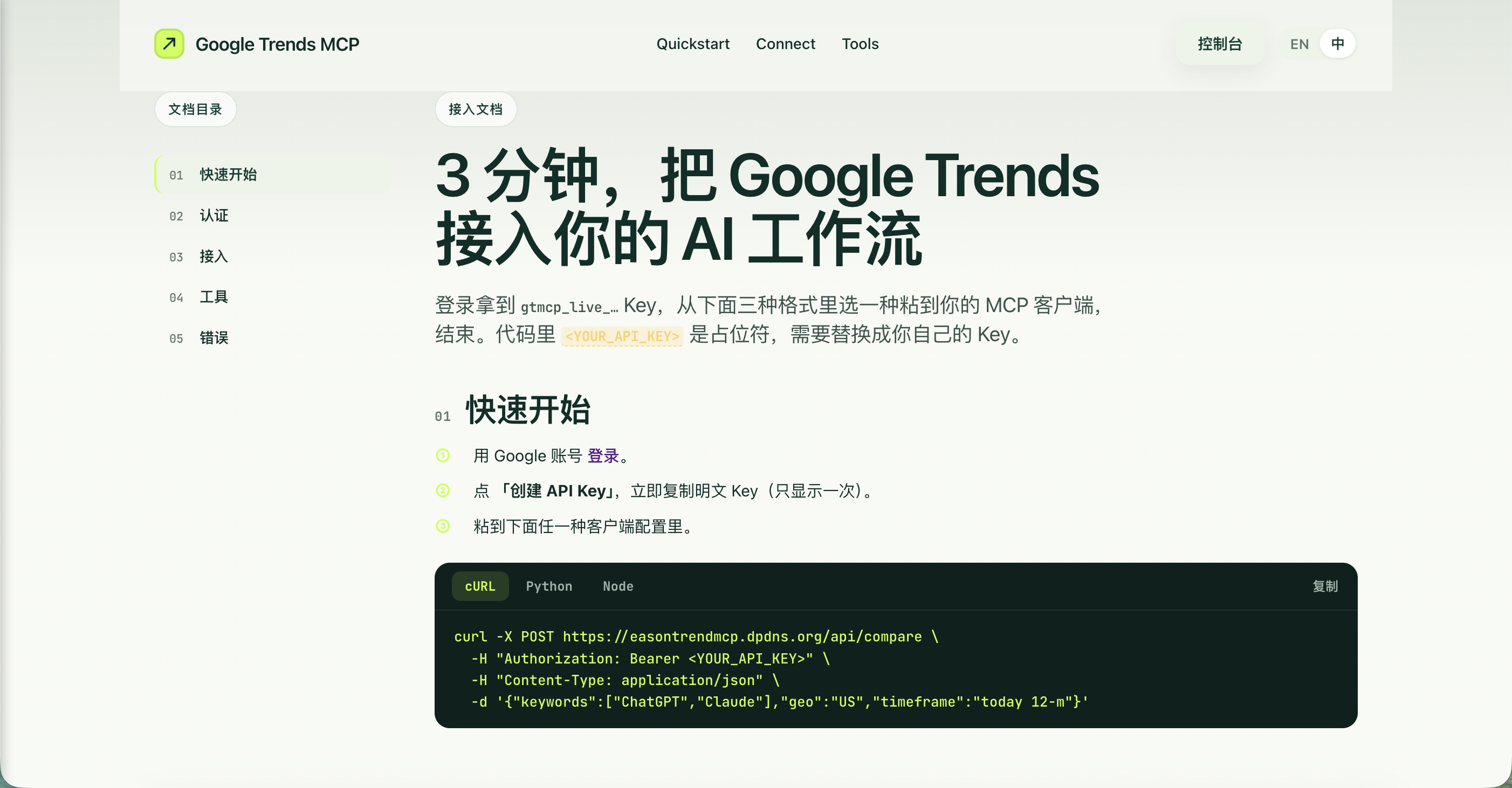
    
  2. Authentication 选择 API Key / Bearer
  3. Header 使用 Authorization: Bearer gtmcp_live_...

配置说明

环境变量

变量默认值说明
GOOGLE_TRENDS_PROVIDERpytrendsTrends 后端(pytrends 或 trendspy)
GOOGLE_TRENDS_MCP_RATE_LIMIT1启用时开启进程内限流
GOOGLE_CLIENT_ID—Google OAuth 客户端 ID(Docker 模式)
GOOGLE_CLIENT_SECRET—Google OAuth 密钥(Docker 模式)
APP_SECRET_KEY—Web session 签名密钥(本地开发用任意字符串)
MAX_API_KEYS_PER_USER3每用户最大 API Key 数量
DATABASE_PATHdata/google-trends-mcp.sqlite3SQLite 数据库路径
HTTPS_PROXY / https_proxy—代理地址(国内网络访问 Google 需要)
RESEARCH_MAX_WORKERS4research 并发线程数

Provider 切换

默认使用 pytrends。如果持续触发 429 限制,可切换到 trendspy:

export GOOGLE_TRENDS_PROVIDER=trendspy

或 smoke-test 时临时覆盖:

.venv/bin/python server.py --smoke-test --provider trendspy --keywords "ChatGPT,DeepSeek"

前端模板系统

前端文件位于 templates/ 目录,独立于 server.py:

文件说明
base.htmlHTML 骨架,使用 {title}、{styles}、{scripts}、{body} 占位符
styles.css完整设计系统(~1721 行):品牌色彩令牌、排版、布局、按钮、卡片、docs 侧边栏、CodeBlock、ConfigCard、ClientTable、StatusPill、响应式等
scripts.js前端交互逻辑(~245 行):中/英语言切换、Hero 多分隔符搜索、实时趋势预览(3s 超时 + fallback)、CodeBlock tab 切换、docs scroll-spy、CountUp 动画、剪贴板复制

server.py 启动时通过 _read_template() 加载并缓存模板文件,由 html_page() 函数组装页面。

设计系统

品牌设计规范和原型参考位于 design-system/ 目录(非运行时依赖,仅供设计参考)。

品牌色彩:

  • 主色:#073f33(森林绿 --forest)
  • 强调色:#c9ff3f(青柠绿 --lime)
  • 墨色:#062f26(最深深色 --deep)
  • 背景:#f8faf5(暖白底色 --soft)
  • 薄荷:#eaf5e6(浅绿卡片背景 --mint)

字体栈: SF Pro Display / SF Pro Text → Inter → 系统 sans-serif;等宽字体使用 JetBrains Mono。

常见问题

Server 已内置 1-3 秒随机请求延迟和退避重试。如果仍然频繁触发:

  • 降低调用频率,缩小时间范围
  • 配置 HTTPS 代理
  • 切换到 trendspy provider 做 A/B 测试

2. 国内网络访问不稳定?

设置代理环境变量:

export HTTPS_PROXY=http://127.0.0.1:7890

3. 为什么 MCP 模式下不能 print?

stdio 模式下 stdout 用于 MCP JSON-RPC 协议通信,普通文本会破坏协议。日志必须写到 stderr。仅 --smoke-test 模式允许 JSON 输出到 stdout。

4. 为什么配置必须使用绝对路径?

桌面 GUI 客户端启动本地命令时,环境变量和终端不同,使用绝对路径能避免 "command not found" 或解释器路径不一致。

5. compare_keywords 和 research_keywords 结果为什么不同?

  • compare_keywords:返回原始 Google Trends 批内热度,适合精确对比
  • research_keywords:返回跨批次归一化后的估算值,适合方向性调研

6. 批量调研速度如何?

  • 内置 2-4 个并发线程拉取数据
  • 每批次 1-3 秒随机延迟 + Google 请求耗时
  • 10 个关键词(2-3 批)约 5-10 秒
  • 50 个关键词(约 13 批)约 15-30 秒
  • 进程内缓存(默认 15 分钟),重复请求跳过网络调用

7. 本地开发没有 Google OAuth 怎么办?

不设置 GOOGLE_CLIENT_ID 时,服务器自动进入 dev 模式,访问 /auth/dev-login 可直接登入开发用虚拟账号,无需 Google 账号。

APP_SECRET_KEY=dev-secret .venv/bin/python server.py --transport streamable-http --host 127.0.0.1 --port 8000
# 然后访问 http://127.0.0.1:8000/auth/dev-login


Install configuration

Are you the maintainer?

Claim this server with your GitHub account to request manual ownership verification.

README Embed Badge
Markdown

Link to the catalog listing for Google Trends MCP server from your README. This badge does not certify ownership, compatibility or security.

[![MCP catalog listing](https://img.shields.io/badge/MCP-awesome--mcp-orange?style=flat-square)](https://awesome-mcp.com/servers/google-trends-mcp)

REPOSITORY STATS

GitHub StarsUnavailable
ForksUnavailable

Public repository statistics could not be verified. Check the configured source address; unavailable counts are not zero.

Downloads and pulls

Separate sources, scopes and periods. Never combined or treated as installations, active users or security reviews.

No reviewed package or image identity; download statistics are not listed yet.

Related search web MCP Servers

Alternative and complementary servers in the same category

View all in search web →

An MCP server that merges Google Search Console history with a live first-party crawl of your site to produce a prioritised, evidence-backed technical SEO audit inside Claude, complete with paste-ready fixes.

Repository stats unavailable
Search & Web Research

An MCP server that offers intelligent web search using OpenAI reasoning models, with support for fast iterations and deep research.

94
Search & Web Research
