
This is a Model Context Protocol (MCP) server for interacting with AIStor object stores.
Repository stats unavailable
Databases & Storage
An MCP server that lets AI clients browse SAP HANA and SAP HANA Cloud schemas, run SQL with guardrails and optionally apply business metadata.
SAP HANA MCP Server is cataloged as an MCP server attributed to hatrigt. An MCP server that lets AI clients browse SAP HANA and SAP HANA Cloud schemas, run SQL with guardrails and optionally apply business metadata. It is categorized under databases storage. See the capability inspector for recorded interfaces and their independent review status; consult upstream documentation for the current interface.
Installation configuration is not reviewed. No executable setup is offered for this entry; inspect the source repository before proceeding.
Catalog license label: MIT. Check the source repository's current license and terms before using, modifying or distributing this software.
Capability definitions are not reviewed. Unreviewed imports are not exposed as trusted interfaces.
No reviewed records to display. This does not establish that upstream lacks this capability.
No reviewed records to display. This does not establish that upstream lacks this capability.
No reviewed records to display. This does not establish that upstream lacks this capability.
Email delivery is not connected. This page does not collect email addresses or create subscriptions.
Browse the registry for current listings instead.
Reviews for SAP HANA MCP Server are not available yet
Review publishing and storage are not connected. This page does not collect or publish ratings or comments, including after sign-in.
README.md · bcdfe0bdec26 · Fetched 2026-11-13 12:43:19 UTC
Original upstream text, without AI rewriting. Scripts, forms and unsafe links are filtered for safety.
Showing the last retrieved documentation snapshot; check the source for current changes.




SAP HANA MCP Server implements the Model Context Protocol for SAP HANA and SAP HANA Cloud. AI clients discover schema, run SQL with guardrails, and optionally merge business/domain metadata so agents interpret codes and tables consistently—without replacing your database as the system of record.
| Document | Purpose |
|---|---|
| This README | Prerequisites, install, how to wire each client, capability summary, configuration cheat sheet, troubleshooting |
| CHANGELOG.md | Release history — features and fixes by version (latest 0.3.1) |
| docs/README.md | Index of /docs |
| docs/ENVIRONMENT.md | Authoritative env reference: every variable, defaults, hard bounds, HTTP auth, security notes |
| docs/configuration-samples.md | Copy-paste: connection profiles (single-container, MDC), semantics JSON, paging pointers |
| docs/local-http-mcp.md | Local HTTP MCP: npm run start:http, Cursor mcp.json, curl smoke checks |
| Method | Use when |
|---|---|
npx + -y hana-mcp-server in MCP config | Default — no global install |
npm install -g hana-mcp-server | You need hana-mcp-server on PATH |
Clone + node hana-mcp-server.js | Developing or pinning a local build |
HTTP entrypoint (from a clone): npm run start:http — default bind 127.0.0.1:3100, path /mcp. See Hosted & HTTP.
| Audience | Transport | Next step |
|---|---|---|
| Chat / lite users | stdio | Claude Desktop |
| Developers (Claude Code, VS Code, Cline, Cursor, Windsurf) | stdio | IDEs & code agents |
| Business apps with AI agents (you host MCP over HTTP) | HTTP | Hosted & HTTP |
Config file path:
~/Library/Application Support/Claude/claude_desktop_config.json%APPDATA%\claude\claude_desktop_config.json~/.config/claude/claude_desktop_config.jsonRegister the server; put connection settings in env (see Configuration; full profile JSON in configuration-samples.md). The example below includes HANA_INSTANCE_NUMBER / HANA_DATABASE_NAME for MDC—remove them if you use a single-container database.
{
  "mcpServers": {
    "HANA Database": {
      "command": "npx",
      "args": ["-y", "hana-mcp-server"],
      "env": {
        "HANA_HOST": "your-hana-host.com",
        "HANA_PORT": "443",
        "HANA_USER": "your-username",
        "HANA_PASSWORD": "your-password",
        "HANA_SCHEMA": "your-schema",
        "HANA_SSL": "true",
        "HANA_ENCRYPT": "true",
        "HANA_VALIDATE_CERT": "true",
        "HANA_CONNECTION_TYPE": "auto",
        "HANA_INSTANCE_NUMBER": "10",
        "HANA_DATABASE_NAME": "HQQ",
        "LOG_LEVEL": "info",
        "ENABLE_FILE_LOGGING": "true",
        "ENABLE_CONSOLE_LOGGING": "false"
      }
    }
  }
}
If the CLI is on PATH, you may use "command": "hana-mcp-server" and omit args.
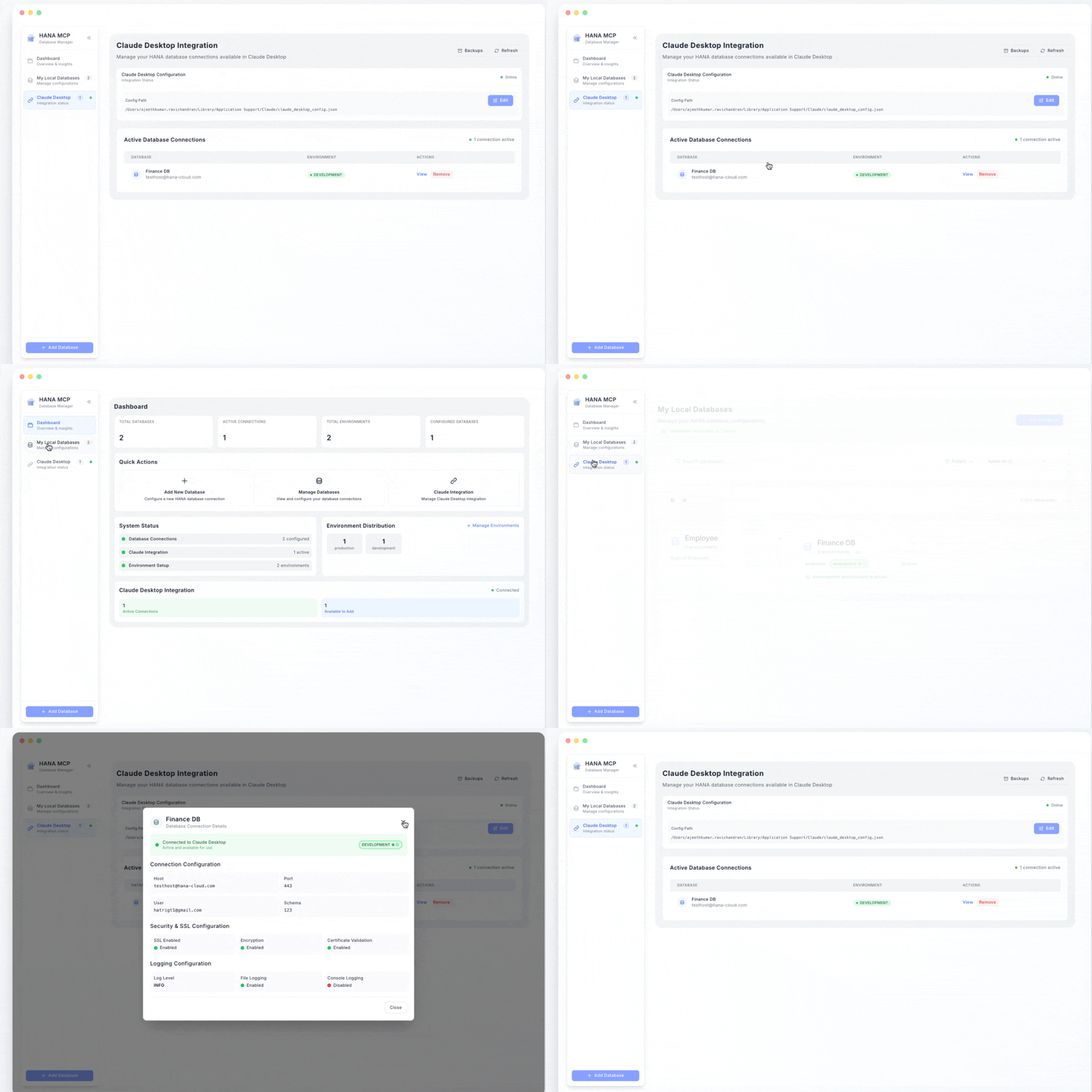
Optional: HANA MCP UI — npx hana-mcp-ui for editing envs and deploying to Claude Desktop.
stdio only; same env keys as above. Canonical example — Claude Code (~/.claude.json or project .mcp.json). The env block below includes HANA_DATABASE_NAME for MDC tenant HANA; omit it for most single-container setups.
{
  "mcpServers": {
    "hana": {
      "type": "stdio",
      "timeout": 600,
      "command": "npx",
      "args": ["-y", "hana-mcp-server"],
      "env": {
        "HANA_HOST": "<host>",
        "HANA_PORT": "31013",
        "HANA_USER": "<user>",
        "HANA_PASSWORD": "<password>",
        "HANA_SCHEMA": "SAPABAP1",
        "HANA_DATABASE_NAME": "HQQ",
        "HANA_SSL": "false",
        "HANA_ENCRYPT": "false",
        "HANA_VALIDATE_CERT": "false",
        "LOG_LEVEL": "info",
        "ENABLE_FILE_LOGGING": "true",
        "ENABLE_CONSOLE_LOGGING": "false"
      }
    }
  }
}
Use the same command, args, and env in VS Code, Cline, Cursor, and Windsurf. After any change to env, restart the MCP server connection in the IDE.
Run the HTTP transport from a checkout of this repository (after npm install). The published npx hana-mcp-server path is stdio only.
npm run start:http
Cursor / local IDE over HTTP: set HANA_* in the shell (or process manager) that runs start:http, then add an HTTP MCP entry with url http://127.0.0.1:3100/mcp ("type": "fetch" or "type": "http", depending on Cursor version). See docs/local-http-mcp.md and ./scripts/start-http-mcp.sh.
| Topic | Detail |
|---|---|
| Endpoint | POST JSON-RPC to /mcp (default base http://127.0.0.1:3100) |
| Tuning | MCP_HTTP_HOST, MCP_HTTP_PORT |
| Health | GET /health → 200 |
| CORS | MCP_HTTP_ALLOWED_ORIGINS — ENVIRONMENT.md §7 |
| Variable | Role |
|---|---|
MCP_HTTP_AUTH_ENABLED | true → require Authorization: Bearer <token> on POST /mcp |
MCP_HTTP_JWT_ISSUER | Issuer / JWKS (omit on SAP BTP with bound XSUAA) |
MCP_HTTP_JWT_AUDIENCE | Optional expected aud |
MCP_HTTP_JWT_SCOPES_REQUIRED | Optional scope list |
SAP BTP: bind XSUAA, MCP_HTTP_AUTH_ENABLED=true, assign role collections. Details: ENVIRONMENT.md §7.
HANA_PASSWORD, JWT material, and URLs with embedded credentials belong in env or a secret manager — not in git.npx -y from the published package in CI and shared desktops instead of a mutable global install.Further notes: ENVIRONMENT.md §9.
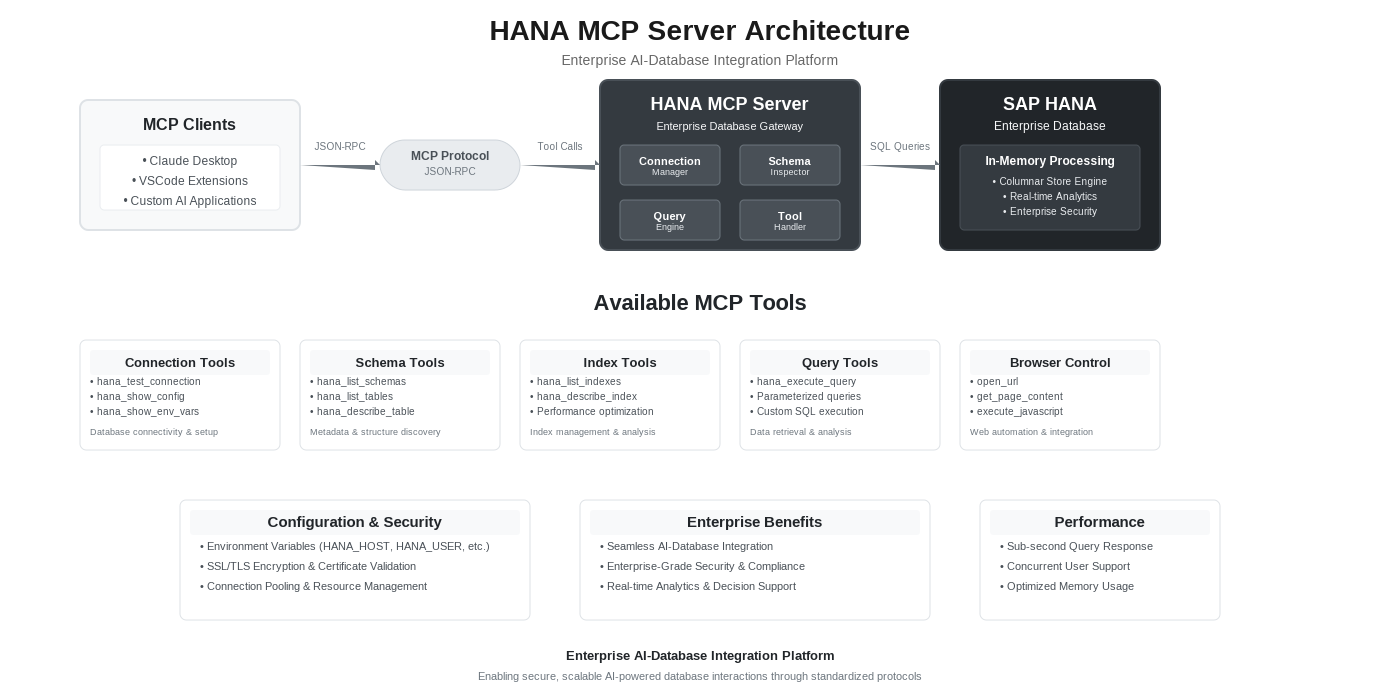
34 tools across six areas, all verified on HANA Cloud.
| Area | Tools | What you get |
|---|---|---|
| Connection & config | hana_show_config hana_test_connection hana_show_env_vars hana_get_session_info | Verify connectivity, inspect configuration, see current user / schema / database / version |
| Schema browsing | hana_list_schemas hana_list_tables hana_describe_table hana_explain_table hana_search_tables hana_search_columns | Paginated schema/table lists, column metadata, cross-schema search, optional business-meaning overlay |
| SQL execution | hana_execute_query hana_query_next_page | Parameterized SQL with optional row/column/cell caps, paging (maxRows/offset/includeTotal), and snapshot continuation |
| Structural analysis | hana_list_constraints hana_list_foreign_keys hana_list_indexes hana_describe_index hana_list_views hana_describe_view hana_list_synonyms hana_list_privileges hana_get_ddl | PK/UK/FK/check constraints, indexes, views with SQL definition, synonyms, effective privileges, CREATE statement DDL |
| Code objects | hana_list_procedures hana_describe_procedure hana_list_functions hana_describe_function hana_list_calculation_views hana_list_sequences | Stored procedures, scalar/table functions, SAP BW/S4 calculation views (_SYS_BIC), sequences |
| Data & performance | hana_get_table_stats hana_get_sample_data hana_get_column_stats hana_explain_plan hana_get_dependencies hana_get_partition_info hana_get_expensive_queries | Row counts, sample rows, distinct/null stats, query execution plan, object dependency graph, partition info, top expensive statements |
| DML guard | — | INSERT / UPDATE / DELETE / TRUNCATE blocked by default; opt-in individually via HANA_ALLOW_INSERT / HANA_ALLOW_UPDATE / HANA_ALLOW_DELETE |
| Resources | hana:///schemas hana:///schemas/{s}/tables/{t} | MCP resource URIs for schema and table enumeration; truncated flag on large payloads |
| Domain knowledge | via hana_explain_table | Optional JSON semantics overlay (table descriptions, column meanings, code-value maps) — configuration-samples.md |
Variables apply to stdio (env in the client config) and HTTP (process environment). Restart after changes.
Source of truth for names, defaults, and clamp ranges: docs/ENVIRONMENT.md.
Copy-paste connection JSON (single-container / MDC): docs/configuration-samples.md#connection-profiles-env-json.
| Parameter | Description | Example |
|---|---|---|
HANA_HOST | Hostname or IP | hana.company.com |
HANA_USER | Database user | DBADMIN |
HANA_PASSWORD | Database password | (secret) |
| Parameter | Default | Notes |
|---|---|---|
HANA_PORT | 443 | MDC SQL ports often 3NN13 (e.g. 31013) |
HANA_SCHEMA | — | Default when a tool omits schema_name |
HANA_CONNECTION_TYPE | auto | auto, single_container, mdc_system, mdc_tenant |
HANA_INSTANCE_NUMBER | — | MDC instance id (e.g. 10) |
HANA_DATABASE_NAME | — | Tenant name for MDC (e.g. HQQ, HQP) — session database only |
HANA_SSL / HANA_ENCRYPT / HANA_VALIDATE_CERT | true | TLS and cert validation flags for the driver |
| Parameter | Default | Notes |
|---|---|---|
LOG_LEVEL | info | error … debug |
ENABLE_FILE_LOGGING | false* | true enables file logs |
ENABLE_CONSOLE_LOGGING | true | Often false for stdio to reduce stderr noise |
*Code default; examples frequently set file logging to true.
| Parameter | Default | Purpose |
|---|---|---|
HANA_QUERY_LIMITS_ENABLED | false | Set to true to enable automatic row/column/cell caps. When false, user-provided maxRows, offset, and includeTotal still work. |
HANA_QUERY_TIMEOUT_MS | 0 | Statement timeout (ms); 0 = disabled. Per-call timeout_ms overrides. |
HANA_MAX_RESULT_ROWS | 50 | Max rows per hana_execute_query page (active when limits enabled) |
HANA_MAX_RESULT_COLS | 50 | Max columns per row returned (active when limits enabled) |
HANA_MAX_CELL_CHARS | 200 | Truncate long cell text (active when limits enabled) |
HANA_QUERY_DEFAULT_OFFSET | 0 | Default offset (active when limits enabled) |
HANA_LIST_DEFAULT_LIMIT | 200 | List tools: default and max page size |
HANA_RESOURCE_LIST_MAX_ITEMS | 500 | Cap embedded names in hana:/// payloads |
HANA_QUERY_SNAPSHOT_TTL_MS | 300000 | Snapshot id lifetime for query paging |
HANA_CONNECTION_POOL_SIZE | 3 | HANA connection pool size (1–20) |
INSERT, UPDATE, and DELETE are blocked by default. Set each to true to permit:
| Parameter | Default | Purpose |
|---|---|---|
HANA_ALLOW_INSERT | false | Permit INSERT via hana_execute_query |
HANA_ALLOW_UPDATE | false | Permit UPDATE via hana_execute_query |
HANA_ALLOW_DELETE | false | Permit DELETE and TRUNCATE via hana_execute_query |
HANA_SEMANTICS_*)| Parameter | Default | Purpose |
|---|---|---|
HANA_SEMANTICS_PATH | — | File path to dictionary JSON (wins over URL) |
HANA_SEMANTICS_URL | — | HTTPS URL to same format |
HANA_SEMANTICS_TTL_MS | 60000 | Cache / reload behavior |
Samples: configuration-samples.md.
| Symptom | Check |
|---|---|
spawn npx ENOENT / spawn hana-mcp-server ENOENT in client logs | Client cannot find npx / hana-mcp-server on PATH — see Client cannot find npx below |
| Connection refused | HANA_HOST, HANA_PORT, network path |
| Auth failed / no client | Password, user, HANA_DATABASE_NAME on tenants; use connection test tool for driver message |
| TLS errors | HANA_VALIDATE_CERT, trust store |
| Wrong or empty objects | MDC: tenant drives visibility; identical schema names can differ by tenant |
| SQL needs another database prefix | hana_execute_query does not rewrite SQL; use the three-part names your HANA expects (e.g. HSP.SAPABAP1.TABLE) while HANA_DATABASE_NAME stays the tenant you connect to (e.g. HQP) |
Debug: LOG_LEVEL=debug, ENABLE_CONSOLE_LOGGING=true, restart.
npx (spawn ENOENT)GUI clients launched from the Dock or Start Menu (Claude Desktop, Cursor, VS Code, …) inherit a minimal PATH and may not see Node tooling installed under /opt/homebrew/bin, ~/.nvm/..., mise, or volta. This affects every npx-based MCP, not just this server. The error appears in MCP client logs as:
Connection failed: spawn npx ENOENT
Pick one fix:
Symlink npx / node into a GUI-visible path (macOS, Homebrew):
ln -s "$(which npx)"  /usr/local/bin/npx
ln -s "$(which node)" /usr/local/bin/node
Use absolute paths in the MCP config — most portable, no PATH dependency. Resolve paths with which node and npm root -g:
{
  "mcpServers": {
    "hana": {
      "type": "stdio",
      "command": "/opt/homebrew/bin/node",
      "args": ["/opt/homebrew/lib/node_modules/hana-mcp-server/hana-mcp-server.js"],
      "env": { "HANA_HOST": "...", "HANA_USER": "...", "HANA_PASSWORD": "..." }
    }
  }
}
Requires a one-time npm install -g hana-mcp-server.
Inject PATH into the MCP env block — keeps the npx form:
"env": {
  "PATH": "/opt/homebrew/bin:/usr/local/bin:/usr/bin:/bin",
  "HANA_HOST": "...",
  "HANA_USER": "...",
  "HANA_PASSWORD": "..."
}
Restart the MCP client after the change. If npx then fails with EPERM on ~/.npm/_cacache, the npm cache has root-owned files from a previous sudo npm — fix with sudo chown -R "$(whoami)" ~/.npm or set "NPM_CONFIG_CACHE": "/tmp/hana-mcp-npm-cache" in the same env block.
npx hana-mcp-ui
hana-mcp-server/
├── src/
│   ├── server/           # MCP lifecycle, resources, HTTP transport
│   ├── tools/            # 34 tools: schema, SQL, discovery, config
│   ├── database/         # HANA client, connection pool, executor, query runner
│   ├── semantics/        # Optional semantics / domain JSON loader
│   ├── utils/            # Logger, config, validators, formatters
│   ├── query-snapshot-store.js
│   └── constants/        # MCP constants, tool definitions
├── tests/
├── docs/                 # README index, ENVIRONMENT.md, configuration-samples.md, diagrams
└── hana-mcp-server.js    # stdio entry point
| Runtime | Node.js 18+ |
| Platforms | macOS, Linux, Windows |
| Dependencies | @sap/hana-client, axios, jose |
MIT — see LICENSE.
Claim this server with your GitHub account to request manual ownership verification.
Link to the catalog listing for SAP HANA MCP Server from your README. This badge does not certify ownership, compatibility or security.
[](https://awesome-mcp.com/servers/hana-mcp-server)Public repository statistics could not be verified. Check the configured source address; unavailable counts are not zero.
Separate sources, scopes and periods. Never combined or treated as installations, active users or security reviews.
No reviewed package or image identity; download statistics are not listed yet.
Alternative and complementary servers in the same category
This is a Model Context Protocol (MCP) server for interacting with AIStor object stores.

A Model Context Protocol server that lets AI assistants run SQL queries against AWS Athena databases and retrieve results.

A Model Context Protocol (MCP) server that exposes access to an InfluxDB v2 instance using the InfluxDB OSS API v2.