A TypeScript MCP server for SSH-based Linux diagnostics with SQLite history and incident workflows

A TypeScript MCP server for SSH-based Linux diagnostics with SQLite history and incident workflows

infra-lens-mcp•byoaslananka

infra-lens-mcp connects to Linux hosts over SSH, captures bounded live metrics, stores observations and approved baselines in local SQLite, explains anomalies, and produces review-first incident artifacts.

License: MIT•Runtime: Awaiting documentation review•Category: cloud devops

WHAT IT DOES

  • •Connects to Linux hosts over SSH and collects bounded live metrics along with a baseline and stored history.
  • •Provides tools to analyze servers, record and compare baselines, retrieve history, inspect host capabilities, plan remediation, and draft incident reports.
  • •Returns both readable JSON text and MCP structuredContent validated by outputSchema definitions.

BEST FOR

  • •Explaining Linux incidents using baseline-aware, review-first diagnostics over SSH.
  • •Drafting incident reports and postmortems from persisted observations.
  • •Checking a host's prerequisites before collecting diagnostics.

ABOUT INFRA-LENS-MCP

A TypeScript MCP server for SSH-based Linux diagnostics with SQLite history and incident workflows is cataloged as an MCP server attributed to oaslananka. infra-lens-mcp connects to Linux hosts over SSH, captures bounded live metrics, stores observations and approved baselines in local SQLite, explains anomalies, and produces review-first incident artifacts. It is categorized under cloud devops. See the capability inspector for recorded interfaces and their independent review status; consult upstream documentation for the current interface.

HOW TO INSTALL

Installation configuration is not reviewed. No executable setup is offered for this entry; inspect the source repository before proceeding.

LICENSE

Catalog license label: MIT. Check the source repository's current license and terms before using, modifying or distributing this software.

Capability inspector

Capability definitions are not reviewed. Unreviewed imports are not exposed as trusted interfaces.

Tools (0)

No reviewed records to display. This does not establish that upstream lacks this capability.

Resources (0)

No reviewed records to display. This does not establish that upstream lacks this capability.

Prompts (0)

No reviewed records to display. This does not establish that upstream lacks this capability.

NEWSLETTER - COMING LATER

Newsletter subscriptions are not open yet

Email delivery is not connected. This page does not collect email addresses or create subscriptions.

Browse the registry for current listings instead.

Community Reviews

Coming later

Reviews for A TypeScript MCP server for SSH-based Linux diagnostics with SQLite history and incident workflows are not available yet

Review publishing and storage are not connected. This page does not collect or publish ratings or comments, including after sign-in.

FREQUENTLY ASKED QUESTIONS

Does infra-lens-mcp execute remediation changes on the host?

No; its plan_remediation tool proposes evidence-backed, approval-required remediation without executing changes.

What transports can the server run over?

It supports stdio and Streamable HTTP, selected by the executable entry point rather than an environment variable.

Upstream README

View this exact version on GitHub

README.md · 1e0d876ed3e4 · Fetched 2026-11-13 11:02:39 UTC

Original upstream text, without AI rewriting. Scripts, forms and unsafe links are filtered for safety.

Showing the last retrieved documentation snapshot; check the source for current changes.

infra-lens-mcp

Explain Linux incidents over SSH with baseline-aware MCP tooling.

A TypeScript MCP server for live Linux diagnostics, local SQLite history,
review-first incident workflows, and secure observability exports.

CI status CodeQL status Security Gates status OSV-Scanner status Codecov coverage OpenSSF Scorecard

npm version npm downloads Node.js 22 or newer MCP 2025-11-25 Signed multi-architecture GHCR image MIT license

Documentation · Usage · Architecture · Security · Governance · Roadmap · Support · Releases

Buy me a coffee

infra-lens-mcp connects to Linux hosts over SSH, captures bounded live metrics, stores observations and approved baselines in local SQLite, explains anomalies, and produces review-first incident artifacts. The npm package and signed container are release-ready; public connector publication remains intentionally blocked until an external OAuth/HTTPS deployment is verified.

Demo
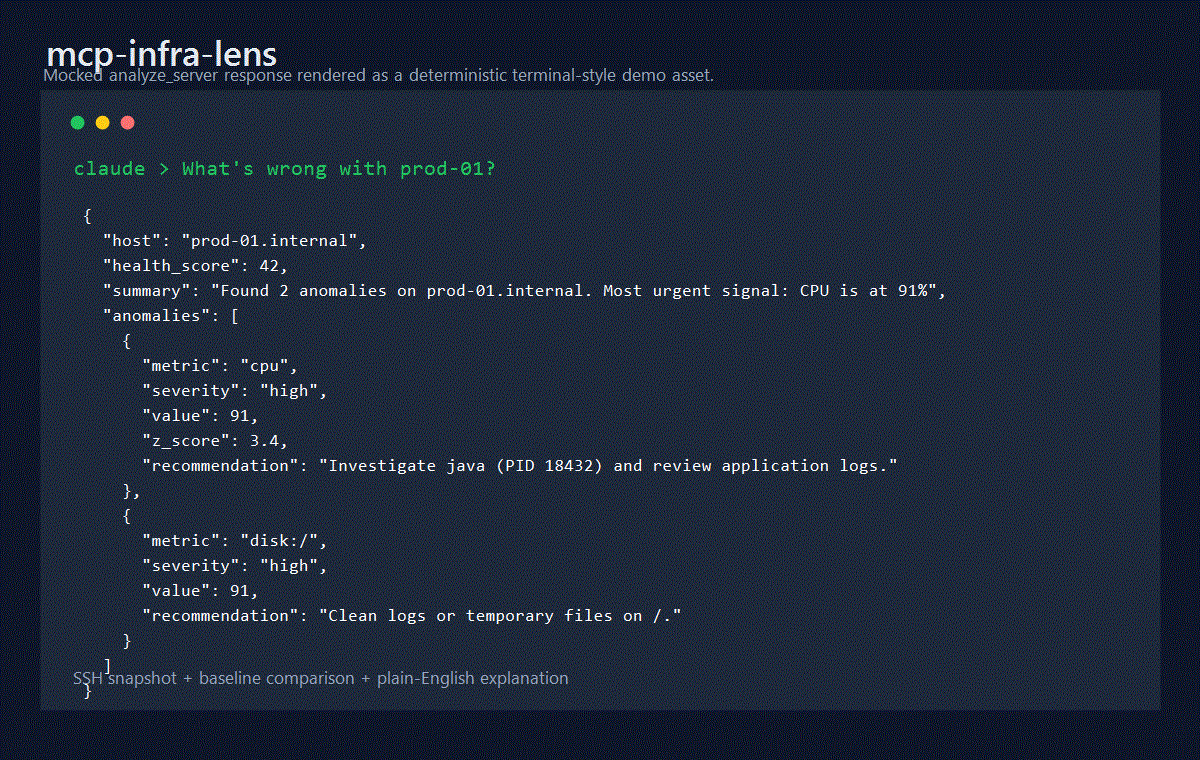
infra-lens-mcp demo

See the MCP 2025-11-25 compliance matrix for current protocol support, delegated behavior, and connector publication constraints.

Tools

ToolPurpose
analyze_serverAnalyze a bounded sampled window with progress/cancellation support, then store only the completed observation
analyze_server_snapshotAnalyze and store one immediate snapshot without a sampling delay
snapshotStore a point-in-time observation without anomaly analysis
record_baselineSave a labeled healthy-state sample
compare_to_baselineCompare current state with a named baseline
get_historyReturn CPU, memory, or load history from SQLite
inspect_host_capabilitiesCheck required Linux commands and proc files before collection
plan_remediationPropose evidence-backed, approval-required remediation without executing changes
draft_incident_reportDraft an incident report and postmortem from persisted observations
compare_incident_windowsCompare adjacent windows for one host or the same window across two hosts

All tools return both readable JSON text and MCP structuredContent validated by declared outputSchema definitions, so clients and agents can consume responses without parsing the text block. Collection tools include a warnings array when optional sections cannot be collected but a partial snapshot is still usable. Use analyze_server_snapshot for interactive checks; use analyze_server only when a sampled window is required. Sampled analysis emits MCP progress when the client supplies a progress token and never persists a cancelled partial run.

Requirements

  • Node.js 24 LTS for CI, Docker, and release workflows
  • Node.js 22 or newer for package runtime compatibility
  • pnpm 11.15.1 through Corepack for development installs
  • Linux SSH targets with /proc, free, df, ps, and uname
  • Strict SSH host verification through known_hosts or pinned SHA256 host keys

Quick Start

Run the stdio MCP server from npm:

npx -y infra-lens-mcp

Desktop MCP client style configuration:

{
  "mcpServers": {
    "infra-lens": {
      "command": "npx",
      "args": ["-y", "infra-lens-mcp"],
      "env": {
        "INFRA_LENS_DB": "/Users/you/.infra-lens-mcp/metrics.db"
      }
    }
  }
}

Local development:

corepack enable
corepack prepare pnpm@11.15.1 --activate
pnpm install --frozen-lockfile
pnpm run build
node dist/mcp.js

Configuration

Transport is selected by the executable entry point, not by an environment variable: npx -y infra-lens-mcp or node dist/mcp.js starts stdio, while node dist/server-http.js starts Streamable HTTP.

VariableDefaultDescription
INFRA_LENS_DB~/.infra-lens-mcp/metrics.dbSQLite database path
INFRA_LENS_RETENTION_DAYS30Snapshot retention in days; 0 disables automatic pruning
MCP_HTTP_HOST127.0.0.1HTTP bind host. HOST remains a deprecated alias
MCP_HTTP_PORT3000HTTP bind port. PORT remains a deprecated alias
MCP_HTTP_ENDPOINT_PATH/mcpCanonical Streamable HTTP MCP endpoint path
MCP_HTTP_ALLOWED_ORIGINSunsetComma-separated allowed Origin values
MCP_HTTP_ALLOWED_HOSTSunsetComma-separated allowed Host values
MCP_HTTP_AUTH_MODEnonenone, bearer, or oauth-gateway; oauth is accepted as a compatibility alias
MCP_HTTP_BEARER_TOKENunsetLocal/dev bearer fallback token
MCP_HTTP_OAUTH_GATEWAY_HEADERx-infra-lens-gateway-authHeader injected by a trusted OAuth gateway
MCP_HTTP_OAUTH_GATEWAY_SECRETunsetShared backend secret required for oauth-gateway mode
MCP_HTTP_BODY_LIMIT_BYTES1048576Maximum JSON request body size
MCP_HTTP_REQUEST_TIMEOUT_MS30000Maximum time to receive and handle an HTTP request before the socket is closed
MCP_HTTP_MAX_CONCURRENT_REQUESTS100Maximum concurrent HTTP requests accepted by the Node process
MCP_HTTP_RATE_LIMIT_PER_MINUTE0Optional per-client in-memory rate limit; 0 disables it
MCP_HTTP_AUTHORIZATION_SERVERSunsetOAuth authorization server metadata URLs
MCP_PROFILEfullfull, remote-safe, chatgpt, or claude
MCP_SSH_STRICT_HOST_CHECKINGtrueStrict host key verification toggle
MCP_SSH_KNOWN_HOSTS~/.ssh/known_hostsKnown hosts file
MCP_SSH_ALLOWED_HOSTSunsetExact host/IP or IPv4 CIDR allowlist; required for remote-safe profiles and enforced in full profile when set
MCP_SSH_ALLOWED_USERSunsetOptional comma-separated SSH username allowlist
MCP_SSH_ALLOWED_PORTSunsetOptional comma-separated SSH port allowlist
MCP_SSH_MAX_SESSIONS_PER_HOST0Optional active SSH session cap per host:port; 0 disables it
MCP_SSH_MAX_CONNECTION_ATTEMPTS_PER_MINUTE0Optional SSH connection-attempt cap per host:port per minute; 0 disables it

MCP_DB_PATH from older examples is not used; use INFRA_LENS_DB.

SSH Security

Strict host key checking is enabled by default. Provide either:

  • a hostKeySha256 value in the connection input, such as SHA256:...
  • a knownHostsPath in the connection input
  • MCP_SSH_KNOWN_HOSTS pointing at an OpenSSH known_hosts file

Raw passwords, private keys, and passphrases are accepted only in the default full profile for trusted local MCP contexts. remote-safe, chatgpt, and claude profiles reject raw SSH credentials in tool input and require MCP_SSH_ALLOWED_HOSTS. Production SSH policy can also restrict exact hosts or IPv4 CIDR ranges, users, ports, per-host active sessions, and per-host connection attempts.

Process command arguments are not collected by the default process command. Secret-like values in process data, SSH errors, and logs are redacted before storage or output.

HTTP Transport

Run the Streamable HTTP transport locally. The canonical MCP endpoint is http://127.0.0.1:3000/mcp unless MCP_HTTP_ENDPOINT_PATH is changed. HTTP mode is stateless today: the server does not issue or accept MCP-Session-Id, and only POST JSON-RPC calls are supported on the MCP endpoint. MCP_HTTP_REQUEST_TIMEOUT_MS and any proxy timeout must exceed the requested sampled window; otherwise use analyze_server_snapshot. stdio has no server-owned wall-clock request timeout, so the client controls its timeout and MCP cancellation.

MCP_HTTP_HOST=127.0.0.1 MCP_HTTP_PORT=3000 node dist/server-http.js

Loopback HTTP can run without auth for local development. Any non-loopback bind, such as 0.0.0.0, fails fast unless all of these are configured:

  • MCP_PROFILE=remote-safe, chatgpt, or claude
  • MCP_HTTP_AUTH_MODE=bearer or oauth-gateway
  • MCP_HTTP_ALLOWED_ORIGINS
  • MCP_HTTP_ALLOWED_HOSTS

Native OAuth/JWT validation is not implemented inside this package. Public deployments should use MCP_HTTP_AUTH_MODE=oauth-gateway behind a production OAuth-aware gateway or reverse proxy, configure HTTPS MCP_HTTP_RESOURCE_URL, and block direct access to the Node process. Keep origin/host allowlists, body limits, request timeout, concurrency limit, and optional rate limit enabled at the Node process even when an upstream proxy also enforces them. See ADR 0006. Connector publication readiness remains false until a full connector deployment is verified.

Docker

The Docker image defaults to stdio mode:

docker build -t infra-lens-mcp .
docker volume create infra-lens-data
docker run --rm -i \
  --read-only \
  --cap-drop=ALL \
  --security-opt=no-new-privileges:true \
  --tmpfs /tmp:rw,noexec,nosuid,nodev,size=64m \
  --mount type=volume,src=infra-lens-data,dst=/home/appuser/.infra-lens-mcp \
  infra-lens-mcp

For local HTTP testing, override the command and keep the bind host on loopback unless a remote-safe profile and auth controls are configured:

docker run --rm -p 127.0.0.1:3000:3000 \
  --read-only \
  --cap-drop=ALL \
  --security-opt=no-new-privileges:true \
  --tmpfs /tmp:rw,noexec,nosuid,nodev,size=64m \
  --mount type=volume,src=infra-lens-data,dst=/home/appuser/.infra-lens-mcp \
  -e MCP_HTTP_HOST=0.0.0.0 \
  -e MCP_HTTP_ALLOWED_ORIGINS=http://localhost:3000 \
  -e MCP_HTTP_ALLOWED_HOSTS=localhost:3000 \
  -e MCP_HTTP_AUTH_MODE=bearer \
  -e MCP_HTTP_BEARER_TOKEN=local-dev-token \
  infra-lens-mcp node dist/server-http.js

Observability exports

Observability is a separate, disabled-by-default process that reads the latest persisted observations without initiating SSH collection:

INFRA_LENS_OBSERVABILITY_ENABLED=true infra-lens-observe

The default OpenMetrics endpoint is http://127.0.0.1:9464/metrics. Optional OTLP/HTTP JSON export uses standard OTEL_EXPORTER_OTLP_* variables. See Observability exports for Prometheus, OpenTelemetry, privacy, and remote-access guidance.

Development

pnpm run format:check
pnpm run lint
pnpm test
pnpm run test:coverage
pnpm run build
pnpm run check:metadata
pnpm run package:dry-run

Docker-backed SSH e2e validation uses a self-contained fixture lifecycle:

pnpm run test:e2e

If a fixture is already running and you intentionally want to skip lifecycle management, use:

INFRA_LENS_E2E_SKIP_FIXTURE=1 pnpm run test:e2e:raw

Start with the documentation index for usage, client setup, operations, incident workflows, observability, storage, security, governance, testing, and release guidance. Generated API docs live in docs/api, and reviewed incident examples live in examples/incidents.

Community

Use SUPPORT.md for support channels and response expectations. Active work is tracked in the infra-lens-mcp Governance project. Project conduct is defined in CODE_OF_CONDUCT.md, and maintainer triage policy lives in docs/governance.md.

Release

Releases are managed through release-please manifest mode and the guarded GitHub Actions release workflow. Implementation PRs must not publish packages, containers, MCP Registry entries, marketplace artifacts, or production GitHub Releases.

See docs/release.md and docs/release-state-machine.md.

License

MIT

Agent plugin and runtime configuration

This repository owns the product-level agent plugin, MCP runtime configuration, and product-specific skills for infra-lens-mcp. The central agent-tools repository should catalog this plugin, but the manifest and workflow instructions live here so they stay synchronized with the actual MCP server package.

FilePurpose
.claude-plugin/plugin.jsonClaude Code-valid product plugin manifest.
.mcp.jsonClaude Code project-local MCP server configuration.
.codex/config.example.tomlCodex CLI MCP configuration example.
.vscode/mcp.example.jsonVS Code / GitHub Copilot workspace MCP configuration example.
opencode.example.jsoncOpenCode project MCP configuration example.
.opencode/skills/OpenCode-native mirrored skill definitions.
docs/agent-runtime-config.mdAgent runtime setup and validation notes.

Validate plugin packaging locally:

claude plugin validate .

For review-first remediation plans, incident drafts, and host/time-window comparisons, see Incident workflows.

Install configuration

Are you the maintainer?

Claim this server with your GitHub account to request manual ownership verification.

README Embed Badge
Markdown

Link to the catalog listing for A TypeScript MCP server for SSH-based Linux diagnostics with SQLite history and incident workflows from your README. This badge does not certify ownership, compatibility or security.

[![MCP catalog listing](https://img.shields.io/badge/MCP-awesome--mcp-orange?style=flat-square)](https://awesome-mcp.com/servers/infra-lens-mcp)

REPOSITORY STATS

GitHub StarsUnavailable
ForksUnavailable

Public repository statistics could not be verified. Check the configured source address; unavailable counts are not zero.

Downloads and pulls

Separate sources, scopes and periods. Never combined or treated as installations, active users or security reviews.

No reviewed package or image identity; download statistics are not listed yet.

Related cloud devops MCP Servers

Alternative and complementary servers in the same category

View all in cloud devops →
Huawei MCP Server
mcp-server-huaweiclouddeveloper•huaweiclouddeveloper

A Model Context Protocol server built on Huawei Cloud services that enables AI assistants to operate Huawei Cloud resources within conversational workflows, supporting ECS, OBS, GaussDB, and other cloud products.

Repository stats unavailable
Cloud & DevOps
Coolify MCP Server
coolify-mcp-server•wrediam

An MCP server that exposes the Coolify v4.3.1 REST API so AI clients can manage applications, databases, services, servers, deployments, and more.

Repository stats unavailable
Cloud & DevOps

A deprecated Model Context Protocol server for interacting with Kong Konnect APIs, enabling AI assistants to query and analyze Kong Gateway configurations, traffic, and analytics.

Repository stats unavailable
Cloud & DevOps


