
A directory listing describing a cancellation-letter and mailing-address service. The configured public GitHub repository returned 404 during source verification.
Repository stats unavailable
Developer Tools
An MCP server and Isaac Sim extension that enable natural language control of NVIDIA Isaac Sim, turning conversational AI inputs into simulation manipulation.
Isaac Sim MCP Extension and MCP Server is cataloged as an MCP server attributed to omni-mcp. An MCP server and Isaac Sim extension that enable natural language control of NVIDIA Isaac Sim, turning conversational AI inputs into simulation manipulation. It is categorized under developer tools. See the capability inspector for recorded interfaces and their independent review status; consult upstream documentation for the current interface.
Installation configuration is not reviewed. No executable setup is offered for this entry; inspect the source repository before proceeding.
Catalog license label: MIT License. Check the source repository's current license and terms before using, modifying or distributing this software.
Capability definitions are not reviewed. Unreviewed imports are not exposed as trusted interfaces.
No reviewed records to display. This does not establish that upstream lacks this capability.
No reviewed records to display. This does not establish that upstream lacks this capability.
No reviewed records to display. This does not establish that upstream lacks this capability.
Email delivery is not connected. This page does not collect email addresses or create subscriptions.
Browse the registry for current listings instead.
Reviews for Isaac Sim MCP Extension and MCP Server are not available yet
Review publishing and storage are not connected. This page does not collect or publish ratings or comments, including after sign-in.
Use the get_scene_info tool, which pings the Isaac Sim Extension Server to verify connection status and retrieve basic scene information.
The create_robot tool supports franka, jetbot, carter, g1, and go1 robot types.
README.md · 949c4886be6e · Fetched 2026-11-13 09:33:35 UTC
Original upstream text, without AI rewriting. Scripts, forms and unsafe links are filtered for safety.
Showing the last retrieved documentation snapshot; check the source for current changes.
The MCP Server and its extension leverage the Model Context Protocol (MCP) framework to enable natural language control of NVIDIA Isaac Sim, transforming conversational AI inputs into precise simulation manipulation. This expansion bridges the MCP ecosystem with embodied intelligence applications.
cd ~/Documents
git clone https://github.com/omni-mcp/isaac-sim-mcp
Isaac Sim extension folder should point to your project folder:
~/Documents/isaac-sim-mcpisaac.sim.mcp_extension# Enable extension in Isaac Simulation
# cd to your Isaac Sim installation directory
# You can change assets root to local with --/persistent/isaac/asset_root/default="<your asset location>"
# By default it is an AWS bucket, e.g. --/persistent/isaac/asset_root/default="/share/Assets/Isaac/4.2"
# Setup API KEY for Beaver3d and NVIDIA
export BEAVER3D_MODEL=<your beaver3d model name>
export export ARK_API_KEY=<Your Bearver3D API Key>
export NVIDIA_API_KEY="<your nvidia api key and apply it from https://ngc.nvidia.com/signout>"
cd ~/.local/share/ov/pkg/isaac-sim-4.2.0
./isaac-sim.sh --ext-folder /home/ubuntu/Documents/isaac-sim-mcp/ --enable isaac.sim.mcp_extension
Verify the extension starts successfully. The output should look like:
[7.160s] [ext: isaac.sim.mcp_extension-0.1.0] startup
trigger  on_startup for:  isaac.sim.mcp_extension-0.1.0
settings:  {'envPath': '/home/ubuntu/.local/share/ov/data/Kit/Isaac-Sim/4.2/pip3-envs/default', 'archiveDirs': {}, 'installCheckIgnoreVersion': False, 'allowOnlineIndex': True, 'tryUpgradePipOnFirstUse': False}
Server thread startedIsaac Sim MCP server started on localhost:8766
The extension should be listening at localhost:8766 by default.
uv pip install "mcp[cli]"
uv run /home/ubuntu/Documents/isaac-sim-mcp/isaac_mcp/server.py
~/Documents/isaac-sim-mcp{
"mcpServers": {
"isaac-sim": {
"command": "uv run /home/ubuntu/Documents/isaac-sim-mcp/isaac_mcp/server.py"
}
}
}
To develop the MCP Server, start the MCP inspector:
uv run mcp dev ~/Documents/isaac-sim-mcp/isaac_mcp/server.py
You can visit the debug page through http://localhost:5173
Notice: Switch to Agent mode in top left of Chat dialog before you type prompt and choose sonnet 3.7 for better coding.
# Create robots and improve lighting
create  3x3 frankas robots in these current stage across location [3, 0, 0] and [6, 3, 0]
always check connection with get_scene_info before execute code.
add more light in the stage


# Add specific robots at positions
create a g1 robot at [3, 9, 0]
add Go1 robot at location [2, 1, 0]
move go1 robot to [1, 1, 0]
# Create multiple robots in a row
acreate  3x3 frankas robots in these current stage across location [3, 0, 0] and [6, 3, 0]
always check connection with get_scene_info before execute code.
add more light in the stage
reference to g1.py to create an new g1 robot simulation and allow robot g1 walk straight  from [0, 0, 0] to [3, 0, 0] and [3, 3, 0]
create more obstacles in the stage
Use following images to generate beaver 3d objects and place them into a grid area across [0, 0, 0] to [40, 40, 0] with scale [3, 3, 3]

<your image url here, could be multiple images urls>
search a rusty desk and place it at [0, 5, 0] with scale [3, 3, 3]
The Isaac Sim MCP Extension provides several specialized tools that can be accessed through natural language in Cursor AI. These tools enable you to control and manipulate NVIDIA Isaac Sim with simple commands:
objects: List of objects to create (each with type and position)floor: Whether to create a ground plane (default: true)gravity: Vector defining gravity direction and magnitude (default: [0, -0.981, 0])scene_name: Name for the scene (default: "physics_scene")robot_type: Type of robot to create (options: "franka", "jetbot", "carter", "g1", "go1")position: [x, y, z] position coordinatesomni_kit_command - Executes an Omni Kit command:
command: The Omni Kit command to execute (e.g., "CreatePrim")prim_type: The primitive type for the command (e.g., "Sphere")execute_script - Executes arbitrary Python code in Isaac Sim:
code: Python code to executeget_scene_info before executing any commandscreate_physics_scene before adding robotscreate_robot for standard robot placement before trying custom scriptsexecute_script with proper async patternsContributions are welcome! Please feel free to submit a Pull Request.
This project is licensed under the MIT License - see the LICENSE file for details.
Below are demonstrations of the Isaac Sim MCP Extension in action:
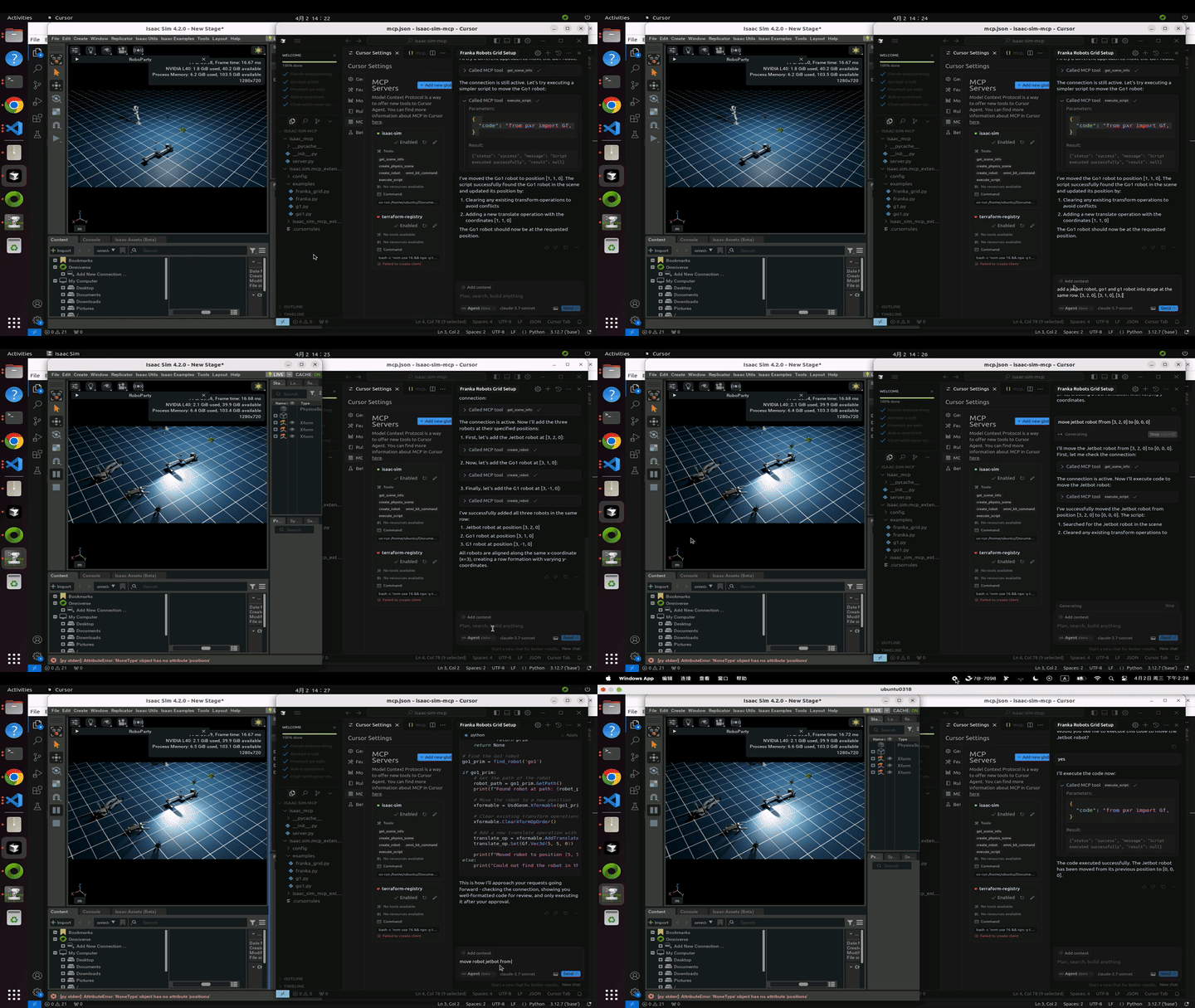
GIF: Adding more robots to the simulation using natural language commands
For higher quality video, you can access the MP4 version directly:
When viewing on GitHub, you can click the link above to view or download the MP4 file.
Claim this server with your GitHub account to request manual ownership verification.
Link to the catalog listing for Isaac Sim MCP Extension and MCP Server from your README. This badge does not certify ownership, compatibility or security.
[](https://awesome-mcp.com/servers/isaac-sim-mcp)Public repository statistics could not be verified. Check the configured source address; unavailable counts are not zero.
Separate sources, scopes and periods. Never combined or treated as installations, active users or security reviews.
No reviewed package or image identity; download statistics are not listed yet.
Alternative and complementary servers in the same category
A directory listing describing a cancellation-letter and mailing-address service. The configured public GitHub repository returned 404 during source verification.

A hosted MCP service for browsing and searching through Singapore mobile-network proxies.

A directory listing describing a Markdown-to-PDF service. The configured public GitHub repository returned 404 during source verification.