
This is a Model Context Protocol (MCP) server for interacting with AIStor object stores.
Repository stats unavailable
Databases & Storage
A local MCP server providing AI models with safe, read-only access to a PostgreSQL database, with schema discovery, validated queries, and PII masking.
Isthmus is cataloged as an MCP server attributed to guillermoballester. A local MCP server providing AI models with safe, read-only access to a PostgreSQL database, with schema discovery, validated queries, and PII masking. It is categorized under databases storage. See the capability inspector for recorded interfaces and their independent review status; consult upstream documentation for the current interface.
Installation configuration is not reviewed. No executable setup is offered for this entry; inspect the source repository before proceeding.
Catalog license label: Apache 2.0. Check the source repository's current license and terms before using, modifying or distributing this software.
Capability definitions are not reviewed. Unreviewed imports are not exposed as trusted interfaces.
No reviewed records to display. This does not establish that upstream lacks this capability.
No reviewed records to display. This does not establish that upstream lacks this capability.
No reviewed records to display. This does not establish that upstream lacks this capability.
Email delivery is not connected. This page does not collect email addresses or create subscriptions.
Browse the registry for current listings instead.
Reviews for Isthmus are not available yet
Review publishing and storage are not connected. This page does not collect or publish ratings or comments, including after sign-in.
No; only SELECT and EXPLAIN statements pass AST-level validation, and queries run in read-only transactions.
It supports stdio and an HTTP transport with authentication for web-based clients and remote access.
README.md · 40675696f1b6 · Fetched 2026-11-13 13:20:05 UTC
Original upstream text, without AI rewriting. Scripts, forms and unsafe links are filtered for safety.
Showing the last retrieved documentation snapshot; check the source for current changes.
Isthmus
The MCP server for your database



Docs · Quickstart · Install · Issues
Isthmus is a local MCP server that gives AI models safe, read-only access to your PostgreSQL database. One binary, runs on your machine, credentials never leave.
# 1. Install (pick one)
curl -fsSL https://isthmus.dev/install.sh | sh   # install script
docker pull guillermosasso/isthmus                # or Docker Hub

# 2. Add to your MCP client config (Claude Desktop example)
{
  "mcpServers": {
    "isthmus": {
      "command": "isthmus",
      "env": {
        "DATABASE_URL": "postgres://user:pass@localhost:5432/mydb"
      }
    }
  }
}
# 3. Ask your AI: "What tables are in my database?"
See the quickstart guide for step-by-step setup with Claude Desktop, Cursor, Windsurf, and more.
Images are published to Docker Hub on every release (linux/amd64 and linux/arm64).
docker run --rm \
  -e DATABASE_URL="postgres://user:pass@host.docker.internal:5432/mydb" \
  guillermosasso/isthmus
Or pin a specific version:
docker pull guillermosasso/isthmus:0.1.1
To use with Claude Desktop, point the MCP config at the container:
{
  "mcpServers": {
    "isthmus": {
      "command": "docker",
      "args": ["run", "--rm", "-i",
        "-e", "DATABASE_URL=postgres://user:pass@host.docker.internal:5432/mydb",
        "guillermosasso/isthmus"
      ]
    }
  }
}
pg_query parser — only SELECT and EXPLAIN allowed (docs)flowchart TB
Claude["Claude Desktop"] & Cursor["Cursor / VS Code"] -->|stdio| STDIO
ChatGPT["ChatGPT / Web"] -->|HTTP| HTTP
subgraph Transport["Transport"]
STDIO["stdio"]
HTTP["HTTP + Auth"]
end
STDIO & HTTP --> Router
subgraph Tools["MCP Tools"]
Router{{"router"}}
Router --> Discover["discover"]
Router --> Describe["describe_table"]
Router --> Query["query"]
end
Discover & Describe --> Explorer
subgraph Schema["Schema Explorer"]
Explorer["Catalog Introspection"]
Explorer --> Policy["Policy Engine"]
end
Query --> Validate
subgraph Security["Security Pipeline"]
direction TB
Validate["AST Validation"] --> ReadOnly["Read-Only Tx"]
ReadOnly --> RowLimit["Row Limit"]
RowLimit --> Timeout["Timeout"]
end
Security --> PG[("PostgreSQL")]
Schema --> PG
PG --> Mask
subgraph Post["Post-Processing"]
direction TB
Mask["PII Masking"] --> Sanitize["Error Sanitization"]
end
Post -.-> Audit["Audit Log"]
Post -.-> OTel["OpenTelemetry"]
Post --> Response["Safe Response"]
Response --> Claude & Cursor & ChatGPT
classDef client fill:#e8f4f8,stroke:#2196F3,color:#1565C0
classDef transport fill:#fff3e0,stroke:#FF9800,color:#E65100
classDef tools fill:#e8eaf6,stroke:#3F51B5,color:#283593
classDef security fill:#fce4ec,stroke:#E53935,color:#b71c1c
classDef explorer fill:#e8f5e9,stroke:#4CAF50,color:#1B5E20
classDef postproc fill:#f3e5f5,stroke:#9C27B0,color:#4A148C
classDef db fill:#fff8e1,stroke:#FFC107,color:#F57F17
classDef obs fill:#eceff1,stroke:#607D8B,color:#37474F
classDef response fill:#e0f2f1,stroke:#009688,color:#004D40
class Claude,Cursor,ChatGPT client
class STDIO,HTTP transport
class Router,Discover,Describe,Query tools
class Validate,ReadOnly,RowLimit,Timeout security
class Explorer,Policy explorer
class Mask,Sanitize postproc
class PG db
class Audit,OTel obs
class Response response
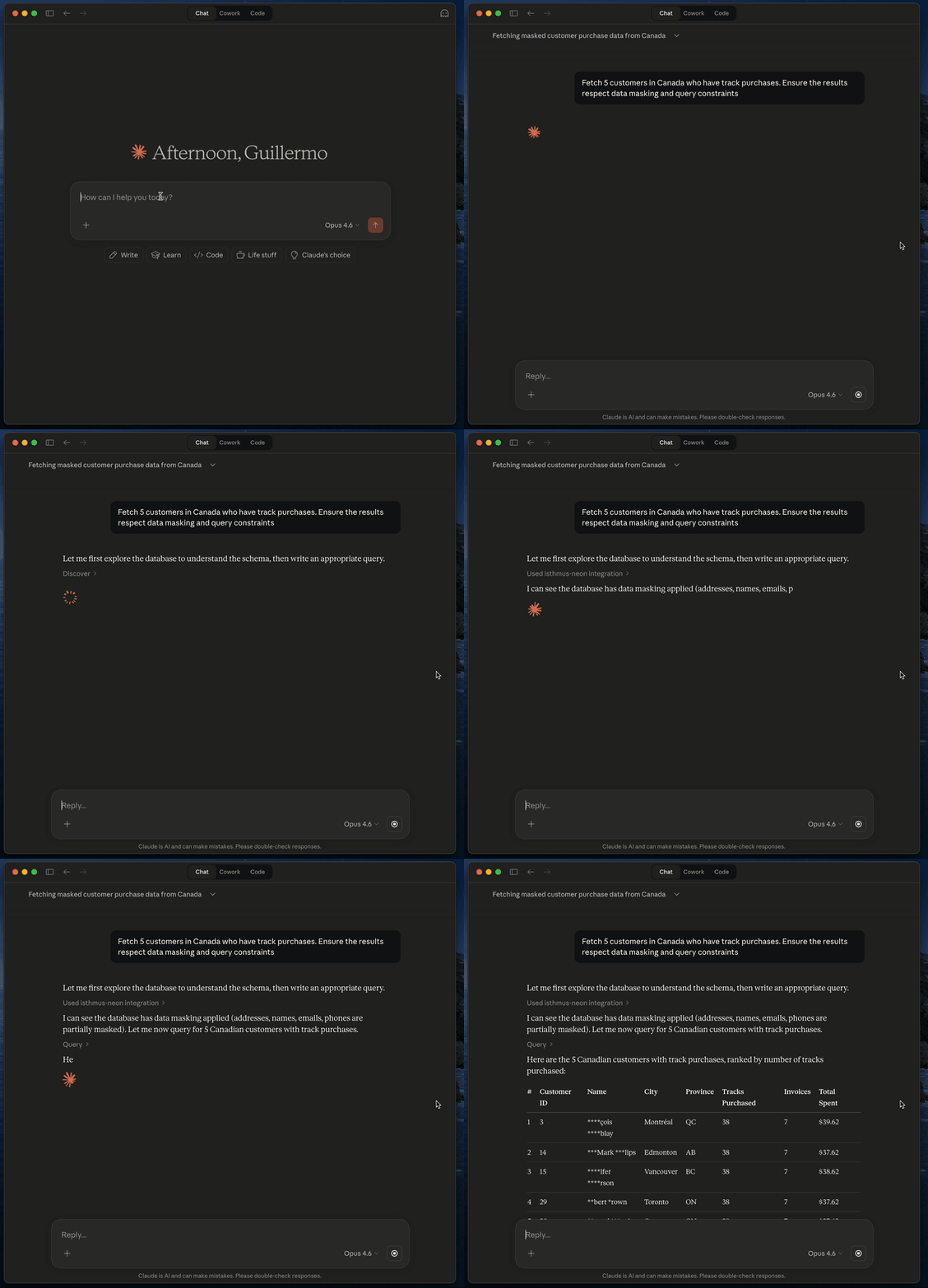
Isthmus sits between your AI client and your database. Every request flows through a security pipeline — SQL is validated at the AST level using PostgreSQL's own parser, queries run in read-only transactions with server-side row limits and timeouts, and PII columns are masked before results reach the AI. The policy engine enriches schema metadata with business context so the AI writes better SQL. All activity is recorded in an append-only audit log with optional OpenTelemetry tracing.
| Tool | What it does |
|---|---|
list_schemas | Discover available database schemas |
list_tables | Tables with row counts, sizes, and descriptions |
describe_table | Columns, types, keys, indexes, and statistics |
profile_table | Deep analysis: sample rows, disk usage, inferred relationships |
query | Execute read-only SQL, results as JSON |
explain_query | PostgreSQL execution plans with optional ANALYZE |
Full reference: isthmus.dev/tools/overview
Visit isthmus.dev for the full documentation:
go install, DockerSee CONTRIBUTING.md. You'll need Go 1.25+ and Docker for integration tests.
make build        # Build binary
make test         # All tests (needs Docker)
make test-short   # Unit tests only
make lint         # Lint
Claim this server with your GitHub account to request manual ownership verification.
Link to the catalog listing for Isthmus from your README. This badge does not certify ownership, compatibility or security.
[](https://awesome-mcp.com/servers/isthmus)Public repository statistics could not be verified. Check the configured source address; unavailable counts are not zero.
Separate sources, scopes and periods. Never combined or treated as installations, active users or security reviews.
No reviewed package or image identity; download statistics are not listed yet.
Alternative and complementary servers in the same category
This is a Model Context Protocol (MCP) server for interacting with AIStor object stores.

A Model Context Protocol server that lets AI assistants run SQL queries against AWS Athena databases and retrieve results.

A Model Context Protocol (MCP) server that exposes access to an InfluxDB v2 instance using the InfluxDB OSS API v2.