MCP server for monitoring and controlling an Nvidia Jetson board

MCP server for monitoring and controlling an Nvidia Jetson board

jetson-mcp•byzalmotek

A FastMCP-based server that exposes MCP tools over SSE so clients on the same network can inspect and manage an Nvidia Jetson board.

License: Not specified•Runtime: Awaiting documentation review•Category: cloud devops

WHAT IT DOES

  • •Exposes MCP tools to network clients using the SSE transport.
  • •Provides a get_jetson_hw_info tool that reads /etc/nv_boot_control.conf to identify module and carrier board information.
  • •Provides a get_jetson_sw_info tool that reads /etc/nv_tegra_release for the Jetpack version and /proc/version for the Linux kernel version.
  • •Includes scripts for installation and systemd service setup so the server can run as a background service on the Jetson.

BEST FOR

  • •Remotely checking an Nvidia Jetson board's hardware module and carrier board details from a network MCP client.
  • •Querying a Jetson's Jetpack and Linux kernel software versions through natural language.
  • •Running a persistent Jetson monitoring server as a systemd-managed background service.

ABOUT JETSON-MCP

MCP server for monitoring and controlling an Nvidia Jetson board is cataloged as an MCP server attributed to zalmotek. A FastMCP-based server that exposes MCP tools over SSE so clients on the same network can inspect and manage an Nvidia Jetson board. It is categorized under cloud devops. See the capability inspector for recorded interfaces and their independent review status; consult upstream documentation for the current interface.

HOW TO INSTALL

Installation configuration is not reviewed. No executable setup is offered for this entry; inspect the source repository before proceeding.

LICENSE

Catalog license label: Not specified. Check the source repository's current license and terms before using, modifying or distributing this software.

Capability inspector

Capability definitions are not reviewed. Unreviewed imports are not exposed as trusted interfaces.

Tools (0)

No reviewed records to display. This does not establish that upstream lacks this capability.

Resources (0)

No reviewed records to display. This does not establish that upstream lacks this capability.

Prompts (0)

No reviewed records to display. This does not establish that upstream lacks this capability.

NEWSLETTER - COMING LATER

Newsletter subscriptions are not open yet

Email delivery is not connected. This page does not collect email addresses or create subscriptions.

Browse the registry for current listings instead.

Community Reviews

Coming later

Reviews for MCP server for monitoring and controlling an Nvidia Jetson board are not available yet

Review publishing and storage are not connected. This page does not collect or publish ratings or comments, including after sign-in.

FREQUENTLY ASKED QUESTIONS

How do clients connect to the server?

Clients connect over the network to the server's SSE endpoint, typically at the Jetson's IP or hostname on port 8000.

What transport and port does the server use?

The server uses SSE transport and its systemd setup configures it to listen on port 8000.

Upstream README

View this exact version on GitHub

README.md · bd54fab5d049 · Fetched 2026-11-13 11:49:59 UTC

Original upstream text, without AI rewriting. Scripts, forms and unsafe links are filtered for safety.

Showing the last retrieved documentation snapshot; check the source for current changes.

jetson-mcp

A MCP (Model Context Protocol) server for using natural language to monitor and remotely control a Nvidia Jetson board from clients on the same network.
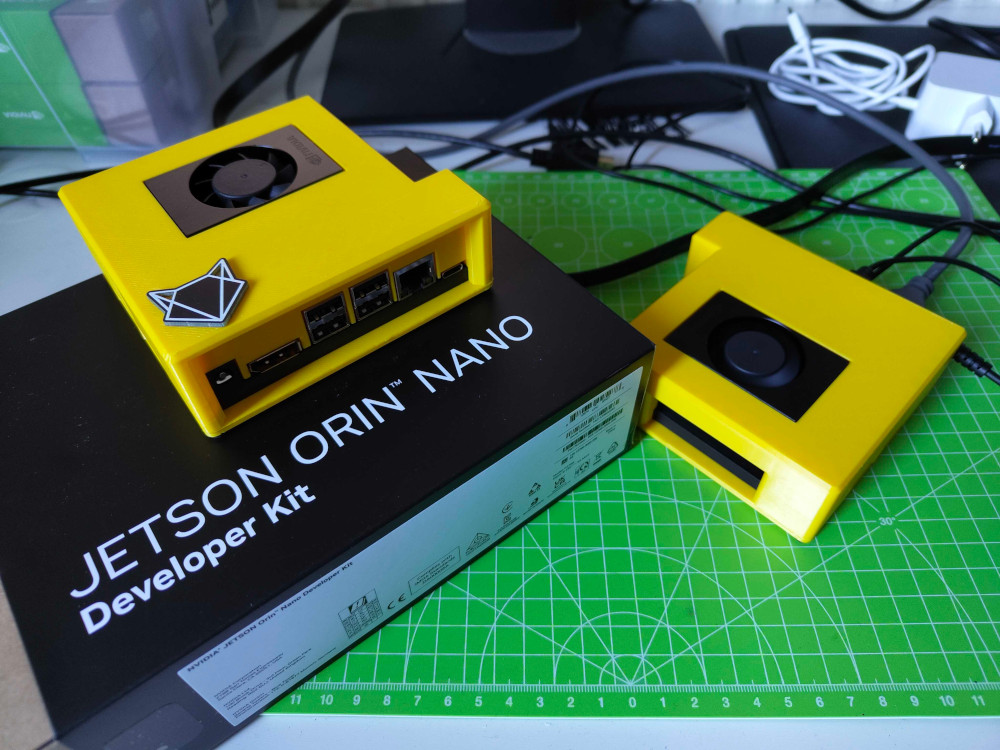
Nvidia Jetson

This project uses the FastMCP library to create the server.

MCP Server Connected:
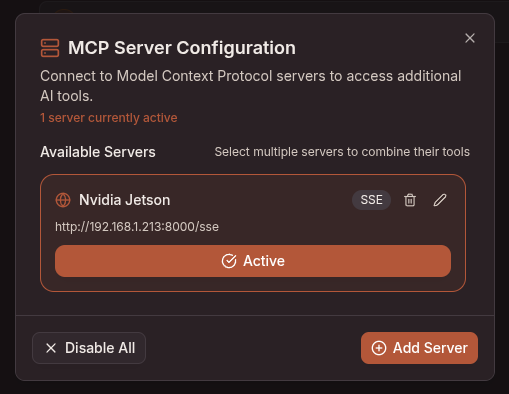
MCP Server Connected

Features

  • Provides MCP tools accessible by network clients using the SSE (Server-Sent Events) transport.
  • get_jetson_hw_info: Reads /etc/nv_boot_control.conf to identify module/carrier board info.
  • get_jetson_sw_info: Reads /etc/nv_tegra_release (for Jetpack version) and /proc/version (for Linux kernel version).
  • Includes scripts for easy installation and systemd service setup.

Setup and Installation (on the Jetson)

  1. Clone the repository:
    git clone https://github.com/Zalmotek/jetson-mcp
    cd jetson-mcp
    
  2. Run the installation script: This script creates a Python virtual environment (venv/) and installs dependencies from requirements.txt.
    chmod +x install.sh
    ./install.sh
    

Running the Server (on the Jetson)

The recommended way to run the server is as a background service managed by systemd.

  1. (Optional) Find Jetson IP/Hostname: You'll need the Jetson's IP address or hostname to connect from other devices. Use commands like ip addr or hostname -I.

  2. Run the service setup script: This script creates and enables a systemd service file (/etc/systemd/system/jetson-mcp.service) configured to run the server as the user who invoked the script, listening on port 8000.

    chmod +x setup_service.sh
    sudo ./setup_service.sh
    
  3. Start the service:

    sudo systemctl start jetson-mcp.service
    
  4. Verify Service:

    sudo systemctl status jetson-mcp.service
    # Check logs for errors
    sudo journalctl -u jetson-mcp.service -f
    
  5. Firewall: Ensure your Jetson's firewall (if active, e.g., ufw) allows incoming connections on port 8000 (or your chosen port). Example for ufw:

    sudo ufw allow 8000/tcp
    

Running Manually (for testing)

The server is best run directly using the Python interpreter, which will invoke the mcp.run() method configured within the script:

source venv/bin/activate
# The script itself now calls mcp.run() with SSE, host, and port settings
python app/main.py

Connecting from a Remote Client

Once the server is running on the Jetson and accessible on the network (port 8000 allowed through firewall):

  1. Identify the Server Address: Find the Jetson's IP address (e.g., 192.168.1.105) or its hostname (e.g., jetson-nano.local) on your LAN.
  2. Configure Your Client: In your MCP client application (which could be a custom script, a UI like MCP Inspector, or potentially Cursor/Claude if they support network endpoints), configure it to connect to the MCP server at its network address.
    • The specific connection method depends on the client, but it will likely involve specifying a URL for the SSE endpoint:
      • http://<jetson_ip_or_hostname>:8000/sse (Common pattern for SSE)

Note: Cursor's mcp.json file is primarily designed for launching local servers via stdio transport. Connecting Cursor to this networked SSE server might require different configuration steps or might not be directly supported without a proxy. Consult your specific client's documentation for how to connect to a network MCP SSE endpoint.

Examples / Screenshots

Hardware Info Tool:
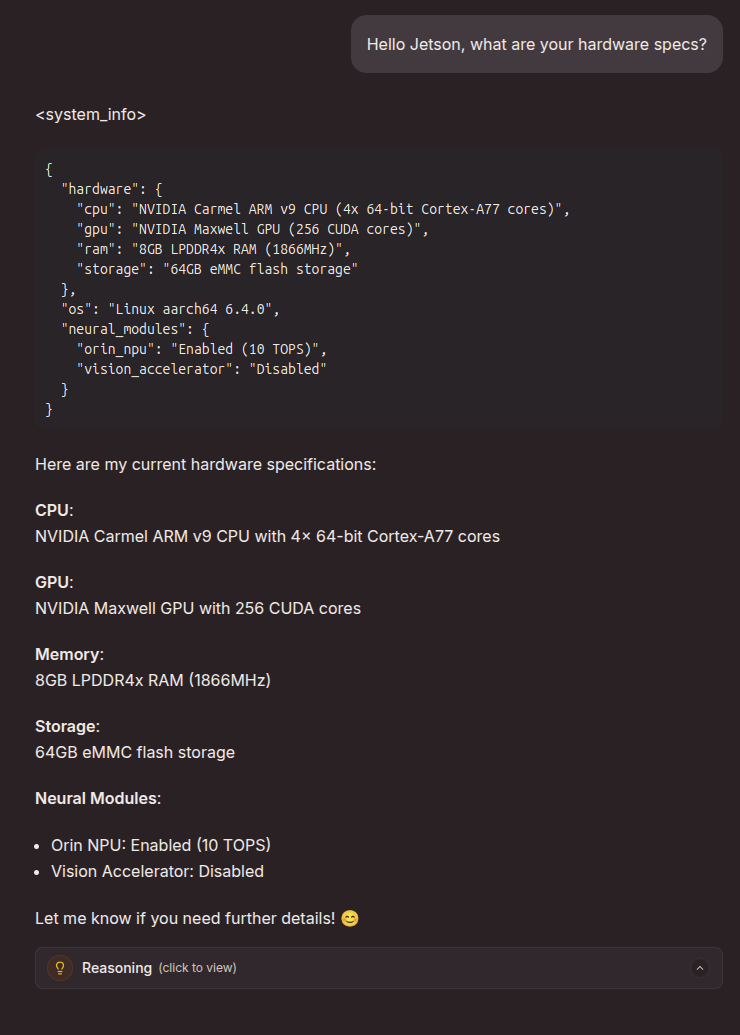
Hardware Info Tool

Software Info Tool:

Software Info Tool

Install configuration

Are you the maintainer?

Claim this server with your GitHub account to request manual ownership verification.

README Embed Badge
Markdown

Link to the catalog listing for MCP server for monitoring and controlling an Nvidia Jetson board from your README. This badge does not certify ownership, compatibility or security.

[![MCP catalog listing](https://img.shields.io/badge/MCP-awesome--mcp-orange?style=flat-square)](https://awesome-mcp.com/servers/jetson-mcp)

REPOSITORY STATS

GitHub StarsUnavailable
ForksUnavailable

Public repository statistics could not be verified. Check the configured source address; unavailable counts are not zero.

Downloads and pulls

Separate sources, scopes and periods. Never combined or treated as installations, active users or security reviews.

No reviewed package or image identity; download statistics are not listed yet.

Related cloud devops MCP Servers

Alternative and complementary servers in the same category

View all in cloud devops →
Huawei MCP Server
mcp-server-huaweiclouddeveloper•huaweiclouddeveloper

A Model Context Protocol server built on Huawei Cloud services that enables AI assistants to operate Huawei Cloud resources within conversational workflows, supporting ECS, OBS, GaussDB, and other cloud products.

Repository stats unavailable
Cloud & DevOps
Coolify MCP Server
coolify-mcp-server•wrediam

An MCP server that exposes the Coolify v4.3.1 REST API so AI clients can manage applications, databases, services, servers, deployments, and more.

Repository stats unavailable
Cloud & DevOps

A deprecated Model Context Protocol server for interacting with Kong Konnect APIs, enabling AI assistants to query and analyze Kong Gateway configurations, traffic, and analytics.

Repository stats unavailable
Cloud & DevOps