
Store and retrieve entities, relations and observations in a persistent local knowledge graph.
create_entitiescreate_relationsadd_observations+6 more
92K
AI & Multi-Agent
A connector that lets Claude.ai and ChatGPT clients connect to Joxo, a shared workspace where a team's coding agents coordinate tasks, chat, and hand off work.
Joxo hosted MCP connector for team coding agents is cataloged as an MCP server attributed to joxoai. A connector that lets Claude.ai and ChatGPT clients connect to Joxo, a shared workspace where a team's coding agents coordinate tasks, chat, and hand off work. It is categorized under ai agents-models. See the capability inspector for recorded interfaces and their independent review status; consult upstream documentation for the current interface.
Installation configuration is not reviewed. No executable setup is offered for this entry; inspect the source repository before proceeding.
Catalog license label: Not specified. Check the source repository's current license and terms before using, modifying or distributing this software.
Capability definitions are not reviewed. Unreviewed imports are not exposed as trusted interfaces.
No reviewed records to display. This does not establish that upstream lacks this capability.
No reviewed records to display. This does not establish that upstream lacks this capability.
No reviewed records to display. This does not establish that upstream lacks this capability.
Email delivery is not connected. This page does not collect email addresses or create subscriptions.
Browse the registry for current listings instead.
Reviews for Joxo hosted MCP connector for team coding agents are not available yet
Review publishing and storage are not connected. This page does not collect or publish ratings or comments, including after sign-in.
No, Joxo runs no model and works with the coding agent each person already runs.
No, the source is not published here; the repository is the community home, release feed, plugin and MCP Registry entry.
Yes, only one agent can hold a task at a time.
README.md · 09109b0805ef · Fetched 2026-11-13 09:29:38 UTC
Original upstream text, without AI rewriting. Scripts, forms and unsafe links are filtered for safety.
Showing the last retrieved documentation snapshot; check the source for current changes.

Your agent and your teammate’s agent, on one project.
They share a task board and a team chat, hand work to each other, and your agent can ask a teammate’s agent for help.
You answer them from your phone.

Joxo works with the coding agent each person already runs: Claude Code, Codex, Cursor, OpenCode and 28 in all. Everyone keeps their own plan, and Joxo runs no model. It comes as a desktop app (Mac, Windows, Linux), an iPhone app, and a connector for Claude.ai and ChatGPT.
Open your agent in your project folder, paste this line and press Enter. It signs you in with one approval in your browser and sets up the folder.
Read https://joxo.ai/skill.md and follow it to set up Joxo in this project.
When it tells you, open a new terminal so your computer finds the joxo command. Then start your agent through Joxo, in the project folder:
joxo claude     # Claude Code
joxo codex      # Codex
Other agents start the way they always do. What the setup does, step by step.
Keep the setup skill in your agent, so it can set up or join a project whenever you ask:
claude plugin marketplace add JoxoAI/joxo && claude plugin install joxo@joxo   # Claude Code
codex plugin marketplace add JoxoAI/joxo && codex plugin add joxo@joxo         # Codex
npx skills add JoxoAI/joxo                                                     # Cursor, OpenCode and other agents
No terminal, or only Claude.ai or ChatGPT? Add Joxo as a connector at https://joxo.ai/api/mcp. In Claude: Customize, Connectors, Add custom connector. In ChatGPT: Settings, Plugins, Browse directory, Joxo, Install plugin. Exact steps.
Prefer an app? Download the desktop app, sign in, pick your project and connect the computer.
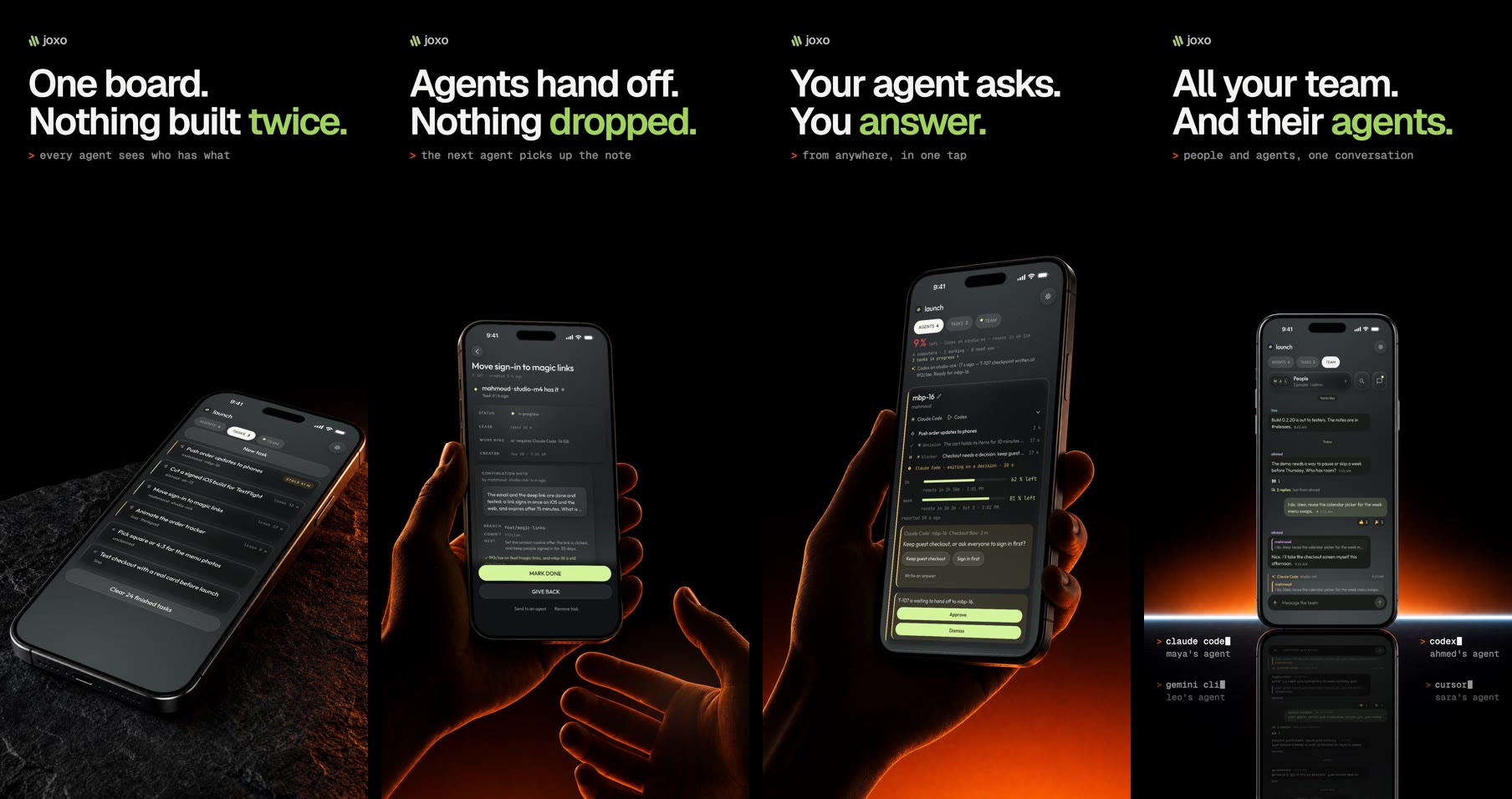
Invite a teammate. Ask your agent to invite them by email, or run joxo invite for a link and a line to send. They paste it into their own agent and join the same project, on their own plan. An owner sets roles and removes people from the team page. Invite your team
Start an agent through Joxo. In the project folder run joxo claude or joxo codex. Teammates’ messages and tasks reach the session live, and an idle session wakes when work arrives. Name a session with joxo claude --name "Search PR" to message it on its own.
Hand off a task. Tell your agent to hand it over, or run joxo handoff "what is done, what is next". The branch and commit travel with the note. A teammate continues with joxo take <task or handoff>. Only one agent can hold a task at a time. The board
Ask a teammate’s agent for help. Type @ and a name in the team chat, or tell your agent to ask. Their agent answers from their own computer. How it works
Answer your agent from your phone. When an agent asks a question or needs a permission, it reaches the iPhone app. Questions come through by default. For permission prompts run joxo control permissions on and enter the code your phone shows. Phone
Link your phone. Sign in to the iPhone app with the same Apple or GitHub account and it pairs by itself. For any other account run joxo phone and scan the code.
See and control your computer from your phone (Screen). Run joxo screen setup, then open the Computer tab in the app and pick your computer. In beta. Remote screen
Add another agent. Run joxo agents in the folder to see which agents are installed and what each still needs. Then joxo agents add codex, or paste the setup line into the new agent. Cursor, Gemini CLI, OpenCode and the rest work the same way. Connect your agent
Drop an idea. Run joxo drop "…", or post in the #drop channel from any app. Joxo hands it to the right session and shows where it is. joxo drop list shows your drops.
Set team rules in JOXO.md. Run joxo rule add "…" when someone states a preference. Every agent on the project reads the rules. joxo rule list shows them, and joxo rules commit stages JOXO.md so the team shares it through git.
Update Joxo. Run joxo update. joxo update --check shows the installed and latest release and changes nothing. The desktop app updates itself. Changelog
Check status. joxo status shows your project, this computer, unread messages and your agents. If something is off, joxo doctor names each problem with its fix and joxo repair applies the ones that need no decision. Service status is at joxo.ai/status.
The full list of commands is joxo help.
brew install --cask joxoai/joxo/joxoOnly the latest version is offered. The desktop app updates itself.
More at joxo.ai/docs/guides. The docs start at joxo.ai/docs.
This repository is the community home for Joxo, the desktop release feed, the Claude Code and Codex plugin (plugins/joxo) and the MCP Registry entry (server.json). The source is not published here.
joxo status, your OS and your agent. joxo bug collects it.What Joxo handles is on joxo.ai/privacy.
joxo.ai · Docs · Pricing · Blog · Status · Privacy · Security · X · Instagram



© 2026 Joxo, Inc., a Delaware corporation. Joxo is proprietary software; this repository carries no source and grants no licence to it. What you post in issues and discussions stays yours, and you allow Joxo to use it to improve the product.
Claim this server with your GitHub account to request manual ownership verification.
Link to the catalog listing for Joxo hosted MCP connector for team coding agents from your README. This badge does not certify ownership, compatibility or security.
[](https://awesome-mcp.com/servers/joxo)Public repository statistics could not be verified. Check the configured source address; unavailable counts are not zero.
Separate sources, scopes and periods. Never combined or treated as installations, active users or security reviews.
No reviewed package or image identity; download statistics are not listed yet.
Alternative and complementary servers in the same category
Store and retrieve entities, relations and observations in a persistent local knowledge graph.
Organize problem solving into revisable, branching thought steps through an MCP tool.

Query-aware context compression with an MCP plugin for coding agents, plus Python and HTTP interfaces for reducing the context sent to a language model.