JSON MCP server

JSON MCP server

json-splitter-and-merger•byvadimnastoyashchy

An MCP server that lets LLMs split, merge, find, and validate data within JSON files.

License: Not specified•Runtime: Awaiting documentation review•Category: file systems-docs

WHAT IT DOES

  • •Splits a JSON file into a specified number of objects per file.
  • •Merges JSON files from a folder into a single JSON file.
  • •Designed to be fast, lightweight, and LLM-friendly.

BEST FOR

  • •Splitting large JSON files into smaller chunks.
  • •Combining multiple JSON files into one.

ABOUT JSON-SPLITTER-AND-MERGER

JSON MCP server is cataloged as an MCP server attributed to vadimnastoyashchy. An MCP server that lets LLMs split, merge, find, and validate data within JSON files. It is categorized under file systems-docs. See the capability inspector for recorded interfaces and their independent review status; consult upstream documentation for the current interface.

HOW TO INSTALL

Installation configuration is not reviewed. No executable setup is offered for this entry; inspect the source repository before proceeding.

LICENSE

Catalog license label: Not specified. Check the source repository's current license and terms before using, modifying or distributing this software.

Capability inspector

Capability definitions are not reviewed. Unreviewed imports are not exposed as trusted interfaces.

Tools (0)

No reviewed records to display. This does not establish that upstream lacks this capability.

Resources (0)

No reviewed records to display. This does not establish that upstream lacks this capability.

Prompts (0)

No reviewed records to display. This does not establish that upstream lacks this capability.

NEWSLETTER - COMING LATER

Newsletter subscriptions are not open yet

Email delivery is not connected. This page does not collect email addresses or create subscriptions.

Browse the registry for current listings instead.

Community Reviews

Coming later

Reviews for JSON MCP server are not available yet

Review publishing and storage are not connected. This page does not collect or publish ratings or comments, including after sign-in.

FREQUENTLY ASKED QUESTIONS

What tools does the JSON MCP server provide?

It provides split and merge tools for JSON files, described as use cases in the README.

Upstream README

View this exact version on GitHub

README.md · 45f00ad3e9d2 · Fetched 2026-11-13 09:12:55 UTC

Original upstream text, without AI rewriting. Scripts, forms and unsafe links are filtered for safety.

Showing the last retrieved documentation snapshot; check the source for current changes.

JSON MCP

Smithery Badge

The Model Context Protocol (MCP) server empowers LLMs to efficiently interact with JSON files. With JSON MCP, you can split, merge, and find specific data, validate within JSON files based on defined conditions.


🌟 Key Features

✅ Fast and lightweight
✅ LLM-friendly functionality


🎥 Demo

Below is a demo showcasing the split functionality:
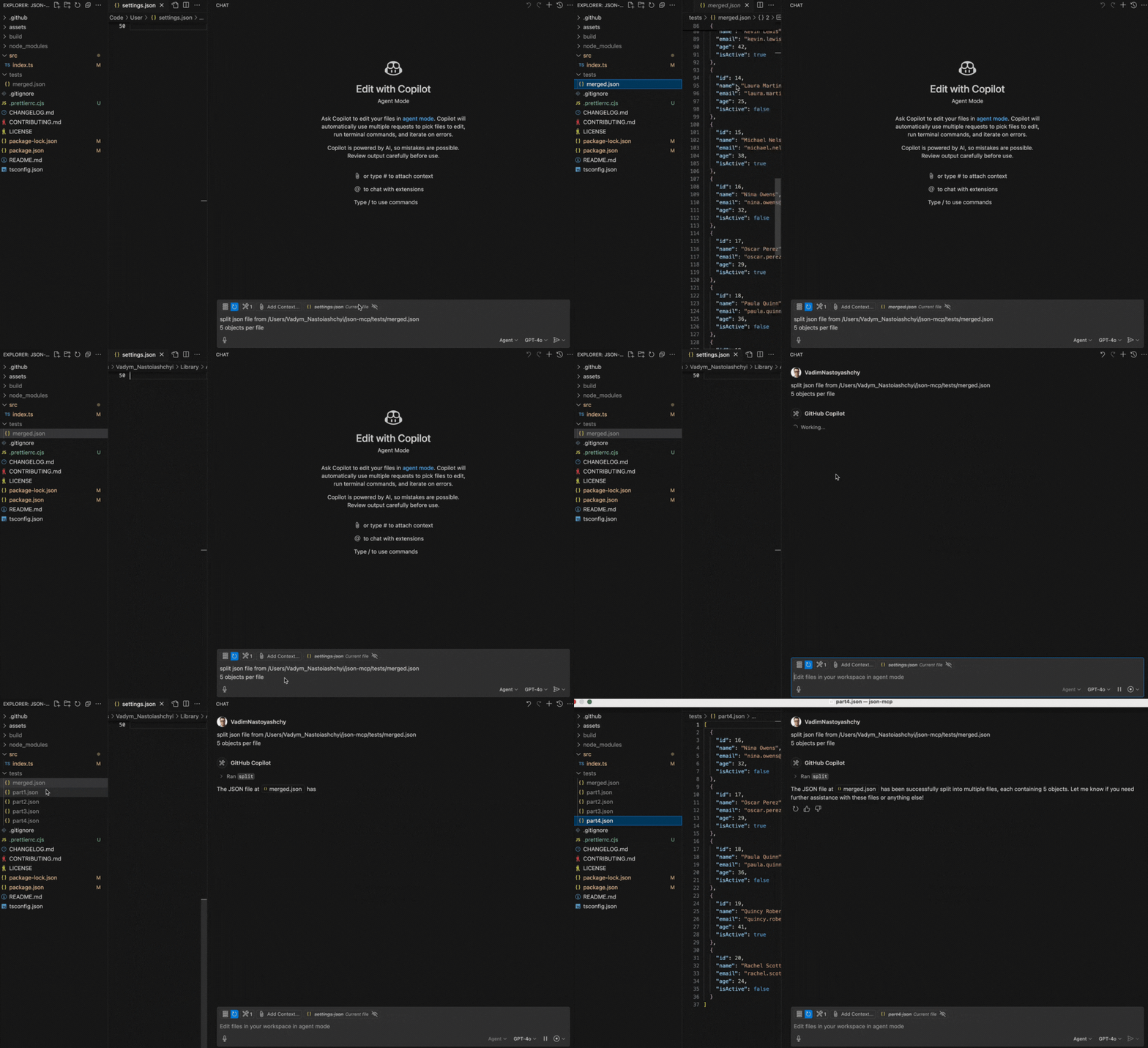
Demo: Split JSON


🔧 Use Cases (Tools)

1. split

Split a JSON file into a specified number of objects.

Note: The file path must be provided.

Prompt Example:

Split JSON file from /Users/json-mcp/tests/merged.json
5 objects per file

2. merge

Merge JSON files into a one JSON file

Note: The folder path should be provided

Prompt Example:

Merge json files from /Users/json-mcp/tests

⚙️ Configuration

Install in VS Code

VS Code Manual Configuration

To configure the JSON MCP server manually in VS Code, update the User Settings (JSON) file:

{
  "mcp": {
    "servers": {
      "json-mcp-server": {
        "command": "npx",
        "args": ["json-mcp-server@latest"]
      }
    }
  }
}

Installation in VS Code

You can install the JSON MCP server using the VS Code CLI:

# For VS Code
code --add-mcp '{"name":"json-mcp-server","command":"npx","args": ["json-mcp-server@latest"]}'

After installation, the JSON MCP server will be available for use with your GitHub Copilot agent in VS Code.

Claude Desktop

To install json-mcp for Claude Desktop automatically via Smithery:

npx -y @smithery/cli install @VadimNastoyashchy/json-mcp --client claude

⚙️ Installation Server

Install globally

npm install -g json-mcp-server@latest

Run after global installation

json-mcp-server
npx json-mcp-server@latest

Install configuration

Are you the maintainer?

Claim this server with your GitHub account to request manual ownership verification.

README Embed Badge
Markdown

Link to the catalog listing for JSON MCP server from your README. This badge does not certify ownership, compatibility or security.

[![MCP catalog listing](https://img.shields.io/badge/MCP-awesome--mcp-orange?style=flat-square)](https://awesome-mcp.com/servers/json-splitter-and-merger)

REPOSITORY STATS

GitHub StarsUnavailable
ForksUnavailable

Public repository statistics could not be verified. Check the configured source address; unavailable counts are not zero.

Downloads and pulls

Separate sources, scopes and periods. Never combined or treated as installations, active users or security reviews.

No reviewed package or image identity; download statistics are not listed yet.

Related file systems-docs MCP Servers

Alternative and complementary servers in the same category

View all in file systems-docs →

A Model Context Protocol server for global law with read-only tools to find and read provisions by date, trace the law behind each word, search text and changes, and check cases or briefs against law in force.

Repository stats unavailable
Files & Documentation
LoreKeeper MCP server
lorekeeper-rpg-lorekeeper-com•lore-keeper

Hosted MCP server for tabletop RPG worlds that organizes messy notes and documents into a private store and lets MCP apps search lore, read documents, find characters, and optionally generate character or world pictures.

Repository stats unavailable
Files & Documentation

An MCP server that gives AI assistants scoped file system operations inside a project directory, with read-only reference projects plus git and GitHub tools.

Repository stats unavailable
Files & Documentation