License: MIT License•Runtime: Awaiting documentation review•Category:cloud devops
WHAT IT DOES
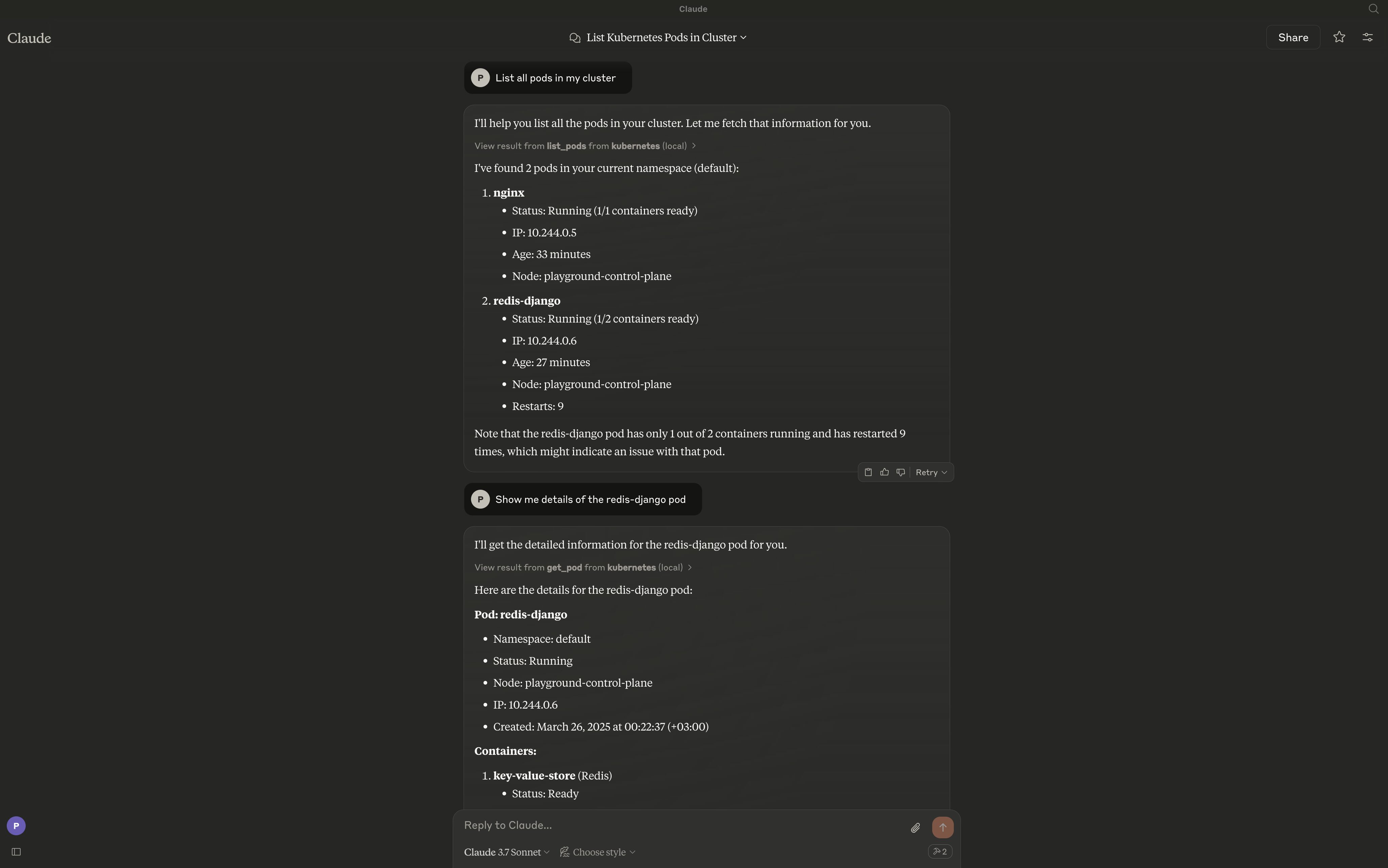
•Exposes Kubernetes operations as MCP tools so an LLM client can manage workloads, networking, config, storage, RBAC, custom resources, and raw manifests through natural language.
•Supports management of core workloads including pods, deployments, jobs, and cronjobs.
•Supports networking resources such as services and ingress, plus port forwarding to pods and services.
•Handles cluster operations including context management, node monitoring, cordoning and draining, and cluster health metrics.
BEST FOR
•Managing Kubernetes workloads through natural language from MCP-compatible clients.
•Applying or deleting raw YAML/JSON manifests and working with custom resources and CRDs.
•Inspecting cluster configuration, storage, and RBAC resources such as configmaps, secrets, persistent volumes, and roles.
ABOUT KAI
Kai - Kubernetes MCP Server is cataloged as an MCP server attributed to basebandit. An MCP server for managing Kubernetes clusters, exposing cluster operations as MCP tools for clients like Claude Desktop, Cursor, and Continue. It is categorized under cloud devops. See the capability inspector for recorded interfaces and their independent review status; consult upstream documentation for the current interface.
HOW TO INSTALL
Installation configuration is not reviewed. No executable setup is offered for this entry; inspect the source repository before proceeding.
LICENSE
Catalog license label: MIT License. Check the source repository's current license and terms before using, modifying or distributing this software.
Capability inspector
Capability definitions are not reviewed. Unreviewed imports are not exposed as trusted interfaces.
Tools (0)
No reviewed records to display. This does not establish that upstream lacks this capability.
Resources (0)
No reviewed records to display. This does not establish that upstream lacks this capability.
Prompts (0)
No reviewed records to display. This does not establish that upstream lacks this capability.
NEWSLETTER - COMING LATER
Newsletter subscriptions are not open yet
Email delivery is not connected. This page does not collect email addresses or create subscriptions.
Browse the registry for current listings instead.
Community Reviews
Coming later
Reviews for Kai - Kubernetes MCP Server are not available yet
Review publishing and storage are not connected. This page does not collect or publish ratings or comments, including after sign-in.
FREQUENTLY ASKED QUESTIONS
Does Kai require a Kubernetes cluster with kubectl configured?
Yes, the server connects to your current kubectl context by default, so you need access to a cluster configured for kubectl.
Can Kai run inside a Kubernetes cluster?
Yes, using the in-cluster flag it can use the pod's service account credentials when deployed inside a cluster.
README.md · 6343a8741550 · Fetched 2026-11-13 09:57:39 UTC
Original upstream text, without AI rewriting. Scripts, forms and unsafe links are filtered for safety.
Showing the last retrieved documentation snapshot; check the source for current changes.
Kai - Kubernetes MCP Server
A Model Context Protocol (MCP) server for managing Kubernetes clusters from MCP-compatible clients like Claude Desktop, Cursor, and Continue.
Overview
Kai exposes Kubernetes operations as MCP tools, letting an LLM client manage your cluster through natural language — workloads, networking, config, storage, RBAC, custom resources, and raw manifests.
Features
Core Workloads
Pods - Create, list, get, delete, and stream logs
Deployments - Create, list, describe, and update
Jobs - Batch workload management (create, get, list, delete)
API Discovery - API resource exploration (list_api_resources)
Requirements
The server connects to your current kubectl context by default. Ensure you have access to a Kubernetes cluster configured for kubectl (e.g., minikube, Rancher Desktop, kind, EKS, GKE, AKS).
Installation
go install github.com/basebandit/kai/cmd/kai@latest
Container image
A multi-arch image (linux/amd64, linux/arm64) is published on Docker Hub:
docker pull cyclon/kai:v1.0.0
docker run --rm cyclon/kai:v1.0.0 -version
CLI Options
kai [options]

Options:
  -kubeconfig string        Path to kubeconfig file (default "~/.kube/config")
  -context string           Name for the loaded context (default "local")
  -in-cluster               Use in-cluster config (when running inside a pod)
  -transport string         stdio (default), streamable-http, or sse-legacy
  -sse-addr string          HTTP listen address for streamable-http/sse-legacy (default ":8080")
  -tls-cert string          Path to TLS certificate (enables HTTPS)
  -tls-key string           Path to TLS private key (enables HTTPS)
  -request-timeout duration Timeout for Kubernetes API requests (default 30s)
  -metrics                  Expose Prometheus metrics at /metrics (default true)
  -log-format string        json (default) or text
  -log-level string         debug, info, warn, error (default "info")
  -version                  Show version information
Logs are written to stderr in structured JSON format by default, making them easy to parse:
For non-stdio clients, run the streamable HTTP transport:
kai -transport=streamable-http -sse-addr=:8080
The MCP endpoint is http://localhost:8080/mcp. Health probes are at /healthz
and /readyz, and Prometheus metrics at /metrics. The legacy SSE transport
(-transport=sse-legacy, endpoint /sse) still works but is deprecated.
Custom Kubeconfig
By default, Kai uses ~/.kube/config. You can specify a different kubeconfig:
kai -kubeconfig=/path/to/custom/kubeconfig -context=my-cluster
Running Inside a Kubernetes Cluster
When deploying Kai inside a Kubernetes cluster, use the -in-cluster flag to automatically use the pod's service account credentials:
kai -in-cluster -transport=streamable-http -sse-addr=:8080
The recommended way to run Kai in-cluster is with kmcp (from kagent), which manages MCP servers as MCPServer resources:
kmcp creates the Deployment and Service for you. The service account needs RBAC for the resources Kai manages — broad get/list/watch, plus create/update/delete where you use mutating tools. See the kmcp deploy guide.
A Model Context Protocol server built on Huawei Cloud services that enables AI assistants to operate Huawei Cloud resources within conversational workflows, supporting ECS, OBS, GaussDB, and other cloud products.
A deprecated Model Context Protocol server for interacting with Kong Konnect APIs, enabling AI assistants to query and analyze Kong Gateway configurations, traffic, and analytics.