
kubectl-mcp-server
Control your entire Kubernetes infrastructure through natural language conversations with AI.
Talk to your clusters like you talk to a DevOps expert. Debug crashed pods, optimize costs, deploy applications, audit security, and manage Helm charts, all through natural language.
Part of CNCF Landscape, Next to Terraform









Installation
Quick Start with npx (Recommended - Zero Install)
# Run directly without installation - works instantly!
npx -y kubectl-mcp-server

# Or install globally for faster startup
npm install -g kubectl-mcp-server
Or install with pip (Python)
pip install kubectl-mcp-server

# Or run it isolated with uv
uvx --from kubectl-mcp-server kubectl-mcp
📑 Table of Contents
What Can You Do?
Simply ask your AI assistant in natural language:
💬 "Why is my pod crashing?"
- Instant crash diagnosis with logs, events, and resource analysis
- Root cause identification with actionable recommendations
💬 "Deploy a Redis cluster with 3 replicas"
- Creates deployment with best practices
- Configures services, persistent storage, and health checks
💬 "Show me which pods are wasting resources"
- AI-powered cost optimization analysis
- Resource recommendations with potential savings
💬 "Which services can't reach the database?"
- Network connectivity diagnostics with DNS resolution
- Service chain tracing from ingress to pods
💬 "Audit security across all namespaces"
- RBAC permission analysis
- Secret security scanning and pod security policies
26 default tools, 209 with every toolset | 14 workflow prompts | 8 resources + 6 resource templates | Stateless MCP 2026-07-28 | Works with all major AI assistants
Why kubectl-mcp-server?
- 🚀 Stop context-switching - Manage Kubernetes directly from your AI assistant conversations
- 🧠 AI-powered diagnostics - Get intelligent troubleshooting, not just raw data
- 💰 Built-in cost optimization - Identify waste and get actionable savings recommendations
- 🔒 Enterprise-ready - OAuth 2.1 auth with per-tool scopes, read-only mode, Secret redaction, fail-closed network binding
- ⚡ Zero learning curve - Natural language instead of memorizing kubectl commands
- 🌐 Universal compatibility - Works with Claude, Cursor, Windsurf, Copilot, and 15+ other AI tools
- ☸️ Production-grade - Stateless HTTP scales behind any load balancer, Helm chart, 516 passing tests
From debugging crashed pods to optimizing cluster costs, kubectl-mcp-server is your AI-powered DevOps companion.
Live Demos
Claude Desktop
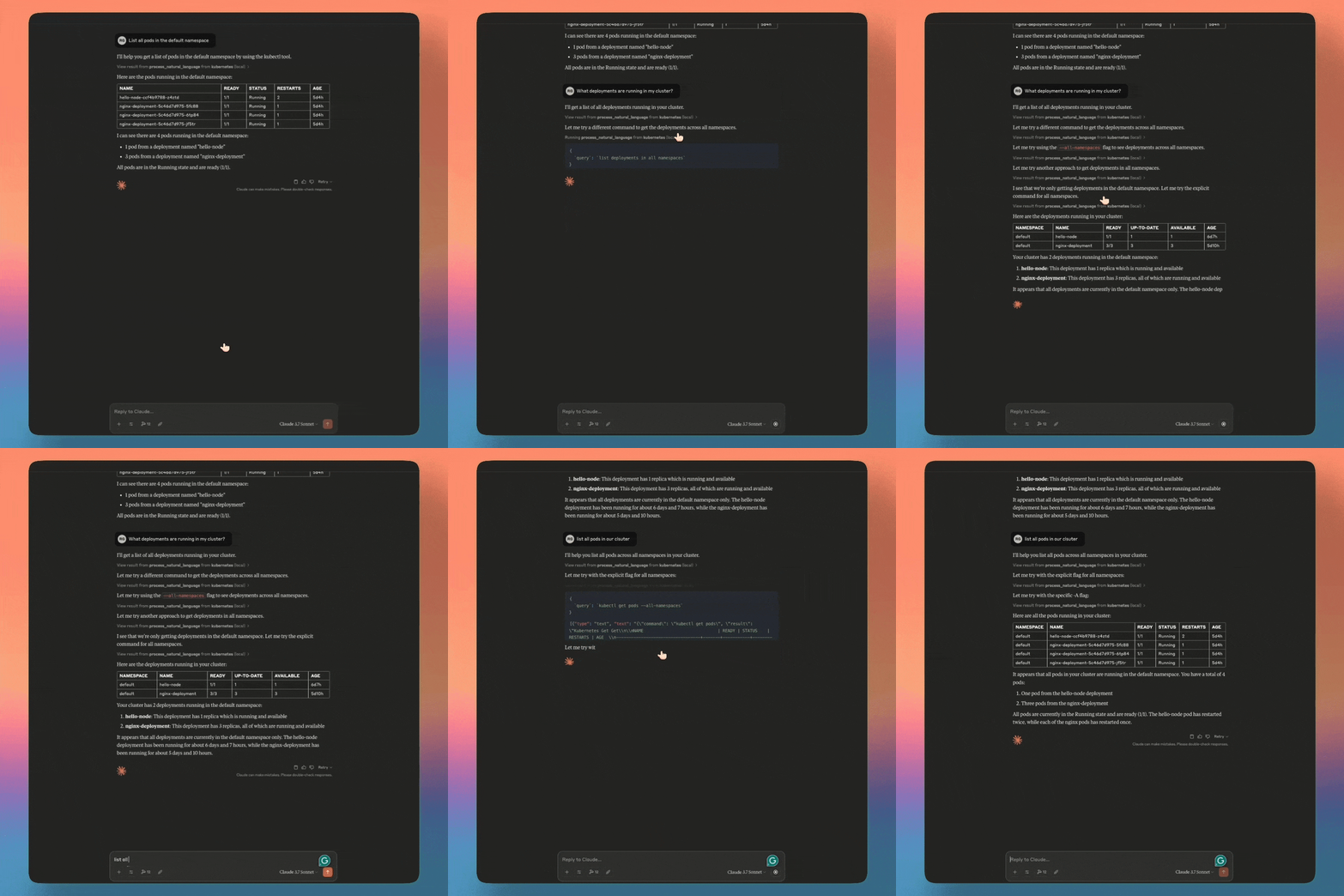
Cursor AI
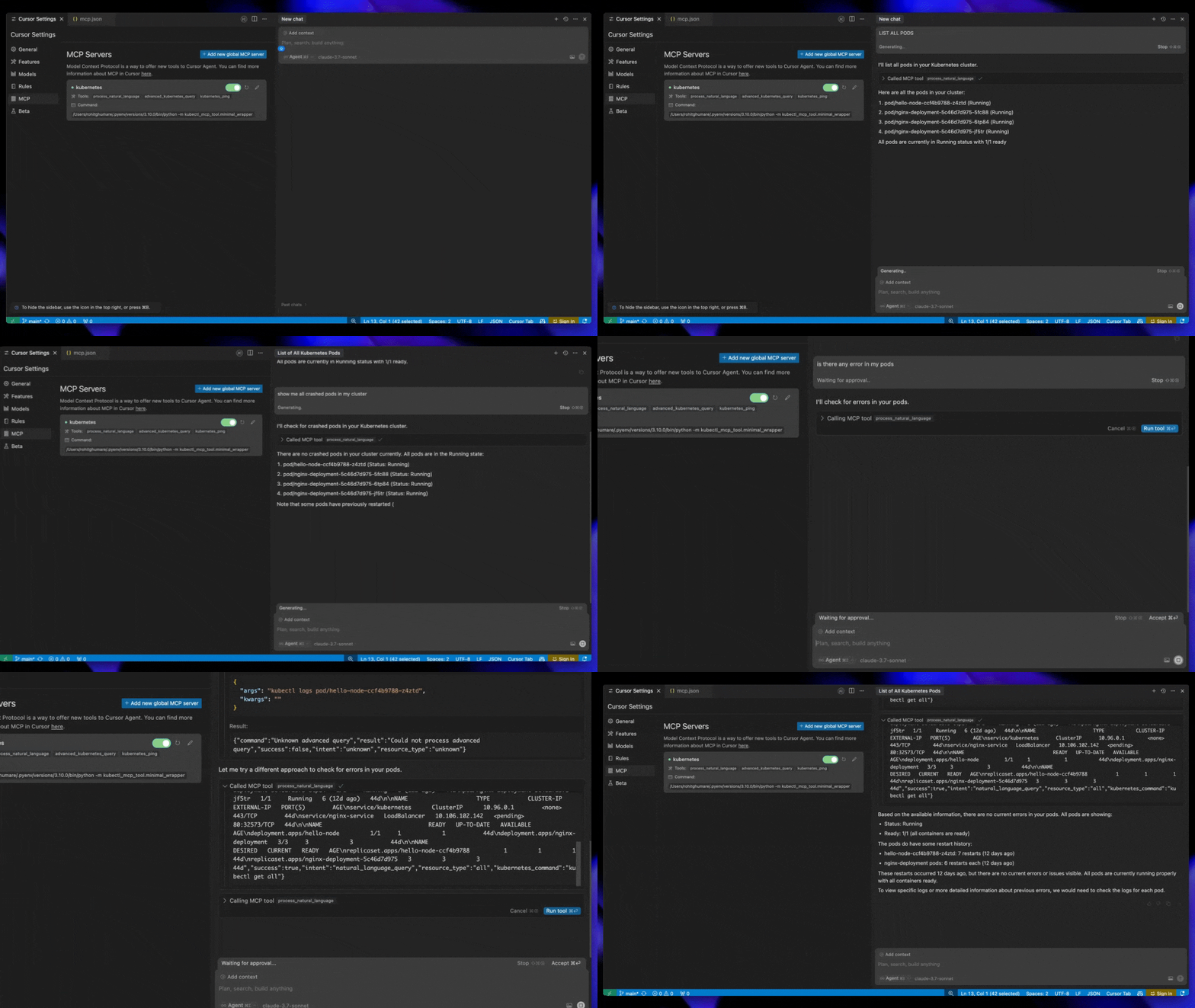
Windsurf
Installation
Quick Start with npx (Recommended - Zero Install)
# Run directly without installation - works instantly!
npx -y kubectl-mcp-server

# Or install globally for faster startup
npm install -g kubectl-mcp-server
Or install with pip (Python)
pip install kubectl-mcp-server

# Or run it isolated with uv
uvx --from kubectl-mcp-server kubectl-mcp
Install from GitHub Release
# Install specific version directly from GitHub release (replace {VERSION} with desired version)
pip install https://github.com/rohitg00/kubectl-mcp-server/releases/download/v{VERSION}/kubectl_mcp_server-{VERSION}-py3-none-any.whl

# Example: Install v2.0.0
pip install https://github.com/rohitg00/kubectl-mcp-server/releases/download/v2.0.0/kubectl_mcp_server-2.0.0-py3-none-any.whl

# Or install latest from git
pip install git+https://github.com/rohitg00/kubectl-mcp-server.git
Prerequisites
- Python 3.10+ or uv (for pip/uvx installation)
- Node.js 18+ (for npx installation)
- kubectl installed and configured
- Access to a Kubernetes cluster
Docker
# Pull from Docker Hub
docker pull rohitghumare64/kubectl-mcp-server:latest

# Or pull from GitHub Container Registry
docker pull ghcr.io/rohitg00/kubectl-mcp-server:latest

# Run with stdio transport (the image runs as UID 10001 with HOME=/home/mcp)
docker run -i --rm -v $HOME/.kube:/home/mcp/.kube:ro rohitghumare64/kubectl-mcp-server:latest

# Run stateless HTTP on localhost only. The container listens on 0.0.0.0, so it refuses
# to start without OAuth (MCP_AUTH_ENABLED) or an explicit MCP_ALLOW_UNAUTHENTICATED=true.
docker run --rm -p 127.0.0.1:8000:8000 -v $HOME/.kube:/home/mcp/.kube:ro \
  -e MCP_ALLOW_UNAUTHENTICATED=true \
  rohitghumare64/kubectl-mcp-server:latest --transport http
Getting Started
1. Test the Server (Optional)
Before integrating with your AI assistant, verify the installation:
# Check if kubectl is configured
kubectl cluster-info

# Test the MCP server directly
kubectl-mcp-server info

# List all available tools
kubectl-mcp-server tools

# Try calling a tool
kubectl-mcp-server call kubectl_get '{"resource_type": "pods", "namespace": "kube-system"}'
2. Connect to Your AI Assistant
Choose your favorite AI assistant and add the configuration:
Quick Setup with Your AI Assistant
Claude Desktop
Add to ~/Library/Application Support/Claude/claude_desktop_config.json:
{
  "mcpServers": {
    "kubernetes": {
      "command": "npx",
      "args": ["-y", "kubectl-mcp-server"]
    }
  }
}
Cursor AI
Add to ~/.cursor/mcp.json:
{
  "mcpServers": {
    "kubernetes": {
      "command": "npx",
      "args": ["-y", "kubectl-mcp-server"]
    }
  }
}
Windsurf
Add to ~/.config/windsurf/mcp.json:
{
  "mcpServers": {
    "kubernetes": {
      "command": "npx",
      "args": ["-y", "kubectl-mcp-server"]
    }
  }
}
Using Python Instead of npx
{
  "mcpServers": {
    "kubernetes": {
      "command": "python",
      "args": ["-m", "kubectl_mcp_tool.mcp_server"],
      "env": {
        "KUBECONFIG": "/path/to/.kube/config"
      }
    }
  }
}
More integrations: GitHub Copilot, Goose, Gemini CLI, Roo Code, and 15+ other clients —> see full configuration guide below.
3. Restart Your AI Assistant
After adding the configuration, restart your AI assistant (GitHub Copilot, Claude Code,Claude Desktop, Cursor, etc.) to load the MCP server.
4. Try These Commands
Start a conversation with your AI assistant and try these:
Troubleshooting:
"Show me all pods in the kube-system namespace"
"Why is the nginx-deployment pod crashing?"
"Diagnose network connectivity issues in the default namespace"
Deployments:
"Create a deployment for nginx with 3 replicas"
"Scale my frontend deployment to 5 replicas"
"Roll back the api-server deployment to the previous version"
Cost & Optimization:
"Which pods are using the most resources?"
"Show me idle resources that are wasting money"
"Analyze cost optimization opportunities in the production namespace"
Security:
"Audit RBAC permissions in all namespaces"
"Check for insecure secrets and configurations"
"Show me pods running with privileged access"
Helm:
"List all Helm releases in the cluster"
"Install Redis from the Bitnami chart repository"
"Show me the values for my nginx-ingress Helm release"
Multi-Cluster:
"List all available Kubernetes contexts"
"Switch to the production cluster context"
"Show me cluster information and version"
MCP Client Compatibility
Works seamlessly with all MCP-compatible AI assistants:
All Supported AI Assistants
Claude Code
Add to ~/.config/claude-code/mcp.json:
{
  "mcpServers": {
    "kubernetes": {
      "command": "npx",
      "args": ["-y", "kubectl-mcp-server"]
    }
  }
}
GitHub Copilot (VS Code)
Add to VS Code settings.json:
{
  "mcp": {
    "servers": {
      "kubernetes": {
        "command": "npx",
        "args": ["-y", "kubectl-mcp-server"]
      }
    }
  }
}
Goose
Add to ~/.config/goose/config.yaml:
extensions:
  kubernetes:
    command: npx
    args:
      - -y
      - kubectl-mcp-server
Gemini CLI
Add to ~/.gemini/settings.json:
{
  "mcpServers": {
    "kubernetes": {
      "command": "npx",
      "args": ["-y", "kubectl-mcp-server"]
    }
  }
}
Roo Code / Kilo Code
Add to ~/.config/roo-code/mcp.json or ~/.config/kilo-code/mcp.json:
{
  "mcpServers": {
    "kubernetes": {
      "command": "npx",
      "args": ["-y", "kubectl-mcp-server"]
    }
  }
}
Complete Feature Set
Every tool definition costs context on every request, and models pick tools less reliably as the list grows. The server therefore registers only the core and helm toolsets (26 tools) by default. kubectl_get, kubectl_describe, kubectl_logs, kubectl_apply and friends work for every resource kind, including custom resources, so the default set covers most day-to-day work. Everything else is opt-in; tools outside the enabled toolsets are not registered at all, so they cannot be called.
kubectl-mcp-server                                    # core + helm
kubectl-mcp-server --toolsets default,diagnostics,certs
kubectl-mcp-server --toolsets all                     # all 209 tools
MCP_TOOLSETS=default,gitops kubectl-mcp-server        # same, via environment
detect_ecosystem reports which operators are installed and which toolsets cover them. With many toolsets enabled and a client that cannot search tools itself, add --tool-search (MCP_TOOL_SEARCH=true): the server then lists only the default tools plus search_tools and call_tool, and the rest are discovered on demand. Read-only mode, scopes and redaction still apply to every discovered call.
For deep work in one ecosystem, its project-maintained MCP server is usually a better fit than the opt-in toolset:
MCP Resources
Access Kubernetes data as browsable resources:
MCP Prompts
Pre-built workflow prompts for common Kubernetes operations:
Add your own prompts in ~/.config/kubectl-mcp/prompts.toml; same-named prompts override the built-ins.
Key Capabilities
- 🤖 26 default tools, 209 opt-in - Generic kubectl and Helm by default, ecosystem toolsets on demand
- 🎯 14 Workflow Prompts - Pre-built workflows for common operations
- 📊 8 Resources + 6 Templates - Browsable Kubernetes data exposure
- 🔄 Opt-in ecosystem toolsets - GitOps, cert-manager, policy, Velero, KEDA, Cilium, Rollouts, CAPI, KubeVirt, Istio, kind, vCluster
- ⚡ Stateless MCP 2026-07-28 - stdio and Streamable HTTP, older clients negotiated automatically
- 🔐 Security First - Read-only mode, per-call confirmation, Secret redaction, flag-injection guard
- 🏥 Advanced Diagnostics - AI-powered troubleshooting and cost optimization
- ☸️ Multi-Cluster - Target any cluster via context parameter in every tool
- 🎡 Full Helm v3 - Complete chart lifecycle management
- 🔧 Powerful CLI - Shell-friendly tool discovery and direct calling
- 🐳 Cloud Native - Deploy in-cluster with kMCP or kagent
Using the CLI
The built-in CLI lets you explore and test tools without an AI assistant:
# List all tools with descriptions
kubectl-mcp-server tools -d

# Search for pod-related tools
kubectl-mcp-server grep "*pod*"

# Show specific tool schema
kubectl-mcp-server tools kubectl_get

# Call a tool directly
kubectl-mcp-server call kubectl_get '{"resource_type": "pods", "namespace": "kube-system"}'

# Pipe JSON from stdin
echo '{"resource_type": "pods"}' | kubectl-mcp-server call kubectl_get

# Check dependencies
kubectl-mcp-server doctor

# Show/switch Kubernetes context
kubectl-mcp-server context
kubectl-mcp-server context minikube

# List resources and prompts
kubectl-mcp-server resources
kubectl-mcp-server prompts

# Show server info
kubectl-mcp-server info
CLI Features
- Structured errors: Actionable error messages with suggestions
- Colorized output: Human-readable with JSON mode for scripting (
--json)
- NO_COLOR support: Respects
NO_COLOR environment variable
- Stdin support: Pipe JSON arguments to commands
Advanced Configuration
Transport Modes
# stdio (default) - Claude Desktop, Cursor, Windsurf, Claude Code
kubectl-mcp-server

# Streamable HTTP, stateless, at http://127.0.0.1:8000/mcp
kubectl-mcp-server --transport http --port 8000

# SSE - deprecated by the MCP spec (SEP-2596), session-bound; kept for old clients
kubectl-mcp-server --transport sse --port 8000
Server options (every flag also reads an environment variable):
Environment Variables
Core Settings:
Authentication (Enterprise):
Security and scaling:
Enterprise: OAuth 2.1 Authentication
Secure your MCP server with OAuth 2.1 authentication (RFC 9728).
export MCP_AUTH_ENABLED=true
export MCP_AUTH_ISSUER=https://your-idp.example.com
export MCP_AUTH_AUDIENCE=kubectl-mcp-server
kubectl-mcp-server --transport http --port 8000
Supported Identity Providers: Okta, Auth0, Keycloak, Microsoft Entra ID, Google OAuth, and any OIDC-compliant provider.
Scopes: tokens with mcp:tools or mcp:admin can call every tool. Set MCP_AUTH_REQUIRED_SCOPES=mcp:read to issue narrower tokens: read-only tools then need mcp:read, tools that change state need mcp:write.
Security
- Network exposure fails closed. HTTP binds
127.0.0.1 by default. Binding any other address requires OAuth or --allow-unauthenticated; the Helm chart refuses to render without one of the two.
- Read-only mode hides write tools. With
--read-only (or MCP_SAFETY_MODE=read-only) every tool whose readOnlyHint is false is removed from tools/list and rejected if called.
- Confirmation works on the stateless protocol.
--confirm-destructive returns an MRTR InputRequiredResult to 2026-07-28 clients and falls back to elicitation for older ones. The approval is bound to the exact operation.
- Secrets are redacted. Secret
data, stringData, the last-applied-configuration annotation, bearer tokens and JWTs are replaced with [REDACTED] in every tool result.
- No flag injection. Identifier arguments (
name, namespace, chart, context, label keys, ...) that start with - are rejected before any CLI runs, so name="--server=https://attacker" never reaches kubectl or helm. kubectl_generic only runs read verbs and blocks credential, connection and raw-output flags.
- No shell. Every subprocess call uses an argument list; nothing runs through
sh -c. CVE-2025-69902 (shell injection in kubectl-mcp-tool <= 1.1.1) was fixed in 1.2.0; upgrade anything older.
Report vulnerabilities privately; see SECURITY.md.
Stateless MCP (2026-07-28)
The server speaks the 2026-07-28 specification: no initialize handshake, no Mcp-Session-Id, server/discover for capabilities, and per-request _meta. Clients on 2025-era revisions are negotiated automatically from the same process, over stdio and HTTP.
Because no request depends on an earlier one, HTTP replicas scale behind a round-robin load balancer with no sticky sessions or shared store. Set MCP_REQUEST_STATE_KEY to the same value on every replica if you use --confirm-destructive.
curl -s http://127.0.0.1:8000/mcp \
  -H 'Content-Type: application/json' -H 'Accept: application/json, text/event-stream' \
  -H 'MCP-Protocol-Version: 2026-07-28' -H 'Mcp-Method: server/discover' \
  -d '{"jsonrpc":"2.0","id":1,"method":"server/discover","params":{"_meta":{"io.modelcontextprotocol/protocolVersion":"2026-07-28","io.modelcontextprotocol/clientCapabilities":{}}}}'
Integrations & Ecosystem
Works with Docker MCP Toolkit:
docker mcp server add kubectl-mcp-server mcp/kubectl-mcp-server:latest
docker mcp server configure kubectl-mcp-server --volume "$HOME/.kube:/home/mcp/.kube:ro"
docker mcp server enable kubectl-mcp-server
docker mcp client connect claude
agentregistry
Install from the centralized agentregistry:
# Install arctl CLI
curl -fsSL https://raw.githubusercontent.com/agentregistry-dev/agentregistry/main/scripts/install.sh | bash

# Install kubectl-mcp-server
arctl mcp install io.github.rohitg00/kubectl-mcp-server
Available via: PyPI (uvx), npm (npx), OCI (docker.io/rohitghumare64/kubectl-mcp-server)
agentgateway
Route to multiple MCP servers through agentgateway:
# Start stateless Streamable HTTP
kubectl-mcp-server --transport http --port 8000

# Configure gateway
cat > gateway.yaml <<EOF
binds:
- port: 3000
  listeners:
  - routes:
    - backends:
      - mcp:
          targets:
          - name: kubectl-mcp-server
            mcp:
              host: http://localhost:8000/mcp
EOF

# Start gateway
agentgateway --config gateway.yaml
Connect clients to http://localhost:3000/mcp.
In-Cluster Deployment
Option 1: kMCP (Recommended)
Deploy with kMCP - a control plane for MCP servers:
# Install kMCP
curl -fsSL https://raw.githubusercontent.com/kagent-dev/kmcp/refs/heads/main/scripts/get-kmcp.sh | bash
kmcp install

# Deploy kubectl-mcp-server (easiest)
kmcp deploy package --deployment-name kubectl-mcp-server \
   --manager npx --args kubectl-mcp-server

# Or with Docker image
kmcp deploy --file deploy/kmcp/kmcp.yaml --image rohitghumare64/kubectl-mcp-server:latest
See kMCP quickstart for details.
Option 2: Standard Kubernetes
Deploy with kubectl/kustomize:
# Using kustomize (recommended)
kubectl apply -k deploy/kubernetes/

# Or individual manifests
kubectl apply -f deploy/kubernetes/namespace.yaml
kubectl apply -f deploy/kubernetes/rbac.yaml
kubectl apply -f deploy/kubernetes/deployment.yaml
kubectl apply -f deploy/kubernetes/service.yaml

# Access via port-forward
kubectl port-forward -n kubectl-mcp svc/kubectl-mcp-server 8000:8000
See deploy/ directory for all manifests and configuration options.
Option 3: kagent (AI Agent Framework)
Integrate with kagent - a CNCF Kubernetes-native AI agent framework:
# Install kagent
brew install kagent
kagent install --profile demo

# Register as ToolServer
kubectl apply -f deploy/kagent/toolserver-stdio.yaml

# Open dashboard
kagent dashboard
Your AI agents can now use the server's enabled toolsets. See kagent quickstart.
Architecture
┌─────────────────┐     ┌──────────────────┐     ┌─────────────────┐
│   AI Assistant  │────▶│   MCP Server     │────▶│  Kubernetes API │
│ (Claude/Cursor) │◀────│ (kubectl-mcp)    │◀────│    (kubectl)    │
└─────────────────┘     └──────────────────┘     └─────────────────┘
The MCP server implements the Model Context Protocol, translating natural language requests into kubectl operations.
Modular Structure
kubectl_mcp_tool/
├── mcp_server.py          # Main server (FastMCP, transports)
├── middleware.py          # Safety mode, flag-injection guard, scopes, redaction, metrics
├── toolsets.py            # Toolset registry, server instructions
├── tools/                  # MCP tools, grouped into toolsets
│   ├── kubectl.py         # Generic get/logs/top/scale for every kind, detect_ecosystem
│   ├── pods.py            # Pod exec & diagnostics
│   ├── cluster.py         # Context/cluster management
│   ├── networking.py      # Network and DNS diagnostics
│   ├── security.py        # RBAC, pod security, secret hygiene audits
│   ├── helm.py            # Complete Helm v3 operations
│   ├── operations.py      # kubectl apply/patch/describe/etc
│   ├── diagnostics.py     # Metrics, namespace comparison
│   ├── cost.py            # Resource optimization & cost analysis
│   ├── gitops.py          # GitOps (Flux/ArgoCD)
│   ├── certs.py           # Cert-Manager
│   ├── policy.py          # Policy (Kyverno/Gatekeeper)
│   ├── backup.py          # Backup (Velero)
│   ├── keda.py            # KEDA autoscaling
│   ├── cilium.py          # Cilium/Hubble network observability
│   ├── rollouts.py        # Argo Rollouts/Flagger
│   ├── capi.py            # Cluster API
│   ├── kubevirt.py        # KubeVirt VMs
│   ├── kiali.py           # Istio/Kiali service mesh
│   ├── vind.py            # vCluster (virtual clusters)
│   ├── kind.py            # kind local clusters
│   └── custom_resources.py # CRD discovery
├── resources/              # 8 MCP Resources for data exposure
├── prompts/                # 14 MCP Prompts for workflows
└── cli/                    # CLI interface
Agent Skills (25 Skills for AI Coding Agents)
Extend your AI coding agent with Kubernetes expertise using the skills in kubernetes-skills/. Skills provide specialized knowledge and workflows that agents load on demand, and each one names the toolsets it needs.
Quick Install
# Any agent (Claude Code, Codex, Cursor, OpenCode, Gemini CLI, ...) via the skills CLI
npx skills add rohitg00/kubectl-mcp-server

# A single skill for a single agent
npx skills add rohitg00/kubectl-mcp-server --skill k8s-helm --agent claude-code

# OpenClaw, from ClawHub (synced from this repo on every merge)
openclaw skills install @rohitg00/k8s-helm

# Or copy into Claude Code directly
cp -r kubernetes-skills/claude/* ~/.claude/skills/
Browse them on ClawHub or list them with npx skills add rohitg00/kubectl-mcp-server --list.
Available Skills (25)
Convert to Other Agents
Use SkillKit to convert skills to your preferred AI agent format:
npm install -g skillkit

# Convert to Cursor format
skillkit translate kubernetes-skills/claude --to cursor --output .cursor/rules/

# Convert to Codex format
skillkit translate kubernetes-skills/claude --to codex --output ./
Supported agents: Claude, Cursor, Codex, Gemini CLI, GitHub Copilot, Goose, Windsurf, Roo, Amp, and more.
See kubernetes-skills/README.md for full documentation.
Multi-Cluster Support
Seamlessly manage multiple Kubernetes clusters through natural language. Every tool supports an optional context parameter to target any cluster without switching contexts.
Context Parameter (v1.15.0)
Most kubectl-backed tools accept an optional context parameter to target specific clusters.
Note: vCluster (vind) and kind tools run via their local CLIs and do not accept the context parameter.
Talk to your AI assistant:
"List pods in the production cluster"
"Get deployments from staging context"
"Show logs from the api-pod in the dev cluster"
"Compare namespaces between production and staging clusters"
Direct tool calls with context:
# Target a specific cluster context
kubectl-mcp-server call kubectl_get '{"resource_type": "pods", "namespace": "default", "context": "production"}'

# Get deployments from staging
kubectl-mcp-server call kubectl_get '{"resource_type": "deployments", "namespace": "app", "context": "staging"}'

# Install Helm chart to production cluster
kubectl-mcp-server call install_helm_chart '{"name": "redis", "chart": "bitnami/redis", "namespace": "cache", "context": "production"}'

# Compare resources across clusters
kubectl-mcp-server call compare_namespaces '{"namespace1": "prod-ns", "namespace2": "staging-ns", "context": "production"}'
Context Management
Talk to your AI assistant:
"List all available Kubernetes contexts"
"Switch to the production cluster"
"Show me details about the staging context"
"What's the current cluster I'm connected to?"
Or use the CLI directly:
kubectl-mcp-server context                    # Show current context
kubectl-mcp-server context production         # Switch context
kubectl-mcp-server call list_contexts         # List all contexts via MCP
How It Works
- If
context is omitted, the tool uses your current kubectl context
- If
context is specified, the tool targets that cluster directly
- Response includes
"context": "production" or "context": "current" for clarity
- Works with all kubeconfig setups and respects
KUBECONFIG environment variable
- No need to switch contexts for cross-cluster operations
Development & Testing
Setup Development Environment
# Clone the repository
git clone https://github.com/rohitg00/kubectl-mcp-server.git
cd kubectl-mcp-server

# Create virtual environment
python -m venv venv
source venv/bin/activate  # On Windows: venv\Scripts\activate

# Install development dependencies
pip install -r requirements-dev.txt
Running Tests
# Run all tests
pytest tests/ -v

# Run specific test file
pytest tests/test_tools.py -v

# Run with coverage
pytest tests/ --cov=kubectl_mcp_tool --cov-report=html

# Run only unit tests
pytest tests/ -v -m unit
Test Structure
tests/
├── __init__.py          # Test package
├── conftest.py          # Shared fixtures and mocks
├── test_tools.py        # Unit tests for all MCP tools
├── test_stateless_security.py # Both protocol eras, confirmation, redaction, injection guard
├── test_resources.py    # Tests for 8 MCP Resources
├── test_prompts.py      # Tests for 8 MCP Prompts
└── test_server.py       # Server initialization tests
555 tests covering: tool registration, resource exposure, prompt generation, both MCP protocol eras end to end, safety modes, confirmation rounds, Secret redaction, flag injection, network exposure, CLI commands, and ecosystem tools.
Code Quality
# Format code
black kubectl_mcp_tool tests

# Sort imports
isort kubectl_mcp_tool tests

# Lint
flake8 kubectl_mcp_tool tests

# Type checking
mypy kubectl_mcp_tool
Contributing
We ❤️ contributions! Whether it's bug reports, feature requests, documentation improvements, or code contributions.
Ways to contribute:
- 🐛 Report bugs via GitHub Issues
- 💡 Suggest features or improvements
- 📝 Improve documentation
- 🔧 Submit pull requests
- ⭐ Star the project if you find it useful!
Development setup: See Development & Testing section above.
Before submitting a PR:
- Run tests:
pytest tests/ -v
- Format code:
black kubectl_mcp_tool tests
- Check linting:
flake8 kubectl_mcp_tool tests
License
MIT License - see LICENSE for details.
Links & Resources
Package Repositories:
Project:
Ecosystem:
Made with ❤️ for the Kubernetes and AI community
If kubectl-mcp-server makes your DevOps life easier, give it a ⭐ on GitHub!


