LangChain MCP Client Streamlit App

LangChain MCP Client Streamlit App

langchain-mcp-client•byguinacio

A Streamlit user interface for connecting to MCP servers and interacting with them using different LLM providers.

License: Not specified•Runtime: Awaiting documentation review•Category: developer tools

WHAT IT DOES

  • •Connects to MCP servers and lets users interact with them through different LLM providers.
  • •Supports connecting to multiple MCP servers simultaneously.
  • •Includes a tool testing interface for testing individual tools with custom parameters.
  • •Offers a chat-only mode for simple conversations without MCP servers.

BEST FOR

  • •Running the included weather server as a quick MCP test.
  • •Testing individual MCP tools with custom parameters.
  • •Having simple conversations without connecting an MCP server.

ABOUT LANGCHAIN-MCP-CLIENT

LangChain MCP Client Streamlit App is cataloged as an MCP server attributed to guinacio. A Streamlit user interface for connecting to MCP servers and interacting with them using different LLM providers. It is categorized under developer tools. See the capability inspector for recorded interfaces and their independent review status; consult upstream documentation for the current interface.

HOW TO INSTALL

Installation configuration is not reviewed. No executable setup is offered for this entry; inspect the source repository before proceeding.

LICENSE

Catalog license label: Not specified. Check the source repository's current license and terms before using, modifying or distributing this software.

Capability inspector

Capability definitions are not reviewed. Unreviewed imports are not exposed as trusted interfaces.

Tools (0)

No reviewed records to display. This does not establish that upstream lacks this capability.

Resources (0)

No reviewed records to display. This does not establish that upstream lacks this capability.

Prompts (0)

No reviewed records to display. This does not establish that upstream lacks this capability.

NEWSLETTER - COMING LATER

Newsletter subscriptions are not open yet

Email delivery is not connected. This page does not collect email addresses or create subscriptions.

Browse the registry for current listings instead.

Community Reviews

Coming later

Reviews for LangChain MCP Client Streamlit App are not available yet

Review publishing and storage are not connected. This page does not collect or publish ratings or comments, including after sign-in.

FREQUENTLY ASKED QUESTIONS

Does the project include an MCP server for testing?

Yes; the README identifies weather_server.py as a simple MCP server for a quick test.

Can the application connect to multiple MCP servers at once?

Yes; multi-server support lets the app connect to multiple MCP servers simultaneously.

Can I use the application without an MCP server?

Yes; chat-only mode supports simple conversations without MCP servers.

Upstream README

View this exact version on GitHub

README.md · 60922b815ff8 · Fetched 2026-11-13 08:02:01 UTC

Original upstream text, without AI rewriting. Scripts, forms and unsafe links are filtered for safety.

Showing the last retrieved documentation snapshot; check the source for current changes.

LangChain MCP Client Streamlit App

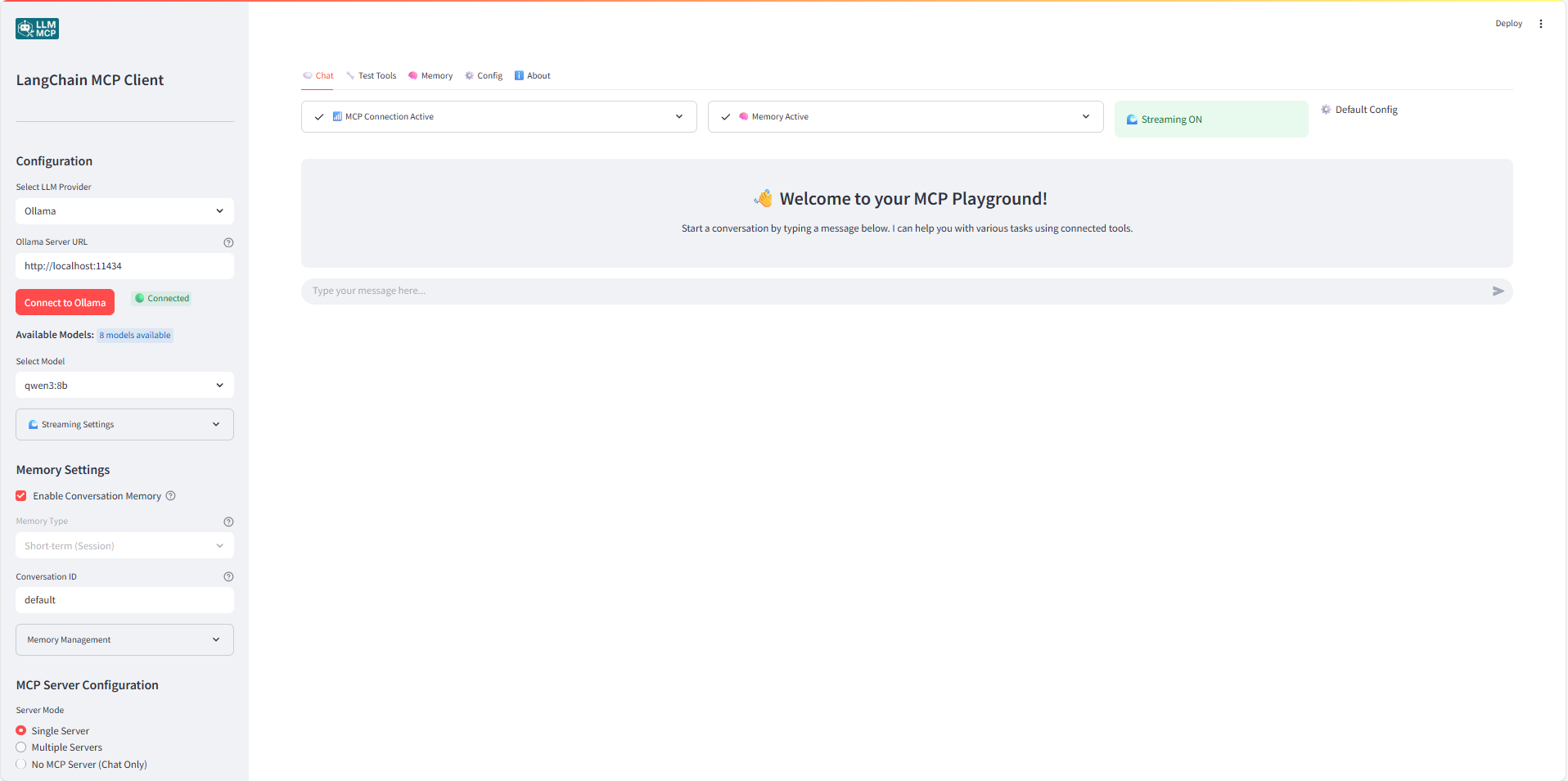
This Streamlit application provides a user interface for connecting to MCP (Model Context Protocol) servers and interacting with them using different LLM providers (OpenAI, Anthropic, Google, Ollama).

App Screenshot

⚠️ Development Status

This application is currently in active development. While functional, you may encounter bugs, incomplete features, or unexpected behavior. We appreciate your patience and welcome feedback to help improve the application.

Features

  • Multi-Provider LLM Support: OpenAI, Anthropic Claude, Google Gemini, and Ollama
  • OpenAI Reasoning Models Support: Enhanced support for o3-mini, o4-mini with specialized parameter handling
  • Streaming Responses: Real-time token-by-token streaming for supported models
  • File Attachments & Multimodal Input: Attach images, PDFs, and text/Markdown files to your chat messages (vision-capable models only for images)
  • MCP (Model Context Protocol) Integration: Connect to MCP servers for tool access
  • Advanced Memory Management: Short-term session memory and persistent cross-session memory
  • Multi-Server Support: Connect to multiple MCP servers simultaneously
  • Tool Testing Interface: Test individual tools with custom parameters
  • Chat-Only Mode: Use without MCP servers for simple conversations
  • Advanced Model Configuration: Custom temperature, max tokens, timeout, and system prompts
  • Intelligent Model Validation: Automatic parameter validation and compatibility checking
  • Comprehensive Logging: Track all tool executions and conversations
  • Export/Import: Save and load conversation history
  • Containerized Deployment: Easy Docker setup

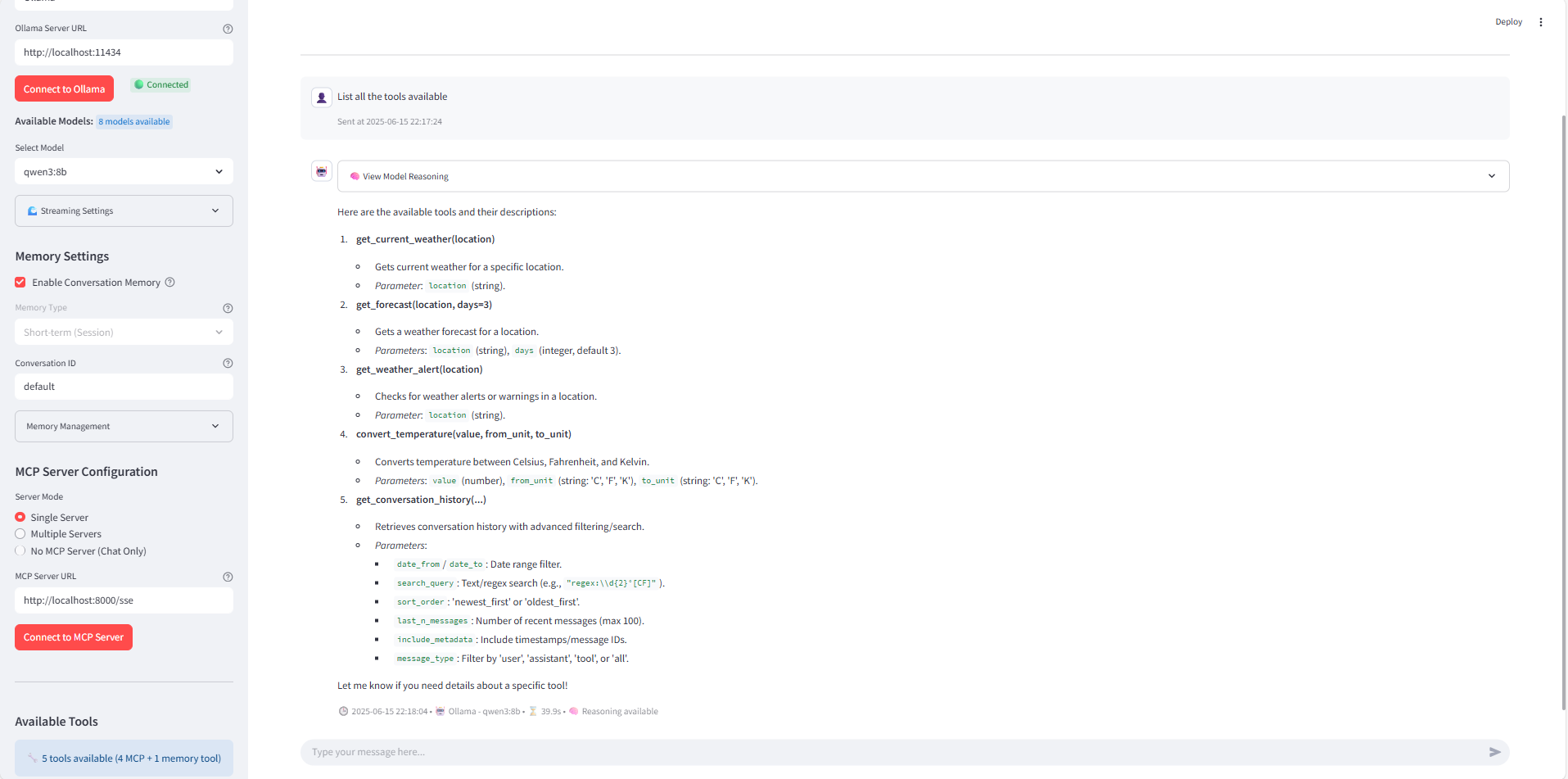
Chat Screenshot

NEW - File Attachments (Multimodal Input)

The application now supports attaching files to your chat messages.

Supported File Types

  • ✅ Images: PNG, JPG, JPEG, GIF, WEBP (requires a vision-capable model)
  • ✅ Documents: PDF (text extracted client-side)
  • ✅ Text: TXT, MD

How To Attach Files

  1. Drag and drop files directly onto the chat input, or
  2. Use the "📎 Attach files (PDF, TXT, images)" expander above the chat to select multiple files.

Attachments are sent along with your next message and appear in the conversation metadata.

How It Works

  • Images: Sent as inline image blocks. Supported by OpenAI GPT-4o/o4 family, Anthropic Claude 3.x, and Google Gemini models. Not supported by Ollama in this app.
  • PDFs: Text is extracted locally using pypdf and included as contextual text alongside your prompt.
  • Text/Markdown: File contents are read and included as additional text context.

Provider Support Notes

  • OpenAI: Use vision-capable models (e.g., gpt-4o, o4-*, gpt-4.1, gpt-4-turbo) for images. Text/PDF work across text models.
  • Anthropic: Claude 3 family (Sonnet/Opus/Haiku) supports images and text.
  • Google: Gemini models support images, text, and MCP tool calling.
  • Ollama: Images not supported here; PDFs/Text are included as text.

NEW - Streaming Support

The application now supports real-time streaming responses for all compatible models:

Supported Models with Streaming

  • ✅ OpenAI: All GPT models (GPT-4o, GPT-4, GPT-3.5-turbo) + Reasoning models (o3-mini, o4-mini)
  • ✅ Anthropic: All Claude models (Claude-3.5-Sonnet, Claude-3-Opus, Claude-3-Haiku)
  • ✅ Google: All Gemini models (Gemini-2.0-Flash, Gemini-2.5-Pro-Exp)
  • ✅ Ollama: All local models (Granite, Qwen, etc.)
  • ❌ OpenAI o1 Series: o1, o1-mini, o1-preview (not supported due to API limitations)

How It Works

  1. Enable Streaming: Toggle in the "🌊 Streaming Settings" section in the sidebar
  2. Real-time Display: Responses appear token by token as they're generated
  3. Tool Integration: See tool execution status in real-time
  4. Fallback Support: Automatically falls back to non-streaming if issues occur

Benefits

  • Better User Experience: See responses as they're being generated
  • Faster Perceived Response Time: Start reading while the model is still generating
  • Real-time Feedback: Know immediately when tools are being executed
  • Interactive Feel: More engaging conversation experience

OpenAI Reasoning Models Support

The application now includes enhanced support for OpenAI's reasoning models with specialized handling:

Supported Reasoning Models

  • ✅ o3-mini: Fast reasoning model with streaming support
  • ✅ o4-mini: Advanced reasoning model with streaming support
  • ❌ o1 Series: o1, o1-mini, o1-preview (not supported due to unique API requirements)

Reasoning Model Features

  • Automatic Parameter Optimization: Uses max_completion_tokens instead of max_tokens
  • Temperature Handling: Automatically disables temperature for reasoning models (they use fixed temperature)
  • Reasoning Effort: Automatically sets reasoning effort to "medium" for optimal performance
  • Streaming Support: o3/o4 series support real-time streaming (o1 series does not)
  • Smart Validation: Prevents incompatible parameter combinations with clear error messages

User Experience

  • Clear Warnings: Visual indicators when selecting reasoning models
  • Alternative Suggestions: Recommends compatible models when o1 series is selected
  • Seamless Integration: Works with all existing features (memory, tools, streaming)

Configuration System

LLM Providers & Parameters

  • OpenAI:
    • Regular Models: GPT-4o, GPT-4, GPT-3.5-turbo with temperature (0.0-2.0), max tokens (1-16384), timeout (10-600s)
    • Reasoning Models: o3-mini, o4-mini with specialized parameter handling (no temperature, max_completion_tokens, reasoning_effort)
    • Unsupported: o1, o1-mini, o1-preview (incompatible API requirements)
  • Anthropic: Claude-3.5-Sonnet, Claude-3-Opus, Claude-3-Haiku with temperature (0.0-1.0), max tokens (1-8192), timeout (10-600s)
  • Google: Gemini-2.5-Flash-Lite, Gemini-2.5-Pro with temperature (0.0-2.0), max tokens (1-32768), timeout (10-600s)
  • Ollama: Local models (Granite3.3:8b, Qwen3:4b) with temperature (0.0-2.0), max tokens (1-32768), timeout (10-600s)

Custom Model Support

All providers now support an "Other" option that allows you to specify custom model names:

  • OpenAI: Enter any OpenAI model name (e.g., gpt-4-turbo, o3-mini, custom fine-tuned models)
  • Anthropic: Enter any Anthropic model name (e.g., claude-3-sonnet-20240229)
  • Google: Enter any Google model name (e.g., gemini-pro, gemini-1.5-pro)
  • Ollama: Enter any locally available model name (e.g., llama3, codellama, custom models)

System Prompts

  • Built-in Presets: Five specialized system prompts for different use cases
  • Custom Prompts: Create and save your own system prompts
  • Real-time Application: Apply configuration changes with instant feedback
  • Configuration Status: Visual indicators showing applied/changed/default states

Configuration Management

  • Apply Configuration: Smart button that detects changes and applies settings
  • Export/Import: Save configurations as JSON files for backup or sharing
  • Reset Options: Reset to defaults or previously applied settings
  • Change Detection: Real-time tracking of configuration modifications

Memory System

Memory Types

  1. Short-term (Session):

    • Conversations stored in browser session memory
    • Lost when browser is closed or app restarted
    • Uses LangGraph's InMemorySaver
  2. Persistent (Cross-session):

    • Conversations stored in SQLite database (conversations.db)
    • Persists across browser sessions and app restarts
    • Uses LangGraph's SqliteSaver with custom metadata management
    • Auto-saves conversations during chat
    • Browse, load, and manage saved conversations

Advanced Memory Features

  • Conversation Import/Export: Import previous conversations with preview and confirmation system
  • Thread Management: Switch between different conversation threads with unique IDs
  • Memory Analytics: Track message counts, memory usage, conversation statistics, and database size
  • Conversation Browser: View and manage all stored conversations with metadata and search capabilities
  • History Tool Integration: When memory is enabled, the agent gains access to a get_conversation_history tool that allows it to:
    • Search through previous conversations by type or content
    • Reference earlier discussions and maintain context
    • Summarize conversation topics and filter messages
    • Access specific parts of the conversation history with clean, formatted output

Memory Safety & Performance

  • Import Validation: Safe import system with format validation and preview before applying
  • Loop Prevention: Robust safeguards against infinite loops during memory operations
  • Flexible Limits: Configurable message limits and memory constraints
  • Real-time Status: Visual indicators for memory state, thread information, and change detection

Tool Testing & Analytics

  • Individual Tool Testing: Access via the "🔧 Test Tools" tab
  • Dynamic Parameter Forms: Auto-generated forms based on tool schemas with real-time validation
  • Performance Tracking: Execution timing, success/failure rates, and detailed statistics
  • Test History: Complete test result history with export capabilities
  • Result Analysis: Success rate calculations and average execution time metrics
  • JSON Export: Export test results and performance data for external analysis

Future Improvements

  • STDIO MCP Servers: Support for connecting to MCP servers using standard input/output (STDIO) for more flexible server configurations
  • RAG (Document Indexing): Index and retrieve from uploaded documents across sessions (attachments are supported now; full retrieval remains planned)
  • Enhanced Tool Validation: Advanced parameter validation and schema checking for MCP tools
  • Multi-threaded Processing: Parallel processing for multiple tool executions and server connections

Installation

  1. Clone this repository:
git clone https://github.com/guinacio/langchain-mcp-client.git
cd langchain-mcp-client

UV manages a project-local .venv and pins from pyproject.toml/uv.lock.

uv sync --all-extras --dev

Run the app with UV:

uv run streamlit run app.py

The application will be available at http://localhost:8501

Security and deployment

This application is local-first and does not include multi-user authentication. The bundled Docker Compose configuration therefore publishes Streamlit and the example MCP server on 127.0.0.1 only. Do not change that binding to 0.0.0.0 or expose the app through a tunnel/public ingress unless you add authentication at a trusted reverse proxy.

Persistent conversations are isolated by a server-issued per-session namespace. Pre-upgrade, globally-scoped conversation rows are quarantined during migration and are not exposed to new sessions. For a trusted single-user deployment that needs storage across browser restarts, set a strong MCP_CLIENT_STORAGE_KEY; every user of that deployment will share that namespace, so do not use this mode for multi-user hosting.

Outbound MCP and Ollama URLs are validated server-side. Loopback URLs remain enabled for local development; link-local/cloud-metadata and reserved addresses are always blocked. Access to trusted RFC1918/private-network servers requires the deployment operator to set MCP_ALLOW_PRIVATE_URLS=true (already set in the local-only Docker Compose service).

Example local environment configuration:

MCP_CLIENT_STORAGE_KEY="generate-a-long-random-value"
MCP_ALLOW_PRIVATE_URLS=true  # only when trusted LAN MCP/Ollama hosts are needed

Alternative: Install with pip and requirements.txt

python -m venv venv
source venv/bin/activate  # On Windows: venv\Scripts\activate
pip install -r requirements.txt
streamlit run app.py

Setting Up an MCP Server

To use this application, you'll need an MCP server running or a valid URL to an MCP server. Use the simple MCP server available on weather_server.py for a quick test:

Run with UV (recommended):

uv run python weather_server.py

Alternative (pip/venv):

python weather_server.py

The server will start on port 8000 by default. In the Streamlit app, you can connect to it using the URL http://localhost:8000/sse.

Troubleshooting

  • Connection Issues: Ensure your MCP server is running and accessible
  • API Key Errors: Verify that you've entered the correct API key for your chosen LLM provider
  • Tool Errors: Check the server logs for details on any errors that occur when using tools
  • Reasoning Model Issues:
    • If you see "o1 Series Models Not Supported", use o3-mini or o4-mini instead
    • Reasoning models don't support custom temperature settings
    • Some reasoning models may not support streaming (check the model-specific warnings)
  • Custom Model Names: When using "Other" option, ensure the model name is exactly as expected by the provider's API, and you have access to it.
  • File Attachments:
    • Images require a vision-capable model (e.g., GPT-4o/o4, Claude 3.x, Gemini). Ollama is text-only here.
    • PDF text extraction depends on the quality of the PDF; scanned images may yield limited text.

Resources

Install configuration

Are you the maintainer?

Claim this server with your GitHub account to request manual ownership verification.

README Embed Badge
Markdown

Link to the catalog listing for LangChain MCP Client Streamlit App from your README. This badge does not certify ownership, compatibility or security.

[![MCP catalog listing](https://img.shields.io/badge/MCP-awesome--mcp-orange?style=flat-square)](https://awesome-mcp.com/servers/langchain-mcp-client)

REPOSITORY STATS

GitHub StarsUnavailable
ForksUnavailable

Public repository statistics could not be verified. Check the configured source address; unavailable counts are not zero.

Downloads and pulls

Separate sources, scopes and periods. Never combined or treated as installations, active users or security reviews.

No reviewed package or image identity; download statistics are not listed yet.

Related developer tools MCP Servers

Alternative and complementary servers in the same category

View all in developer tools →
Postbye
postbye-mcp•postbye-team

A directory listing describing a cancellation-letter and mailing-address service. The configured public GitHub repository returned 404 during source verification.

Repository stats unavailable
Developer Tools
Singapore Proxy MCP
singapore-proxy-mcp•Xavierfok

A hosted MCP service for browsing and searching through Singapore mobile-network proxies.

0
Developer Tools

A directory listing describing a Markdown-to-PDF service. The configured public GitHub repository returned 404 during source verification.

Repository stats unavailable
Developer Tools