

A directory listing describing a cancellation-letter and mailing-address service. The configured public GitHub repository returned 404 during source verification.
Repository stats unavailable
Developer Tools
A standalone MCP server that gives MCP clients bounded FHIR chart read tools, plus opt-in write tools that require human approval before anything is saved.
Last EHR MCP server is cataloged as an MCP server attributed to cbetz. A standalone MCP server that gives MCP clients bounded FHIR chart read tools, plus opt-in write tools that require human approval before anything is saved. It is categorized under developer tools. See the capability inspector for recorded interfaces and their independent review status; consult upstream documentation for the current interface.
Installation configuration is not reviewed. No executable setup is offered for this entry; inspect the source repository before proceeding.
Catalog license label: Apache-2.0. Check the source repository's current license and terms before using, modifying or distributing this software.
Capability definitions are not reviewed. Unreviewed imports are not exposed as trusted interfaces.
No reviewed records to display. This does not establish that upstream lacks this capability.
No reviewed records to display. This does not establish that upstream lacks this capability.
No reviewed records to display. This does not establish that upstream lacks this capability.
Email delivery is not connected. This page does not collect email addresses or create subscriptions.
Browse the registry for current listings instead.
Reviews for Last EHR MCP server are not available yet
Review publishing and storage are not connected. This page does not collect or publish ratings or comments, including after sign-in.
Only when LASTEHR_MCP_WRITES is set to proposal and the client declares MCP elicitation; otherwise writes are off.
No. Approval sends the proposal to the FHIR server, which can still reject it, and approval does not review the proposal for clinical correctness.
No, the demo and local walkthrough use synthetic patients, and the Epic and Oracle Health paths use those vendors' sandboxes.
README.md · bba8d40b5ea2 · Fetched 2026-11-13 14:10:21 UTC
Original upstream text, without AI rewriting. Scripts, forms and unsafe links are filtered for safety.
Showing the last retrieved documentation snapshot; check the source for current changes.




Status: early / alpha. Use synthetic data only. License: Apache-2.0.
Read the chart broadly. Write only what a human approved. @lastehr/mcp
is an MCP server in front of a FHIR backend. Read tools are on by default.
Writes are proposals: the approval prompt shows a diff of the resource beside
what the agent cited and already read, and nothing is saved until you
approve. Synthetic data only. This is not a clinical or compliance claim.
npm latest is @lastehr/mcp@0.5.4. The Official MCP Registry record for
io.github.cbetz/last-ehr marks 0.5.4 isLatest.
npx -y @lastehr/mcp@0.5.4 init --demo
npx -y @lastehr/mcp@0.5.4 init --demo --client claude-code
npx -y @lastehr/mcp@0.5.4 init --demo --client cursor
init --demo runs synthetic seed patients in-process, and approved writes vanish when the process exits. Synthetic data only. This is not a clinical or compliance claim.
init without --demo prints a client configuration for a backend you operate and exits. It does not start a server, register the client, or contact a FHIR endpoint.
npx -y @lastehr/mcp@0.5.4 init
npx -y @lastehr/mcp@0.5.4 init --client claude-code
npx -y @lastehr/mcp@0.5.4 init --client cursor
init accepts --client json (the default), claude-code, or cursor. A Medplum token, or this repository's local HAPI stack via FHIR_BACKEND=hapi and FHIR_BASE_URL, is below. Docker is required for HAPI; the first image pull can take several minutes.
Default output:
{
  "mcpServers": {
    "lastehr": {
      "command": "npx",
      "args": [
        "-y",
        "@lastehr/mcp@0.5.4"
      ],
      "env": {
        "MEDPLUM_ACCESS_TOKEN": "<replace-with-a-least-privilege-token>"
      }
    }
  }
}
--client cursor adds "type": "stdio". --client claude-code prints
claude mcp add lastehr -- npx -y @lastehr/mcp@0.5.4 plus comments. That
command does not set LASTEHR_MCP_WRITES. The generated command is pinned
to the version that ran init.
Replace <replace-with-a-least-privilege-token>. doctor treats that
placeholder as a present access token and does not contact a server. Only
doctor --connect reaches a server.
The package engine range in packages/mcp/package.json is
^22.18.0 || >=24.2.0.
Set "LASTEHR_MCP_WRITES": "proposal" in env to enable the approval gate.
The write tools are add_note, record_observation,
record_superseding_observation, and create_task. They appear only in
clients that declare MCP elicitation (form; a bare elicitation capability
counts, and URL-only elicitation does not).
The in-process store at the top of this page needs no account and no Docker.
This repository's local HAPI stack is the other no-account backend. Set
FHIR_BACKEND=hapi and FHIR_BASE_URL or HAPI_BASE_URL. No Medplum
token. The stack has no auth, Compose binds it to loopback, and it is for
synthetic records only.
Node 22.18+ (or 24.2+) and a running Docker daemon:
git clone https://github.com/cbetz/last-ehr.git
cd last-ehr
npm install
npm run demo:local
demo:local starts HAPI and Postgres, seeds synthetic patients, and opens
the fixed walkthrough at http://localhost:3000/demo.
It does not create or read .env.local. The first image pull can take
several minutes. Press Ctrl-C to stop Next.js. npm run demo:local:down
removes the stack.
In the configuration init printed, replace the env block with:
"env": {
  "FHIR_BACKEND": "hapi",
  "FHIR_BASE_URL": "http://localhost:8080/fhir"
}
Keep the rest, including "type": "stdio" when --client cursor printed it.
Save it where the client reads MCP config (for Cursor,
~/.cursor/mcp.json or .cursor/mcp.json). With FHIR_BACKEND=hapi, the
server does not read MEDPLUM_*.
The Claude Code line does not carry those variables. Export them in the shell that launches Claude Code:
export FHIR_BACKEND=hapi
export FHIR_BASE_URL=http://localhost:8080/fhir
After HAPI is up, this check prints no patient records:
FHIR_BACKEND=hapi FHIR_BASE_URL=http://localhost:8080/fhir npx -y @lastehr/mcp@0.5.4 doctor --connect
doctor --connect checks FHIR R4 metadata and a count-only Patient
search. It does not check other resource permissions, writes, or a client's
approval UI.
npm run mcp:demo is a separate checkout-only lab, outside the
@lastehr/mcp package. It exposes search_patients and
show_patient_info for four fixture patients. See the
MCP guide.
Local stack failures: Troubleshooting the local lab.
Last EHR can be the approval gate in front of the Epic FHIR sandbox and the
Oracle Health secure sandbox. The human sees the Observation those servers
accepted (Epic flowsheet code plus encounter, Oracle legal-authenticator
performer and an allowlisted vital), and the agent gets a read-back diff
after the save. Synthetic sandbox patients only. This is not a clinical or
compliance claim. The adapters stay behind
LASTEHR_EXPERIMENTAL_FHIR_ADAPTERS=1 because those sandboxes do not
support delete: an approved write persists, and the safety eval cannot
clean up. Ten-minute setup is in
docs/adapters/epic-cerner.md.
export LASTEHR_EXPERIMENTAL_FHIR_ADAPTERS=1
export FHIR_BACKEND=epic
export LASTEHR_CLIENT_ID='your-non-production-client-id'
export LASTEHR_PRIVATE_KEY_PATH="$PWD/lastehr-sandbox.pem"
export LASTEHR_KEY_ID='lastehr-epic-1'
export LASTEHR_ENCOUNTER='Encounter/eMT95RPaM-HxLc3NeIA5qlQ3'
Then ask: Record a heart rate of 72 bpm for patient erXuFYUfucBZaryVksYEcMg3.
The card shows flowsheet code 8 and LOINC 8867-4 before anything is
saved. Oracle uses FHIR_BACKEND=oracle-health, LASTEHR_SCOPES, and an
oral temperature (8331-1) with LASTEHR_PERFORMER.
Those sandboxes are in @lastehr/mcp@0.5.4.
npx -y @lastehr/mcp@0.5.4 init --backend epic
npx -y @lastehr/mcp@0.5.4 init --client claude-code --backend oracle
npx -y @lastehr/mcp@0.5.4 doctor
init --backend epic or oracle prints placeholder env
(LASTEHR_BACKEND, LASTEHR_CLIENT_ID, LASTEHR_PRIVATE_KEY_PATH,
LASTEHR_KEY_ID, LASTEHR_JWKS_URL, and LASTEHR_ENCOUNTER or
LASTEHR_PERFORMER plus LASTEHR_SCOPES for Oracle) and the setup steps.
doctor checks the key, JWKS kid, token exchange, granted scopes, and
search scope without printing secrets. npx tsx scripts/sandbox-proof
stays a checkout script; the published CLI does not include it.
These are optional. The published MCP package and the local synthetic stack above are the first path.
| Goal | Start here |
|---|---|
| Test an MCP (stdio) implementation of the write protocol | npx @lastehr/agent-write-conformance — conformance guide |
| Have an assistant draft synthetic work, then review it separately | npm run work:demo — Assistant Work Lab. Add --agent --model-env .env.local only when a model key is already configured. |
| Connect an external MCP assistant to durable synthetic work | Work MCP connector: npm run --silent work:mcp -- --print-config |
| Deploy the web app | Quickstart: Vercel, with your own Medplum project and model key |
| Run the web app locally | Quickstart: Medplum, or npm run demo:local for the fixed synthetic walkthrough |
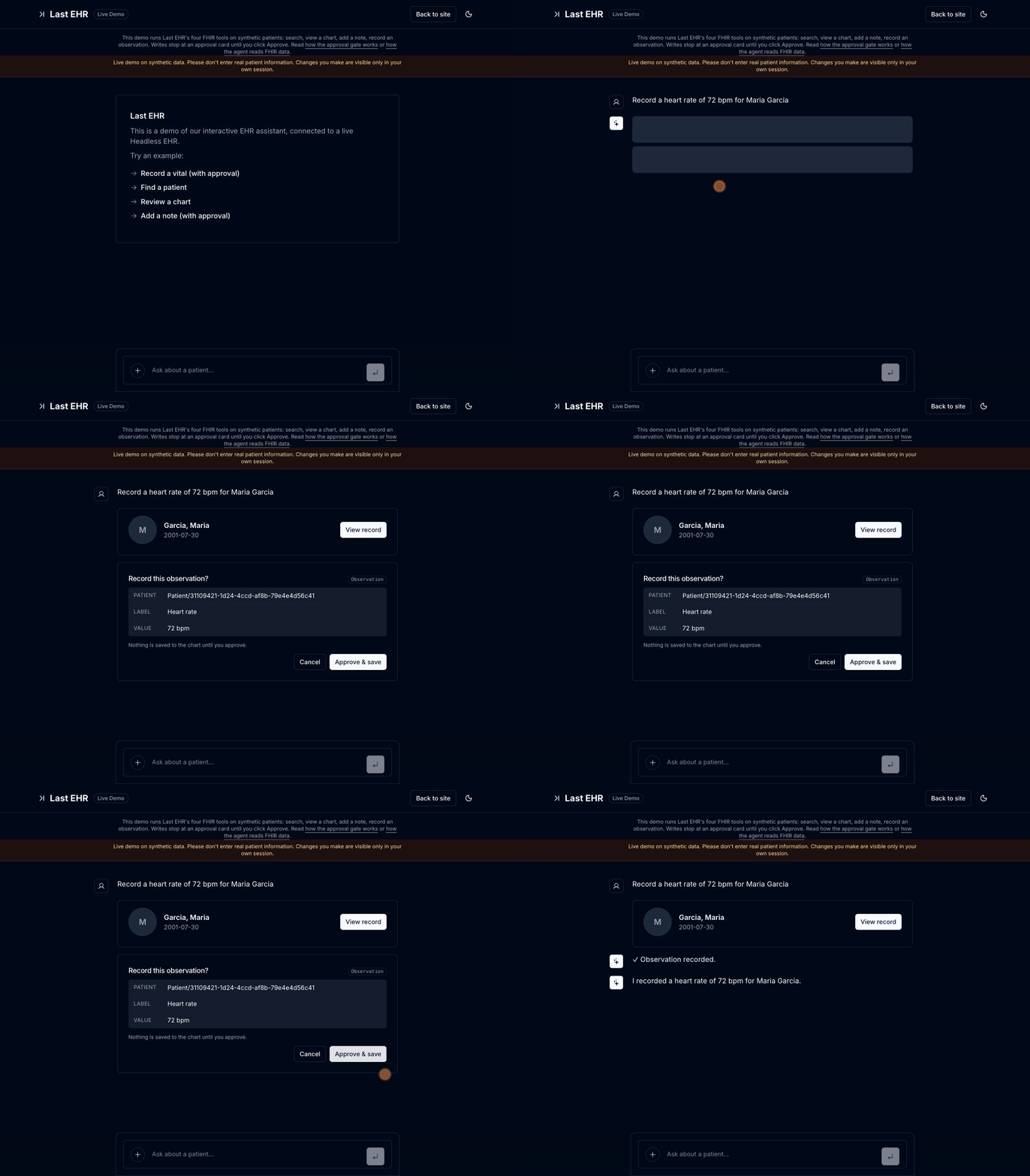
| Open the hosted synthetic demo | https://www.lastehr.com/demo — no sign-up. Ask Find patients named Smith, then Record a heart rate of 72 bpm for Maria Garcia, and inspect the approval card before anything is saved. |
| Read the protocol | Approval-Gated Agent Writes on FHIR, v0.1 draft |
| See the FHIR read surface | FHIR coverage |
| Inspect two read-only tools on four fixture patients | npm run mcp:demo -- --client claude-code from a checkout. Not the published package. |
| Connect native Grok Bot to synthetic work | Grok Bot with Last EHR |
| Deploy a dedicated synthetic Work service | Hosted Synthetic Work |
| Run the synthetic safety-mechanics check | npm run eval — evaluation guide. This checks proposal, approval, denial, and cleanup mechanics. |
Read the chart broadly. Write only what a human approved. Last EHR is the agent layer for a headless FHIR EHR. It does three things, and the write protocol is only one of them.
It reads the chart broadly. 25 of US Core 9.0.0's 27 readable resource types, across 23 patient-scoped sections, following references so authors, encounters, and provenance stop being dead pointers. Counted in the open, with the ceiling published rather than implied, in FHIR coverage.
It is built so the agent cannot fake an absence. "She has never had a flu shot" is the answer a chart agent must never invent, so a read reports when its window was capped, when a reference lookup was refused, and when a code filter matched nothing in a section that does hold records. Filters that a section cannot apply are refused with the legal values instead of silently dropped. These are safety-boundary tests, not best-effort behavior.
Every write is a proposal. Show the exact resource, require an explicit human decision, commit exactly what was reviewed, and record what created it. That half is a small protocol, Approval-Gated Agent Writes on FHIR (v0.1 draft): Proposal → Decision → Commit → Audit. Two implementations run here, a web approval card and MCP elicitation-gated write tools, plus a conformance suite that checks implementations with its own FHIR reads. Independent implementations and criticism are invited.
Five FHIR backends sit behind one interface. This repository is the reference implementation: bring your own FHIR backend and model key for a real agent (Medplum for the authenticated path, or any verified adapter for synthetic evaluation), or start with the zero-key local synthetic walkthrough.
Last EHR is a layer, not an EHR. It runs on top of a headless FHIR backend (Medplum for authenticated use; HAPI FHIR, Firely Server, Aidbox, or Oystehr for synthetic evaluation) and talks to it over the FHIR API. It is not the system of record and never bundles or forks the backend. The web agent has no separate chart database, but processes chart data and sends chart context to the configured model provider. The opt-in local Work Lab persists synthetic requests, run progress, proposals, and decisions. See the HIPAA deployment groundwork before planning a clinical deployment.
Status: early / alpha. APIs, structure, and scope will change. Use synthetic data only. · License: Apache-2.0
Try the live demo: no sign-up, synthetic data, and every write goes through the approval gate.
Project = tenant, ProjectMembership = user, AccessPolicy = RBAC). Last EHR doesn't reimplement any of that, and writes are bounded by your AccessPolicy.Last EHR is Medplum-supported for authenticated deployments and includes a
local, no-auth HAPI FHIR mode for synthetic-data evaluation. Firely
Server (FHIR_BACKEND=firely), Aidbox (FHIR_BACKEND=aidbox), and
Oystehr (FHIR_BACKEND=oystehr) are verified synthetic-evaluation
adapters: each passed both contract harnesses and the
FHIR Agent Safety Eval against a disposable synthetic
target. Other FHIR R4 backends need an adapter before they are
supported. Epic and Oracle Health sandbox adapters are flag-gated
(LASTEHR_EXPERIMENTAL_FHIR_ADAPTERS=1) and can post an approved
Observation; they are not a supported path because those sandboxes do not
support delete. See
docs/adapters/epic-cerner.md and the
support matrix for the web,
SMART, MCP, auth, and evaluation boundaries before choosing a path.
Self-hosted demos can offer a backend picker (swap the EHR under the
live agent, per session) and an "under the hood" panel streaming the
agent's FHIR operations — both off by default; see the support matrix for
the eligibility rules and npm run check:backends for preflight.
Next.js 15 (App Router) + React 19. The agent lives in app/api/chat/route.ts (streamText + FHIR tools); the FHIR calls go through a small backend interface (lib/fhir/backend.ts) with five built-in adapters: Medplum (hosted or self-hosted, token-authenticated), plus local HAPI FHIR, Firely Server, Aidbox, and Oystehr for synthetic evaluation (docs/support.md). Epic and Oracle Health sandbox adapters are behind LASTEHR_EXPERIMENTAL_FHIR_ADAPTERS and are not part of that supported set. The interface is four methods plus contract notes, so an adapter for another headless EHR is a small, well-scoped contribution. See docs/adapters.md and the roadmap.
flowchart LR
    B["Browser chat"] --> A["/api/chat<br/>streamText + FHIR tools"]
    A -- "reads<br/>search_patients, show_patient_info, read_chart_section" --> M[("Your FHIR backend<br/>(Medplum, HAPI, Firely, Aidbox, Oystehr)")]
    A -- "writes<br/>add_note, record_observation,<br/>record_superseding_observation, create_task" --> C{"Approval card"}
    C -- "Approve & save" --> M
    C -- "Cancel" --> N["Nothing saved"]
    M -. "Authenticated calls use the signed-in user,<br/>bounded by your AccessPolicy.<br/>Chart context reaches the configured model." .-> A
On the public demo, writes are also tagged with your session, so you only ever see the seed data plus your own edits.
The published MCP package and the no-account local HAPI stack are in Start here. The paths in this section are the hosted demo, a Vercel deploy, and a local web app. Longer local-lab notes, including failures, are in docs/quickstart.md.
Hosted synthetic demo (browser, no install): lastehr.com/demo. Synthetic data, no account.
Deploy with Vercel and your own keys:
You'll still need a Medplum project seeded with the synthetic patients (npm run seed, below) for the demo to have data.
Run it locally (authenticated Medplum path). Prerequisites: Node 22.18+ (or 24.2+), a Medplum project (Medplum-hosted free tier or your own), and one tool-capable model API key (OpenAI, Anthropic, or Amazon Bedrock). For a real agent without Medplum, the same .env.local works with FHIR_BACKEND=hapi against the local Docker stack, or with any verified synthetic-evaluation adapter (support matrix).
git clone https://github.com/cbetz/last-ehr.git
cd last-ehr
npm install
cp .env.example .env.local      # then edit .env.local (see below)
npm run seed                     # load synthetic patients into your Medplum
npm run dev                      # http://localhost:3000/demo
At minimum set, in .env.local:
OPENAI_API_KEY (default provider), or ANTHROPIC_API_KEY with AI_PROVIDER=anthropic, or AWS credentials plus AI_PROVIDER=bedrock and MODEL_ID;NEXT_PUBLIC_MEDPLUM_BASE_URL / MEDPLUM_BASE_URL if you're pointing at your own Medplum (leave blank to use Medplum's hosted API);MEDPLUM_CLIENT_ID + MEDPLUM_CLIENT_SECRET (a Medplum ClientApplication): used by npm run seed, and by the no-sign-in quickstart when you also set NEXT_PUBLIC_QUICKSTART=true. Or set NEXT_PUBLIC_MEDPLUM_GOOGLE_CLIENT_ID to sign in via Medplum's Google OAuth instead.npm run seed loads a small synthetic patient set (scripts/fixtures/patients.ts: four patients with conditions, medications, allergies, immunizations, and vitals/labs, two named "Smith"). It wipes and recreates those patients each run, so it is safe to re-run. Then open /demo and ask: "find patients named Smith." Use synthetic data only.
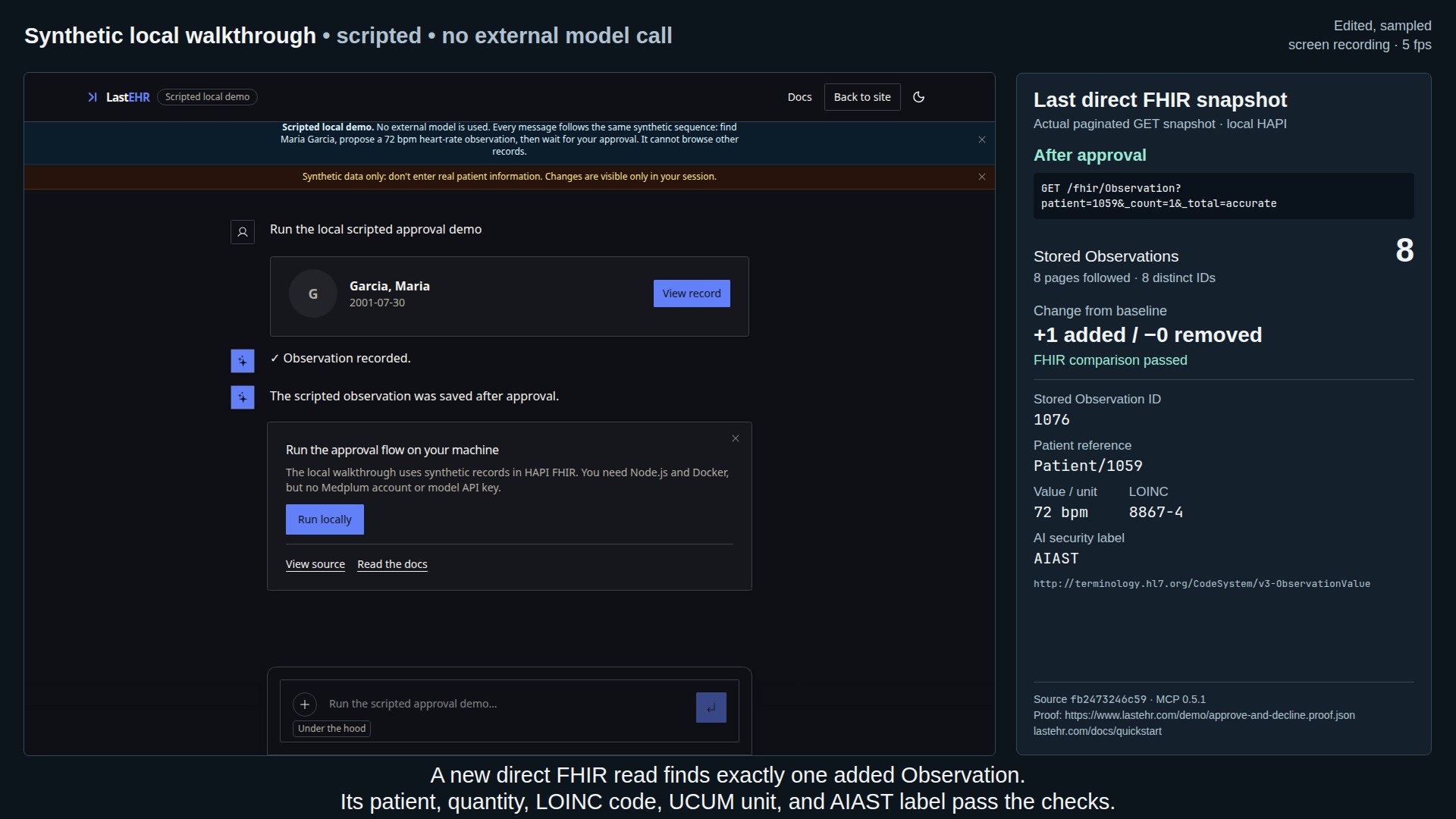
Local FHIR stack, no Medplum account or model key: the repo ships a Docker Compose stack with HAPI FHIR and Postgres, plus an explicit scripted walkthrough that exercises the approval loop without calling an external model provider.
npm install
npm run demo:local                            # HAPI, seed data, and http://localhost:3000/demo
demo:local forces the local HAPI + scripted configuration without creating or
overwriting .env.local. This fixed, no-network walkthrough always finds the
seeded Maria Garcia record and proposes one Heart rate: 72 bpm Observation.
It does not interpret your prompt, browse charts, or call a model provider; the
FHIR wrapper permits only that synthetic record and observation. Press Ctrl-C
to stop Next.js; use npm run demo:local:down to remove the local stack.
Honest scope: the local HAPI server runs with no auth, so this mode is for
local, single-tenant use only; per-browser session isolation is client-side
filtering, not a security boundary. The published @lastehr/mcp package targets
Medplum (credentialed) or a local HAPI stack; the separate checkout-only
npm run mcp:demo Local Lab exposes four synthetic, read-only fixture
charts without credentials.
Neither local route is a real-data or production path. To run a real agent
against HAPI, configure .env.local with a supported model key instead. The
hosted public demo stays on Medplum.
To run the app container too, use npm run docker:local after filling
.env.local; it combines the HAPI/Postgres compose stack with the app image.
Release tags and manual publish runs push a prebuilt scripted-demo image to
ghcr.io/cbetz/last-ehr; if the pull fails, no public image has been
published yet. See
Pull and run from GHCR.
For the longer version, see docs/quickstart.md.
Last EHR can launch directly from app.medplum.com. Register it once in your Medplum project by creating a ClientApplication with:
launchUri = https://<your-host>/launchredirectUri = https://<your-host>/launch/callbackthen set SMART_CLIENT_ID to that ClientApplication's id in your deployment.
Last EHR appears on the Apps tab of every Patient and Encounter page;
launching it opens the chat already scoped to that patient, reusing your
Medplum sign-in (SMART App Launch with PKCE, public client, no secret). The
token is bounded by the granted SMART scopes and your AccessPolicy, and writes
still stop at the approval card.
The zero-setup path is the init --demo command at the top of this page.
Start here is a Medplum token or the local HAPI stack. This
section is the same package with a Medplum credential.
@lastehr/mcp is a small, standalone MCP server for
Medplum (or the local HAPI stack). It gives Claude Code, Cursor, and other
MCP clients four bounded chart read tools — search_patients,
show_patient_info, read_chart_section, and read_document, the same read
surface the web agent has; writes exist only as an explicit opt-in where a
human approves each proposed write through the client's approval prompt
(details). It speaks stdio by default; since 0.4.0 an opt-in
HTTP transport lets a hosted agent reach it as an OAuth resource server, with
each caller's own FHIR credential obtained per session. The process needs no
shared FHIR credential; each session holds its exchanged token
(design and evidence).
npx -y @lastehr/mcp@0.5.4 init --client claude-code
Use npx -y @lastehr/mcp@0.5.4 --version to check that package version
without starting the server.
Authenticate with a least-privilege MEDPLUM_ACCESS_TOKEN, or
MEDPLUM_CLIENT_ID plus MEDPLUM_CLIENT_SECRET; set MEDPLUM_BASE_URL for a
self-hosted Medplum instance. Read access can still return PHI, so review the
MCP client's model-provider and data-handling boundary before connecting it to
a real project.
From a checkout, npm run mcp builds and starts that same package. Full setup,
client configuration, and the support boundary are in the MCP guide.
The Official MCP Registry listing is the canonical discovery record for the exact, verified release.
For a separate reviewer inbox and work that survives an assistant disconnect,
use the checkout-only Work MCP connector. Its four tools
read one invented chart, propose a Task, check a durable Work ID, and cancel
pending work. It is a local synthetic experiment with ordinary MCP tools;
it is not included in @lastehr/mcp and does not implement the MCP Tasks
extension or remote OAuth transport.
To evaluate the MCP surface before configuring Medplum, use the separate local lab from a repository checkout:
npm install
npm run mcp:demo -- --client claude-code
It starts local HAPI, reloads the repository's synthetic fixture records, and
prints a client registration command. The generated MCP process exposes two of
the package's four read-only tool names — search_patients and
show_patient_info only, since its fixture client serves too few resource
types for the section reader — and can only resolve those fixture patients.
It is not included in @lastehr/mcp, does not make HAPI a supported package
backend, and must never be pointed at real data. The Local Lab server needs no
FHIR credential or provider API key, but the MCP client itself still needs its
normal model account and may transmit the synthetic tool output to that model.
Run npx -y @lastehr/mcp@0.5.4 init --client claude-code, or npx -y @lastehr/mcp@0.5.4 init --client cursor. The Claude Code command prints a claude mcp add line. The Cursor command prints JSON for ~/.cursor/mcp.json or .cursor/mcp.json, including type stdio. Point that server at a FHIR backend you operate: a Medplum access token (MEDPLUM_ACCESS_TOKEN), or MEDPLUM_CLIENT_ID and MEDPLUM_CLIENT_SECRET, or this repository's local HAPI stack with FHIR_BACKEND=hapi and FHIR_BASE_URL such as http://localhost:8080/fhir. Claude or Cursor supplies the model. The MCP server talks to the FHIR server. Start with synthetic records. Setup: https://www.lastehr.com/docs/mcp
Only the public Epic FHIR sandbox, and only with the experimental adapter flag LASTEHR_EXPERIMENTAL_FHIR_ADAPTERS=1. The MCP package selects that sandbox with LASTEHR_BACKEND=epic. The web app selects it with FHIR_BACKEND=epic and the same flag. A write still waits for a person to approve it. The sandbox does not support delete, so an approved Observation stays on that shared sandbox. This is not a connection to a production Epic system. Setup: https://github.com/cbetz/last-ehr/blob/main/docs/adapters/epic-cerner.md
Writes are off until LASTEHR_MCP_WRITES=proposal. That profile can create a note (Communication), a measurement or a linked correction (Observation), or a follow-up task (Task). Each write pauses until a person approves it in a client that supports MCP elicitation. Approve sends that proposal to the FHIR server. Cancel, or no answer, saves nothing. A client that cannot show the prompt is not offered the write tools. The web app shows the same decision on an approval card. The FHIR server can still reject the write. Approving saves the proposal. It does not review the proposal for clinical correctness.
No. The public demo and the local HAPI walkthrough use synthetic patients. The Epic and Oracle Health paths use those vendors' public sandboxes and their synthetic sandbox patients. Do not point this alpha software at real patient records while you are evaluating it.
A comparison of other open-source FHIR MCP servers is at https://www.lastehr.com/compare/fhir-mcp-servers
Every variable is documented in .env.example. The real-agent
model path is provider-agnostic with one hard rule: every external provider
offered here can carry a BAA, because deployments of this project head toward
real clinical data even though the demo is synthetic-only. The scripted
option is a separate, explicit, zero-key local HAPI walkthrough, not a model
provider or a PHI-ready mode.
| AI_PROVIDER | Key | Example MODEL_ID | BAA path |
|---|---|---|---|
scripted | None | Fixed local synthetic sequence | No external provider call. Requires explicit local HAPI flags; cannot act as a general agent. |
openai (default) | OPENAI_API_KEY | gpt-4.1-mini | OpenAI signs BAAs with zero-retention options for API traffic on qualifying plans. |
anthropic | ANTHROPIC_API_KEY | claude-sonnet-4-6 | Anthropic signs BAAs with zero-retention options for API traffic on qualifying plans. |
bedrock | AWS credential env + AWS_REGION | us.anthropic.claude-haiku-4-5-20251001-v1:0 | Amazon Bedrock is available under an AWS BAA for eligible services; set an explicit model id or inference profile. |
The BAA requirement applies to the external-provider rows: signing one is the operator's step, not a default, and a bare API key is not PHI-ready. Aggregators that cannot sign a BAA (OpenRouter, per their current public terms) are deliberately not offered. Analytics (PostHog) and the marketing-site waitlist (Neon) are optional and lastehr.com-specific.
The web agent has no separate chart database, but it processes chart data. The opt-in local Work Lab also stores synthetic requests, run progress, proposals, decisions, and receipts in SQLite. The approval gate is a write-safety control, not a privacy control: in external-model modes, chart context is sent to your configured model provider before write approval. The Work Lab's real agent mode sends your synthetic prompt and bounded invented chart fields to that provider. Its default manual client and test-only scripted mode make no model request. None of these lab modes is qualified for real patient data.
Use synthetic data unless you have real agreements in place. Pointing this at real PHI requires, at minimum:
See SECURITY.md for the full posture and how to report vulnerabilities.
Self-hosting is free and Apache-2.0. A managed hosted tier (managed Medplum + a signed BAA, multi-tenancy, billing) may follow, built only after the open-source core has traction.
A personal open-source project. Not affiliated with, endorsed by, or sponsored by Medplum, Vercel, or any employer.
Apache-2.0. See NOTICE for third-party attributions, CONTRIBUTING.md to contribute, and GOVERNANCE.md for how the project is run.
Claim this server with your GitHub account to request manual ownership verification.
Link to the catalog listing for Last EHR MCP server from your README. This badge does not certify ownership, compatibility or security.
[](https://awesome-mcp.com/servers/last-ehr)Public repository statistics could not be verified. Check the configured source address; unavailable counts are not zero.
Separate sources, scopes and periods. Never combined or treated as installations, active users or security reviews.
No reviewed package or image identity; download statistics are not listed yet.
Alternative and complementary servers in the same category
A directory listing describing a cancellation-letter and mailing-address service. The configured public GitHub repository returned 404 during source verification.

A hosted MCP service for browsing and searching through Singapore mobile-network proxies.

A directory listing describing a Markdown-to-PDF service. The configured public GitHub repository returned 404 during source verification.